

 RGLAS
RGLAS Thank you Bettina,
Performed the indicated test, with no results.
Strange is that the mobile version does work fine.
I hope you can help me further.
RGLAS Hello Calin,
I think you have already adjusted something.
In my first update, not all tagDiv plugins were installed.
Now just tried again, and now I see that more plugins are installed, so now I have a good working websiten again.
Thanks
RGLAS Please downgrade to 11.1 your site coming back
RGLAS Please downgrade to 11.1 your site coming back
RGLAS Please downgrade to 11.1 your site coming back
RGLAS Please downgrade to 11.1 your site coming back
RGLAS Please downgrade to v 11.1 your site coming back.
RGLAS Downgrade to 11.1 your site coming back again.
-
This reply was modified 4 years by
RGLAS.
RGLAS We have the same issue Our website is down. While we have a License Certificate.
our website displays tagDiv website
When we downgrade from 11.3.1 to 11.2 our website is back
RGLAS Here de Fault
PHP Fatale fout: Uncaught AmpProject #AmpWPException #InvalidService: De service ID “paired_routing” wordt niet herkend en kan niet worden opgehaald. in /var/www/clients/client80/web131/web/wp-content/plugins/amp/src/Exception/InvalidService.php:57
RGLAS Hi Bettina,
That’s clear, then I’m sure you can also specify which plugin you do support with the same feature to make the page title invisible in newspaper
RGLAS Hi Vlad,
See image between the plugin https://ibb.co/Btb0b1z
I have been using this plugin for over two years.
I hope you can help my with this, all the other pages where I also use HIDE I don’t have this, it’s only on my main page.
Regards
Ronald
RGLAS Hello,
We use Newspaper, but when we go to a post page with a Slider and try to Hide the title, than we see the text what you see in the image.
RGLAS If I deactivate the Plug-in “tagDiv Mobile Theme”.
and only the plug-in “Official AMP for WP” Activate then the critical error is gone.
But then the “Listen Live” page doesn’t work properly anymore, like I made it for Mobile, so it shows the desktop mode. also that when I click on the menu on my mobile it doesn’t respond anymore. So I have to click on the Logo of the site again to be able to do something.
I think it’s strange, I can’t get out of this anymore.
RGLAS Tried something else, which seems to work for a while.
When I tick “Mobile + AMP” in the Theme Panel everything seems to work fine.
In the AMP plug-in I have the choice between “Transitional” and “Advanced Settings” off. When I go to the website on my mobile I get the message “There has been a critical error on your website” but not on my Desktop or Ipad.
RGLAS Hello Calin,
I did what you suggested, but now I have another problem. have selected AMP in the Mobile Settings but now my “Listen Live” Page can no longer be used for the mobile, now get the same as on my desktop.
And that’s what I don’t want. If I do set it to be good on a mobile, then something else happens, if I choose “Listen Live” on my mobile and the page is loaded the menu no longer works, you have to click on the logo so you return to the home page.
remains strange. I also adjusted the all theme requirements as indicated.
RGLAS which is also notice that on the mobile view the translation choice no longer works under http://wp.costablanca.fm/category/costa-blanca-news/
RGLAS Hallo Calin,
I turned off WP Rocket, and now installed WP Super Cache again. work a little better now.
Sometimes a message: critical error on your website
But what I find below is a delay of a script on the mobile page of a webplayer which I don’t have under WP Rocket.
Check out our test page. http://wp.costablanca.fm at Listen Live this page shows the biggest problem.
-
This reply was modified 6 years by
RGLAS I can’t get it done, on my ipad I need the normal version of the site, that’s fine, but a page that doesn’t want to switch to AMP. (mobile version)
Do I change this then it is my mobile good and on the ipad again not, and this happens specifically on a page.
I don’t get this right
RGLAS Hello Simon,
Thanks for your explanation, by now everything works as it should. use WP Rocket again, and Desktop and Mobile works fine now.
RGLAS Hi Calin,
When i use wp super cache it’s give me a lot of problems.
on my mobile phone it’s not posible to see my slider, wahet i make
with slider revolution.
On my ipad and desktop there is no problem. it’s looks like
this happend after i use wp super cache. when i go back to wp rocket
is works.
So what can i do, that wp super cache work fine, with AMP.
-
This reply was modified 6 years by
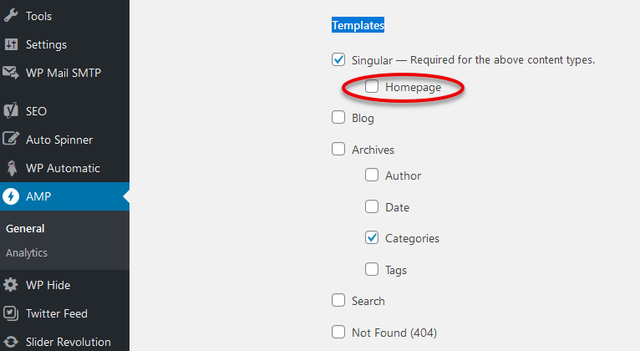
RGLAS Hello, I can’t change the earlier message, but I think I found the problem.
I had to search in the AMP settings
I’ve had to unchecked Templates at Homepage
-
This reply was modified 6 years by
RGLAS I’ve been busy for a while but it changes from day to day, sometimes I see on my ipad the mobile theme, and on the iphone the desktop theme. I have the impression that NEWSPAPER doesn’t handle the mobile themes very well, I suspect it’s still in a beta phase.
I also have the change wp- concerns the critical error, but that doesn’t work either.
-
This reply was modified 6 years by
RGLAS I did everything as described, just had to reinstall and activate my “tagDiv Mobile Theme”.
But when I go to my site on my iphone I get the message:
There has been a critical error on your website.
That’s strange, on the desktop and ipad no problem.
This is only on my home-Page all the others are doing well
-
This reply was modified 6 years by
RGLAS Same here, only here to be different. On my iphone I sometimes just get my desktop and can’t use the menu here anymore.
Is very annoying because a lot of people still use their mobile phone.
I hope it will be read so that this can be solved in the next update.
-
This reply was modified 6 years by
