simchris
 Link to a page might be helpful.
Also be aware YouTube was having major issues the past 2 days timing out. We saw this on several of our sites, and I could not even reach YouTube in a web browser yesterday morning.
We’ve also seen issues with G+, and Google News timing out completely.
So, they are obviously messing with something this week.
simchris Usually that issue is from using the Photon plugin in the (crappy) Jetpack stuff.
I’ve found it much better to use the regenerate thumbnails plugin to create the new thumbs for the theme, and so you have the correct sizes. The “resizing” in responsive is also partially dependent on the web browser, and some do a better job than others.
Might not apply to your use case, but after 12 months with the theme that’s been my experience.
simchris Not a theme issue aside from the fact that changing themes can sometimes throw off Google News if they are scraping your photos still and NOT reading the XML news sitemap.
One of my sites switched to Newsmag this past Sat. and no trouble with images in Google News. We’ve been using the Newspaper theme for 12+ months with couple of sites in Google News, also without issue.
Just remember
For best results with Google News you should be using a NEWS SITEMAP in addition to your normal sitemap. The NEWS sitemap will have de facto link to image in the news sitemap XML. Google is now finally using that, unlike as recently as Nov. 2014.
AND:
1) you should have the image in your META data (e.g., OG tags)
2) you should have an actual image in the body of the post/story, as Google prefers that to say, the giant background image behind everything like the title of story.
3) Google doesn’t like GIFs
4) Google News will more often skip anything which looks like a logo, chart, or advert now; meaning something without a full color range of a photo; we trick them sometimes by putting a logo on a gradient background
5) Google News may skip an image which is too small
Our sites have been in Google News since it first launched in BETA 10 years ago, so we have to deal with this on daily basis. 🙂
Hope that helps!
simchris HI, Lucian
fyi, the custom CSS works well for the PayPal box, except needs a little more space on the iPhone portrait as just part of the W is cut off in “What is PayPal?”. This is due to the little arrow box, even when I shortened the box description.
I am testing the rest today. 🙂
-
This reply was modified 11 years by
simchris.
simchris On cropping, we ran into this also.
The theme, like most now, use WordPress built-in functions for images based on “featured image” and don’t use a smart plugin as things like the venerable TimThumb used to do. WP doesn’t seem keen on baking some of that stuff in, sadly.
However, I believe you can edit the image size functions in the theme, much like I change the default compression myself from 90 to 50.
So, since WP 3.9 can set the crop position when you ´add_image_size´
http://codex.wordpress.org/Function_Reference/add_image_size#Crop_Mode
eg.,
add_image_size( 'custom-size', 220, 220, array( 'left', 'top' ) ); // Hard crop left top
so, while the theme runs on default; you could edit the function to always crop from left top, or bottom up, etc.
simchris You might post the issue on the Yoast SEO support page on WordPress.org. If you have the “premium” version of plugin, you can ask them to check your site for you.
TagDiv does not manage the Yoast SEO plugin.
I’m using it on ALL our sites with no issues, with various themes.
Also note that technically there is no “index.xyz” file just your website:
So, on the “page” you create to develop your home page be sure to put in all the info for Yoast to optimize it. It should work.
If you have a problem, it might be another plugin, or caching.
Try editing the Yoast settings with ONLY the Visual Composer plugin running, and Yoast SEO, and ALL other plugins OFF.
simchris Awesome, Lucian
thanks for all your help.
Hopefully all my various little items with WooCommerce this week might give you some good food for a FAQs page in the docs for others choosing to use WooC with Newsmag. 🙂
simchris You would need to sort out how to connect your caching to save caches and load caching from your CDN. Some CDN’s do that for you, which makes local caching redundant. Very tricky to setup; not really theme related, though. Lots of articles on this in Google (I went through this a year ago; we ended up not using CDN but we have dedicated server.)
simchris Another WooCommerce item; not sure if theme or WooC related.
When logged out, and on a product page, under reviews tab, it says “you must be logged in first…” but link to login goes to the main site admin panel and not the store login. Might be cookie remembering “me” vs “customer” … but bizarro.
I’m actually trying to figure out how to completely disable the darn reviews entirely; turning off comments doesn’t do it in both WP > discussion *and* in the theme panel.
Adding a “disable reviews” button in your themes would be a massively cool feature. But I know that is down about 200 items on “requests.” 🙂
Sheesh. Woo is really dumb about some things like that.
simchris Link to example?
simchris Make sure you have your website address set in your WordPress > settings > general page.
Also, you can choose not to put media in date folders from the WordPress > settings > media page.
These are not related to the theme in any way, but the setup of WordPress.
if you’re loading content from a CDN of some kind, the images might be stored at that IP, but again, that is not managed by the theme.
simchris I don’t work here. I’ve just been using the theme for 12+ months on several production sites for our network generating 10 million page views, and I make a billion dollars a day in my dreams. So we both know what we’re doing. Woohoo!
So, go ahead and post your problems and folks will try to help 🙂
simchris Me, too. And I have a design award from Apple. Yay us!
So, typically for support tickets here …
specify the problem or question, and link to a post/page where you’re having the issue to see if it’s a console error, possible conflict with a plugin, etc.
TagDiv support folk are great at checking that for you. And you can do CSS over-rides from the theme panel; first look at the inspector in Chrome to find the class.
simchris Yes. You need to ask for support in the support forum, which is in the open. If it’s a security flaw or similar, or need somebody to login to your system to see what a bug might happen to be, they will usually ask you to email them any “secure” info and obviously not post that here.
FYI: Theme developers don’t do custom modifications. For “big changes” you might/definitely will need to hire a developer; as the company doesn’t provide a re-engineering service beyond what the theme is designed and advertised to do.
Once you review the theme docs, you can ask for help here, and then TagDiv support folk and/or the “community” can chime in with solutions already done the past 13 months with theme, or help with your specific use case.
simchris This probably has no impact, but your @ name is CaseSensitive as @LelyNews
while the link you have is lelynews …
it works under both on Twitter, but I believe one is a redirect to the other.
I know it’s stupid, but “technically” everything on the web after first
/ is cAsE sensitive. It might not have anything to do with it, but I’ve run into this issue before and that solved it.
simchris Yeeehhhhaaaahhhh! (as we say out here in the Wild West …)
Just tested with Google “Structured Data Testing Tool” and the preview does show the correct rating, et al.
I think that fixed it.
So, good to add to next version of theme ! 🙂
Thanks again.
simchris I’m not having this issue on our site.
A link to your page where you see this problem might be helpful.
I use IE11/Win7-64 as my “daily driver” 🙂
simchris You can see my sites …
production site now live with Newsmag as of this past weekend; this was old news portal in our network moved from ooooold pre 2009 template system, and still tweaking: http://floridanewswire.com
And here is my test (hobby) magazine site- http://ga-ga.com – which is an ongoing process as I’m basically rescuing content from several of our “defunct” websites and moving them into ONE shiny new place while we’re doing original content as well… it’s not technically a live/promoted site, even though it’s being shared in social – it’s not in Google News, for example, while the Florida site is.
Sites are not fully optimized… meaning minification and font optimization not yet done, as I had done with Newspaper theme. In any case they look great on all devices (well. logos still need to be tweaked for mobile …. but that’s my job, not the theme’s problem).
simchris Sorry….. trying to setup a WooCommerce thing at same time (and using Newsmag!), and bouncing from one thing to another.
I will try to do this today and update ticket with results 🙂
simchris Thanks, Lucian
pardon any follow ups on WooCommerce, but I’m going to be testing the heck out of this as we’re moving from another cart system from past 5 years to WooCommerce, for various reasons I won’t bore you with.
One additional CSS element:
with the PayPal option box on checkout page, the text “what is PayPal” gets covered up by the info box for PayPal which appears to be a block item and if you have CSS for that should be set to wrap whitespace, as there is no room to right of the info box for the little what is paypal text. I’m actually trying to find a “hook” to hide that text, but still learning how to do stuff like that with WooCommerce.
If you have any suggestion on that or a CSS over-ride to text-wrap the info box for the payment type. Well, I guess I could use the inspector, too. Duh.
🙂
simchris The theme uses the built-in functions of WordPress to get thumbs on front page, which are pulled from the “featured image.”
In theory you could create a custom field, then hack the block/module for home page to use the field in place of the featured image, but this would mean you would *always* have to do that, which might be annoying.
I’m sure tech support may have a better answer, but there is no simple way to do that.
simchris Email isn’t managed by the theme, but by WordPress and your server.
So, normally you need something like smtp email plugin or comparable if your hosting setup doesn’t work with sending form emails via php.
PHP’s mail() function does not use your SMTP mail server – it simply constructs an email to look like it came from that account. SO, depending on host setup it might not work.
W3 cacbe bas also been known to break sign up emails.
These might not apply to you, but “getting upset” about something working doesn’t solve anything, so best to simply look at what you need to do to debug why YOUR setup doesn’t work.
I would first check with your host to see if they have any known issues with using WordPress and sending emails from forms.
With your setup you might have to use this, which is common solution:
https://wordpress.org/plugins/wp-mail-smtp/
simchris Yes, you don’t need the update for anything yet … the updated version of Visual Composer has bugs and not fully stable.
A new version tested to work with the theme will be included with next theme update.
As noted in second post on this thread, current version tested compatible with the theme is 4.3.5.
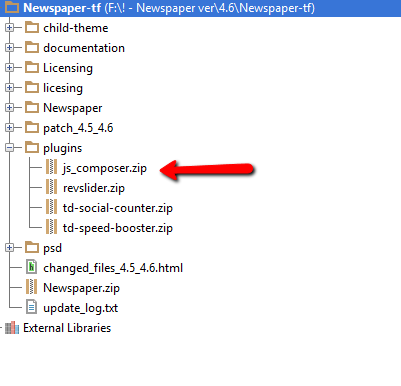
The bundled version is only updated when the theme is updated. You cannot update it separately, nor would you want to as it might break the theme custom modules 🙂
SEE STICKY TOPIC TOP OF FORUM FRONT PAGE:
https://forum.tagdiv.com/topic/how-to-update-visual-composer-2/
The Visual Composer plugin that comes with the theme is licensed to the theme, the license specifies that only we can provide the updates and you don’t have to buy it or register it. We provide updates on a regular basis, after we test the plugin for theme compatibility the plugin is included in the latest theme update, inside the Plugins folder:
https://forum.tagdiv.com/wp-content/uploads/2015/01/visualc_newspaper.png
Here is guide on how to update the plugin – https://forum.tagdiv.com/update-the-visual-composer-plugin-wpbakery/
Emil G.
simchris Yep, as I noted previously, the block-title custom CSS was the fix we used. 🙂
simchris It doesn’t work that way, due to dpi of the monitor, font size on different devices, differences in font files on different devices, etc.
In other words, expecting the words to “wrap” identically in the editor and the live page will never happen. A web browser is a fluid reader, and not a fixed device like ink and paper (e.g., “real magazine”).
You have no finite control over layout as you do with something like QuarkXPress or similar print production.
So, for example a web-safe font, and even a Google font may have different kerning, metrics, letter spacing, etc. depending on device, and somebody might even have fonts over-ridden to “always” use Times Roman, vs seeing PT Sans or whatever.
So, a line in the editor which is 8 words long, might only be 7 words long on the “actual” page, as it’s only a virtual preview, and not a “pixel accurate” preview of the live page. WordPress isn’t that precise. It’s a blog platform which has “matured” into a CMS. It’s not a professional publishing application for multi-platform publishing at a micro-control-level.
In other words, it’s impossible to make something like “identical” on all devices using this kind of product, or really any modern CMS; because the web isn’t a fixed viewport on ANY device.
——–
In the same way, the “metrics” and DPI of different devices makes WordPress admin panels render slightly differently per device — this is a function of WordPress… so if the “line” is set to take 50% of the view; well, the view is going to vary in width per device. So, 50% of 640px on a desktop might be 50% of 600px on a tablet due to responsive layout and resizing to fit the new device; etc.
Nothing is inherently wrong or needs to be fixed, this is just how it works.
The divider line is an “aid” not a 100% exact representation — it’s not a WYSIWYG setup 🙂
-
This reply was modified 11 years by