

 stringbenderb5
 Hi,
I am having Global Editing issue with every page except the home page.
Can you please watch this short video and tell me how to correct this issue?
It is different than the older issue.
stringbenderb5 The instructions above did not correct my issue.
My website does not give me the same options to select.
Can you please watch the video below so I can demonstrate what I
am talking about?
How can I accomplish what I am asking in video?
stringbenderb5 Sorry, but the instructions you sent did not solve my issue. Please see below.
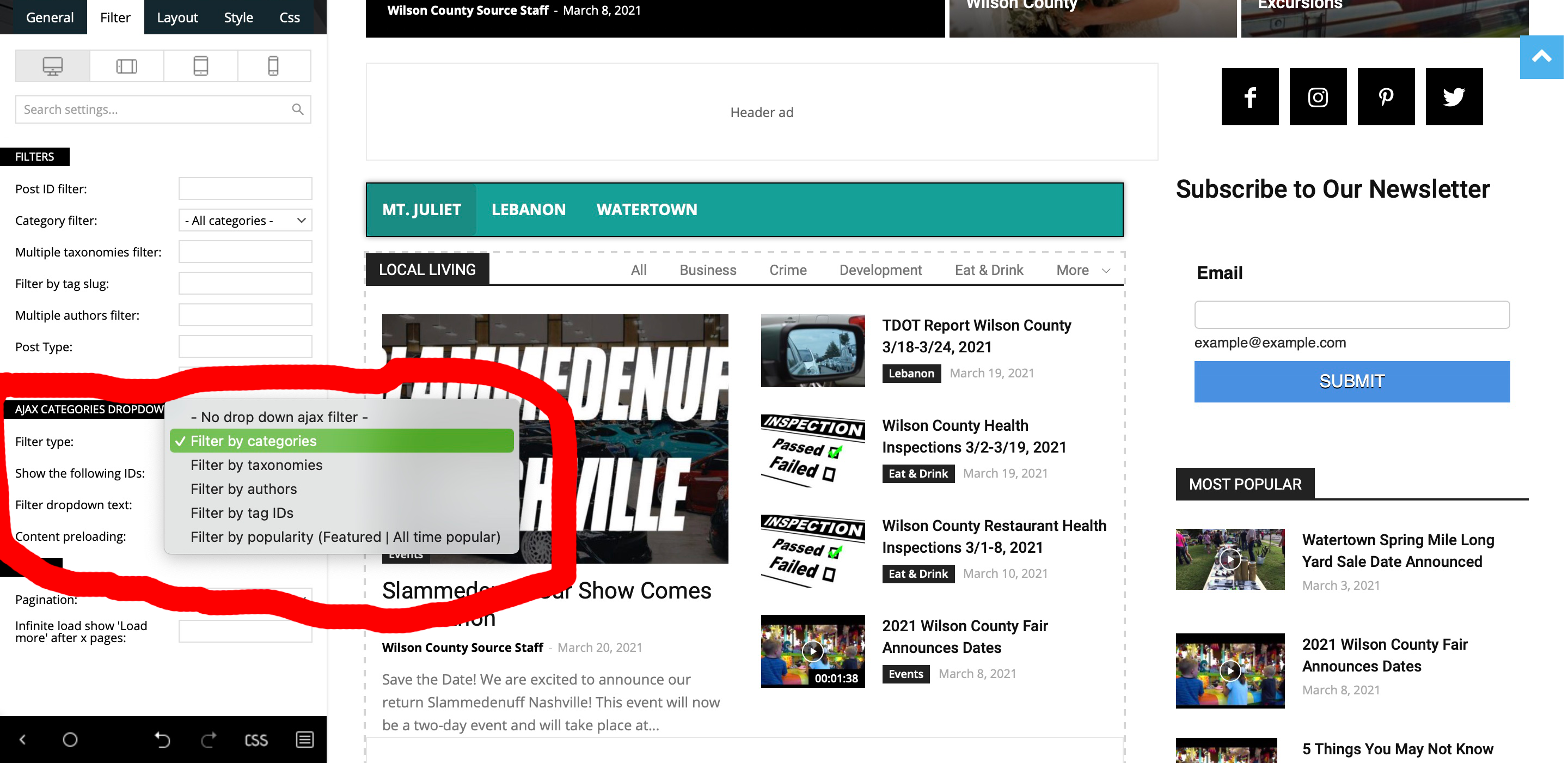
Filter by Categories gives me All, Business, Crime, Development, Eat & Drink, More (dropdown)
Filter by Taxonimies gives me only the selection “All”
Filter by ID Tags gives me All, lebanon, tn, tennessee, mt. juliet, obituaries, events, more (not sure why these are not capitalized.
So, none of the above settings gives me the below.
Element Used: Flex Block 3
Ajax Categories has been enabled.
I need it to display the below.
Parent Category: Latest News
Alax Tabs: Eat & Drink, Entertainment, Events, Health & Fitness, Kids & Family, Things to Do, Travel.
How do I get these specific categories to show up in those tabs?
As you can see in screenshot below it does not give me these options to select from.
stringbenderb5 Sorry, can you please watch my video now? It is public.
Thanks
stringbenderb5 So How do you edit a post with TagDiv Composer? I need more step by step instructions from beginning to end if possible.
ALSO: can you please give me step by step instructions on how to do what I am showing in this short video? https://youtu.be/lH4O57PRP_Y
Example
Dashboard > Posts > TagDiv Composure > etc…
I do not see any button in posts to switch to tagdiv composure. How do I get buttons to show?
stringbenderb5 I was asking about the email link. That is the one that is not working. How do I fix that?
It is set the same way on another site and it works, but it does not work on this site.
stringbenderb5 It would be great if this feature was changed to pull the most recent article. How many news websites are going to want to push articles from years ago? Wouldn’t they want the most recent by category, by tag, etc…?
Please submit this information when the next version of the Newspaper Theme is being developed or when there is going to be a major update.
Thanks
stringbenderb5 I looked at the article. My theme does not have the “Update” like it appears in the article you sent. Please see screenshot – https://cloudninemagazine.com/wp-content/uploads/2020/12/a.png
Our programmer said that when WordPress updates to 5.6, it will break the current 10.3 Newspaper Theme that we are using. This theme needs to be converted to 10.3.2, which it does not appear to be a way other than buying a new theme.
Is there another way?
stringbenderb5 Do you have a way to work around that? Yoast is installed on the site, and is trying to use a 410 when deleting an existing page.
stringbenderb5 It does not work correctly. I copied the iFrame right from Calin’s post and pasted into header element, and it still does not work.
https:cloudninemagazine.com
How can this be fixed?
stringbenderb5 The header is still not correct. I tried the code you sent me but, for some reason it did not fix it.
How can this be fixed now?
stringbenderb5 This is the code for the above
<video width=”1336″ height=”200″ autoplay loop muted>
<source src=”https://cloudninemagazine.com/wp-content/uploads/2020/07/Clouds_1336x200.mp4″ type=”video/mp4″ />
</video>
stringbenderb5 Please look at the thumbnail below. This is the one that is not displaying.
How can this be fixed?
https://cloudninemagazine.com/wp-content/uploads/2020/05/A.png
stringbenderb5 I clicked the button to make 3 columns, but instead it made 3 rows.
How can this be corrected please?
https://cloudninemagazine.com/wp-content/uploads/2020/03/header.png
stringbenderb5 So, is the “Slick Header” template used by building the entire pages with the template?
I do not want to make any changes to the website, nor do I want to build any more pages, or rebuild old pages. All I want to do is get a background header to show up full width on mobile device.
Is this possible?
Please see my earlier reply.
Thank you so much for your help 🙂
stringbenderb5 Can I please get more instruction?
I do not want to redesign my desktop header. Only the mobile header.
I created this header https://dev.yall.com/tdb_templates/mobile-header/
It is showing a desktop version that I DO NOT want to use. If you reduce
screen size you will see what I created.
Now, how do I get this header to show up on mobile device?
I DO NOT want to have to rebuild the entire page. My goal is just to have the background image display in mobile header fullwidth.
Is it possible to get directions a 5 year old could follow? Sorry, I just find this very confusing.



