Vlad S
 Hello !
I pressume you mean the part wich includes the latest articles section. That one comes from the page building so you will have to edit the page in order to have that removed so you can edit it using the composer: https://www.screencast.com/t/uzXRgXTiHlH Also the sidebar from the bottom of the page comes from the widget section wich can be edited by going to Appearance – Widgets
I hope this was helpful !
Thank you !
Vlad S Hello !
All the fonts can be set up in Theme Panel – Theme fonts. There you will find all tabs: https://forum.tagdiv.com/font-customization/
I hope this was helpfull !
Thank you !
Vlad S Hello !
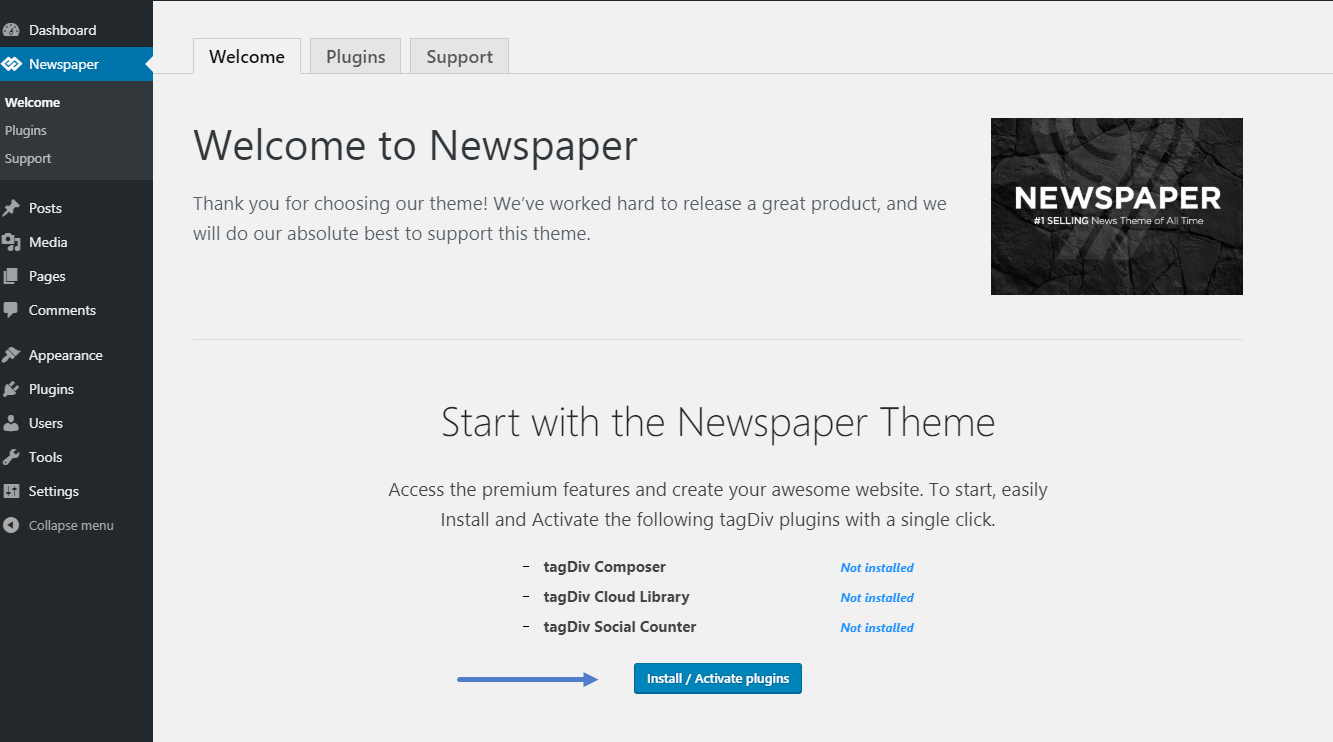
Please make sure to install the required plugins after installing the theme: https://forum.tagdiv.com/wp-content/uploads/2015/05/welcome_screen.png
Let me know this fixed your issue !
Thank you !
Vlad S Hello !
Unfortunately this option is not available on Newspaper theme. We are sorry for the inconvenience !
Thank you !
Vlad S Hello !
Please contact us via email at contact@tagdiv.com and provide admin login, as well as cPanel or FTP if possible. We will take a look. Include a link to this topic in the email.
Thank you !
Vlad S Hello !
That can be achieved by following the next steps:
Step 1. Add or edit a new ROW: https://www.screencast.com/t/0jWkAEzd8f
Step 2. Set the layout of the row by clicking on the ROW tab: https://www.screencast.com/t/lTEtcEkR
Step 3. Add pricing table elements: https://www.screencast.com/t/rI8zWHYePq09
Step 4. Edit the element by simply clicking on it: https://www.screencast.com/t/ptd6x7Yfa2g
I hope this was helpfull !
Thank you !
Vlad S Hello !
The mobile theme is the AMP version only the layout is changed but the functionality is exactly the same. There are some new designs recently featured that use FULL AMP version of your website but our theme is not yet compatible with that.
We are sorry for the inconvenience !
Thank yo u!
Vlad S Hello !
This option is available by using a css code. Provide a link to your website and point out where you want us to hide the categories and we would gladly help you !
Thank you !
Vlad S Hello !
The designs do not match because you are using the mobile theme. The Mobile theme was specially designed for optimization on mobile devices. Unfortunately on mobile theme you cannot do much changes of design. If you want to have the same design as on desktop mode you can achieve that by simply disabling the mobile theme.
Also the first time you enter your site you can’t see the mobile theme due to cache, only after 1 refresh you will see the mobile theme.
Thank you !
Vlad S Hello !
I’m sorry for posting the wrong picture: https://www.screencast.com/t/DMcJArxUs
Here is the correct one !
Thank you !
Vlad S Hello !
That one comes from the page building so you will have to edit the page in order to have that removed so you can edit it using the composer: https://www.screencast.com/t/uzXRgXTiHlH Also the sidebar from the bottom of the page comes from the widget section wich can be edited by going to Appearance – Widgets
I hope this was helpful !
Thank you !
Vlad S Hello !
Please contact us via email at contact@tagdiv.com and provide admin login, as well as cPanel or FTP if possible. We will take a look. Include a link to this topic in the email.
Thank you !
Vlad S Hello !
In order to achieve a greater page speed you will have to follow this tutorial: https://tagdiv.com/how-to-increase-page-loading-speed/
This will help your pages !
Thank you !
Vlad S Hello !
In order to delete a row you will have to use the tagDiv Composer, click on the row button and drag it to detele option: https://www.screencast.com/t/6jdj765yz
I can’t seem to find the bar you are mentioning, can you be a bit more specific ? or attach a screenshot so I can indentify your issue ?
I hope this was helpfull !
Thank you !
Vlad S Hello !
Sorry for missunderstanding your issue !
That can be achieved by editing the blocks active color using the tagDiv Composer as you can see here: https://www.screencast.com/t/jYyV0MMSWWM8
I hope this was helpfull !
Thank you !
Vlad S Hello !
In order to translate you have to simply edit them using the tagDiv Composer and set the title you want as you can see here: https://www.screencast.com/t/8dNu9wc3J
Thank you !
Vlad S Hello !
Here it is: https://www.screencast.com/t/CwBWXoebec3
.entry-category a {

color: yellow;

background-color: blue!important

}

.td-category a {

color: yellow!important;

}
I hope this was helpfull !
Thank you !
Vlad S Hello !
You can edit the shadow by editing the header template using tagDiv Composer and you can set your preferences as you can see here: https://www.screencast.com/t/1TfVJfanb
Thank you !
Vlad S Hello !
Please make sure that all the system status is achieved as you can find out here: https://tagdiv.com/newspaper-theme-requirements/ If it is not achieved please raise all the values to meet the requirements !
Follow the steps and it should work like a charm !
Thank you !
Vlad S Hello !
Please contact us via email at contact@tagdiv.com and provide admin login, as well as cPanel or FTP if possible. We will take a look. Include a link to this topic in the email.
Thank you !
Vlad S Hello !
Please contact us via email at contact@tagdiv.com and provide admin login, as well as cPanel or FTP if possible. We will take a look. Include a link to this topic in the email.
Thank you !
Vlad S Hello !
Please try updating them via FTP, this should definetly do the trick.
Let me know how this worked out !
Thank you !
Vlad S Hello !
Please provide a link to your page to inspect.
Thank you !
Vlad S Hello !
I think that the redirect to all those pages will confuse them. But that is only my opinion.
Please let me know if our support team can help you with anything else !
Thank you !
Vlad S Hello !
Sorry but unfortunately the exchange widget does not allow any other currency to be added as the api we use from the exchange server does not support it. Sorry for the inconvenience.
Thank you !