- NewspaperCustom Fields Support
- NewspaperIntroduction to CPT and ACF with Newspaper Theme
- NewspaperCreate a form contact page
- NewspaperUsing the Theme Translations with WPML
 simchris
 Interesting point; in our case we’d rather simply have “NewsArticle” since we don’t use/are not blogs
https://schema.org/NewsArticle
https://schema.org/BlogPosting
NewsArticle and BlogPosting are both a “subset” of article
REF
https://schema.org/Article
Seems like a nice feature would be to have a field in the theme panel to specify this properly (e.g., BlogPosting or NewsArticle); or perhaps turn if off as I have a hunch some “schema.org” plugin might prove useful for some of the extended elements – or even Advanced Custom Fields (ACF) to embed custom elements in posts.
https://schema.org/articleBody
https://schema.org/articleSection
https://schema.org/alternativeHeadline
https://schema.org/copyrightHolder
obviously the overall wrapper of “article” works for now.
But obviously “Blog” alone doesn’t fit either schema!
 Bryson T
 Custom fields and a new post type would be your best bet to accomplish the print edition archive. It’s way beyond the scope of support for the theme, but you can get tons of information by googling wordpress advanced custom fields and wordpress custom post types should be helpful too.
There are plenty of free (very well tested and highly regarded) plugins to help you create the post types. Building the front-end design would have to be done manually, though. Current post templates won’t display the custom post type entries the way you’re wanting.
Good luck!
 Lucian
 Hi,
Thanks for your suggestion. I will add this on our request list and we will consider it for future updates.
You can also use a plugin like Advanced Custom Fields and use this method to do it: https://forum.tagdiv.com/topic/function-to-hide-ads-and-function-to-show-author/
Thanks
Lucian Hi,
Thanks for your suggestion. I will add this on our request list and we will consider it for future updates.
You can also use a plugin like Advanced Custom Fields and use this method to do it: https://forum.tagdiv.com/topic/function-to-hide-ads-and-function-to-show-author/
Thanks
simchris Had same issue; we used Auto Post Thumbnail PRO from CodeCanyon; which will generate featured image from first image in the post. Doesn’t help with captions as far as I know. This at least allows the thumbnails to work site wide on indexes and modules. Then leave the setting in theme to NOT use featured image on POSTS, so you don’t have duplicate images at top of pages. Means you cannot use couple of the full width photo layouts, but this is one way to do it.
Or, you could figure out some tricky dbase hack to assign the custom fields to main dbase fields used by WordPress for featured image and importing all the images into the media manager somehow.
This is outside the realm of support for the theme, so you might have to consult a php programmer conversant with advanced hacks to WP dbase.
 wpdiv
wpdiv When i read through the above article, i am really happy to have option to disable post specific ads via Advanced custom fields plugin to add some custom code in…
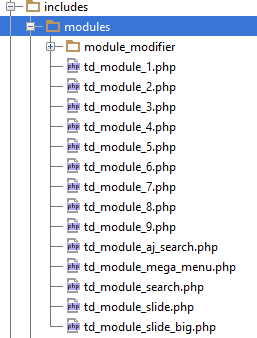
includes > modules > module modifier > td_module_blog.php
Newspaper child theme documentation https://forum.tagdiv.com/child-theme-documentation/ says that child theme supports for these files https://forum.tagdiv.com/wp-content/uploads/2014/03/04_modules.png
Does the above file supports via child theme?
Kindly help me..
 Emil G
 Hi,
I guess it’s doable using a plugin like Advanced Custom Fields and echo the field value from each post instead of that text. I’ll add this on the list and i will talk with the team about it.
Thank you, Emil G.
Lucian Hi,
Then the image will be loaded at 600px and you would need to use custom css to make it fit into it’s container on desktops and also on tablets and set it to 100% width for mobiles. To target the image for all screens widths (desktop/tablets/mobiles) you would have to use this css snippets:
/* mobile */
@media (max-width: 767px) {

}
/* tablet */
@media (min-width: 768px) and (max-width: 1023px) {

}

/* desktop */
@media (min-width: 1024px) {

}
You could also use the advanced css filed from theme panel and add the css for tablets/mobile/desktop into the specially designed fields: http://screencast.com/t/yqSKh7xOaZ
If you don’t have basic html/css/php knowledge and don’t know how to do it we suggest you hire a developer to do it for you as unfortunately we cannot offer custom work as we work hard on the development, updates, fixes and support. You can always get a freelancer from sites like: http://studio.envato.com/ if you don’t know how to do it yourself.
Hope this helps!
Thanks for the message!
-
This reply was modified 11 years by Lucian.
Lucian Hi,
1. Unfortunately the at the moment the mega menu it’s limited to display just 5 subcategories even if more of them are available.
You could try and use this method and change the numbers of the subcategories displayed there: https://forum.tagdiv.com/topic/maximum-5-subcategories-in-mega-menu/#post-20859
2. You can try to do it using a plugin like Advanced Custom Fields, take a look here for an example – https://forum.tagdiv.com/topic/function-to-hide-ads-and-function-to-show-author/
Hope this helps!
Thanks
Emil G Hi,
You can doit using a plugin like Advanced Custom Fields, take a look here for an example – https://forum.tagdiv.com/topic/function-to-hide-ads-and-function-to-show-author/
Basically you need to create a checkbox that will appear on each post editing area, and a condition on the author box to appear only when the box is unchecked, you can find the author box function here – http://screencast.com/t/EVD3CDvhYHkM
Thank you, Emil G.
Lucian Hi,
You can use the Advanced Custom Fields plugin and the method posted here: https://forum.tagdiv.com/topic/function-to-hide-ads-and-function-to-show-author/#post-8993
Hope this helps!
Thanks
 enterpr1se
Hi,
Is there any sample code to hide ads in specific post by Advanced Custom Fields like https://forum.tagdiv.com/topic/function-to-hide-ads-and-function-to-show-author/#post-8993
Thanks
Lucian Hi,
You can hide it via css and use this css:
.category .td-g-rec-id-header, .category .td-a-rec-id-header, .tag .td-g-rec-id-header,.tag .td-a-rec-id-header {

display: none;

}
Or use Advanced Custom Fields and this method to achieve this: https://forum.tagdiv.com/topic/function-to-hide-ads-and-function-to-show-author/#post-8993
Hope this helps!
Thanks
Lucian Hi,
You can also achieve this using the “Advanced Custom Fields” plugin. Here is an implementation, take a look on the entire tread: https://forum.tagdiv.com/topic/function-to-hide-ads-and-function-to-show-author/#post-9187
Thanks again for your suggestion, we also plan to improve the ads system in the future so I have added this on our feature requests list and we will consider it.
Thanks
Lucian Hi,
You can also use Advanced Custom Fields plugin, please follow this topic: https://forum.tagdiv.com/topic/function-to-hide-ads-and-function-to-show-author/#post-8993
Hope this helps!
Thanks
Lucian Hi,
I believe that your code is wrong, please read here about this: http://www.advancedcustomfields.com/resources/displaying-custom-field-values-in-your-theme/
You can always get a freelancer from sites like: http://studio.envato.com/ if you don’t know how to do it yourself.
Thanks
 TheMediumUTM
 I had the same problem. Here are my steps (I think these are the only two I used, so let me know if it doesn’t work).
1. I edited my single_template_3.php file and moved the <header> content, which originally looked like this:
      <header>
      ...
      </header>
    </div>
   </div>
</div> <!-- close the row from td_page_generator -->
To look like this:
    </div>
    <header>
    ...
    </header>
  </div>
</div> <!-- close the row from td_page_generator -->
Note that I also redid my subtitles using Advanced Custom Fields. The way I did it, I was able to put it under the title in the <header> section. I’m not sure whether yours will end up where you want them.
2. I styled the header using CSS:
.single_template_3 header {
  position: static;
  }

@media (max-width: 768px) {
  .single_template_3 header h1 {
    margin-top: 30px;
    }
  }
This was a few weeks ago now and I don’t quite remember how I determined those style rules, but anyhow, hope it works for you…
Lucian Hi,
You can use Advanced Custom Fields plugin, please follow this topic: https://forum.tagdiv.com/topic/function-to-hide-ads-and-function-to-show-author/#post-8993
Hope this helps!
Thanks
Lucian Hi,
The theme is compatible and you can use Woocommerce plugin for your products. The theme hasn’t been build to work with custom post type you can customize though a custom post template an add it like this: https://forum.tagdiv.com/topic/help-post-site-template-for-custom-post-type/#post-22609
You can search the forum as there are many examples on how to use Advanced Custom Fields plugin, here is an example: https://forum.tagdiv.com/topic/function-to-hide-ads-and-function-to-show-author/#post-8993
Hope this helps!
Thanks
Lucian Hi,
1. You could also use a plugin like advanced custom fields then a condition which will show the “leave a reply” comment section only if you want it or not, you can read more about this method here: https://forum.tagdiv.com/topic/function-to-hide-ads-and-function-to-show-author/#post-8993
If you don’t know how to achieve this and you don’t have basic php/html/css knowledge we recommend you to hire a developer or a freelancer from sites like: http://studio.envato.com/
Unfortunately for this you will need custom work and we cannot offer custom work at this time as we work hard on the development, updates, fixes and support.
We also have this on our todo list but as we have over 160 features requests and issues on this list we have to pick very carefully what we implement so if more people will ask for this we will do it.
2. That setting/feature comes from WordPress, you can try to find a solution for this online or try to find a plugin to do it, as I said before unfortunately we cannot offer custom work at this time.
Sorry about this!
Thanks for the message!
Lucian Hi,
You can use the do_shortcode() function and add the ‘code A’ on the category template and use a condition like this to show it only if it’s a specify category using this method: https://forum.tagdiv.com/topic/block-widget-to-appear-in-one-category/#post-21306
You can do the same for the ‘code B’ which you want on other categories.
And use the method I suggested above using Advanced Custom Fields plugin to display ‘code B’ and/or ‘code A’ on posts template.
If you can’t manage to do this alone we recommend you to hire a freelancer to do it for you.
Thanks
simchris Yeah, I ended up doing it that way since I was manually putting in a copyright notice for the author’s work (e.g., for a fiction piece, or book serial), as well as link to the author’s page to “read more by this author” …); and sometimes link back to “read chapter one” … just made it the simplest solution vs “wrangling” custom stuff.
Advanced Custom Fields is cool way to do it too, but I’m already doing too many hacks per theme update, and skipping every couple of theme updates (waiting on 4.3.1 now!), so one more thing to drop into templates was a bit much, so the manual way kind of worked since I can put the dates on the copyright more easily than trying to do query, and doesn’t add yet another data field to dbase, etc.
I think in an environment where you have multiple authors posting their own stuff, a custom field is great because you could make it “required” so that it’s always there, and remind people it needs to there, etc.
TheMediumUTM I used the Advanced Custom Fields plugin to add a repeating photographer meta field to my posts, saved credits for all the post’s images in said field, and edited Newspaper’s single templates to display the credit with an icon. For example:
http://mediumutm.ca/news/pink-hijabs-raise-awareness-of-breast-cancer
But this is very similar to what tcdraper did in the first place :p And it’s not the best for posts with photos from multiple different sources, which happens to be a rare case for us.
Lucian Hi,
You could do this by using a plugin like Advanced Custom Fields to chose, when editing the post if to show that author box or not for that post.
Here is how you can do it, follow this topic: https://forum.tagdiv.com/topic/function-to-hide-ads-and-function-to-show-author/#post-8993
If you don’t have basic php/html/css knowledge we recommend you hire a freelancer from sites like: http://studio.envato.com/ if you don’t know how to do it yourself.
Unfortunately we cannot offer custom work as we work hard on the development, updates, fixes and support.
Thnaks
simchris Basically drop in the field where you want it in the template, which it looks like you have located for the module3 post layout.
Here are docs for ACF, if you didn’t already look at them
http://www.advancedcustomfields.com/resources/displaying-custom-field-values-in-your-theme/
You can try using shortcode, as per the docs such as
[acf field="{$field_name}"]
or normal php method
<?php the_field('custom_title'); ?>
Not sure if that was what you were asking, but perhaps that helped 🙂