- NewsmagUsing the theme translations together with WPML
- NewsmagHow to update a plugin
- NewsmagCustom Post Type Support
- NewsmagAbove footer ads
- NewsmagWeather Widget
- NewsmagHow to update the theme
- NewsmagIntroduction
- NewsmagLogo & Favicon
- NewsmagFooter templates
- NewsmagUsing other ads
- NewsmagCustom ad spots
- NewsmagArticle ads
- NewsmagSidebar ads
- NewsmagHeader ads
- NewsmagLoading image effects
- NewsmagCategory top post styles
- NewsmagSmart Lists
- NewsmagGeneral settings
- NewsmagTheme thumbs
- NewsmagtagDiv slider gallery
 Romi
Romi Hello
Sorry because I couldn’t explain what I wanted to you well. What I want is that the images that appear in the Recent Posts widget are avatar images of the article author. Not images from featured images.
An example is the following Recent Post widget.

As you can see, what appears in the Recent Post Widget above are images from featured images or images in the article I don’t want that. What I want to appear in the Recent Post Widget are the author avatar images. That’s what I want.
Thank you very much!
Muhammad Nagib Alaydrus

 dedektifdergi@gmail.com
 Do you have an example of this please?
 Calin
Calin Hi,
What you can try is to set a big line-height on header elements from header and desktop, another alternative is with css, for example for mobile it can be used this custom css:
.td-header-main-menu  {

min-height: 100px!important;

}

.td-header-menu-wrap {

    min-height: 101px!important

}

#td-top-mobile-toggle i {

      line-height: 101px;

}
– https://i.imgur.com/tzKCv1q.png
I hope this will help you!
 kalaivani
 load-scripts.php?c=1&load%5Bchunk_0%5D=jquery-core,jquery-migrate,utils,wp-polyfill-inert,regenerator-runtime,wp-polyfill,wp-hooks&ver=6.4.1:5 JQMIGRATE: Migrate is installed, version 3.4.1
deprecated.min.js?ver=73ad3591e7bc95f4777a:2 wp.compose.withState is deprecated since version 5.8. Please use wp.element.useState instead.
i @ deprecated.min.js?ver=73ad3591e7bc95f4777a:2
D @ compose.min.js?ver=3189b344ff39fef940b7:9
(anonymous) @ td_js_for_guten_blocks_editor.min.js?ver=2542f6ebea260f8fc5fdc19a93688182:28
td_js_for_guten_blocks_editor.min.js?ver=2542f6ebea260f8fc5fdc19a93688182:7 Uncaught ReferenceError: lodash is not defined
at tdThemeControlsBlocksAttributes (td_js_for_guten_blocks_editor.min.js?ver=2542f6ebea260f8fc5fdc19a93688182:7:37)
at load-scripts.php?c=1&load%5Bchunk_0%5D=jquery-core,jquery-migrate,utils,wp-polyfill-inert,regenerator-runtime,wp-polyfill,wp-hooks&ver=6.4.1:13:3096
at blocks.min.js?ver=7204d43123223474471a:10:413
at data.min.js?ver=dc5f255634f3da29c8d5:2:12464
at redux-routine.min.js?ver=0be1b2a6a79703e28531:9:750
at data.min.js?ver=dc5f255634f3da29c8d5:2:11537
at Object.dispatch (data.min.js?ver=dc5f255634f3da29c8d5:2:12407)
at Object.apply (data.min.js?ver=dc5f255634f3da29c8d5:2:17805)
at blocks.min.js?ver=7204d43123223474471a:10:3399
at data.min.js?ver=dc5f255634f3da29c8d5:2:12464
tdThemeControlsBlocksAttributes @ td_js_for_guten_blocks_editor.min.js?ver=2542f6ebea260f8fc5fdc19a93688182:7
(anonymous) @ load-scripts.php?c=1&load%5Bchunk_0%5D=jquery-core,jquery-migrate,utils,wp-polyfill-inert,regenerator-runtime,wp-polyfill,wp-hooks&ver=6.4.1:13
(anonymous) @ blocks.min.js?ver=7204d43123223474471a:10
(anonymous) @ data.min.js?ver=dc5f255634f3da29c8d5:2
(anonymous) @ redux-routine.min.js?ver=0be1b2a6a79703e28531:9
(anonymous) @ data.min.js?ver=dc5f255634f3da29c8d5:2
(anonymous) @ data.min.js?ver=dc5f255634f3da29c8d5:2
apply @ data.min.js?ver=dc5f255634f3da29c8d5:2
(anonymous) @ blocks.min.js?ver=7204d43123223474471a:10
(anonymous) @ data.min.js?ver=dc5f255634f3da29c8d5:2
(anonymous) @ redux-routine.min.js?ver=0be1b2a6a79703e28531:9
(anonymous) @ data.min.js?ver=dc5f255634f3da29c8d5:2
(anonymous) @ data.min.js?ver=dc5f255634f3da29c8d5:2
(anonymous) @ data.min.js?ver=dc5f255634f3da29c8d5:2
ie @ blocks.min.js?ver=7204d43123223474471a:3
Qe @ block-library.min.js?ver=875919a30abea6016ef8:12
h_ @ block-library.min.js?ver=875919a30abea6016ef8:14
(anonymous) @ block-library.min.js?ver=875919a30abea6016ef8:14
VC @ block-library.min.js?ver=875919a30abea6016ef8:14
er @ edit-post.min.js?ver=6720d8a86f225f3ce492:7
(anonymous) @ post-new.php:2745
kalaivaniError is
Uncaught ReferenceError: lodash is not defined
td_js_for_guten_blocks_editor.min.js?ver=2542f6ebea260f8fc5fdc19a93688182:7 Uncaught ReferenceError: lodash is not defined
at tdThemeControlsBlocksAttributes (td_js_for_guten_blocks_editor.min.js?ver=2542f6ebea260f8fc5fdc19a93688182:7:37)
at load-scripts.php?c=1&load%5Bchunk_0%5D=jquery-core,jquery-migrate,utils,wp-polyfill-inert,regenerator-runtime,wp-polyfill,wp-hooks&ver=6.4.1:13:3096
at blocks.min.js?ver=7204d43123223474471a:10:413
at data.min.js?ver=dc5f255634f3da29c8d5:2:12464
at redux-routine.min.js?ver=0be1b2a6a79703e28531:9:750
at data.min.js?ver=dc5f255634f3da29c8d5:2:11537
at Object.dispatch (data.min.js?ver=dc5f255634f3da29c8d5:2:12407)
at Object.apply (data.min.js?ver=dc5f255634f3da29c8d5:2:17805)
at blocks.min.js?ver=7204d43123223474471a:10:3399
at data.min.js?ver=dc5f255634f3da29c8d5:2:12464
tdThemeControlsBlocksAttributes @ td_js_for_guten_blocks_editor.min.js?ver=2542f6ebea260f8fc5fdc19a93688182:7
(anonymous) @ load-scripts.php?c=1&load%5Bchunk_0%5D=jquery-core,jquery-migrate,utils,wp-polyfill-inert,regenerator-runtime,wp-polyfill,wp-hooks&ver=6.4.1:13
(anonymous) @ blocks.min.js?ver=7204d43123223474471a:10
(anonymous) @ data.min.js?ver=dc5f255634f3da29c8d5:2
(anonymous) @ redux-routine.min.js?ver=0be1b2a6a79703e28531:9
(anonymous) @ data.min.js?ver=dc5f255634f3da29c8d5:2
(anonymous) @ data.min.js?ver=dc5f255634f3da29c8d5:2
apply @ data.min.js?ver=dc5f255634f3da29c8d5:2
(anonymous) @ blocks.min.js?ver=7204d43123223474471a:10
(anonymous) @ data.min.js?ver=dc5f255634f3da29c8d5:2
(anonymous) @ redux-routine.min.js?ver=0be1b2a6a79703e28531:9
(anonymous) @ data.min.js?ver=dc5f255634f3da29c8d5:2
(anonymous) @ data.min.js?ver=dc5f255634f3da29c8d5:2
(anonymous) @ data.min.js?ver=dc5f255634f3da29c8d5:2
ie @ blocks.min.js?ver=7204d43123223474471a:3
Qe @ block-library.min.js?ver=875919a30abea6016ef8:12
h_ @ block-library.min.js?ver=875919a30abea6016ef8:14
(anonymous) @ block-library.min.js?ver=875919a30abea6016ef8:14
VC @ block-library.min.js?ver=875919a30abea6016ef8:14
er @ edit-post.min.js?ver=6720d8a86f225f3ce492:7
(anonymous) @ post-new.php:2745
how to fix it.please support
 renovaweb
Hello !
I really like this theme, thanks !
But the mobile version doesn’t work (critical error)
Homepage seems fine
I tried with AMP, AMP + Mobile, Mobile
I tried with AMP plugin not activated too
Website: https://dev.magazine3rve.cc/
PHP 8 with php ini ressources boosted to max
WordPress 6.4.1 with Newspaper Child theme Version : 9.0c
NewspaperVersion : 12.6.1
PHP errors on inner pages or articles
Warning: require_once(/home/mag3rve/dev.magazine3rve.cc/wp-content/themes/Newspaper/legacy/common/wp_booster/td_css_res_compiler.php): Failed to open stream: No such file or directory in /home/mag3rve/dev.magazine3rve.cc/wp-includes/template.php on line 790
Fatal error: Uncaught Error: Failed opening required ‘/home/mag3rve/dev.magazine3rve.cc/wp-content/themes/Newspaper/legacy/common/wp_booster/td_css_res_compiler.php’ (include_path=’.:/opt/cpanel/ea-php80/root/usr/share/pear’) in /home/mag3rve/dev.magazine3rve.cc/wp-includes/template.php:790 Stack trace: #0 /home/mag3rve/dev.magazine3rve.cc/wp-content/plugins/td-composer/legacy/common/wp_booster/td_autoload_classes.php(42): load_template(‘/home/mag3rve/d…’, true) #1 [internal function]: td_autoload_classes->loading_classes(‘td_css_res_comp…’) #2 /home/mag3rve/dev.magazine3rve.cc/wp-content/plugins/td-composer/legacy/common/wp_booster/td_global.php(780): class_exists(‘td_css_res_comp…’, true) #3 /home/mag3rve/dev.magazine3rve.cc/wp-content/plugins/td-composer/legacy/common/wp_booster/td_wp_booster_functions.php(1184): td_global::reset_theme_settings() #4 /home/mag3rve/dev.magazine3rve.cc/wp-includes/class-wp-hook.php(324): hook_wp_head(”) #5 /home/mag3rve/dev.magazine3rve.cc/wp-includes/class-wp-hook.php(348): WP_Hook->apply_filters(NULL, Array) #6 /home/mag3rve/dev.magazine3rve.cc/wp-includes/plugin.php(517): WP_Hook->do_action(Array) #7 /home/mag3rve/dev.magazine3rve.cc/wp-includes/general-template.php(3052): do_action(‘wp_head’) #8 /home/mag3rve/dev.magazine3rve.cc/wp-content/plugins/td-standard-pack/Newspaper/header.php(11): wp_head() #9 /home/mag3rve/dev.magazine3rve.cc/wp-content/plugins/td-composer/td-composer.php(259): require_once(‘/home/mag3rve/d…’) #10 /home/mag3rve/dev.magazine3rve.cc/wp-includes/class-wp-hook.php(324): {closure}(”) #11 /home/mag3rve/dev.magazine3rve.cc/wp-includes/class-wp-hook.php(348): WP_Hook->apply_filters(”, Array) #12 /home/mag3rve/dev.magazine3rve.cc/wp-includes/plugin.php(517): WP_Hook->do_action(Array) #13 /home/mag3rve/dev.magazine3rve.cc/wp-content/themes/Newspaper/header.php(2): do_action(‘tdc_header’) #14 /home/mag3rve/dev.magazine3rve.cc/wp-includes/template.php(790): require_once(‘/home/mag3rve/d…’) #15 /home/mag3rve/dev.magazine3rve.cc/wp-includes/template.php(725): load_template(‘/home/mag3rve/d…’, true, Array) #16 /home/mag3rve/dev.magazine3rve.cc/wp-includes/general-template.php(48): locate_template(Array, true, true, Array) #17 /home/mag3rve/dev.magazine3rve.cc/wp-content/plugins/td-standard-pack/Newspaper/page.php(7): get_header() #18 /home/mag3rve/dev.magazine3rve.cc/wp-includes/template-loader.php(106): include(‘/home/mag3rve/d…’) #19 /home/mag3rve/dev.magazine3rve.cc/wp-blog-header.php(19): require_once(‘/home/mag3rve/d…’) #20 /home/mag3rve/dev.magazine3rve.cc/index.php(17): require(‘/home/mag3rve/d…’) #21 {main} thrown in /home/mag3rve/dev.magazine3rve.cc/wp-includes/template.php on line 790
Thank you very much !
 varre
varreHi,
I’m looking for a feature like this that I can add in my posts. I couldn’t find in shortcodes.


Plus, I want to remove website & email text area in comments how I can do that?
Thanks.
 Hal
HalI decided to try the Newspaper Theme’s “shop” template to build my wife an online shop. It’s not quite where I want it yet, but I’ve only been at it a few hours. I have some products, categories, prices, shipping, etc in place. I thought I had the PayPal setup and ready, but when I did a sample order, put them in the cart, and went to check out, I got this error:
There are no payment methods available. This may be an error on our side. Please contact us if you need any help placing your order.
Even though I’ve been through the PayPal setup several times and saved the settings, I’m still having this error.
Any advice would be appreciated.
Thanks,
Hal
 Twisted Pear
Hi,
I need to migrate Cloud Templates from dev to live without disturbing existing posts on live.
I have been able to migrate the Cloud Templates by using WordPress’s export/import, however, the Page Templates (Homepage & Page) have not come across?
I can recreate the pages by using Gutenberg, but how do I make them Cloud Templates? There is no ‘Blank’ Cloud Template option for Homepage or Page to install and replace. Do I need to install another template (with assets and styles) and then overwrite it?
 Kari7
Kari7Hi,
I tried everything under the sun to remove the title from my images when the cursor is on the image (image over title)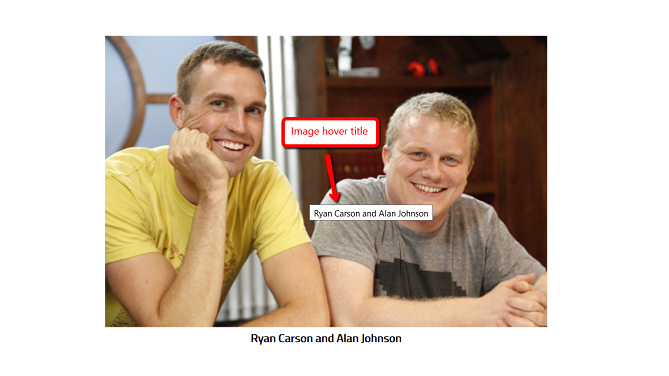
I used the following javascript code (without script as asked) but it still doesn’t work.
jQuery(document).ready(function($) {
$(‘img[title]’).each(function() { $(this).removeAttr(‘title’); });
});
Can you help me?
Regards,
Kari
 syned
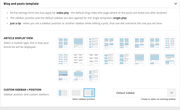
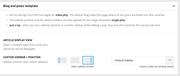
synedToday I updated the Newspaper theme and all the different modules/templates disappeared from Template Settings.
Is there any way to bring them back and make my site look as it did before the update?
For example it now shows full post content on the homepage instead of showing only excerpt.
Template settings before and after update:
 forevermogulmag
 Can you provide the page examples. For stuff like this it would be good to also provide the pages too because most people want it in the same formatting. I can’t quite get the layout. https://prnt.sc/Q_xfIF8Qzxdt
I also emailed last weekend login information into WordPress for forever mogul. Feel free to dump the page example in there.
Calin Hello,
Here is an example where the code is apply – https://i.imgur.com/lOPrGqL.png (if you are using cloudflare you need to purge it).
Please do a test and instead setting the code in mobile section set it in this place – https://i.imgur.com/k6xqA5S.png
Thank you!
 Bettina
 Hello Rob!
A shortcode can be inserted by using the element called “Column text” or “Text with title”. For example, in the step3 here: https://forum.tagdiv.com/add-cryptocurrency-price-ticker-widget/
“Column text” and “text with title” elements have a button called “edit content” and if you click on that button, the WP Editor will open, and you can add some text/code/shortcode there. Close the WP Editor from X, save the changes from Composer and view the page to see the changes.
I hope that helps you!
Thank you!
 banyaninfomedia
I am using newspaper theme and current version of theme is 12.6.2 whenever i try to edit any css files in order to reduce unused css & Js. the ‘td cloud library’ plugin deactivate automatically and and on activation it shows an error that this plugin is not compatible with current version of newspaper theme. and after this my site shows error on header and footer. how can i solve this issue, please provide me a proper solution.
Is this possible to remove Unused CSS & JS from my site?
 news9
news9Hi I am using Newsmag header style 4. There is nine dot icon on mobile menu. How can I switch it to hamburger menu. Example is shown in screenshot
 pkrn
pkrnI started with Classic demo theme without media. I want to create post without sidebar but I couldn’t find a way to remove it completely. There’s a block in sidebar column that cannot be removed. So I implemented pre-design template from cloud library, https://cloud.tagdiv.com/spa-and-wellness-resorts-are-amazing-for-your-health/. In editor mode, I can see pictures in envira gallery block but when preview or publish it-there’s no content but it did show up when use original template.
 eduardo
I would like to know if it is possible to remove the preview of the post text that appears when I view posts from any category, an example: https://mobilidadesampa.com.br/category/estradas/
image example: https://imgur.com/VYlbcQs
 gugacwb
Hello,
I am facing some issues with Mobile Theme/AMP. All the Custom Code I wrote at Mobile Theme Panel are not loading in AMP version when I´m not logged in. But when I’m logged in all the css codes are working just fine.
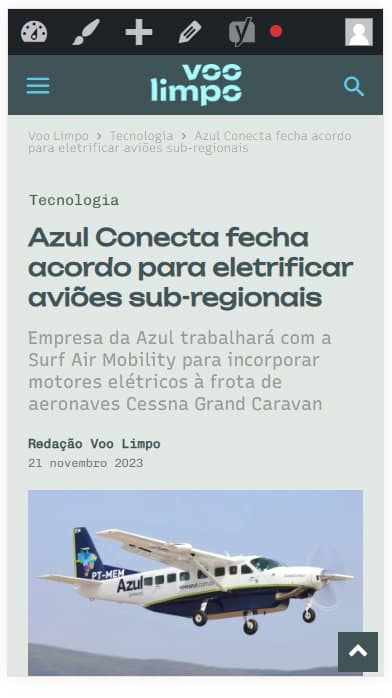
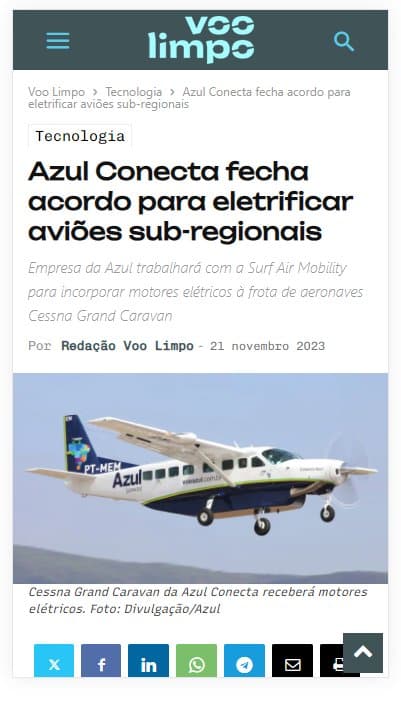
For example: https://voolimpo.com.br/tecnologia/2023/11/21/azul-conecta-fecha-acordo-para-eletrificar-avioes-sub-regionais/?amp
Logged in: https://voolimpo.com.br/wp-content/uploads/2023/11/css-1.jpg
Not logged in: https://voolimpo.com.br/wp-content/uploads/2023/11/css-2.jpg
What should I do to solve this issue?
Thank you.
 jayflyer
for example, in a paragraph block, i just want to slightly increase font size of a first sentence or line.
 upmy-life
Hello,
I have created a taxonomy called “format”.
And on each category page I have made some sections with Big Grid Flex 2 elements.
My goal is to get in each “Big Grid Flex 2” a list of post from the CURRENT category AND a specific taxonomy.
For example in the first block of the page https://upmy.life/axe/relations-sociales/communication/ I just want to have posts from the current category “Mieux communiquer” AND from the taxonomy “format = Guide Ultime” (which is id=154).
Is it possible to make this ?
Because I have tried several filters (“Category -> Current category” + Multiple terms filter:154) or (“Category -> Current category” + Multiple terms filter:154 +Single – Related from taxonomies:format) and so on… but nothing works.
Thanks
 mariobrown
 I just sent another email again with the same subject – Mario Brown WP Admin & Cpanel Access (Ref: Forum post-492526)
 tektenweb
Hello,
I’d like to enlarge the font size of pagination numbers, but I couldn’t achieve this using CSS. I believe I couldn’t find the correct class target.
For example, the page numbers that appear at the bottom of the categories are very small, and I’d like to increase their size. I would appreciate it if you could provide a resource regarding this issue.
Thank you.
 Anamaria
 Hi,
Unfortunately, for the mobile theme/AMP plugin, the post cannot display the modified date.
With tagDiv Composer, you can add the element Single Post Modified Date in Single Post Template, and you can change the additional text in “Last updated on” => https://www.screencast.com/t/EvfUQMfzkd, and the Single Post Modified Date will show you the last time you edited that post => https://www.screencast.com/t/j74uz43paZj
-> https://forum.tagdiv.com/single-post-shortcodes/
Thank you!
 perspektive
Hey there!
I changed the Header of the mainpage and the main blog-post-sample on the page perspektive-online.net to cloud-based samples. Then i modified them by the tagdiv composer
Unfortunatly sometimes it doesnt work
On the mainpage sometimes still the “coronavirus”-logo is displayed.
https://postimg.cc/yWBBdQbv
On the blogposts when clicking on the first post a old version of the mobile-theme is shown. It’s not a problem on older posts.
https://postimg.cc/p9N4SyNq
Can you help?
Thanks!