- NewspaperWP Rocket and Newspaper Theme: Optimization Guide
- TutorialsFrom WPBakery to tagDiv Composer
- TutorialsOffset Feature
- TutorialsWhat is Ajax preloading?
 From the Strait
Hi there,
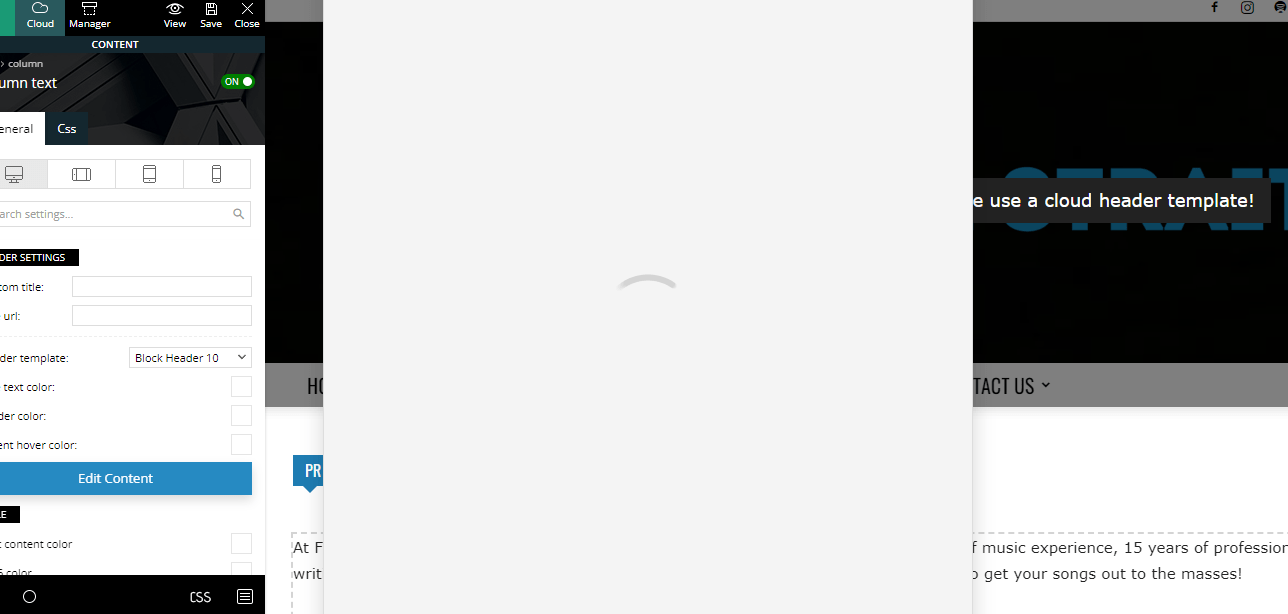
For the past two months or so, even with the new theme update(s), I’m unable to edit any written content on my pages using tagdiv composer. When I click on “Edit Content”, the window never actually loads. Here’s a screenshot as an example:https://fromthestrait.com/wp-content/uploads/2022/12/FTS-Screenshot-Edit-Content-Window.png.
My website is https://fromthestrait.com
Does anyone know how to fix this? Thanks!
 Bettina
 Hello @osiortcp !
A shortcode can be inserted by using the element called “Column text” or “Text with title”. For example, in the step3 here: https://forum.tagdiv.com/add-cryptocurrency-price-ticker-widget/
I hope that helps you!
Thank you!
 LinkBaits7
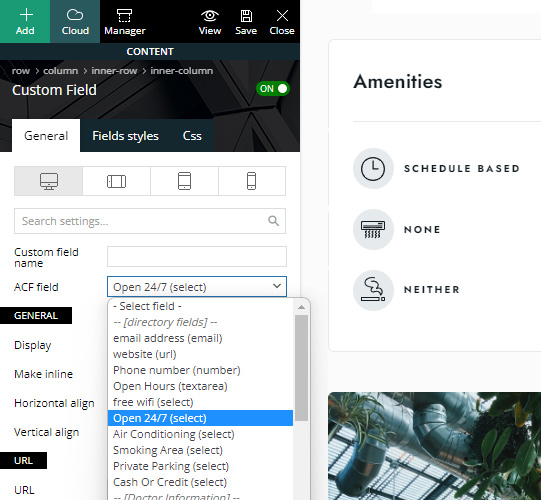
I am creating a submission form which need to include a number of ACF created custom fields; however the form input field isn’t showing all created ACF custom fields. It seems to only be showing text, textarea, number, url & email but not other fields like select, date, WYSIWYG Editor, date picker etc.
But in documentation, demos & features it shows fields such as select:
 Luan Santos
 Olá,
Estou com o mesmo tendo o mesmo problema com o shortcode do Campaign Monitor.
Como foi resolvido?
 beyonduality
 – Clean unfamiliar Theme Panel injected code (example – https://i.imgur.com/4q70kCv.png);
I´ve found this code in the custom code, removed it, but the redirection is still on the page.
-
This reply was modified 3 years by
beyonduality.
 Anamaria
 If you notice that the site redirects to other sites, it may be because of injected malware. We recommend you follow the steps below:
– Change admin passwords and delete admin accounts you are not familiar with;
– Delete any weird/unknown plugins;
– Delete the weird/unknown themes;
– Clean unfamiliar Theme Panel injected code (example – https://i.imgur.com/4q70kCv.png);
– Clean WordPress files (example – https://i.imgur.com/stJCqiK.png)
– Update the theme to the latest version, Newspaper 12.1.1
If you have gone through the steps above and are still facing issues, don’t hesitate to contact us via email at contact@tagdiv.com. We’ll be ready to help you as soon as possible.
Thank you!
 webarts
 You can try to search for word “faros” in this site https://bit.ly/3jmoHJg
when click in search button, i see results only in posts /?s=faros&post_type=post
when i click view all results, working fine ?s=faros
webarts Now when I press search i see only posts results
and in address bar i see this /?s=petra&post_type=post
Anamaria Hi,
Seems you have the Mobile theme plugin activated, and it is disabled for the homepage. When you install and activate the Mobile Theme plugin, your pages will be overwritten by the plugin (the mobile theme comes with its own templates for page, post, category, etc so your current templates from the desktop theme will get converted to the mobile theme layout, the page content is made without builders in mobile editor => https://www.screencast.com/t/xbgZG8kH also, the options that are provided to edit the mobile theme version are limited (this keeps the things simple)).
Better deactivate the plugin and see the results
Also, if you create a mobile page, please make sure you assign it like this https://www.screencast.com/t/lektAhyjd
This is a video about Responsive Newspaper Theme, AMP & Mobile Theme, Mobile Pages & Templates -> https://www.youtube.com/watch?v=SpGkOnJeNZY
Please check this topic where I explained each mobile version -> https://forum.tagdiv.com/topic/mobile-version-not-working-properly-2/ and choose what mobile version you want.
Thank you!
Anamaria Hello,
Please note that you can’t customize the AMP pages with the tagDiv Composer.
You have only some settings for this layout, which you can find in the Theme Panel -> Mobile Theme
Also, please check this topic where I explained each mobile version -> https://forum.tagdiv.com/topic/mobile-version-not-working-properly-2/ and choose what mobile version you want.
Thank you!
Anamaria Hello,
To activate the theme, please check this guide https://forum.tagdiv.com/newspaper-6-how-to-activate-the-theme/
If you notice that the site redirects to other sites, it may be because of injected malware. We recommend you follow the steps below:
– Change admin passwords and delete admin accounts you are not familiar with;
– Delete any weird/unknown plugins;
– Delete the weird/unknown themes;
– Clean unfamiliar Theme Panel injected code (example – https://i.imgur.com/4q70kCv.png);
– Clean WordPress files (example – https://i.imgur.com/stJCqiK.png)
– Update the theme to the latest version, Newsmag v5.2.3
If you have gone through the steps above and are still facing issues, don’t hesitate to contact us via email at contact@tagdiv.com. We’ll be ready to help you as soon as possible.
Thank you!
 Disha_S
Can you please suggest me the community-based plugin? Which is compatible with your theme
For example-> I have installed below plugins but they are not compatible with your theme.
#peepso WordPress plugin
#Buddyboss WordPress plugin
Anamaria Hello,
If you notice that the site redirects to other sites, it may be because of injected malware. We recommend you follow the steps below:
– Change admin passwords and delete admin accounts you are not familiar with;
– Delete any weird/unknown plugins;
– Delete the weird/unknown themes;
– Clean unfamiliar Theme Panel injected code (example – https://i.imgur.com/4q70kCv.png);
– Clean WordPress files (example – https://i.imgur.com/stJCqiK.png)
– Update the theme to the latest version, Newsmag v5.2.3
If you have gone through the steps above and are still facing issues, don’t hesitate to contact us via email at contact@tagdiv.com. We’ll be ready to help you as soon as possible.
Thank you!
 GujaratAsmita
give me three salutation : My website is GujaratAsmita.com
SEO Description : No meta description was found for your homepage.
Keywords in Title & Description : No page description found on the page.
The size of the HTML document is 60 Kb, over the average of 33 Kb and our recommendation of 50 Kb.
 miner1
When I install amp for my newspaper site, when using the burger menu in the left top I click on dropdown categories and come to a blank page, there is only one logo and menu, same for each category.
is there a conflict between mobile theme and amp ? its all over the place causing confusion
 BijuSoman
We are trying to edit the home page, but it is crashing. This is brand new installation
Error message is:
This site can’t be reached
The webpage at https://www.barons.in/wp-admin/post.php?post_id=188&td_action=tdc&tdbTemplateType=page&prev_url=%2F%2Fwww.barons.in%2Fwp-admin%2Fedit.php%3Fpost_type%3Dpage might be temporarily down or it may have moved permanently to a new web address.
ERR_HTTP2_PROTOCOL_ERROR
 archnews
 Is there any update on this? I’ve removed all plugins except yours as a test to ensure its not a compatibility issue and still having a problem. Google reported that they believe your mobile theme and the AMP plugin have conflicts somewhere, but obviously arn’t going to launch an investigation as its not their product (its yours)
 menneskedyr
Possible bug found:
Single Post Title element has a Big first letter option. That option works fine, but it doesn’t seem to recognize characters with diacritics, for example Č, Š, Ć, Đ and so on.
So when the title begins with “Đ” for example, a question mark appears instead of Đ in Big first letter.
I’ve checked site charset etc, all looks fine. I guess the bug could be buried somewhere in TD Composer. For now I’ve patched it with JS but it’s far from ideal of course.
Please look it up when you find the time 🙂 thanks.
Bettina Hello @dfrosso!
Can you please provide some screenshots about how you’ve set up the single post cloud template and an example of a post from that category? Also, your website link.
Thank you!
Anamaria Hello,
I checked and now it seems you don’t have the AMP plugin activated.
Please note that you can’t customize the AMP pages with the tagDiv Composer.
You have only some settings for this layout, which you can find in the Theme Panel -> Mobile Theme.
The AMP works better only with the Mobile Theme plugin. From my point of view, if you don’t use the Mobile Theme plugin, then there is no reason or benefit to AMP. Please read all about AMP here: https://forum.tagdiv.com/tagdiv-amp-plugin-tutorial/
Thank you!
 username p21y
 I am sorry İ only have linux systems, so I can’t download the jing tool.
I can email you a screenshot for sure, but this is a hard error reported in the server log.
I found an even simpler case that triggers the problem. With the newspaper theme installed and the lifenews web site imported without content, simply adding a new page then clicking the tagDiv composer button, results in theppphp error in the server log:
[Fri Dec 23 00:59:31.988326 2022] [php7:warn] [pid 805726] [client 176.234.90.118:15378] PHP Warning: ftp_fget() expects parameter 1 to be resource, null given in /var/www/perspektif-21.net/webroot/wp-admin/includes/class-wp-filesystem-ftpext.php on line 146, referer: https://perspektif-21.net/wp-admin/post.php?post=41&action=edit
 dfrosso
 Hi.
We prefer not to give access to our website admin area, for security reasons.
Could you make an example video from another URL?
Thanks.
 mhdaflal31
Amp Version Notworking Images(Not showing) https://liveuaenews.com/?amp=1
username p21ysite: perspektif-21.net
Latest Debian, PHP 7.4, apache 2
Fresh WordPress install, newly purchased and installed Newspaper 12, imported Life news example web site without content
Attempting to edit the home page with TagDiv composer (for example mouse over on the entry for the logo img produces a popup image – labelled gadgets) and the Apache error log on the server show the following message:
[Thu Dec 22 11:45:01.521540 2022] [php7:warn] [pid 740740] [client 176.234.90.118:15204] PHP Warning: ftp_fget() expects parameter 1 to be resource, null given in /var/www/perspektif-21.net/webroot/wp-admin/includes/class-wp-filesystem-ftpext.php on line 146, referer: https://perspektif-21.net/wp-admin/post.php?post_id=30&td_action=tdc&tdbTemplateType=page&prev_url=%2F%2Fperspektif-21.net%2Fwp-admin%2Fedit.php%3Fpost_type%3Dpage
Anamaria Hello,
Please note that you can’t customize the AMP pages with the tagDiv Composer.
You have only some settings for this layout, which you can find in the Theme Panel -> Mobile Theme
Also, please check this topic where I explained each mobile version -> https://forum.tagdiv.com/topic/mobile-version-not-working-properly-2/ and choose what mobile version you want.
Thank you!