
- ApiPractical example – How to add a new Block and Module
- Apitd_api_top_bar_template::delete
- Apitd_api_top_bar_template::update_key
- Apitd_api_top_bar_template::update
- Apitd_api_top_bar_template::add
- Apitd_api_single_template::delete
- Apitd_api_single_template::update_key
- Apitd_api_single_template::update
- Apitd_api_single_template::add
- Apitd_api_footer_template::delete
- Apitd_api_footer_template::update_key
- Apitd_api_footer_template::update
- Apitd_api_footer_template::add
- Apitd_api_smart_list::delete
- Apitd_api_smart_list::update_key
- Apitd_api_smart_list::update
- Apitd_api_smart_list::add
- Apitd_api_thumb::delete
- Apitd_api_thumb::update_key
- Apitd_api_thumb::update
 Qplus Account
Hi Support Team,
I am using the Newspaper theme and currently have a MailChimp newsletter subscription form set up via the theme’s TagDiv Composer module. My client would like to switch from MailChimp to Zoho Campaigns.
I have the full Zoho embed code (which includes its own <form> markup, input fields, and button).
I need to:
Replace the existing MailChimp form with this Zoho embed code.
Ensure the Zoho form inherits the same styling (font, button colors, spacing) as the original MailChimp form, so it blends seamlessly with the site design.
Could you please guide me on the best way to do this? Specifically:
Should I use the “Embedded Form Code” field in the module, or is it better to use a Raw HTML element?
What CSS selectors should I target to apply my theme’s styles to the Zoho form inputs and button?
Are there any compatibility considerations with TagDiv Composer when using a third-party embed like Zoho?
Any help or sample CSS to maintain a consistent look would be greatly appreciated.
Thank you in advance for your support!
 Incredible
Hi TagDiv,
I have a question regarding custom CSS code. Let’s say I’ve added an extra class help of tagdiv composer to an element and applied custom CSS to it. Will this conflict with the default CSS provided by the TagDiv Composer?
For Example:-
I’ve added an extra class .title { position: absolute; , background-color: red;}
While the default TagDiv Composer class is .td-module-title { position: relative; , background-color: black;}
Will these two styles conflict with each other? or will the CSS code I’ve added to my extra class take priority?
And second question is Can I use Inspect Element to find the default CSS classes assigned by TagDiv Composer to the element, and then add my custom code directly to those same classes?
Would this be considered a good practice?
Also, could having multiple classes on a single element have any negative impact on SEO?
Thanks,
Atul
 Calin
Calin Hi,
Yes, that one is a standard header. To use a cloud header, you need to have tagDiv Cloud Library installed, and you can edit it using tagDiv Composer.
But what you can do is to enable the boxed version for the website, and this will adjust the ad on your current header https://forum.tagdiv.com/background-introduction/, just set a background color, for example, white.
Thank you!
 ColinSeif
 Hi Calin,
Ok – thanks for sorting this – great work & very much appreciated!
Regards,
Colin
Calin Hi,
If you like a section from your website and you want to reuse it on other pages or templates, you can use the right click on that element/row and you can save it in tagdiv Composer as a new element – https://i.imgur.com/zo723Dh.png
Also, templates can be saved and used as individual or global, for example, a cloud header can be set globally, from 3 places, theme panel https://i.imgur.com/go50ftC.png or cloud templates https://i.imgur.com/8QLfPOu.png or when you are on a page or template from manager https://i.imgur.com/tE96Hgr.png to set a header individualy it can be done from tagDiv Composer using the manager and slecting the text of the cloud header, this will become green https://i.imgur.com/ZKHlyR2.png
I hope this will help you!
Thank you!
Calin Hi,
Please check now, it should be use the mobile theme only on amp and I also disabled the amp redirect from mobile to amp – https://i.imgur.com/zIAZqu6.png
Thank you!
 emmalabbe
 Hi
We made many tests during last weeks, even a server change to be sure everything is okay on our side.
But even if we’ve unlocked more “speed”, server loading time is still very high. Not from the database part (still a few miliseconds to load it all) but actions done by tagdiv plugins.
Here is an example of full profiling of a front page:
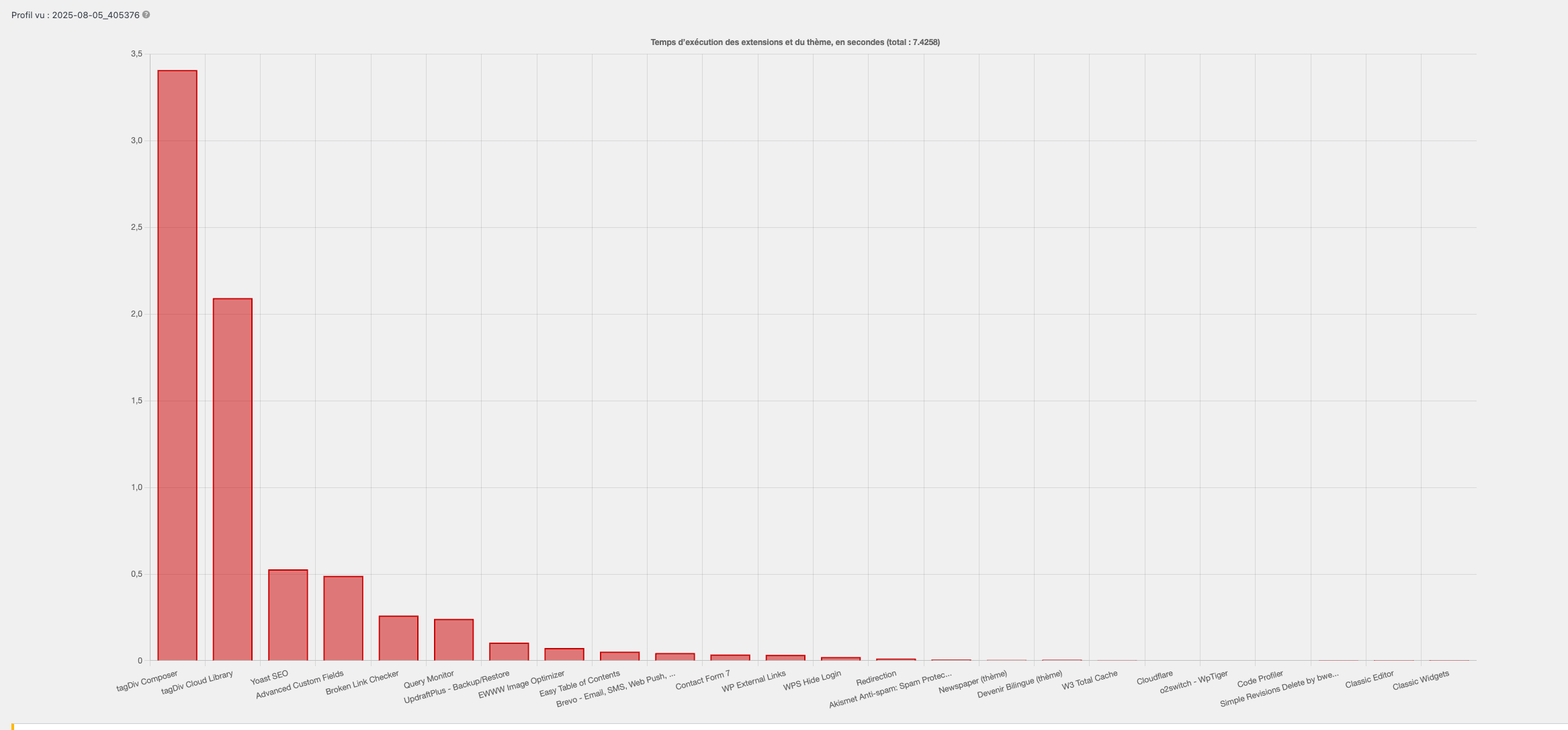
We tried everything you said:
– Rollback to php 7.4, 8.0 & 8.1
– Changing tagdiv version (last 3 versions and last major version)
I don’t know what to try more… I can give you access to the dashboard to run tests if necessary.
-
This reply was modified 1 year by
emmalabbe.
 Emanuele
we cannot add a custom css for the theme quotes. the theme is outputting this:
.tdi_141 .tdb-block-inner blockquote p {
font-family: Chivo !important;
font-size: 48px !important;
line-height: 1 !important;
font-weight: 900 !important;
text-transform: none !important;
color: #000000;
}
but if we add something to the wp customizer, with the !important nothing happen because the code above is outputted after so we are not able to change the theme css. any suggestion on how to update the quotes css?
for example this is not applied:
.tdb-block-inner blockquote p {
font-size: 22px !important;
font-weight: 600 !important;
line-height: 1rem ! Important;
}
thank you!
 gleloudas
 We did fix it with the help of chatgpt.. byt adding:
dd_action(‘template_redirect’, function () {
ob_start(function ($html) {
$count = 0;
return preg_replace_callback(
‘/<span class=”entry-thumb td-thumb-css(.*?)”(.*?)>/’,
function ($matches) use (&$count) {
if ($count === 0) {
$count++;
return ‘<span class=”entry-thumb td-thumb-css skip-lazy’ . $matches[1] . ‘”‘ . $matches[2] . ‘>’;
}
return $matches[0];
},
$html
);
})
the tagdiv should have an add class to image element and add high priority image for this field (and all elements with image – depending on design) on order to be future proof. Thank you.
 GulfAiMagazine
I have WP on a staging url locally. The only additional plugin I installed was the yoast duplicate post which I needed to clone the imported demo pages and configure them. I’m on the landing page with tagDiv editor but if I click the Manager button, the zone manager doesnt open. Clicking it also gives an error in the chrome console:
js_files_for_wrapper.min.js?ver=492e3cf54bd42df3b24a3de8e2307cafx:688 Uncaught TypeError: Cannot read properties of undefined (reading ‘router’)
at HTMLAnchorElement.<anonymous> (js_files_for_wrapper.min.js?ver=492e3cf54bd42df3b24a3de8e2307cafx:688:255)
at HTMLAnchorElement.dispatch (load-scripts.php?c=0&load%5Bchunk_0%5D=jquery-core,jquery-migrate,utils,wp-dom-ready,wp-hooks&ver=6.8.2:2:40035)
at v.handle (load-scripts.php?c=0&load%5Bchunk_0%5D=jquery-core,jquery-migrate,utils,wp-dom-ready,wp-hooks&ver=6.8.2:2:38006)
(anonymous) @ js_files_for_wrapper.min.js?ver=492e3cf54bd42df3b24a3de8e2307cafx:688
dispatch @ load-scripts.php?c=0&load%5Bchunk_0%5D=jquery-core,jquery-migrate,utils,wp-dom-ready,wp-hooks&ver=6.8.2:2
v.handle @ load-scripts.php?c=0&load%5Bchunk_0%5D=jquery-core,jquery-migrate,utils,wp-dom-ready,wp-hooks&ver=6.8.2:2
 vet
vet Examples:
See the author box please
https://www.vet-alex.com/vet/news/brooke-equine-training-2025/
 Julie
JulieHi,
I’m currently trying to achieve the following:
1) I want to be able to hide the featured image placeholder if no featured image is set for a post, for example in the Post Loop.
2) I want to exclude posts that have no featured image in the Big Grid Flex 2.
Does anybody know how to implement these settings?
 solehack
I am trying to write logic in the functions.php to check the slug of my categories and if is category A then it updates the template, category B then its a different template on the post. It seems to be changing this via the metadata but not actually reflecting.
Anyone have any idea why it would update in the meta but not reflect? This was the code I was using:
add_action('save_post', function($post_id) {

    if (defined('DOING_AUTOSAVE') && DOING_AUTOSAVE) return;

    if (wp_is_post_revision($post_id)) return;

    if (get_post_type($post_id) !== 'post') return;
$categories = get_the_category($post_id);
if (empty($categories)) return;
$category_slugs = wp_list_pluck($categories, 'slug');
$template_map = [
'slugA' => 'tdb_template_1010',
'slugB' => 'tdb_template_1009',
'slugC' => 'tdb_template_1010',
];
$selected_template = 'tdb_template_919'; // Default template
foreach ($template_map as $slug => $template) {
if (in_array($slug, $category_slugs)) {
$selected_template = $template;
break;
}
}
// Always update base template
update_post_meta($post_id, 'td_post_template', $selected_template);
// Pull existing theme settings (or create new)
$theme_settings = get_post_meta($post_id, 'td_post_theme_settings', true);
if (!is_array($theme_settings)) {
$theme_settings = [];
}
// Inject template assignment into theme settings
$theme_settings['td_post_template'] = $selected_template;
// Save updated array
update_post_meta($post_id, 'td_post_theme_settings', $theme_settings);
});
 slivertorp
 Hi Calin, thanks to your precious advice, I have managed to fix the infinite loading on my second website by disabling/re-enabling a couple of security plug-ins.
So I have pasted the same css code from your last comment, but for some reason, on that website, the css code doesn’t make the text and button visible on my “image info box” blocks as you can see on Firefox on the side bar: https://australie.bucket-list.fr/visiter-sydney-le-guide-complet-des-incontournables/ for the campervan image and the plane image for example.
Would you know what could be causing that?
Thanks a lot.
Calin Hi,
This cna be done using a cache or an optimise plugin. For example, the WP Rocket plugin can do this.
Thank you!
 yunie_
Please watch video here: https://www.dropbox.com/scl/fi/mf2y0z29961vbos1uqflg/tagdiv-video.mp4?rlkey=cc62cf8ajzaxmhhqlmsmbosnk&dl=0
Also can i make the sidebar disappear altogether on mobile?
I’ve tried this but it did not work:
@media (max-width:767px){

.single .td-main-sidebar{

display:none!important

}}
 gpeter
 Hi Calin,
I think I might have a similar problem. I noticed that several important WooCommerce plugins do not display on the product page when using the TagDiv Woo plugin on desktop – for example, WooCommerce Product Bundles, other bundle plugins, or the YITH Countdown plugin. Running these or similar plugins is important, but most of them do not support a shortcode workaround.
What can I do? What could be the issue? It’s clear that the tagdiv woo theme is not handling this correctly because everything works fine on Mobile Theme (mobile) and with other classic themes.
Thank you!
 regio-online
 Hi Calin,
Thanks for your tips regarding the recommanded thumbs settings. Your suggestion to regenerate would works if those thumbs where on the sae server in our uploads folder. That is however not the case.
Simply put: we have no thumbs. We only have one size (full or 1920) on Google Drive. Inside the _wp_attachment_metadata rows in our postmeta each thumbnailsize for our theme is described and shown if needed, but it does not fysicly exsist anywhere. It is just the one Google Drive image served in different sizes described in that table. There are about 13 sizes and each size is described twice in one row. There is one row for each image and there about 35.000 images. You can do the math for that is over 910,000 seperate rules in postmeta,
Example of _wp_attachment_metadata (first few lines of one row only):
a:7:{s:5:”width”;i:2560;s:6:”height”;i:1394;s:4:”file”;s:40:”Isolatie-Foto-gemeente-Altena-scaled.jpg”;s:8:”filesize”;i:317478;s:5:”sizes”;a:19:{s:6:”medium”;a:6:{s:4:”file”;s:79:”https://drive.google.com/thumbnail?id=1425AFrPRIGp9vQy9TsJIg8W9A1X2G1vo&sz=w300″;s:5:”width”;i:300;s:6:”height”;i:163;s:9:”mime-type”;s:10:”image/jpeg”;s:8:”filesize”;i:10721;s:3:”url”;s:79:”https://drive.google.com/thumbnail?id=1425AFrPRIGp9vQy9TsJIg8W9A1X2G1vo&sz=w300″;}s:5:”large”;a:6:{s:4:”file”;s:80:”https://drive.google.com/thumbnail?id=1425AFrPRIGp9vQy9TsJIg8W9A1X2G1vo&sz=w1024″;s:5:”width”;i:1024;s:6:”height”;i:558;s:9:”mime-type”;s:10:”image/jpeg”;s:8:”filesize”;i:71200;s:3:”url”;s:80:”https://drive.google.com/thumbnail?id=1425AFrPRIGp9vQy9TsJIg8W9A1X2G1vo&sz=w1024″;}s:9:”thumbnail”;a:6:{s:4:”file”;s:79:”https://drive.google.com/thumbnail?id=1425AFrPRIGp9vQy9TsJIg8W9A1X2G1vo&sz=w150″;s:5:”width”;i:150;s:6:”height”;i:82;s:9:”mime-type”;s:10:”image/jpeg”;s:8:”filesize”;i:3789;s:3:”url”;s:79:”https://drive.google.com/thumbnail?id=1425AFrPRIGp9vQy9TsJIg8W9A1X2G1vo&sz=w150″;}s:12:”medium_large”;……… etc.
So, you see that the image sizes need to be cleared inside the database and can not be regenerated.
 moha
moha https://best-fonts.net/maybella-wedding-font/
This is an example link.
I want to make rounded edges and a very simple, subtle shadow under my gallery to make it more attractive.
Thank you.
 Greg
Greg Hi Julie, hi Calin,
Thank you both so much for your quick and helpful replies – that was exactly what I needed!
@Julie – your tip about checking the Theme Panel → Background & Social Links was spot on. Really appreciate you sharing your workaround!
@Calin – the screenshots were incredibly helpful and guided me straight to the solution. I’ve now completely removed the background image and social icons from the mobile menu – all done cleanly via the Theme Panel, no extra CSS needed. Perfect!
Big thanks to the entire tagDiv team for your great support and such a flexible, powerful theme. Keep up the awesome work!
Best regards,
Greg
Calin Hi,
If you want to make those changes for the tagdiv gallery https://forum.tagdiv.com/gallery-2/ it can be done with a small CSS. If you have an example with the layout, I can provide the CSS code for you.
Thank you!
GregSubject: Mobile menu shows old background image + social icons, cannot find them in Composer
Hi tagDiv team,
I’m using your theme with the “Shop Audio” template and working with tagDiv Composer.
I’m having an issue with the mobile (hamburger) menu:
When I open the menu, it shows an old background image (with speakers) I didn’t add – and I can’t find it in the Composer to remove or change it.
Also, social media icons (Facebook, Instagram, etc.) appear at the top, but I can’t find them in any row/column in the Composer either.
I double-checked:
The correct header & mobile templates are assigned.
The elements are not visible in the structure panel.
I had to hide them using custom CSS, which works but isn’t ideal.
❓Question:
Where exactly can I edit or remove the background image and the social icons in the mobile menu, when they are not visible inside the Composer?
Thanks for your support and for providing such a great theme!
Best regards,
Greg


regio-online In the meantime I also figured out that it is the plugin WP Media Folder that creates the largest amount of db rows in postmeta, wich have everything to do with the set image sizes in the themepanel of Newspaper and WP Core.
In have a question regarding those imagesize settings.
The WPMF Google Drive addon or the theme creates a db row _wp_attachment_metadata, wich holds references to the image file on Google Drive, but does so many different times in many different sizes (se below. I only mention the image size not the whole code. Every size is mentioned twice):
————
https://drive.google.com/thumbnail?id=19EI*************ZWn&sz=w300
https://drive.google.com/thumbnail?id=19EI*************ZWn&sz=w1024
https://drive.google.com/thumbnail?id=19EI*************ZWn&sz=w150
https://drive.google.com/thumbnail?id=19EI*************ZWn&sz=w768
https://drive.google.com/thumbnail?id=19EI*************ZWn&sz=w1536
https://drive.google.com/thumbnail?id=19EI*************ZWn&sz=w2048
https://drive.google.com/thumbnail?id=19EI*************ZWn&sz=w150
https://drive.google.com/thumbnail?id=19EI*************ZWn&sz=w218
https://drive.google.com/thumbnail?id=19EI*************ZWn&sz=w300
https://drive.google.com/thumbnail?id=19EI*************ZWn&sz=w324
https://drive.google.com/thumbnail?id=19EI*************ZWn&sz=w485
https://drive.google.com/thumbnail?id=19EI*************ZWn&sz=w696
https://drive.google.com/thumbnail?id=19EI*************ZWn&sz=w1068
https://drive.google.com/thumbnail?id=19EI*************ZWn&sz=w1920
https://drive.google.com/thumbnail?id=19EI*************ZWn&sz=w1600
https://drive.google.com/thumbnail?id=19EI*************ZWn&sz=w2200
https://drive.google.com/thumbnail?id=19EI*************ZWn&sz=w2800
https://drive.google.com/thumbnail?id=19EI*************ZWn&sz=w3400
https://drive.google.com/thumbnail?id=19EI*************ZWn&sz=w4000
——————-
This looks generated by WPMF, but it are the themepanel block settings => Thumbs on Modules/Blocks and I quess the WordPress thumbnail, meium, large and full settings.
At the moment I have all the thumb sizes turned on (except the retina), but I use 3 blocks in my pages, Beginning with one Big Grid Flex Block 6, several Big Grid Flex Block 1 and several Flex Block 1. With Flex Block 1 I use different views and image sizes to show.
However if I fill out ‘full’ or ‘1920×0’ the images fit in every Block in any size. It is good to know that before I upload an image through the WPMF Google Drive folder in WP Media Library, I first resize every image to max 1400w x 600h in jpg format and compressed to on everage 120Kb an image. At the moment there are over 35.000 images on Google Drive (about 3.5GB total in size).
Question (at last): if I can set every block in my pages to the full or 1920 setting, could I then disable all other thumbnail size settings? There is only one size image on Google Drive, but is delivered (as seens in the db row) in different size.
That is accumulating a lot of unnessary data it seems making my postmeta table very large and prone to disrupption of service.
If it is possible as I asked, I will have to contact WPMF for a way to get rid of the bloat of information no longer needed.
Hope you can make some sense om my message, because even writing it down was complex for myself.
 jjgoi
jjgoiHi,
I recently bought the Newspaper template and used the Forest Beat theme and found the experience to be so extremely difficult-to-use and cumbersome.
It doesn’t come with a page template – which is fine – but clearly there’s no way for me to even create a tagdiv template at all that my non-post pages can use. A hacky way I did was to import any random template into “Page”, and copy-pasted the Base64-encoded source.
I went through your knowledgebase and there doesn’t seem to be any way to figure out how this can be used?
1. How do you even add your own template such that it can be used by pages? I only just need a simple page layout but seems to be an impossible task.
2. If I want to customise the “Single Post Author” component on a page, I noted the default Forest Beat overrides font-size as 16px, somehow I cannot replicate that via the tagDiv composer?
3. I wanted to change the theme colours of Forest Beat, from the theme colours tab, I can only change the primary accent and a bunch of other colours, but I cannot find these:
--light-green-forest-beat – where can I modify this?
The entire tbd-global-colors block (via view-source) is:
--mm-custom-color-4:#C2A25D;--mm-custom-color-5:#F7F9F9;--mm-custom-color-1:#053426;--mm-custom-color-2:#B79259;--mm-custom-color-3:#79847E;--accent-color:#fff;--accent-forest-beat:#5c6b28;--dark-green-forest-beat:#1D2110;--white-forest-beat:#FFFFFF;--transparent-white-forest-beat:rgba(255,255,255,0.25);--transparent-white-2-forest-beat:rgba(255,255,255,0.6);--transparent-white-3-forest-beat:rgba(255,255,255,0.7);--transparent-dark-green-forest-beat:rgba(29,33,16,0.8);--transparent-dark-green-2-forest-beat:rgba(29,33,16,0.25);--light-green-forest-beat:#F3F7EE;--transparent-dark-green-3-forest-beat:rgba(29,33,16,0.65)
Is the experience intended to be like that?
 Littletwos
is there any example theme demos that show a method or way to “insert” recommended products within the article – outside of the actual ads; like for example talking about dog leads and then have a box that recommends one with link to it on amazon etc.



