
- NewspaperWP Rocket and Newspaper Theme: Optimization Guide
- TutorialsFrom WPBakery to tagDiv Composer
- TutorialsOffset Feature
- TutorialsWhat is Ajax preloading?
 Vlad S
 Hello !
This is a bit odd. Since you already installed the theme on one host you should be able to install it on a local host too. Do you use XAMPP localhost ? Try placing the Newspaper theme FOLDER not zip dirrectly into the wp-content folder of your localhost.
Thank you !
 oil4vap
 pls visit elvapeador.es
the images of sidebar With UPEV, for example.
if you click on it, will load again elvapeador.es
and we need load http://www.upev.org
in ads panel we have set
<div class=”td-all-devices”> </div>
but we dont know how to add link.
thx
 WenTraveling
I have got the feedback of my former post (#post-314162), but I still have some question.
1. I have activate AMP plugin already, but I can’t find the AMP icon on my side bar for AMP settings. I saw it on my site before, but not it is missing. How should I get it back?
2. If I follow the steps to change the mobile theme from theme panel, “USE THE MOBILE THEME FOR : Mobile +AMP”, the set of my website seen on computer will go wrong.
Thank you so much again!
my website: https://wentraveling.com/
 himanshu00123
Hi,
I have read the Tutorial of AMP implementation on https://forum.tagdiv.com/tagdiv-amp-plugin-tutorial and installed Mobile theme plugin and amp plugin from theme Plugin section and follow the steps as told in the tutorial but there is no AMP menu item in my left sidebar of admin panel below setting menu item

The single Post/Page is also not showing any AMP option like the image given below
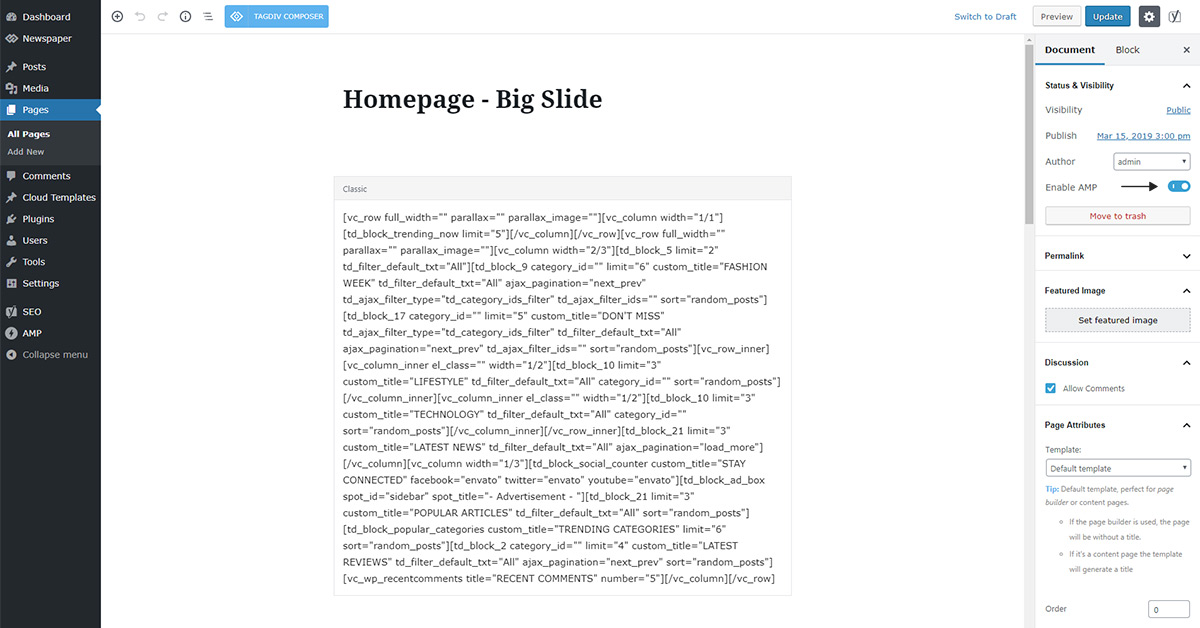
Please help
Website: hub4trendies.com
Vlad S Hello !
In order to install AMP you will need Mobile theme. Find out more about it here: https://forum.tagdiv.com/tagdiv-amp-plugin-tutorial/
Please note that this is a Custom Work request. We can offer custom work for a fee. Send us your inquiri here: https://tagdiv.com/premium-customization-services/ and you will receive a quotation.
Thank you !
 juunza
Hi, I just bought the Newspaper theme and I think it’s a brilliant product. Just a few questions for now.
1. How can I create a post with Next/Back Buttons underneath the content?
Example; http://www.articlesvally.com/worldwide/girl-hair/ and http://www.articlesvally.com/worldwide/girl-hair/3 ?
2. Can I get content of a particular page to appear under a specific post?
Example; I have Homepage 1, Homepage 2 and Homepage 3. Then I have published Post 1, Post 2 and Post 3. Is it posible to show content of Homepage2 under Post 1?
3. How can I change the name of the author on posts?
Best Regards,
Oliver.
 Nirmalsingh
Hi tagdiv team
Can you please activate AMP in my website?
Website url – https://www.nayaseekhon.com
I want to keep some points for this.
1. Create only post and pages AMP version.
2. If possible, make it like this website (hindime.net) AMP pages.
thanks.
 Calin
Calin Hi,
You can use the licence only for one final/online product, for example if you want to change the domain/hosting you’ll need to remove the key from the first domain/hosting and after that you can use the licence for the theme on the new domain/hosting ; for more details please check our documentation -> https://forum.tagdiv.com/newspaper-6-how-to-activate-the-theme/
-> https://themeforest.net/licenses/standard
-> https://themeforest.net/licenses/terms/regular
How to remove the licence key? simply reset the license key in the theme system status panel
– https://www.screencast.com/t/rdjQDTbokwT
Thank you!
Calin Hello,
1. The mobile version is look like that because you have the mobile theme plugin that provide you a better speed then responsive version of theme, but in order to achieve that speed you’ll need to create a new content for pages because in the most of cases those were made with builders ( tagDiv Composer, WPBakery ) and you need to use only the mobile editor ( you need to set the content for pages in mobile editor and this content will be display on mobile theme)
-> https://www.screencast.com/t/ebUIzt4se
Also since Newspaper v9.7.4 you can show the responsive version on mobile theme -> http://prntscr.com/oh6r2s you can check more details about mobile theme in our documentation -> https://forum.tagdiv.com/the-mobile-theme/
2. Please make sure that after you activate the mobile theme you select one of those options from them panel> mobile theme for AMP -> http://prntscr.com/pb4z2p save the settings and refresh the page, after that the amp settings will appear -> http://prntscr.com/pb4zpx
Thank you!
 Astx
Astx hello,
All the elements that can be translated from the theme’s panel’s “Translations”, I can translate only to one language, but I need to have them both in Armenian and Russian. For example sections “Trending, previous, next, close, etc” can be translated only to one language…
Calin Hello,
So you would like to create a single template for a CPT? That is possible in a child theme. You can copy a template from the composer (both single and loop files) in the child theme main folder, for example template 2 – https://prnt.sc/p83m25
Then rename them in the child theme as the events CPT name is https://prnt.sc/p83s0a -> https://prnt.sc/p83nc1 (I used a CPT added by an Events plugin)
Now it’s required to make a small modification in the loop file you copied in then child theme -> https://prnt.sc/p83olv
The result is that the event CPT will use this post template, I used template 2 in my example – https://prnt.sc/p83p48
You can place the archive in the main child theme folder -> https://prnt.sc/p84658
– https://prnt.sc/p846fs -> https://prnt.sc/p846ji
Thank you!
 howtomoney
It seems to be an application error!!
Below is my setup.
↓↓↓↓↓↓
*Use Mobile Theme For:
Mobile <=== Selected
Mobile + AMP
AMP
 cantoute
Hi,
just found out what was taking my server threw hell… it’s the search form that send a post on every letter tipped !!!
please, please add lodash debounce on this
it’s nothing to do
check this
https://css-tricks.com/debouncing-throttling-explained-examples/
please !!!
added to the fact that call is done via POST makes it hell to cache it!
and it really deserves caching !!
so changing it to a GET so cdn can cache it would be marvelous!
thanks
 leepf
leepf When I edit pages with td-composer, it has this An error:
Warning: file_get_contents(): SSL operation failed with code 1. OpenSSL Error messages: error:1416F086:SSL routines:tls_process_server_certificate:certificate verify failed in /opt/lampp/htdocs/wp-content/plugins/td-composer/legacy/common/wp_booster/td_remote_http.php on line 221
Warning: file_get_contents(): Failed to enable crypto in /opt/lampp/htdocs/wp-content/plugins/td-composer/legacy/common/wp_booster/td_remote_http.php on line 221
Warning: file_get_contents(https://www.dsez.org.cn/wp-content/plugins/td-composer/assets/fonts/td-multipurpose/td-multipurpose.css): failed to open stream: operation failed in /opt/lampp/htdocs/wp-content/plugins/td-composer/legacy/common/wp_booster/td_remote_http.php on line 221
I have send an email to you!
WenTraveling(1) I have followed the tutor of The Mobile Theme on NEWSPAPER website, but my page still can’t show the theme on my mobile. I have checked my website on the AMP-checking website, it says the link doesn’t have AMP.
(2) Furthermore, I have installed the AMP plugin, but the AMP setting icon disappear on my sitebar of WordPress (I have seen it just minutes before). Where can I get it back?
My website address: https://wentraveling.com
 andxtagdiv
As per this: https://forum.tagdiv.com/the-child-theme-support-tutorial/
I understand the advantage of using templates for theme updates, but I am not quite sure about the disadvantages.
1) How can I create a template from a page that I have created? Not coming from a pre-designd template.
2) The advantage of custom CSS in a child theme is that I can adjust, for example colors or fonts for all uses on the website. So, when I edit colors/fonts in my saved custom page template, will that also be shown on all pages that use that template?
Thank you
 eingkoul
 Hello,
In fact I would like to use the numbered list style for the block of the most popular articles as seen on news sites in general and I don’t know how to apply it with the theme.
example:
1. Post 1
2. Post 5
3. Post 8
5. Post 2
Thanks
 samarpahwa
This is the second time I am putting this query here – my Edit with TD Composer is not working. It’s just buffer and give no response at all. I have deactivated all plugins except tag div composer?
post_id=131427&td_action=tdc&tdbTemplateType=page&prev_url=%2F%2Fwww.findhealthtips.com%2F
 mni
mni  LenFI
LenFIHi,
I have created a cloud template on my website to create ‘profiles’ for football players. On top of the page there is a general section with some basic information, including a player foto. The photos are uploaded on our server and each foto or player has a ‘unique id’ (for example: https://fminside.net/images/news/DF11/19024412.png)
Instead of uploading each photo to a profile separately, I would like to use a custom field to have it automatically post the correct image in the profiles by filling in the ID of the player in that field when creating a new post. The ID that I put into the custom field needs to be added to an URL, which matches our database with pictures.
Example screen of where I want to display the image:

I tried to use a raw html component using:
>img src=”https://fminside.net/images/news/DF11/get_post_meta($fm20_player_id).png” /< (brackets put in wrong to show you the code)
But that did not do the trick.
1. How can I make the field display inside the posts?
2. Is it even possible to use a custom field like this?
3. Is there any other code I need to alter to have this displayed?
Thanks in advance
 nevinaydogan
hello, I have to correct permalink settings on every new post. This is selected: https://www.izmirvehaber.com/example-yazi/
But it assigns a numeric value. I’m updating again after every post
 manasek
Hi, there might be a translation for the word “Tag” missing in the tag archive page. I have Czech translation loaded and a field for the “Tag” is filled properly with a word “štítek”. You can see example here: http://telezjetele.cz/oblast/sumava/
leepf When I active the plugin_tagDiv Mobile Theme, the following error occurs on page:
Warning: getimagesize(): SSL operation failed with code 1. OpenSSL Error messages: error:1416F086:SSL routines:tls_process_server_certificate:certificate verify failed in /opt/lampp/htdocs/wp-content/plugins/td-cloud-library/shortcodes/header/tdb_header_logo.php on line 611
Warning: getimagesize(): Failed to enable crypto in /opt/lampp/htdocs/wp-content/plugins/td-cloud-library/shortcodes/header/tdb_header_logo.php on line 611
Warning: getimagesize(https://www.dsez.org.cn/wp-content/uploads/2019/09/20190030a9bae8c5-6408-c14f-f90c-ce57c1779713.png): failed to open stream: operation failed in /opt/lampp/htdocs/wp-content/plugins/td-cloud-library/shortcodes/header/tdb_header_logo.php on line 611
Calin Hello,
Unfortunately we do not use the SpeedKit, therefore we can not say if this will work or not with our theme, sorry! Also we can not say which URLs you’ll need to remove to still have the mobile theme and amp activate with the SpeedKi.t
Thank you for your understanding!
Calin Hello,
Please provide me some examples about this problem, some screenshots/video with the settings that you made on staging site and how will show on product website.
Thank you for your understanding!

