
No search results were found in Documentation!
 jadmac
 Hello, thanks for the update! Unfortunately, that is not exactly what I want.
Besides I can just make a new page as my site is quite big now and already well established.
I need some way of inserting an author box site-wide to already existing pages.
 akshem
 Hi,
I have tried the Custom ad code and shortcode method with Google Adsense ads.
Still, the ad is not showing up below author box.
Please check the screenshots.
http://prntscr.com/llgtd3
http://prntscr.com/llgtlf
https://prnt.sc/llgts1
 twinpickle
 How strange! I have cleared cache and web browser and yet I still see it. Still, if I’m the only one it doesn’t matter. On another sidebar issue… the default bar I am trying to design to appear beside posts doesn’t show the author image or name. It just shows a blank photo and ‘Author name’. I am using the same TavDiv Author box as I put on my homepage side bar which works fine. What am I missing?
 Calin
Calin Hi,
If this is what you want to achieve https://www.screencast.com/t/IJgU1p7z , then you can do it yourself.
1. Make a page with tagDiv composer and insert the below code in text.
https://www.screencast.com/t/ttbgAwPPY9v
[vc_row][vc_column][td_block_author][/vc_column][/vc_row]
2. You need to go in theme file go in wp-content>theme>newspaper> and search for page.php open the page and set the code from here like in screenshot
https://www.screencast.com/t/8YyuuDXMUCM
Also you can add the code just in all template page ( those are the template pages ) or just in dose you want to have the author box.
In all example:
https://www.screencast.com/t/TBH7jFN17
https://www.screencast.com/t/4Q3xNwRdLyeO
https://www.screencast.com/t/BCDXIfDc0T
https://www.screencast.com/t/BCDXIfDc0T
https://www.screencast.com/t/r1b79g4G
Also if you want to do not loss this change in theme files you can make this in child theme
Hope this will help you.
Thanks.
 Simion C.
 Hi,
Just remembered, that will be the case indeed. Disabling the author box won’t remove the author link and surrounding code. That used to be the case before but many users received structured data errors (missing author).
It is required by Google to have this loaded, if you were to remove that there will be errors with structured data
– https://kb.yoast.com/kb/fixing-hcard-author-error/
– https://wpcolt.com/fix-hentry-errors-wordpress/
Since this link will appear only in the page source you could just leave it as it is. or disable the author archives in the Yoast SEO settings (the author link will redirect to the homepage)
– https://www.screencast.com/t/Q7L0tPLmP1
Thanks
 rent-a-guide
 Hi Simion, thanks fir the quick reply. I already disabled the authors box, but link to to authors page remains in source code. It’s only hided with “display:none”. I Just made ist visible to explain what I exactly mean. I’d like to completely remove it.
image linking vcard:https://ibb.co/bEHgVL
-
This reply was modified 7 years by
rent-a-guide.
-
This reply was modified 7 years by
Simion C. Hi,
You can disable the author box as well – https://www.screencast.com/t/8HHsaht6s
Then the only link to the author page would be the one from the top bar, as you are logged in (if top bar login is enabled)
– https://www.screencast.com/t/Hc2r7l4T
Thanks
 theplanettelex
Hi,
I want to edit the way posts are printed in PDF : changing the font size, etc. Do you know how to do that in Newspaper ?
Also : I use the coauthors option made possible by Bogdan. It works very well except when I use templates.
For exemple, coauthors do not appear in the tag pages (e.g. this article) That’s because I could not find a way to edit the proper files. Do you know which file I could edit to implement the coauthors in the templates (especially tags and search) ?
Thanks
akshemHi,
I have tried inserting the ad via Ad Inserter Pro plugin keeping the setting as After Post but the ad doesn’t show up.
Please help how can I display the ad after the author box.
Thanks.
Calin Hi,
I think you can edit the theme files in order to achieve your desire, but this will require some skills.
Also you can read this topic Add custom text at bottom of every page? , maybe you can edit the plugin for author box on pages.
Thank you for your understanding.
 writingwolf
tagDiv Composer won’t open anymore. It just hangs forever with this error message. Right before this happened, I was building a new site at http://itresumewriter.com/ and had just added an Author Box to the homepage. No idea what caused it, but now the tagDiv is non-functional.
Error:
Error at rows: 7(models) : 21(dom). The model does not match the content
jadmacHello, I want to add an author box to the bottom/below my pages. I don’t want to have to do this manually as I have hundreds of pages of content. I need some way to do it globally and restrict certain pages from having it e.g. the homepage.
Can anyone suggest a suitable plugin that may work? Or some other work around?
Simion C. Hi,
If those are posts, blocks and grids can display them. You can add a filter on top of a block and users can sort them. That filter is called the ajax filter, it can display these elements
– https://www.screencast.com/t/6lhswFj3
So you can display categories, authors, tags or a popularity filter. Users can filter the block according to these options.
If the posts have reviews they will be displayed like this
– https://www.screencast.com/t/Oc2Zno3V
If those are not posts, you could use an image element, and add a text element below it. Or a image info box with text over the image
– https://www.screencast.com/t/vFyzb4ew
But to sort them there is no such element currently.
Thanks
 Edward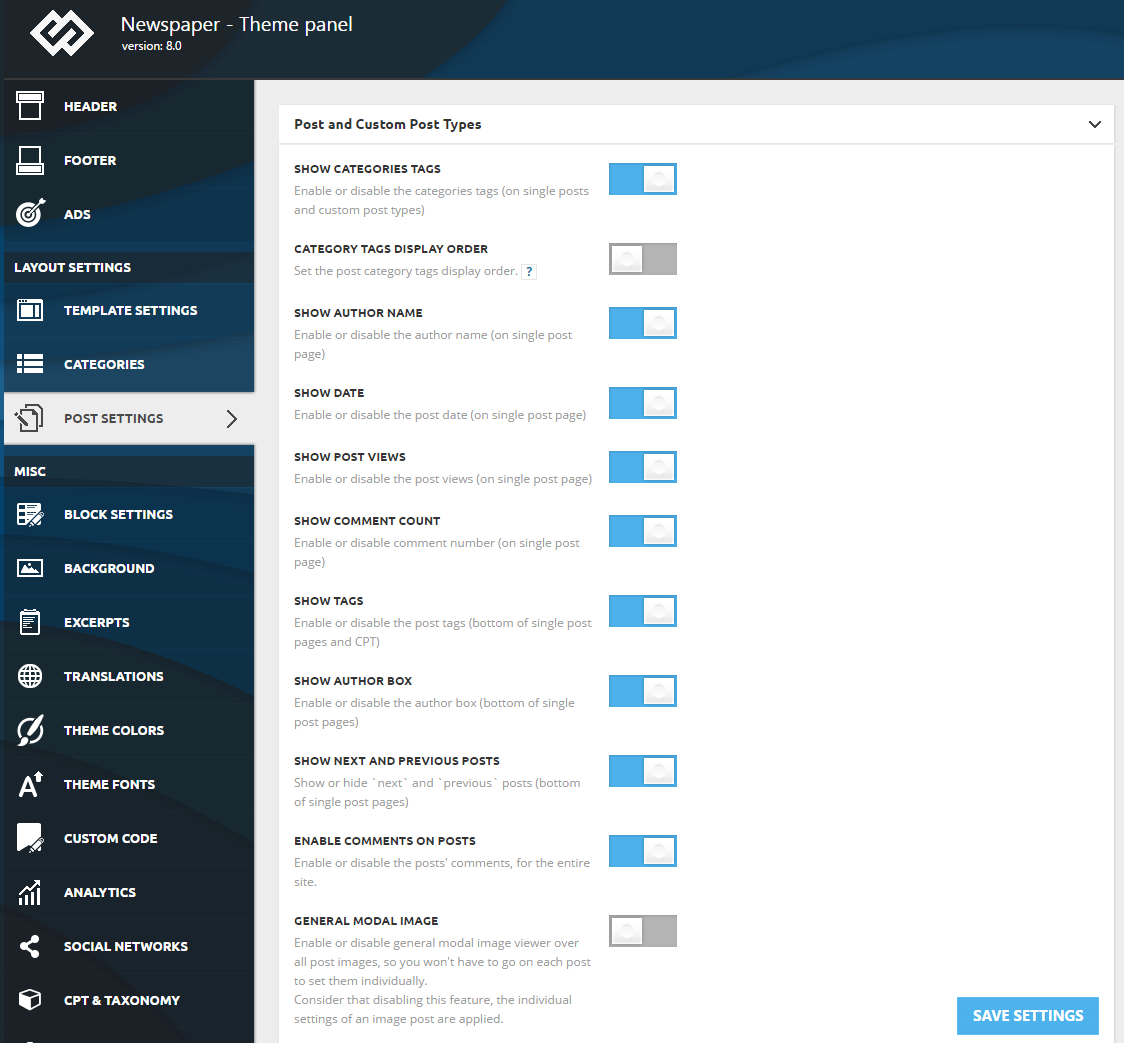
Disable
Show author box – This option allows you to enable or disable the author box displayed at the bottom of single post pages
 shariful_hamid
I want to remove author card/author box (end of each posts) from each posts. Please let me know how?
My URL:
http://amrai71.com
 axehorde
I have a problem with big grid slide.
I set the slide in my website http://www.labussolanews.com
1- i want to see the category before the title, like this one https://demo.tagdiv.com/newspaper/big-grid-slide/
remove the author name and keep the date.
2- Also in mobile layout it cause some problems. The longest title go outside the image box and there is too much space between title and the lower edge. (see attached below). https://ibb.co/jj2d7q
3- Is it possible to scroll only the first big image instead of the whole block?
4- Is it possible to make the side arrows always visible instead of showing them only when you go over it?
5- another problem is that the smaller images, in the mobile version of the site, shrink not proportionally, are crushed laterally and the image become distorted (I refer to the last 2 of the block, see the image)
OT question:
i set a background ads image with url and I have increased the space between the browser header and the site layout box (with the advanced css code, only in desktop).
6- I notice that in the mobile version, when pages or articles are loading, it show for 2/3 or 4 seconds the background ads (in this case i see the amazon logo at the top, see my homepage). Is there a way to prevent background from loading in the mobile version?
7- Last question. I create the background layout with photoshop. I set the document at 1920×1080. I also create a 1163 white box for see the size of the site and left 115px from the top. Are this dimensions correct? Because the background doesn’t fit the whole white space around the site. Now you see it right because I took the width to 2200 to cover everything, but i don’t know why with 1920 does not work. Maybe because the browser bar? Can you send me a .psd file with the correct layout for create custom background?
Thank you for your patience
Simion C. Hi,
The plugin must be removing the theme post setting box for some reason. I couldn’t say why it does that, maybe the plugin author might have an idea. Could be the same as in this topic
– https://wordpress.org/support/topic/custom-metaboxes-missing-after-upgrading-from-2-8-10-to-2-9-0/
Thanks
 arthale
Greetings. I would like to show the post of the latest author, on below author name in Author Box.
I want to show the box as this order:
Picture
Name
Post Name+URL
Could you give me the PHP code for it? Is it possible?
Thank you.
 F27Corsair
 Yes, that is almost it!
I utilized the ‘page’ tag in the post type box as you recommended, but it displays random posts. I have a certain few that I would like to display. Do you have a recommendation on how to do that? The only thing i could think of was to purposely change the author of the posts and place in an author filter as well, but I’m sure they may be an easier way to do it. Thanks.
Travis
-
This reply was modified 7 years by
F27Corsair.
 larevuefonciere
Hello,
I use the co-authors plus plugin on my website in order to display multiple authors: https://wordpress.org/plugins/co-authors-plus/
Thanks to the following post I was able to change the files in order to activate the changes: https://forum.tagdiv.com/topic/multiple-authors-co-authors-on-articles-author-links-and-author-boxes/
However, I have created a cloud template for one of the pages of my website and the plugin doesn’t work on that page.
What should I do in order for the plugin to work with the cloud template?
Kind regards,
 avramedia
Hi, Can we remove related articles and more from author box from a single/multiple category?
Calin Hi,
If you referee at “Sample Author name”, the name of that box appear only in template editor, after you’ll set the template on author will look like this: https://www.screencast.com/t/BeRKKMzuBtDe , admin is an author.
Thank you for your understanding.
Simion C. Hi,
That is an author box in the sidebar of the post, a widget. Edit the post and check which sidebar it’s using
– https://www.screencast.com/t/6AIbzvoDsUY5
Sidebars can be edited in Appearance->Widgets – https://www.screencast.com/t/6UzpARnF
They can be created from multiple places, you can have as many as needed
– https://forum.tagdiv.com/sidebars-tutorial/
Also be sure to take note of the primary category setting
– https://forum.tagdiv.com/primary-category/
With it you can control all the post sidebars in a category, at once.
Please let us know if you have more questions.
Thanks
 Smanchi
 Solved :
Code for anyone that wants to add Authors Latest Posts to Authors Box
$buffy .= '<div class="td-authors-url">';

		$last_article = $wpdb->get_row($wpdb->prepare("SELECT * FROM $wpdb->posts WHERE post_author = %d AND post_status = 'publish' AND post_type = 'post' ORDER BY post_date DESC LIMIT 1", $td_author->ID), ARRAY_A);

		$buffy .= '' . $last_article['post_title'] .'';

		$buffy .= '</div>';
Calin Hi,
You can do that using a plugin ( example Co-Authors Plus),
Please read this topic: https://forum.tagdiv.com/topic/multiple-authors-co-authors-on-articles-author-links-and-author-boxes/
Thank you.
