Lucian
 Hi,
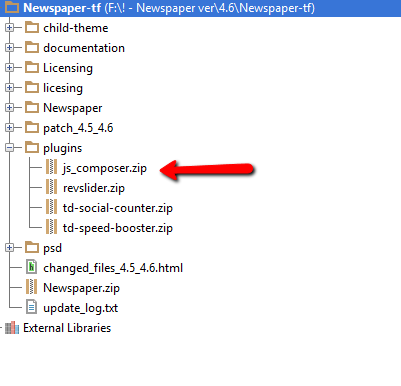
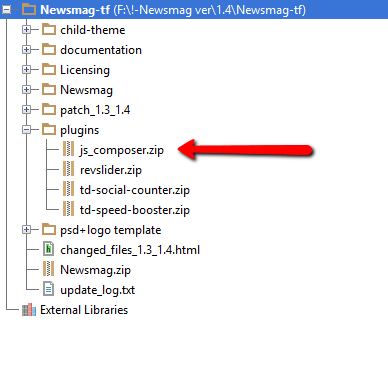
As Chris stated you need to update your VC plugin from the /plugins folder that was provided with the theme files and use this guide to install/update it: https://forum.tagdiv.com/how-to-update-visual-composer-plugin-wpbakery/
Please also note the following:
-
The theme includes a license for this plugin so you don’t have to buy it.
You don’t have to activate the plugin license, it’s already activated.
You can’t update the plugin directly from the it’s producer.
You don’t have to worry about the plugin update warnings.
We provide updates on a regular basis, after we test the plugin for theme compatibility we include it in the latest theme update, inside the ../plugins folder
Also please note that we will release an update with the new version of VC as soon as they will fix issues that apparently they have with the current version: http://screencast.com/t/MhULCZhfr
You can see their forum for more info: http://codecanyon.net/item/visual-composer-page-builder-for-wordpress/242431/comments?page=332
Thanks
Lucian Hi,
@Teejoow Please let me know if you refer to theme’s activation or VC plugin activation provide more details about this. If you refer to theme’s activation key then you can use your purchase code for each project without receiving an error for the VC plugin though you need to update following this guide: https://forum.tagdiv.com/how-to-update-visual-composer-plugin-wpbakery/ as we include the VC plugin within each theme update if there is an available update for it so you don’t need to buy it or you don’t need any license key: https://forum.tagdiv.com/topic/how-to-update-visual-composer-2/
Thanks
Lucian Hi,
I believe you refer to the Visual Composer issues which appears with older versions of VC when updating WordPress to 4.1
I have noticed while checking your site that you use the latest theme version (1.4) and the 4.3.4 version of VC which can cause this.
This issue appears because of the Visual Composer plugin when updating to WordPress 4.1. We have included the fixed version of the plugin(4.3.5) within the latest theme version so please make sure you update the Visual Composer plugin from the /plugins folder using this guide: https://forum.tagdiv.com/how-to-update-visual-composer-plugin-wpbakery/
Please let me know how it goes!
Thanks
 Emil G
The Visual Composer plugin that comes with the theme is licensed to the theme, the license specifies that only we can provide the updates and you don’t have to buy it or register it. We provide updates on a regular basis, after we test the plugin for theme compatibility the plugin is included in the latest theme update, inside the Plugins folder:
https://forum.tagdiv.com/wp-content/uploads/2015/01/visualc_newspaper.png
Here is the guide on how to update the plugin – https://forum.tagdiv.com/update-the-visual-composer-plugin-wpbakery/
Conclusion – We’re testing the plugin latest version, if everything is ok we will include it in the next update and only then you can update the plugin by downloading the theme latest version and following the procedure presented in the plugin update guide.
Emil G.
Emil GThe Visual Composer plugin that comes with the theme is licensed to the theme, the license specifies that only we can provide the updates and you don’t have to buy it or register it. We provide updates on a regular basis, after we test the plugin for theme compatibility the plugin is included in the latest theme update, inside the Plugins folder:
https://forum.tagdiv.com/wp-content/uploads/2015/01/visualc_newsmag.png
Here is the guide on how to update the plugin – https://forum.tagdiv.com/how-to-update-visual-composer-plugin-wpbakery/
Conclusion – We’re testing the plugin latest version, if everything is ok we will include it in the next update and only then you can update the plugin by downloading the theme latest version and following the procedure presented in the plugin update guide.
Emil G.
 jk
jk yep, new update of WPBakery Visual Composer is available…19.1 2015
 AriansyahIT
 I’ve bought wpbakery latest visual composer so I can process my web page. But I still can not process the page is blocked, there is a message that appears as “license expired”. I’ve uploaded many times over 10 hours until now there is still no solution. send the reply please to ariansyah2211@gmail.com
 simchris
 Yup:
from the theme docs:
How to Update Visual Composer plugin (WPBakery)
•The theme includes a license for this plugin so you don’t have to buy it.
•You don’t have to activate the plugin license, it’s already activated.
•You can’t update the plugin directly from the it’s producer.
•You don’t have to worry about the plugin update warnings.
simchris from the theme docs:
How to Update Visual Composer plugin (WPBakery)
•The theme includes a license for this plugin so you don’t have to buy it.
•You don’t have to activate the plugin license, it’s already activated.
•You can’t update the plugin directly from the it’s producer.
•You don’t have to worry about the plugin update warnings.
simchris from the theme docs:
How to Update Visual Composer plugin (WPBakery)
•The theme includes a license for this plugin so you don’t have to buy it.
•You don’t have to activate the plugin license, it’s already activated.
•You can’t update the plugin directly from the it’s producer.
•You don’t have to worry about the plugin update warnings.
simchris You don’t need a visual composer license key — again!
Please see the theme docs, right side of page.
https://forum.tagdiv.com/update-the-visual-composer-plugin-wpbakery/
You have a “bundled” version of the plugin, not a paid individual license version.
You can ignore “nag screen” in WordPress panel saying there is an update. You cannot automatically update the bundled version from WordPress; only with a new THEME update.
———-
docs
———-
How to Update Visual Composer plugin (WPBakery)
•The theme includes a license for this plugin so you don’t have to buy it.
•You don’t have to activate the plugin license, it’s already activated.
•You can’t update the plugin directly from the it’s producer.
•You don’t have to worry about the plugin update warnings.
simchris You can’t manually update the plugin; it’s a free “bundled” version, which is tested and contains compatible custom modules for the theme.
The version included with the theme is updated when major theme updates are released.
You cannot update the commercial paid version to work with the theme, as they may not have all the same functions and because the version included with theme is optimized for the theme.
Not rally a PITA as you have no need to update every dot revision of the plugin to add features not included with the theme or tested to even work properly.
Just because an update is available doesn’t mean you need to have it!
See the theme docs for more info
https://forum.tagdiv.com/how-to-update-visual-composer-plugin-wpbakery/
Hope that helps !
 newsthrottle
Hi, we tried to update the Visual Composer released via FTP and plugin upload. It will install fine, but when you try to get back onto the site or backend, you get a blank white screen no errors. We have to then delete or rename the plugin folder via FTP to get the site back up. Any input would be greatly appreciated, the CHANGE NOTES on Visual Composer are pretty lengthy and would be good to upgrade to this version.
 saggel
There is a new version of WPBakery Visual Composer (V4.4) available. when you upload it?
Lucian Hi,
The Visual Composer plugin is included in the theme’s files within the /plugins folder so you don’t have to buy it, as instructed in the guide provided by Alin above: https://forum.tagdiv.com/how-to-update-visual-composer-plugin-wpbakery/ ..use the FTP method, deleted the plugin folder then upload the plugin from the /plugins folder that was provided along with the theme files which you’ve downloaded from themeforest. This was tested many times so you should not have any issues with it.
Regarding youtube playlist we suggest you disable all plugin empty cache/purge files (if you are using CDN host services) as I have found various js error in your browsers’s console which can cause this so I suspect that a plugin is conflicting with theme js: http://screencast.com/t/x9ksjStPR
Make sure you try all this and let me know if you still have issues afterwards.
Thanks
Lucian Hi,
Please remove the VC plugin and use this guide to update it: https://forum.tagdiv.com/update-the-visual-composer-plugin-wpbakery/ ..and make sure you add it from the /plugins folder within the theme files that you’ve downloaded from themeforest.
Please let me know how this goes!
Thanks
Lucian Hi,
@Piso6 As Chris stated you also need to update the theme to the latest version (1.4) and the Visual Composer plugins also so please make sure you download the latest theme version from themeforest: http://themeforest.net/downloads then update the theme using the FTP method from this guide: https://forum.tagdiv.com/how-to-update-theme/ and the Visual Composer following this guide: https://forum.tagdiv.com/how-to-update-visual-composer-plugin-wpbakery/
If you still have issue after doing this please make sure you also empty cache and check this without any plugins active so disable all plugins, leave just the VC plugin active then empty cache/purge files if you sue CDN then check again.
Please let me know how this goes and also provide your site’s URL.
Thanks
 Alin [tagDiv]
 Hi,
Please make sure that Visual Composer plugin is active and if it is check on page edit if is set to Classic Mode: http://screencast.com/t/wRvrYK84bP
If you still have issues you can install the Visual Composer plugin for /plugins folder as instructed here: https://forum.tagdiv.com/how-to-update-visual-composer-plugin-wpbakery/
Let me know if you still have issues with this and provide site url.
Thanks!
Lucian Hi,
The issue you have is not due to your ads. This usually happens when using the tagdiv speed booster plugin which moves the theme style to the footer which causes this delays on loading the style and for a moment your site appears unstyled.
First please try this without any plugins active, leave just VC and speed booster and empty cache.
I’ve noticed you use the 4.6 theme version. Please download latest theme version from themeforest, update it and also update you VC plugin and also the speed booster plugin from the /plugins folder then test for this again and let me know if this still happens.
Use this guides and do the same for the speed booster also:
https://forum.tagdiv.com/update-the-visual-composer-plugin-wpbakery/
https://forum.tagdiv.com/how-to-update-the-theme/
Thanks
-
This reply was modified 11 years by Lucian.
Lucian Hi,
Please make sure that you download the latest theme version from themeforest: http://themeforest.net/downloads then use this guide and install/update the theme uploading the files via FTP: https://forum.tagdiv.com/how-to-update-the-theme/ then use this guide to remove the VC plugin and install the one from the plugins folder: https://forum.tagdiv.com/update-the-visual-composer-plugin-wpbakery/
Please let me know if yous still can’t managed this.
Thanks
Lucian Hi,
You need to update it like this: https://forum.tagdiv.com/how-to-update-visual-composer-plugin-wpbakery/
Thanks
 monsterdevelopment
 Hello, Thanks for the suggestions! 🙂
@kovachx: When we set to just 4 and no delay, it loads (we had already tried this prior to posting here), but no “slider” effect works, so images do not slide. Just 4 still images. We have allowed for all categories, which is what we want. There are no posts without images on any published posts.
@lucian: We have verified all posts have images. See: http://fishfarminginternational.com
You can see the slider loads blank, then works after the two “blank” frames and all 16 posts included, have images.
Here is what we have tried so far with no luck:
1. Changing to less number of post. Once we get to 4, the 2 blank frames don’t load.
2. Picking a single category which all posts have images. Still shows blank frames.
3. Anything above 4 posts selected and we get the 2 blank frames, with no posts before the posts with images load.
4. We use this plugin to be certain there is a featured image for each post: https://wordpress.org/plugins/post-list-featured-image/
5. We are using the “Big Slide” from the WPBakery Visual Composer.
6. We tried deactivating all plugins, this did not fix it.
Any other ideas?
Thank you.
-
This reply was modified 11 years by
monsterdevelopment.
monsterdevelopmentHello,
We have just upgraded to the very latest version of the Newspaper Theme 4.6.1, WordPress 4.1 and the latest WP Bakery Visual Composer 4.3.5.
When we load our website’s main page, that has the “Big Slider” the slider loads blank. There are “two” frames that are blank, then the slider runs with images present.
My settings are 16 posts to make 4 separate slides of content, with 6 second delay to start slides. When the page is first loaded, there are “two blank slides” then the rest of the slides (4) load with images.
Does anyone else have or had this trouble? We have disabled all plugins and it still happens.
Thank you.
Lucian Hi,
You don’t need to update/activate it as the updated and latest version it is added within theme’s files so you just need to download the latest theme version(4.6.1) from themeforest: http://themeforest.net/downloads ..then update your theme using this guide and the FTP method: https://forum.tagdiv.com/how-to-update-the-theme/
After that remove the VC plugin and use this guide to install the VC plugin included within the /plugins folder that was included within the theme files you’ve downloaded from themeforest: https://forum.tagdiv.com/update-the-visual-composer-plugin-wpbakery/
Thanks
 cartu73
The system is asking to update my WPBakery Visual Composer, but appear rhis message: “Please activate your license in Product License tab”
This plugin was included in Newspaper Theme, so what do I have to do?