kblundy
I have a very large site working on V9.2.2
It uses WpBakery extensively across thousands of pages. I tried to install V10 on a testbed and I cannot get any pages to work with Wpbakery enabled and tagDiv disabled.
Is there a migration tool from 9.x to 10.x that doesn’t involve rebuilding thousands of pages?
Also, what is the last version of Newspaper that I can use with my existing site without having to make drastic changes? Where do I download it from, please?
I realise you see this as progress – but leaving paying customers with no upgrade options means it probably easier to move to a completely different template that still supports WPbakery / Visual Composer.
Please give me some options.
 Vlad S
 Hello !
This seems to be indeed an issue. At the moment we recommend you to disable the WP Bakery and work only with tagDiv Composer.
We are sorry for the inconvenience !
Thank you for your understanding !
 awtownn
 To clarify my question. Images seem to insert into TD Composer, but not backgrounds.
When I click Row button in a row > CSS > Background Image the Add Media box appears. I select an image and then receive the error message. I’ve tried various images and sizes. These same images can be inserted or added as an inline single image or image in classic mode or via WPBakery.
How to solve this?
awtownnI’m in TD Composer trying to set a background image in a row. The error “Invalid data Current state has involved an issue.” appears. I’ve tried various images and various sizes.
Then, went to another page and used WPBakery. Images insert fine. And, inserting images in Classic mode works fine.
What’s wrong with TD Composer?
 Calin
Calin Hi,
1. We do not recommend to to use WPBakery (visual composer) on post, only on pages -> https://forum.tagdiv.com/how-to-use-visual-composer/ also do what was the previews version that you use until the update? do you still have a backup ?
2. WPBakery is a bundled plugin and in Newspaper 10.3.1 (last version) the WPBakery version is 6.1 -> https://i.imgur.com/gZzLMk3.png as I can see you are using an old WP Bakery v5.0.1
4. As long the theme updates were made correctly then there should be no problems for pages.
5. Unfortunately our theme do not have this system, the only way to set the code only on a specific page is to set the id of page/post in your code.
If there is something that you do not understand or you have other questions, please let me know!
Thank you!
 Adamhen86
Hi,
I recently disabled WP Bakery to make the switch to TagDiv Composer. I built a page entirely on TagDiv Composer without issue, including using some elements from the cloud templates.
Everything looks fine and seems to function, but I’m now getting the error message about the content not being created by TagDiv.
In looking at the the text on the WordPress editor, I’m seeing lines that look like Visual Composer. Please see below. This is a direct element from the TagDiv Cloud Library that I haven’t adjusted in any way.
[tdc_zone type=”tdc_content”][vc_row][vc_column][/vc_column][/vc_row][vc_row full_width=”stretch_row_1600 td-stretch-content”
Can you please let me know why I’m all of sudden getting this error message?
Thanks.
 natagrit
 1.
I have deactivated TagDiv Cloud library and still the content int he posts are not editable using WP BAkery composer. My client is really used to it and at least for now we would like to be able to have some continuity and have it as an option.
I can see the content of the post in the Classic mode, but the moment I click on Backend editor the content disappears and it is not available for editing.
https://imgur.com/a/MjeWfRC
2.
WP Bakery is Version 5.0.1
Does that mean that the latest theme version does not recognize it? (I was under impression that WP BAkery is bundled and should be upgraded with the theme)
4.
This block was created with WP BAkery – a bit strange that it cannot be interpreted by the theme. (On the front-end it is displayed correctly though)
5.
I think your answer explains how to set global custom css.
My question was rather ‘how to do you set css specific to this page only’
In VC it was easy, you click on the css icon on the specific page and added. How it is done with TagDiv Composer?
Thank you.
Calin Hi,
1. If you want to use WP Bakery you can use it as long you do not activate the tagDiv Cloud Library, you can use only one of theme with tagDiv Composer.
2. The website was mad using that builder ? if yes and after update the content was no longer available in the builder, then is possible to have an old version of the plugin and the new theme update will no longer recognize it.
3. TagDiv Composer is the theme builder, all the features from the theme are set in tagDiv Composer and tagDiv Cloud Library, that’s way we recommend to use tagDiv Composer for pages and templates.
4. Usually when is look like that, there is a plugin that is no longer enable, and will be display the shortcodes for it, or when that tagDiv Composer can not interpret the code. I think in this case is the second one.
5. Using tagDiv Composer you have more option to customize the flex blocks and other elements, but if you want to add some css then you need to set it in theme panel -> https://i.imgur.com/1vemXtV.png, indeed you can set the css like this -> https://i.imgur.com/uKYC5SH.png or -> https://i.imgur.com/LY92rlI.png
Thank you!
natagritHi, I have updated to 10.3 and have some questions.
1. Do I need to remove WP Bakery Visual composer since I run Standard Pack and TagDiv Composer?
2. My pages look like this now: https://imgur.com/a/APe6cUI – nothing in the field of WP Bakery module (where I used to see all elements. Is this normal?
3. Do I understand it correctly that from now on the only way to edit pages is through TagDiv Composer?
4. When I open page in TagDiv Composer I still see those things: https://imgur.com/a/0APPoRR – what do I do about them and how do I edit them?
5. How do I provide on-page CSS with TagDiv composer? (it was quite easy with WP Bakery)
Thank you.
Elijah.
Calin Hi,
Please note that we specific that WPBakery Page Builder works properly only on Pages -> https://i.imgur.com/c43M28U.png -> https://forum.tagdiv.com/how-to-use-visual-composer/
You can still use the WPBakery with our theme, but you’ll need to choose between tagDiv Cloud Library and WPBakery, you can use only one of them in order to work properly with the theme, also we recommend to use tagDiv Cloud Library. Also you can not edit the pages or demos with WPBakery these were made with tagDiv Composer and the pages need to be edited only with the editor that were made.
Thank you for your understanding!
 Otacool
 Yeah, if I disable WPBakery Page Builder it shows properly, but I don’t intend to do so since when I bought both yours and their products they were listed as compatible with each other (it still says so on your envato market page). I didn’t have compatibility problems or these issues in the beginning, it all started when you decided to upgrade your tagdiv composer.
I can be fine having to disable WPBakery every time I have to edit one of your templates, but I intend to use that plugin for writing posts, so solve my problem please, cause you created it, not them.
Calin Hi,
Please note that our support hours are from Monday – Friday: 8:00 AM – 17:00 PM GMT+2,
also note that we take in order of time the topics ( time when was post the question ) and if you post/replay again in your topic the time will change and will be move to recent question, therefore the answer will be delay.
Please make sure that you sort the filter after latest, because if you do not have posts set in featured category, then the grids will not be displayed. -> https://i.imgur.com/NafEY2k.png
If you are using the mobile theme plugin that provide you a better speed then responsive version of theme, but in order to achieve that speed you’ll need to create a new content for pages because in the most of cases those were made with builders ( tagDiv Composer, WPBakery ) and you need to use only the mobile editor ( you need to set the content for pages in mobile editor and this content will be display on mobile theme)
-> https://www.screencast.com/t/ebUIzt4se
Since Newspaper v9.7.4 you can show the responsive version on mobile theme -> http://prntscr.com/oh6r2s you can check more details about mobile theme in our documentation -> https://forum.tagdiv.com/the-mobile-theme/ or if you want to have the responsive version only, you can use the amp option from mobile theme -> https://i.imgur.com/n7fEXCy.png (to use the mobile theme template on amp) or you can disable the plugin.
Thank you!
 sentierol
 the plugins above are all updated to the last version, except WishList Member and also WPBakery Page Builder version 5.6 instead of 6.1 (I didn’t put in the list above)
sentierol Hi,
here’s what I did:
FIRST ATTEMPT
I updated theme to 10.3
I updated all plugins
I cleared cache
I activated all required plugins (including the required plugins, which are are 4: there’s also Social Plugin).
It didn’t work.
SECOND ATTEMPT
I updated theme to 10.3
I updated all plugins
I cleared cache
As you said, I deactivated all plugins, except “tagDiv Composer”.
I cleared cache.
STILL BAD GRAPHICS
ATTEMPT 3
I deactivated and deleted old version of Wp Bakery Page Builer (in WordPress standard plugin section)
I updated theme to 10.3
I updated all plugins
I cleared cache
I activated all 4 required plugins.
It didn’t work.
ATTEMPT 4
I deactivated and deleted old version of Wp Bakery Page Builer (in WordPress standard plugin section)
I updated theme to 10.3
I updated all plugins
I cleared cache
I deactivated all plugins, except “tagDiv Composer”.
STILL WRONG GRAPHICS
Calin Hi,
I think that this is a plugin conflict between tagDiv Cloud Library and WPBakery, you can use only one of them, you should decide which one you want to use, we recommend to use the tagDiv Cloud Library with tagDiv Composer these are the theme plugins.
Let me know the results!
Thank you!
 lbinternet1
 Good afternoon,
I tried sending you guys message through my email by replying directly but i noticed it did not go and bounced back as failed message. Also your response above did not help as I have tried that its coming up as a text editor rather than giving me the option to edit using the blocks. I am used to the WP bakery page builder and you guys are using another page builder that i am not familiar with and makes it difficult for me to edit the code as i am not good in coding.
I have more questions below
Instagram on the homepage is not properly set so it keeps disappearing all the time
How can I do the video news like ur demo, theme use is Romanian
How can i edit the footer so i can add the newsletter and also remove ur company watermark
How can I change the footer title colour
How can I have the ads to work on posts
How can I make the category menu more wider so it gives me the option to add more categories
How can I close the gap between the posts on the homepage for the big banner
How can I make the posts with the box like ur demo
How can I make the menu sticky when scrolling down the posts
Check http://www.irepsalone.com for more understanding
Thank you
 iconshare
 Hello,
I have new Version of your theme and all plugins are active (except wpbakery and slider revolution).
Rgards
sentierolDear Newspaper Staff,
I currently have the 9.6.1 version with:
ACTIVE
tagDiv Composer
tagDiv Social Counter
ACTIVATE
tagDiv Cloud Library
WPBakery Page Builder: version 5.6 (6.1 is the last one)
I don’t know if I need wpbakery page builder, anyway I don’t have the automatic update for this plugin.
I update from NewsP 9.6.1 to 10.3, after that I activate all the required plugins (included Stardard Pack) and I clean the website cache. After all this, the website changes a lot not in better.
strange code appears right below the title:
[tdc_zone type=”tdc_content”]
[td_block_trending_now css=”.vc_custom_1547535486730{margin-top: 10px !important;}”]
Pictures are lot bigger inside the posts and a lot smaller on the homepage.
The menu and all the submenus are taken away from the horizontal menu and put in a list mode.
here’s the screenshots (they redirects to the url: https://it.imgbb.com/)
https://ibb.co/gRKKVVX
https://ibb.co/5G666L6
https://ibb.co/f9nckN0
https://ibb.co/JqB1TcY
Please help, thank you
Calin Hi,
I think that this is a plugin conflict between tagDiv Cloud Library and WPBakery, you can use only one of them, you should decide which one you want to use, we recommend to use the tagDiv Cloud Library with tagDiv Composer these are the theme plugins.
Let me know the results!
Thank you!
 smartdevil
I am trying to stretch row and add a parallax background but none of them are working.
I am using wp bakery as page builder. Please help me on how can I fix this.
Calin Hi,
That menu bar is a snap menu, this can be set/edit from theme panel> header if you are using a standard header -> https://i.imgur.com/Ms7972z.png if you are using a cloud header, then you can edit it using tagDiv Composer as in our tutorial video from here -> https://www.youtube.com/watch?v=HXQQygkCCJo
The second problem is related to a plugin conflict, tagDiv Cloud Library and WPBakery, you can use only one of them, please deactivate the WPBakery and the sidebar should work again.
Let me know the results!
Thank you!
Vlad S Hello !
You can achieve this in tagDiv Composer using images on the pricing table: https://www.screencast.com/t/ESYIT9F9WM as you can see here. Unfortunately using WP-Bakery will conflict and we recommend using the tagDiv Composer for it.
Also the stretch row option will not work unfortunately. We are sorry for the inconvenience !
I hope this was helpful !
Thank you !
 vampireprincess
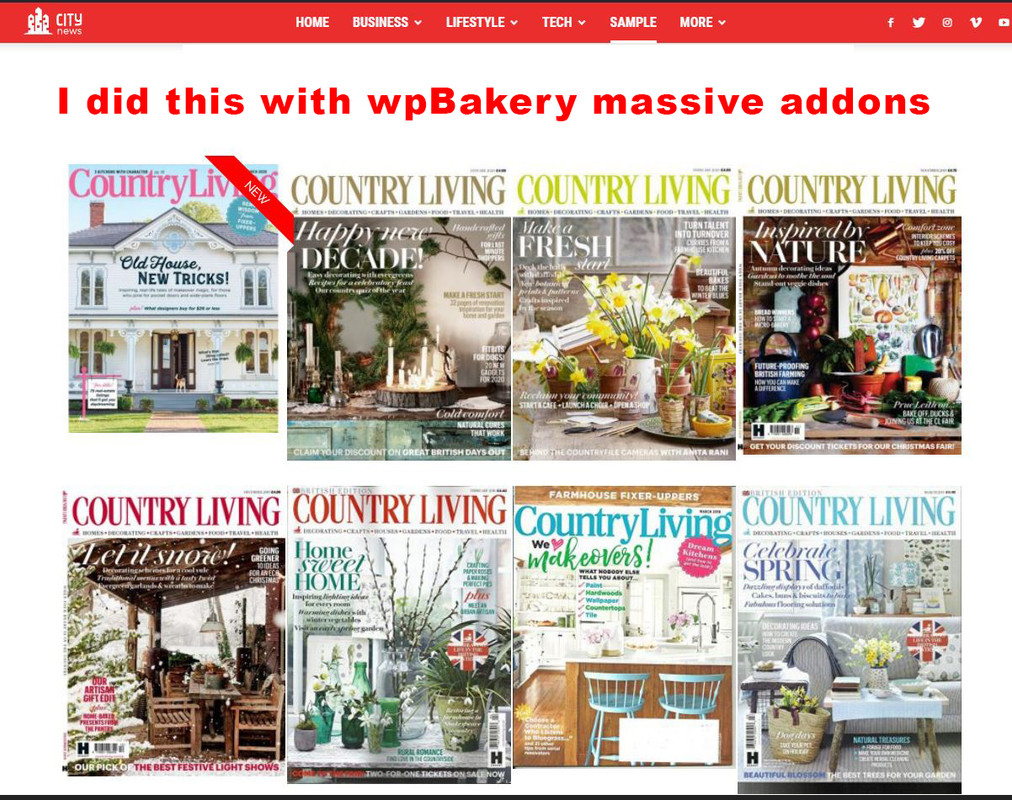
I wish to achieve the same effect for my magazine editions as you achieved on your demo page.
I want that each image direct me to a page or category where are located 30-35 articles only from that issue.
I wish to have on some editions a ribbon, a Title and some hover over effect.
Did you achieved all with the TdComposer, or it was done through wpBakery?
Because I cant get nothing similar with any of the Td codeblocks for images, for images I found a very limited options.
I installed a “massive addons” for wpBakery and I got similar effect but
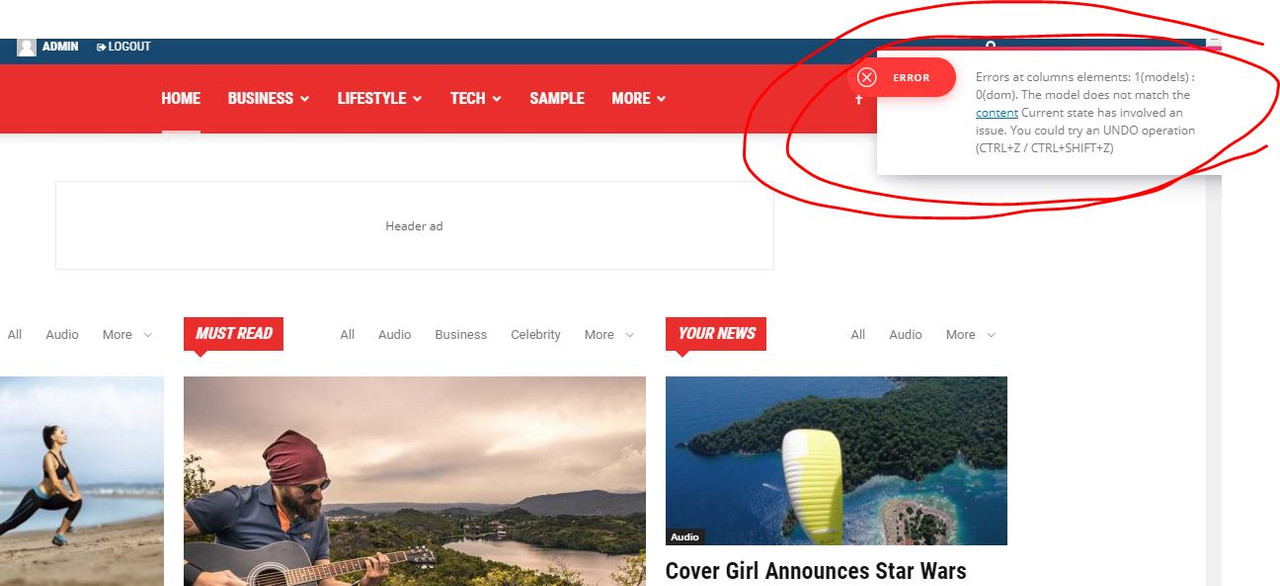
now I cant edit anyomore the pages which was done with TdComposer it gives me some error.
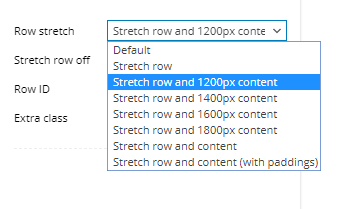
Finally in WpBakery how can I get the stretch row and 1200px content, that is exist in TD?
https://i.postimg.cc/zXVKfm5s/1.jpg
https://i.postimg.cc/SsSVTZ8m/2.jpg
https://i.postimg.cc/0QyFM5VG/3.jpg
https://i.postimg.cc/G23t4Y0M/5.png
Calin Hi,
If you are using the mobile theme plugin that provide you a better speed then responsive version of theme, but in order to achieve that speed you’ll need to create a new content for pages because in the most of cases those were made with builders ( tagDiv Composer, WPBakery ) and you need to use only the mobile editor ( you need to set the content for pages in mobile editor and this content will be display on mobile theme)
-> https://www.screencast.com/t/ebUIzt4se
Since Newspaper v9.7.4 you can show the responsive version on mobile theme -> http://prntscr.com/oh6r2s you can check more details about mobile theme in our documentation -> https://forum.tagdiv.com/the-mobile-theme/ or if you want to have the responsive version only, you can use the amp option from mobile theme -> https://i.imgur.com/n7fEXCy.png (to use the mobile theme template on amp) or you can disable the plugin.
If this is not what you mean, please provide me some more details.
Thank you!
Calin Hi,
I think that this is a plugin conflict between tagDiv Cloud Library and WPBakery, you can use only one of them, please deactivate the WPBakery and the sidebar should work again.
Let me know the results!
Thank you!