
 Calin
Calin Hi @bilalbzd,
The mobile version is look like that because you have the mobile theme plugin that provide you a better speed then responsive version of theme, but in order to achieve that speed you’ll need to create a new content for pages because in the most of cases those were made with builders ( tagDiv Composer, WPBakery ) and you need to use only the mobile editor ( you need to set the content for pages in mobile editor and this content will be display on mobile theme)
-> https://www.screencast.com/t/ebUIzt4se
Mobile Theme: Automatic Optimization for Mobile with Newspaper Theme -> https://tagdiv.com/mobile-theme-automatic-optimization-for-mobile-newspaper-theme/
Also for the 3 blocks, you’ll need to have set same feature posts (that have set feature category) -> https://forum.tagdiv.com/featured-posts-2/ -> https://www.screencast.com/t/QsJ6ppY4
If you want the responsive version and amp you should use this opinion -> https://www.screencast.com/t/jZct5ueBqOrb but if you have amp activate on pages you’ll need to create in Mobile editor a content for AMP version of page.
If you do not have the featured category, you’ll need to add some posts in feature category -> https://forum.tagdiv.com/featured-posts-2/ if you do not have this category you can create it, just make sure that you set the category name to be
Featured
Let me know if you have more questions!
 Catalin
 Hi,
Unfortunately, please notice that does not exist any patch between 9.6 and 9.7, sorry! The theme was changed a lot and also, the root of the theme files was changed. The Newspaper theme update brings a change for the customers that use WP Bakery Page Builder with our Theme: when you’ll be updating to the Newspaper 9.7 version, you’ll need to activate the tagDiv Composer to keep the Newspaper theme functionality you’ve previously used.
Otherwise, you will have basic WordPress functionality, complying with Envato WordPress Requirements – https://help.author.envato.com/hc/en-us/articles/360000472383-WordPress-Theme-Requirements
Please note that activating the tagDiv Composer doesn’t mean that you are required to use our custom page builder on your website.
You can use the WP Bakery page builder as you did before the update
We recommended you to do not use the tagDiv Composer and WP Bakery page builders on the same page though, because you cannot edit with WP Baker blocks and shortcodes created with tagDiv Composer or vice-versa.
Please make a backup for your website before updating.
Thanks.
Calin Hi,
I checked your website and now is on full width -> https://www.screencast.com/t/2KODA4qbUBGU
There is a known issue currently with single image elements used in pages built with WPBakery, when the tagDiv composer is also active. It has been identified however and will be fixed in the next theme update. Sorry for this inconvenience.
In the mean time the fix is to download this file – http://cdn.tagdiv.com/wp-content/uploads/2019/04/tdc_map.zip and replace it in the tagDiv composer
– http://prntscr.com/nikwre
The single images will look and function correctly after doing this.
Sorry for this inconvenience, the fix will be included in the next theme update.
Thank you for your understanding!
Calin Hi,
The mobile theme is a plugin that provide you a better speed then responsive version of theme, but in order to achieve that speed you’ll need to create a new content for pages because in the most of cases those were made with builders ( tagDiv Composer, WPBakery ) and you need to use only the mobile editor ( you need to set the content for pages in mobile editor and this content will be display on mobile theme)
-> https://www.screencast.com/t/ebUIzt4se
If you want the responsive version and amp you should use this opinion -> https://www.screencast.com/t/jZct5ueBqOrb but if you have amp activate on pages you’ll need to create in Mobile editor a content for AMP version of page.
Mobile Theme: Automatic Optimization for Mobile with Newspaper Theme -> https://tagdiv.com/mobile-theme-automatic-optimization-for-mobile-newspaper-theme/
Also for the 3 blocks, you’ll need to have set same feature posts (that have set feature category) -> https://forum.tagdiv.com/featured-posts-2/ -> https://www.screencast.com/t/QsJ6ppY4
If you do not have the featured category, you’ll need to add some posts in feature category -> https://forum.tagdiv.com/featured-posts-2/ if you do not have this category you can create it, just make sure that you set the category name to be
Featured
Let me know if you have more questions!
Calin Hi,
The mobile theme is a plugin that provide you a better speed then responsive version of theme, but in order to achieve that speed you’ll need to create a new content for pages because in the most of cases those were made with builders ( tagDiv Composer, WPBakery ) and you need to use only the mobile editor ( you need to set the content for pages in mobile editor and this content will be display on mobile theme)
-> https://www.screencast.com/t/ebUIzt4se
Mobile Theme: Automatic Optimization for Mobile with Newspaper Theme -> https://tagdiv.com/mobile-theme-automatic-optimization-for-mobile-newspaper-theme/
Let me know if you have more questions!
 Jakyo
JakyoHello,
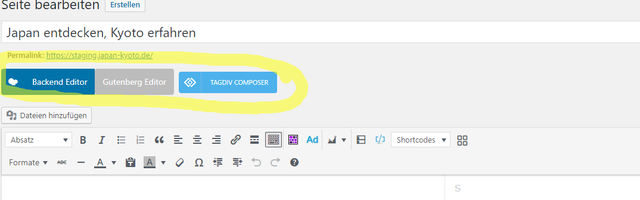
I’ve just bought Newspaper and set it up, but when I headed to my start page, I noticed that I can’t access WPBakery, the buttons are missing. I’ve narrowed it down to the plugin Yoast SEO. When it’s deactivated, the builder buttons show up.
Yoast deactivated:
Yoast activated:
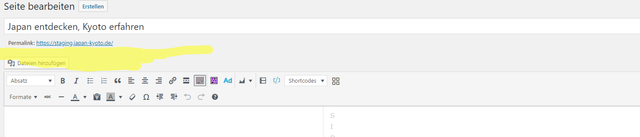
Thanks for any help.
Calin Hi,
The mobile theme is a plugin that provide you a better speed then responsive version of theme, but in order to achieve that speed you’ll need to create a new content for pages because in the most of cases those were made with builders ( tagDiv Composer, WPBakery ) and you need to use only the mobile editor ( you need to set the content for pages in mobile editor and this content will be display on mobile theme)
-> https://www.screencast.com/t/ebUIzt4se
If you want the responsive version and amp you should use this opinion -> https://www.screencast.com/t/jZct5ueBqOrb but if you have amp activate on pages you’ll need to create in Mobile editor a content for AMP version of page.
Mobile Theme: Automatic Optimization for Mobile with Newspaper Theme -> https://tagdiv.com/mobile-theme-automatic-optimization-for-mobile-newspaper-theme/
Also for the 3 blocks, you’ll need to have set same feature posts (that have set feature category) -> https://forum.tagdiv.com/featured-posts-2/ -> https://www.screencast.com/t/QsJ6ppY4
If you do not have the featured category, you’ll need to add some posts in feature category -> https://forum.tagdiv.com/featured-posts-2/ if you do not have this category you can create it, just make sure that you set the category name to be
Featured
Let me know if you have more questions!
Calin Hi,
The mobile theme is a plugin that provide you a better speed then responsive version of theme, but in order to achieve that speed you’ll need to create a new content for pages because in the most of cases those were made with builders ( tagDiv Composer, WPBakery ) and you need to use only the mobile editor ( you need to set the content for pages in mobile editor and this content will be display on mobile theme)
-> https://www.screencast.com/t/ebUIzt4se
Mobile Theme: Automatic Optimization for Mobile with Newspaper Theme -> https://tagdiv.com/mobile-theme-automatic-optimization-for-mobile-newspaper-theme/
Also for the 3 blocks, you’ll need to have set same feature posts (that have set feature category) -> https://forum.tagdiv.com/featured-posts-2/ -> https://www.screencast.com/t/QsJ6ppY4
If you do not have the featured category, you’ll need to add some posts in feature category -> https://forum.tagdiv.com/featured-posts-2/ if you do not have this category you can create it, just make sure that you set the category name to be
Featured
Let me know if you have more questions!
Calin Hi,
Please check this topic about How can I view the mobile version of a webpage in Google Chrome for Desktop?
If you are no using the mobile theme plugin you can use flex blocks and you can chose the layout for each device ( desktop, iPad, mobile ).
The mobile theme is a plugin that provide you a better speed then responsive version of theme, but in order to achieve that speed you’ll need to create a new content for pages because in the most of cases those were made with builders ( tagDiv Composer, WPBakery ) and you need to use only the mobile editor ( you need to set the content for pages in mobile editor and this content will be display on mobile theme)
-> https://www.screencast.com/t/ebUIzt4se
Mobile Theme: Automatic Optimization for Mobile with Newspaper Theme -> https://tagdiv.com/mobile-theme-automatic-optimization-for-mobile-newspaper-theme/
Thank you!
 Vlad S
 Hello !
If you’re planning on going for a long time with our products the best option will be to start learning and use tagDiv Composer since it was created by us for our theme. If not then you can use WP Bakery but we cannot confirm that all the functions will work 100%.
You can use WP Bakery but with time it won’t get much more options for it. So our choice will still remain the tagDiv Composer.
Thank you !
 drjeff_007
Hi Guys,
I’m a bit confused as to which one to use to build my pages? Elementor vs Tag Div Composer
Also, is WP Bakery no longer used/needed?
Thanks!
Jeff
Calin Hi,
The mobile theme is a plugin that provide you a better speed then responsive version of theme, but in order to achieve that speed you’ll need to create a new content for pages because in the most of cases those were made with builders ( tagDiv Composer, WPBakery ) and you need to use only the mobile editor ( you need to set the content for pages in mobile editor and this content will be display on mobile theme)
-> https://www.screencast.com/t/ebUIzt4se
If you want the responsive version and amp you should use this opinion -> https://www.screencast.com/t/jZct5ueBqOrb but if you have amp activate on pages you’ll need to create in Mobile editor a content for AMP version of page.
Also please check our documentation for Mobile Theme: Automatic Optimization for Mobile with Newspaper Theme -> https://tagdiv.com/mobile-theme-automatic-optimization-for-mobile-newspaper-theme/
Also for the 3 blocks, for those you’ll need to have set seam feature posts (that have set feature category) -> https://forum.tagdiv.com/featured-posts-2/ -> https://www.screencast.com/t/QsJ6ppY4
You’ll need to add some posts in feature category -> https://forum.tagdiv.com/featured-posts-2/ if you do not have this category you can create it, just make sure that you set the category name to be
Featured
Let me know if you have more questions!
Calin Hi,
The Newspaper theme update brings a change for the theme implementation.
When you’ll be updating to the Newspaper 9.7 version, you’ll need to activate the tagDiv Composer to keep the Newspaper theme functionality you’ve previously used.
Otherwise, you will have basic WordPress functionality, complying with Envato WordPress Requirements – https://help.author.envato.com/hc/en-us/articles/360000472383-WordPress-Theme-Requirements
Please read this article we wrote on the new update https://tagdiv.com/updating-the-core-of-tagdiv-themes/ to learn what it changes and what you must do in order to keep the functionality intact.
If you are using the WPBakery and you have issues with the single image please check this topic -> https://forum.tagdiv.com/topic/using-wpbakery-page-builder/
Thank you!
Calin Hi,
Unfortunately you can not use the WPBakery to edit the the demos, all demos and template are build with tagDiv Composer, using others builders will brake the pages.
Also since Newspaper v9.7, you’ll need to activate the tagDiv Composer to keep the Newspaper theme functionality you’ve previously used.
Otherwise, you will have basic WordPress functionality, complying with Envato WordPress Requirements – https://help.author.envato.com/hc/en-us/articles/360000472383-WordPress-Theme-Requirements
Please read this article we wrote on the new update https://tagdiv.com/updating-the-core-of-tagdiv-themes/ to learn what it changes and what you must do in order to keep the functionality intact.
Thank you!
Calin Hi,
There is a known issue currently with single image elements used in pages built with WPBakery, when the tagDiv composer is also active. It has been identified however and will be fixed in the next theme update. Sorry for this inconvenience.
In the mean time the fix is to download this file – http://cdn.tagdiv.com/wp-content/uploads/2019/04/tdc_map.zip and replace it in the tagDiv composer
– http://prntscr.com/nikwre
The single images will look and function correctly after doing this.
Sorry for this inconvenience, the fix will be included in the next theme update.
Thank you!
 moonenbeams
Hello Team
We have had endless difficulties updating to the new Theme 9.7. It doesn’t work for us.
Found a clash (images not fitting correctly in sidebar) between TadDiv composer and WP Bakery so disabled Bakery and working good again.
Have tried turning off every plugin except TagDiv but still 9.7 theme doesn’t work.
Can I pay someone to install the new theme and get it working? Is there anyone with the skills available?
I feel like I am going around in circles.
Thanks,
Antoon
The site is https://bayonline.co.nz
 sico-tv
Hi.
How is possible to make the Racing Mag template to work properly with WPBakery page builder?
This is the only thing that i get (since the template was released) and…sucks https://ibb.co/RBTCTH5
Help would be GREAT, just GREAT!
Thank you
 yukiy531
Hello,
Since updating to the latest version the single image size elements on a page build with WPBakery Page Builder do render wrong. I want to view it full, but the image is cropped.
Sample page
http://sbn.japaho.com/catalog/allian/
Image
http://sbn.japaho.com/sbn/wp-content/uploads/2016/06/ALLIAN1000x650.jpg
http://sbn.japaho.com/sbn/wp-content/uploads/2016/06/allian.jpg
 Forkast
Hello,
When i create an (empty) child theme and activate the WPBakery plugin, the layout breaks.
It differs from the parent theme, although no changes were made to the child theme yet.
Version: 9.7.2
Repro steps:
Install parent theme
Create basic child theme
Activate child theme
Activate WPBakery plugin
View website
Expected behaviour:
(Empty) child theme should look like the parent (default) theme or no differences in layout
Actual behaviour:
Layout of (child) theme is broken different after activating WPBakery
Remarks:
The parent (default) theme seems to be working correctly with the WPBakery plugin activated
Please advice how to resolve this?
Thanks
 Achim
AchimSince updating to the latest version(s) the single image size elements on a page build with wp bakery page builder do render wrong.
turning off the tagdiv composer plugin renders the images correctly again (but with some errors codes on the page), so I presume it lies within the tagdiv composer…
any help would be appreciated…
thanks.
page with both plugins active:
https://imagizer.imageshack.com/img924/6517/NufNQd.png
page without tagdiv composer (how the images should look):
https://imagizer.imageshack.com/img921/9589/8TwPxq.png
Calin Hi,
The mobile theme is a plugin that provide you a better speed then responsive version of theme, but in order to achieve that speed you’ll need to create a new content for pages ( including About us & Contact Us ) because in the most of cases those were made with builders ( tagDiv Composer, WPBakery ) and you need to use the mobile editor section ( you need to set the content for pages in mobile editor and this content will be display on mobile theme).
-> https://www.screencast.com/t/ebUIzt4se
Please check our documentation for Mobile Theme: Automatic Optimization for Mobile with Newspaper Theme -> https://tagdiv.com/mobile-theme-automatic-optimization-for-mobile-newspaper-theme/
Thank you!
 Simion C.
 That shouldn’t happen, in my case after using the fix I can still edit the page same as before with WPBakery and change the image – http://prntscr.com/nlep9z
What exactly is happening in your case? Please let us know if possible. Any feedback is much appreciated.
Simion C. Hi,
What builder did you use to create the page? If you edit the page with the builder it was built with, does it look properly?
From what I can see those are column text elements which contain images, entered in a full row (not split into more columns).
The latest update consists or some modifications to the theme
– https://tagdiv.com/updating-the-core-of-tagdiv-themes/
Now the tagDiv composer has to be active in order to have the same functionality as before. Does it look different if you deactivate the tagDiv composer as a quick test? Also try to update the WPBakery plugin to 5.7, it is included in the latest theme package
– https://forum.tagdiv.com/newsmag-how-to-update-visual-composer-plugin/
Thanks
Simion C. Hi,
If you used WPBakery to build the website, then you should keep it active at all times. If it is deactivated, elements like the ones you mention will not work and they will be displayed as code – http://prntscr.com/nldx30 – http://prntscr.com/nldxg1 They are specific to and provided by WPBakery, not the theme.
Having the WPBakery builder active should not cause the thumbnails to not be loaded. Usually plugins, or various codes entered in the theme panel or theme files can conflict with the theme and cause such issues. These would be the first to check in such cases.
Also be sure to check if there are enough resources – https://forum.tagdiv.com/newsmag-requirements-for-newsmag/
Having such plugins as WPBakery and elementor, revolution slider etc active can consume many resources.
Thanks
Calin Hi,
The mobile theme is a plugin that provide you a better speed then responsive version of theme, but in order to achieve that speed you’ll need to create a new content for pages because in the most of cases those were made with builders ( tagDiv Composer, WPBakery ) and you need to use only the mobile editor ( you need to set the content for pages in mobile editor and this content will be display on mobile theme)
-> https://www.screencast.com/t/ebUIzt4se
If you want the responsive version and amp you should use this opinion -> https://www.screencast.com/t/jZct5ueBqOrb but if you have amp activate on pages you’ll need to create in Mobile editor a content for AMP version of page.
Also please check our documentation for Mobile Theme: Automatic Optimization for Mobile with Newspaper Theme -> https://tagdiv.com/mobile-theme-automatic-optimization-for-mobile-newspaper-theme/
Also for the 3 blocks, for those you’ll need to have set seam feature posts (that have set feature category) -> https://forum.tagdiv.com/featured-posts-2/ -> https://www.screencast.com/t/QsJ6ppY4
You’ll need to add some posts in feature category -> https://forum.tagdiv.com/featured-posts-2/ if you do not have this category you can create it, just make sure that you set the category name to be
Featured
Let me know if you have more questions!



