
- ApiPractical example – How to add a new Block and Module
- Apitd_api_block::delete
- Apitd_api_block::update_key
- Apitd_api_block::update
- Apitd_api_block::add
- ApiAPI – Blocks – Introduction
- Apitd_api_thumb::update_key
- Apitd_api_thumb::update
- Apitd_api_thumb::add
- ApiAPI – Thumbnail – Introduction
- Apitd_api_category_top_posts_style::update_key
- Apitd_api_category_top_posts_style::update
- Apitd_api_category_top_posts_style::add
- ApiAPI – Category top section style – Introduction
- Apitd_api_module::update_key
- Apitd_api_module::update
- Apitd_api_module::add
- ApiAPI – Modules – Introduction
- ApiUsing the Theme API in plugins
- ApiThe Theme API
 nieveslgil
Hello,
I have setup Newsmag on my site:https://costatropical.tv/
The mobile version of my site was showing correct but suddenly the blocks in the home page are dissapear. Now it is only showing Latest articles and Reccomended videos which are panels “Homepage Latest Articles”.. Mobile version does not show menus either.
Please advise
Thanks!
 Anamaria
 Hello,
Please go to the Theme Panel -> Block Settings -> Meta info on modules/blocks and enabled the date -> https://i.imgur.com/uxP2wyL.png
Thank you!
Anamaria Hello,
We do not recommend setting two posts loop on the same page/template, because most of the settings from the first loop element will be set for the second one.
A workaround is to use flex blocks, and set the ads after each flex block and using the offset option -> https://forum.tagdiv.com/offset-feature/
Thank you!
Anamaria Hello,
You can icon only like this in for block title -> https://i.imgur.com/9GFs1py.png -> https://i.imgur.com/EzzncR3.png
You can change the align for submenu here https://i.imgur.com/S9E78rm.jpg
Thank you!
Anamaria Hello,
Unfortunately, you cannot change the module space globally; you must do it for each block.
Thank you!
Anamaria Hello,
I recommend using Flex Blocks instead of the blocks 1-25.
Please go to the Theme Panel -> Block Settings -> Meta info on modules/blocks and enabled the modified date -> https://i.imgur.com/uxP2wyL.png this is for blocks 1-25 or big grid.
Thank you!
 Calin
Calin Hello,
Indeed we recommend to use flex blocks and flex grids, those are providing options for everything you need and you can choose the image thumb size that you want to use for that module.
Our theme images are based on thumbs that are created by the theme
Normally the image you are uploading should be at least the dimension of the biggest thumbs size you are using on your website.
Thank you!
Calin Hi,
The new path top that file is – wp-content/plugins/td-composer/legacy/Newspaper/includes/shortcodes/td_block_mega_menu.php but this will work only for a standard header, if is a cloud header the path is a different one wp-content/plugins/td-cloud-library/shortcodes/header/tdb_header_mega_menu.php unfortunately this file can not be set in a child theme, it will be need to be edited after each theme update or it will be need to make a plugin with a similar shortcode in tagDiv Composer.
Thank you!
 michaeldef
 I’m having the same problem. Date won’t show even when appropriate box is checked. Date appears in one module because I typed it into the excerpt.
• Live page – https://bayarearegistry.com/category/photos/
• Composer – https://www.screencast.com/t/x0TBHzfaIITJ
Note: Big lead image is created w/ Posts Loop 2. Smaller thumbnails created with Flex Block 1.
 varre
varrehi,
i’m using “Big Grid Flex 2” on my homepage but “zoom effects on hover” doesn’t work even it’s on. when i edit homepage with Tagdiv Composer, it works properly but when I finish and return to homepage doesn’t work. the other problem is “edit” button on the Blocks and Grids. I didn’t see any “edit” word on Themepanel and I couldn’t change it. (See example below)

 haipo
haipoHi Team
Show modified date and time ago – not showing on block 21
What may be the reason for that?
See example:
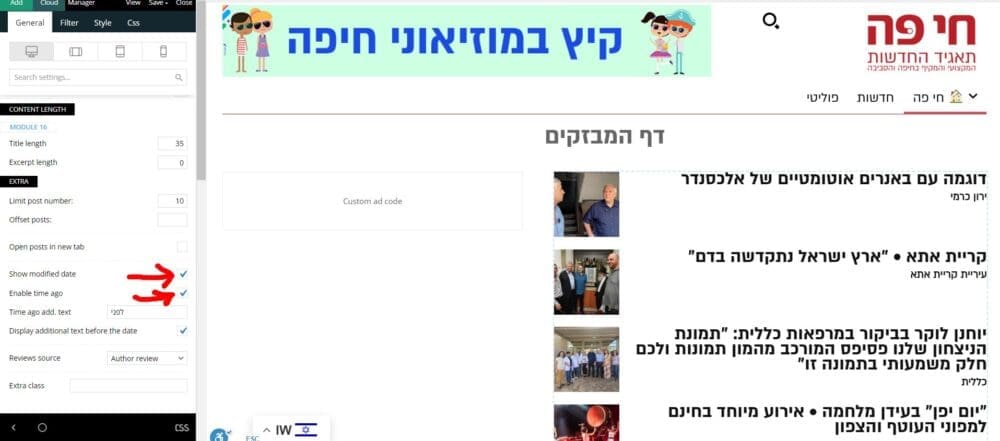
–
Thanks
Yaron
 skarem100
 The above problem is resolved.
Is that possible to add icons to the block titles? For example for sport news I want to add a small ball beside the Sport title.
if yes please let me know.
Regards
 odddic
Hi there, I getting an issue on this flex block builder;
So the condition like this:
– I have custom field (ACF) field “affiliate_url”
– then in module template I couldn’t find anything that can make this ACF field be button. We only have Read more button in module shortcode.
So what possibility I can do to have this affiliate_ulr button?
Thanks
 Alastair Dixon
 Please please please can you guys add numbered pagination for flex blocks. It would be so useful to be able to create a page and have a flex block list a specified number of posts based on a tag filter that uses multiple tags to list content for example. There’s no way of doing this and have numbered pagination as far as I’m aware? Please can you add it to the flex blocks??
Best,
Alastair
 maidigitalcreations
What are the best practices for uploading images using this theme? It would be super helpful if there was an article about this. From what I’ve gathered, it seems better to use flex blocks than the standard ones because there’s more things you can customize.
1. What are the recommended dimensions for blog post images and feature images? If there’s specifics depending on the template, where can we find that information?
2. What are the recommended file sizes?
3. Should we upload a file specific for the feature image?
 ersandrino
 I saw the video you sent me. But in the end, the outermost blocks of flex block 5 are not the same size as the central three as shown by the screenshot taken from your video: https://prnt.sc/YzUwum-7BAtR. How do you get all 5 of them the same size?
 KevinLeclerc
Hi Newspapper Team
I would like to exclude third level sub-categories from mega menu.
Eg :
Cat 1 (mega menu)
– Sub cat 1: show
– Sub cat 2: show
— Sub cat 2.a: hide
— Sub cat 2.b: hide
— etc.
– Sub cat 3: show
– etc.
I’ve read two threads mentioning this possibility by placing and modifying a copy of the td_block_mega_menu.php file in the child theme (https://forum.tagdiv.com/topic/exclude-sub-categoy-on-megamenu/) (https://forum.tagdiv.com/topic/is-it-possible-to-exclude-third-level-sub-categories-from-mega-menu/).
But they are from 2015 and 2018, and in 2024, I can’t find any td_block_mega_menu.php file in Newspapper > Includes > Shortcodes (no shortcodes folder exist).
Thank you in advance for your help,
Best,
Kevin
Anamaria Hello,
Please edit the search template, select the block and filter it to Search – Current search https://i.imgur.com/eSgK8na.png
Thank you!
ersandrino I saw the video and thank you. But from what you created, six inner rows are formed in the end. If I have to insert 5 flex block 5 modules I will have one left over at the end as shown in this screenshot: https://prnt.sc/wnCEXiZNqacZ . You sent me the two links to these pages: https://tagdiv.com/flexibility-rows-columns-newspaper-theme/ and then this: https://tagdiv.com/how-to-add-delete-and- duplicate-row-newspaper-theme/ but I can’t center the 5 blocks making them all appear aligned in the center with identical lateral spaces to be able to center it.
 Bettina
 Hello @lukstan!
Please check the block’s settings and make sure you have no offset value there.
Thank you!
ersandrino as I wrote to you, I should have 5 different flex block5 elements for each block. The example you gave me is not suitable. To make you understand better, each of these 5 elements of flex block 5 will then have to include articles with different categories.
Anamaria Hello,
Do you want have different content for each block? If not, you can set the layout of the flex block 1 to show five posts -> https://i.imgur.com/A7b2rM3.jpg
Thank you!
Bettina Hello @peters1964!
Edit it with the tagdiv composer from here: https://app.screencast.com/QAHStujBIzq5f
Start customizing it as you like. You can import from the Cloud Library sections, blocks, etc. already designed: https://app.screencast.com/XmXeN3Cf760TK
The page templates can’t be global on each page, and it is not working as a single template, for example.
Thank you!
ersandrinoHI,
I would like to understand if I can have a layout of 5 elements instead of 4. Let me explain better…I should insert a layout of 5 elements instead of 4 into my new project. Currently part of my page is made up of a full screen row as shown in this screenshot: https://prnt.sc/hW_08-vqUAVW where inside I have an “inner row” of 4 blocks as shown in this one screenshot: https://prnt.sc/zW_Za-FHCxZR. Inside each “inner row” block I inserted the module: “Flex Block 5”. I would like to add another one so as to go from 4 to 5 modules of: “Flex Block 5”. Unfortunately I have to have 5 of these modules that are independent and I wanted to understand with you if you had something ready, or if I need to make some changes to the code and tell me how to do it. I hope you can give me valuable support.
Thank you
Calin Hello,
1. This situation is because there are some elements that still have the text set to be center or left align and it will be need to edit each of them in part, but this will take a lot of times, so if you want a quick solution, try this custom css:
body .td-container-wrap .td_block_wrap {

    text-align: right;

}
Just set this code in the theme panel > custom code > custom css and the results should be – https://i.imgur.com/HLn9m59.png
2. A part of fonts indeed can be set from the theme panel, but using cloud templates you’ll need to apply the font on those too, for this you’ll need to edit each cloud template and select the manager then the Global font and replace there all fonts with Persian – https://i.imgur.com/7MqBLe4.png (this can be done on pages and cloud templates).
I hope this will help you!
Thank you!



