- TutorialsDefault Block Settings Guide
- NewspaperWP Rocket and Newspaper Theme: Optimization Guide
- TutorialsFrom WPBakery to tagDiv Composer
- TutorialsOffset Feature
- TutorialsWhat is Ajax preloading?
 findlay
I just can’t find a way of displaying a block of a particular author’s posts on my front page.
I’d like to display a title like “Author’s Spotlight – Christian Carter” with only his posts showing in the block.
Is there any way of doing this?
Thanks
Derek
 SALZBURG12
We moved to a new server and had version 2.1 of NewsMag installed.
Today we upgraded our site http://www.salzburg12.at and all the plugins. Clear the cache – everything looks fine.
But when I try to edit a page with the Visual Composer fron the Themeforest ZIP (seems not to be the latest version) I can’t edit anything. Visual Composer loads, but when I click on an element nothing happens. I even can add new Blocks or whatever.
Please help!
 Andrei L.
 Hi
I am not sure what grid you’re using but you can try this css for big grid 1:
.td_block_big_grid .entry-thumb {
transform: none!important;
-webkit-transform: none!important;
-moz-transform: none!important;
}
If you’re using a different grid try to adjust this class like in this example:
-for big grid 3 the class is .td_block_big_grid_3
Let me know how it goes and if you still need assistance please provide more details.
Thanks!
-
This reply was modified 10 years by Andrei L..
 Bogdan B.
 Hello Lucas,
Please make sure you installed the theme correctly and that the file wp-content/themes/Newspaper/includes/block_templates/td_block_template_1.php exists. If not, try to reinstall the theme following this tutorial: https://forum.tagdiv.com/install-via-ftp/
Let us know how it goes!
Andrei L. Hi
1. @NM-user the theme blocks have fixed sizes and adding a new margin will create layout problem. Evan some default elements from VC have this margin and the best way is to add the margin manually for those which don’t have it set by default. So the margin will apply only for the specific element and won’t create layout issues. You can find the design options following this link: http://screencast.com/t/1LxD5ZQl
2. To make the titles of tabs bold try this css in theme apnel > custom css: http://screencast.com/t/Cbw363rC9P
-this is for the current tabs
.vc_tta-title-text{

font-weight: bold;;

}
this css is for deprecated tabs:
.wpb_tabs li a{

font-weight: bold;

}
3. We will release an update which will include the latest version of VC soon. At the moment we test the current plugin’s version with the theme so we make sure that works fine.
4. If you use some elements like Tabs, you will have to re-add them to your page as the VC developers have changed the classes, the design for them – http://screencast.com/t/3r1YoBw7
Thanks!
Bogdan B. Hello Kerem,
Unfortunately there is no option for this and creating one will require custom work which we cannot provide at the moment. If you know your way around PHP you can edit these 2 files:
newspaper->includes->shortcodes->td_block_authors.php and newspaper->parts->page-authors-box.php
If not maybe you can find a plugin for the author box that adds more information.http://www.shoutmeloud.com/author-box-wordpress-plugin.html
We have not tested these plugins so we cannot make a recommendation. You will have to try them out and see how they work.
I hope this helps.
Thank You!
 Alin [tagDiv]
 Hi,
For the category template you will need custom modifications to place ads in the content, please check this solution – https://forum.tagdiv.com/topic/how-can-add-horizontal-sidebar/#post-62563
Also if you want to place a custom ad just just bellow the pagination on a category page you can edit the category.php and use do_shortcode function like this – http://screencast.com/t/lr17J6O36C – http://screencast.com/t/rW0jkhWqlrTS or if you want this just above the footer – http://screencast.com/t/HqvjtO1x – http://screencast.com/t/VXWereyztO
<?php echo do_shortcode('[td_block_ad_box spot_id="custom_ad_1"]');?>
In page content you can add ads using Ad Box block – http://screencast.com/t/DBn7hgVVXf and for post pages thare are specific spots in Theme Panel > Ads where you can paste your code(top, inline, bottom) – https://forum.tagdiv.com/article-ads/
Thanks!
-
This reply was modified 10 years by Alin [tagDiv].
 lucas47
I tryed to install the demos theme, but an error appears:
Warning: require_once(/public_html/wp-content/themes/Newspaper/includes/block_templates/td_block_template_1.php): failed to open stream: No such file or directory in /public_html/wp-includes/template.php on line 555
Fatal error: require_once(): Failed opening required ‘/public_html/wp-content/themes/Newspaper/includes/block_templates/td_block_template_1.php’ (include_path=’.:/opt/php-5.5/pear’) in /public_html/wp-includes/template.php on line 555
 AlessandroTax
 Hi,
Thank’s for your reply!
I’v found a plugin for the background managment, but when i click on it, don’t open the link.
In the documentation i’v found thi FAQ: http://wordpress-advertising.com/faq/#faq/link-background-ads-not-working
They say:
If you added a background ad to your site but the link is not working it means that your theme has another full width container div above the main body. You will need to find out the ID of the specific container div and add this to the Background Container field in the shortcode editor.
If you can’t find the specific container ID please contact your Theme developer.
Thank you
Bogdan B. Hi,
As an alternative you could edit these blocks with css to align them, but it would result in too much white space on the module that has just one row of title text:
example:
.td_module_5.td_module_wrap .entry-title{

min-height:75px

}
result: http://screencast.com/t/VLmxCQMKYn4z – images align but title gets white space below to align to the other title that is significantly longer.
This is the problem with using blocks with text above the image. When the text is below the image, images do not get affected by title lengths.
I hope this helps.
Thank you!
Andrei L. Hi
Replace the above css with this one: http://screencast.com/t/wnFwycpV
.td-grid-group-1 .td-module-thumb, .td-grid-group-2 .td-module-thumb{
margin: 0 1px 0 0;
}
.td-grid-style-5 .td-big-grid-scroll .td-big-grid-post{
padding-top: 1px;
}
.td-grid-group-1 div:last-child{
margin-top: 1px
}
.td-grid-group-2 div:first-child, .td-grid-group-3 div:first-child {
padding-top: 0!important;
}
.td_block_big_grid_7 .td-module-thumb a:last-child:before{
opacity: 0.3 !important;
}
Thanks!
-
This reply was modified 10 years by Andrei L..
 ddasma
 Hi Andrei,
Finally, i solved the problem, i inserted html blocks..deleted it and now works fine.
No i have another issue for Big Grids, i want to remove the zoom when you pass de mouse over the thumbnail..that’s its possible?
Thanks you so much!
Bogdan B. Hello,
You should not be embarrassed to hire a freelancer for this job, because some of them are actually looking for small projects like this. Either they are beginners at freelancing or simply prefer smaller tasks due to lack of time for big projects. There are many sites which provide freelance work and the prices will not be very high for a task like this. Unfortunately we cannot provide custom work because we are a small team and time does not allow us to tackle such tasks. Sorry!
As for the masonry grid, it can only be used on pages as a block not on category pages as a module.
Thank you!
 Catalin
 Hy byothe,
Please try the code below:
.td-footer-wrapper .td-pb-span4 .td_block_wrap .td-next-prev-wrap, .td-footer-wrapper .td-pb-span4 .td_block_wrap .td-load-more-wrap{

margin-top: 20px;

}
.td-footer-wrapper .td_block_wrap .td-next-prev-wrap, .td-footer-wrapper .td_block_wrap .td-load-more-wrap{
margin-bottom: 0!important;
}
Thanks!
 __NoX__
 well, i saw under “Theme Status” this message mark as yellow:
max_input_vars 1000 – the max_input_vars should be bigger than 2000, otherwise it can cause incomplete saves in the menu panel in WordPress
Could this be the reason for the white page issue?
 artstorm
 2015/10/28 15:55:06 [error] 1213#0: *2135139 FastCGI sent in stderr: “PHP message: PHP Catchable fatal error: Object of class stdClass could not be converted to string in /var/www/htdocs/wp-content/themes/Newspaper/includes/wp_booster/td_block.php on line 131
how to fix this problem?
Alin [tagDiv] Hi,
@paulberrow We have made some test using the Vc 4.7.4 and old version of the theme and it creates some issues on tagdiv blocks, we will try to find solutions, unfortunately I cannot provide an exact date.
@dodacdung You can update it via ftp, also you could try to deactivate and delete it and install it from here – http://screencast.com/t/NeIrAMKdm3
Thanks!
Bogdan B. Hello,
You can limit the title on your block from the theme panel-> excerpts, but unfortunately blocks with titles above images behave like that if the titles do not have the same number of rows.
3 rows http://screencast.com/t/Xf9ND5fp
2 rows http://screencast.com/t/ZdQZfE2hz
Easiest way to make them equal is to have longer titles to fit 2 rows and limit the word count from excerpts http://screencast.com/t/KqdI6oDQXSg7 so the block will always show posts on 2 rows like in our demo: http://demo.tagdiv.com/newspaper/block-6/
Thank you!
 strawberrybase
Hi,
Due to the dimensions of the ‘slide’ block, all the images i’m using are cropped quite badly at the bottom edge. Is there away to position the images in the slide so they are aligned to the middle so there’s an equal amount cropped of both the top and bottom edges, rather than just the bottom?
Thanks
 rehman
Hello TagDiv team,
The title links under Mega Menu dropdown are enclosed in <H3> and the code looks like this:
<h3 itemprop=”name” class=”entry-title td-module-title”>How to Install Windows 10 on VirtualBox</h3>
All the listed articles have <h3>.. I do not want them to be enclosed in h3…
can you please point me to the file containing this code and the code that I need to add to replace this h3 with a BOLD text.
Thanks.
 kanenas
 Please note that you have to do this change in the main theme as this file cannot be overwritten via child theme.
Is it something that you consider including on a future release of the theme?
Thanks!
 JorgeDDW
this is what i got in my homepage:
[vc_row][vc_column][td_block_trending_now navigation="manual" sort="random_posts"][td_block_big_grid sort="featured"][/vc_column][/vc_row][vc_row el_class="td-ss-row"][vc_column width="2/3"][td_block_1 custom_title="" header_color="#e29c04" border_top="no_border_top" td_ajax_filter_type="td_category_ids_filter" ajax_pagination="next_prev"][td_block_15 custom_title="" header_color="#0b8d5d" sort="random_posts" limit="8" td_ajax_filter_type="td_category_ids_filter" ajax_pagination="next_prev"][vc_row_inner][vc_column_inner width="1/2"][td_block_2 custom_title="" header_color="#4db2ec" sort="random_posts" limit="1" ajax_pagination="next_prev"][/vc_column_inner][vc_column_inner width="1/2"][td_block_10 custom_title="" sort="random_posts" limit="4"][/vc_column_inner][/vc_row_inner][/vc_column][vc_column width="1/3"][td_block_ad_box spot_id="sidebar"][td_block_6 custom_title="" header_color="#ed581c" sort="random_posts" limit="1"][td_block_8 custom_title="" header_color="#0152a9" sort="random_posts" limit="2"][/vc_column][/vc_row][vc_row][vc_column][td_block_14 custom_title="" header_color="#288abf" tag_slug="more news" sort="random_posts" limit="3" ajax_pagination="next_prev"][/vc_column][/vc_row]
And is not showing anything on my homepage: http://robertnoticias.com/
 Le Claqueur de Doigts
Hi everyone,
And first of, I hope you’re all doing very well !
I’d like to built a custom block with a custom module for my global category settings.
But after a full week of inconclusive work, now I give up.
So here I am, looking for some help !
What I’m trying to achieve is this result : http://makemylemonade.com/category/look/streetstyle
But instead of the yellow fading, I’d like the zoom effect of Big Grid 5 + the post title only when the media is hovered.
Also, I’d like the media to be 220x220px.
I followed the Theme API step by step guide and created my own plugin but I’m not qualified enough to achieve my goal.
And I know and understand that you can’t provide specific code, that’s why I’m just asking for guidelines, to know what does what so that I can then do it to my taste.
Thank you very much in advance guyz. 🙂
 byothe
Hello,
I would like to know if I can do something (else than cutting the title) to align the pictures in a block when I have articles with titles going on 3 rows next to an article with a title on 2 rows ?
Like here : http://www.screencast.com/t/0lWKgWgBmqnz
 rcallejonvillalobos
 Hi Catalin, my problem persists.
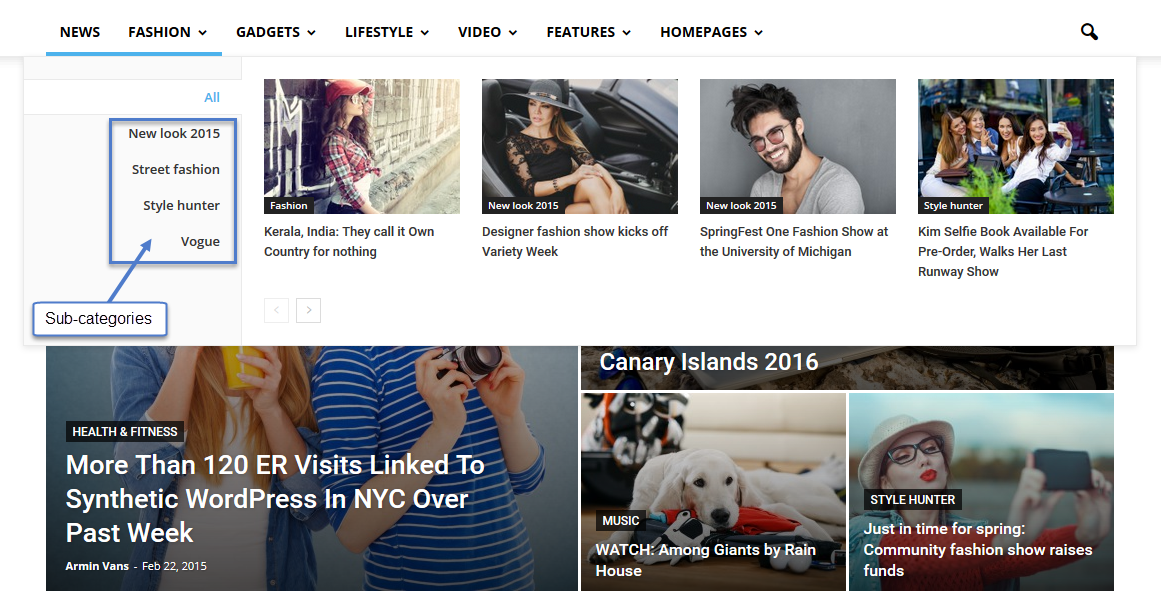
I want to put a Mega menu with sub-categories. But my sub -categories do not look good…
The sub-category appear under the blocks: http://oi59.tinypic.com/estbp5.jpg instead of to the right of the blocks: https://forum.tagdiv.com/wp-content/uploads/2015/05/2015-06-15_13-48-10.png