
- ApiPractical example – How to add a new Block and Module
- Apitd_api_block::delete
- Apitd_api_block::update_key
- Apitd_api_block::update
- Apitd_api_block::add
- ApiAPI – Blocks – Introduction
- Apitd_api_thumb::update_key
- Apitd_api_thumb::update
- Apitd_api_thumb::add
- ApiAPI – Thumbnail – Introduction
- Apitd_api_category_top_posts_style::update_key
- Apitd_api_category_top_posts_style::update
- Apitd_api_category_top_posts_style::add
- ApiAPI – Category top section style – Introduction
- Apitd_api_module::update_key
- Apitd_api_module::update
- Apitd_api_module::add
- ApiAPI – Modules – Introduction
- ApiUsing the Theme API in plugins
- ApiThe Theme API
 Bettina
 Hello Anurag Srivastava!
1. Edit an article with the tagdiv Composer, and there you can find all the settings for the text: https://prnt.sc/_14aOoDzEECt -> https://prnt.sc/ynfT5G_Zk7k2
2. Edit the homepage with the tagdiv Composer, click on those blocks and change the filters: https://forum.tagdiv.com/flex-block-settings-guide/
3. You can drag and drop the elements where you like in the page. Also, you can copy and paste the element after another: right-click on the element: https://prnt.sc/di9HxFxYhxDp -> right-click on the other element and choose paste after.
More documentation about the cloud templates is here:
– https://forum.tagdiv.com/cloud-library-templates/
– https://forum.tagdiv.com/design-post-pages-using-cloud-library-templates/
– https://forum.tagdiv.com/cloud-library-category-templates/
Thank you!
 bluedot
 I’ll have to give it a try with caching plugins disabled. The lazy loading feature is enabled in the theme panel, but the flex block 1 in the footer does not lazy load the post thumbnails.
Bettina Hello!
Display a CPT like this: https://prnt.sc/o5Yh76qttY_t
Documentation here: https://forum.tagdiv.com/flex-block-settings-guide/
Thank you!
 kalacosolutions
 I am not requesting support for the third party plugin; I am asking how can a Custom Post Type be included in FlexGrids or FlexBlocks.
Bettina Hello @sjgold !
Unfortunately, this is not implemented in the theme already.
For customization and other services, you can contact our custom work team here: https://tagdiv.com/premium-customization-services/.
Display a CPT like this: https://prnt.sc/o5Yh76qttY_t
Documentation here: https://forum.tagdiv.com/flex-block-settings-guide/
Thank you for your understanding!
 sjgold
 I will use a static page, I was showing you it should work.
The fact that you do not support standard WordPress loops is pretty much a reason to ask for a refund. I showed you that I can not even get JUST the custom posts in the blocks.
Do you have any code that would work for your loops? How would I get just the Custom posts to show up?
Bettina Hello @sjgold !
We recommend you to use a static page for your homepage and choose the one you use from that dropdown, so you can customize it with the TagDiv Composer.
Please note that you can not display both posts and CPTs in a tagdiv block, only posts or only CPTs. The code you applied only affects the standard WordPress loops while our loops work differently.
Thank you!
Bettina Hello!
I’m sorry, but we cannot provide support for untested plugins.
The theme has been tested with the CPT UI plugin.
Normally, you can display the CPTs in the tagdiv blocks.
Thank you!
Bettina Hello @bluedot!
If you activate the lazy load feature from the theme panel, then the images from the flex blocks will have this effect too when you refresh the page.
Please check if the feature is saved as enabled in your theme panel.
Make a test and deactivate ALL plugins except tagDiv ones, also if you are using a cache plugin, deactivate it, clear all cache and try again.
Thank you!
sjgold Let me try to explain with images…
https://imgur.com/a/7p5OZbe
So the first image shows what I refer to as the query loop and the results it gives. As you can see the first post is the Warhammer post.
Then we changed the settings so the homepage is just the latest posts. You will note there are 2 posts above the Warhammer post, which is due to the custom posts that are generated from the YouTube API and pushed into WordPress. This is due to the code we inserted into the standard YouTube query that appends in the proper custom posts.
The query is shown in the last image and this is the standard way that you would do this according to WordPress. I believe that you are NOT generating the info in the blocks the standard way which is stupid if that’s the case. I assure you this is 100% why I bought the theme as you stand it will deal with custom posts… but your definition of custom posts is more custom fields like ACF would do.
Then I show you that it is pulling all categories, and I show you moving to just the category that contains those custom posts and how it comes back with no results.
Bettina Hello @heisks !
Unfortunately, I can’t see your capture. Try to use a flex block and check if that block is working. The posts loop is filtering the posts automatically depending on the page template.
Thank you!
Bettina Hello!
Please edit the pages with the tagdiv Composer, click on those blocks, and check the filters that are used there: https://forum.tagdiv.com/flex-block-settings-guide/
Also, check if you use any offset (https://forum.tagdiv.com/offset-feature/) or this feature: https://forum.tagdiv.com/unique-articles/.
Make sure that every post has been assigned a category.
Thank you!
Bettina Hello @poldino!
If your demo has extra code, then this code can be in a custom CSS block when you edit the page with the TagDiv Composer, in the live CSS box, or in the theme panel under Custom Code.
If this is not what you mean, then please provide more information about your issue or what you need to achieve exactly.
A solution for sending a screenshot/video is this:
Download, capture, and send: https://www.techsmith.com/jing-tool.html
After making the screenshot, you will have a link; paste it here.
Thank you!
kalacosolutionsI’ve installed Events Manager plugin on my news site which is a Custom Post Type. Is there a way to get the Custom Post Type to be included in any of the Flex Blocks or Flex Grids?
 viclee888
I have enabled the Line social share button but it never shows up. Other ones such as facebook linked in all show up correctly but Line never shows. How do I fix this?
Update: somehow .td-social-line is set to display:none. After I added a custom class
.td-social-line {display: inline-block !important;}
it now displays. Why is it set to display:none? It was not set in styles.css or in customizer.
bluedot To clarify: are you suggesting that if we use the image hover effects on a flex block 1, it should lazy load images? Or that there is no option to lazy load images in a flex block 1?
 heisks
There are 105 posts in the category/KOBA.
I set 12 limit posts numbers but shows only 6 posts in the grid module(post loop).
How I could fix it?
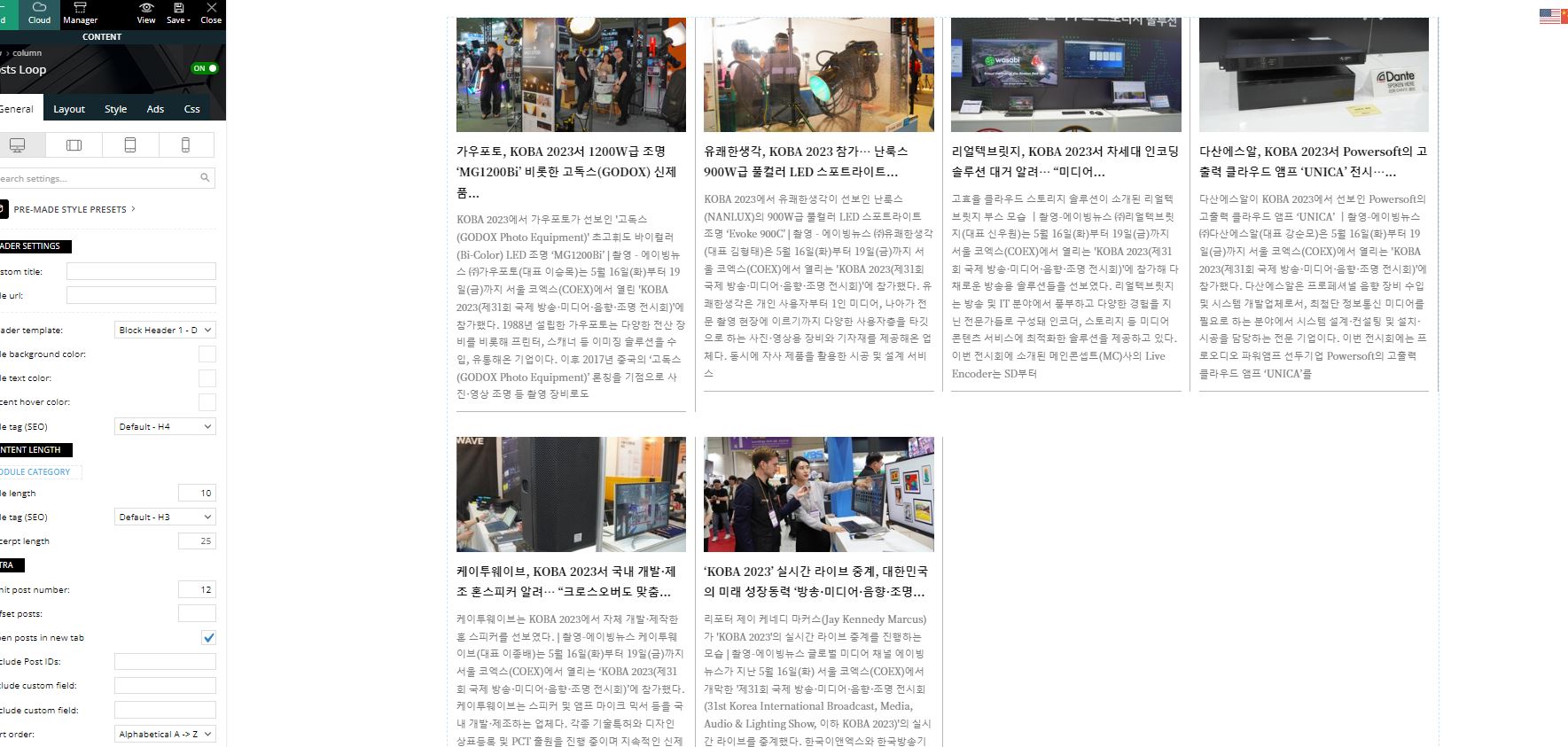
 danna
dannaHello,
I have a homepage with a big grid that displays the latest 4 articles, and below it, there’s a block for each category. Can I exclude articles displayed in the grid from the blocks? The “offset” option doesn’t work because the grid displays the latest posts from over 10 different categories.
I need something like a filter that says: “Don’t display in the Block if displayd in the grid.” Is that possible?
All the best,
Daniel
 luke-tt
 Hi Bettina,
no, this does not work. If I exclude
/jquery-?[0-9.](.*) (.min|.slim|.slim.min)?.js

/jquery-migrate(.min)?.js

/wp-content/plugins/td-composer/legacy/Newsmag/js/tagdiv_theme.min.js

tdBlocksArray
the whole submenu doesn’t work.
Now I deleted the exclusions and it’s like before, I will give you two examples what I mean:
https://www.eronite.com/beziehung-promiskuitive-frau/
=> the menu is not sticky, no “back-to-top” button is shown and the magnifying glass for search is not clickable, no submenu (missing arrows)
https://www.eronite.com/rubber-latex-lack-leder-fetisch/
=> All it’s fine
I am wondering because on some posts it works, on other posts it doesn’t.
Thank you and best regards,
Luke
 Berbi
BerbiHello,
I have 3 websites with TagDiv Newspaper theme installed, each with a specific licence.
Yet for all these 3 websites, Google Search Console tells me that some sitemaps can’t be indexed because of a robots.txt blockade: https://www.screencast.com/t/mDzUsF8B.
There are 3 sitemaps, on all 3 websites, that can’t be indexed :
-author-sitemap.xml
-category-sitemap.xml
-sitemap_index.xml
Yet, here is what I see on my file robots.txt : https://www.screencast.com/t/KGoHXufu
I precise that this ‘Non indexable” bug happens only with TagDiv Newspaper.
Did I miss any settings ?
 nate.brown@coresafety.com
Hello, I am having trouble getting the modules to recognize filters from WooCommerce taxonomies.
https://core-security.com/techservices/ will display the products and the filters on the left side work because their url is: ?tdb_tax_pa_brand=core
but the taxonomies within the module when clicked don’t work: ?taxonomy=pa_key-features&term=nda-compliance
Please assist.
Thank you!
Bettina Hello @manjunatha !
From my point of view, if you don’t use the Mobile Theme plugin, then there is no reason or benefit to AMP. Unfortunately, you can not customize the amp pages so easily, because there are not so many settings and the AMP plugin that you use should be compatible with those features.
Use this CSS code:
a, .td-post-author-name a, .td-post-content blockquote p {

    color: black;

}
Try to change the Accent color from Theme Panel -> Theme Color -> General Theme color -> https://i.imgur.com/gvoN3sh.png
Thank you!
Bettina Hello @srikanth !
If the page is editable with the TagDiv Composer, then yes. Otherwise, no.
https://forum.tagdiv.com/flex-block-settings-guide/
Thank you!
Bettina Hello @dmenciot!
The answer is no. For multiple authors, you can try to use the Guest Author & Co-AuthorCo-Authors Plus plugin.
You can find more useful details here about a custom block:
– https://forum.tagdiv.com/modules-builder-newspaper-theme/
– https://forum.tagdiv.com/flex-block-builder-flex-loop-builder/
Thank you!
 mtdas99
Suddenly Chrome inspect element shows an error:
x Uncaught ReferenceError: tdBlock is not defined
at data:text/javascript;base64,dmFy…KQ==:1:18
x Uncaught SyntaxError: “undefined” is not valid JSON
at JSON.parse (<anonymous>)
at data:text/javascript;base64…0pKQ==:1:17
x Uncaught ReferenceError: tdBlock is not defined
at data:text/javascript;base64…fNzEp:1:18
x Uncaught SyntaxError: “undefined” is not valid JSON
at JSON.parse (<anonymous>)
at data:text/javascript;base64,dmFy…iOiExfSkp:1:17
I couldn’t found solution to this error. I am using lightspeed plugin enabling CSS & JS optimization. Please help to resolve the issue.
URL: https://news.cbshop.in/company-secretary-career-in-india-points-bought-to-know/

