
- NewspaperFlex Block Builder and Flex Loop Builder
- NewspaperHow to use the Flex Blocks cache option
- NewspaperHow to edit modules for Flex Block X
- NewspaperHow to insert a block inside the content of a post
- NewspaperFlex Block Settings Guide
- NewspaperMeta Info on Modules and Blocks
- NewspaperTheme modules and blocks
- TutorialsDefault Block Settings Guide
- NewsmagBlock settings tutorial
- NewsmagCategory tag on modules/blocks
- NewspaperThumbnails – Fix strange looking images on blocks
- NewspaperBlock settings tutorial
- NewspaperCategory Tag on Modules/blocks
- ApiPractical example – How to add a new Block and Module
- Apitd_api_block::delete
- Apitd_api_block::update_key
- Apitd_api_block::update
- Apitd_api_block::add
- ApiAPI – Blocks – Introduction
- NewspaperWP Rocket and Newspaper Theme: Optimization Guide
 notoello
Hi! How may I delete the annoying ad that seems to be built into the theme.
Here’s the html code of this ad:
<div style=”display: inline-block”>
<span class=”td-adspot-title”>Advertisment</span>
</div>
I enabled “Show hidden elements” in the manager, but nothing is showing up there.
Any idea how I can remove this?
Thanks!
 Sebshot69
 Hello, thank you for your message. However, this is a specific issue I’m facing: what I refer to as the contextual menus settings of the builder are the tab options proposed for rows, columns, and elements that make up the building blocks of your TagDive plugin (see attached screenshot). These tabs no longer expand.
Regarding this, I noticed that some users mentioned a potential conflict with other plugins. As a reflex — being familiar with WordPress — I immediately disabled all other plugins to test, but the issue persists.
I also checked the browser console to see if any JavaScript errors were being thrown, but there’s nothing noticeable there either.
I’m truly at a loss and losing a lot of time, as I can’t continue working on our NGO’s website (planet-keeper.org) without access to these contextual menus.
Thank you for your help.
Best regards,
-
This reply was modified 1 year by
Sebshot69.
 Anamaria
 Hello,
You don’t need to make changes in the child theme, you just need to set a placeholder from Theme Panel -> Blocks Settings -> https://i.imgur.com/mo0Cbu2.png
After you set the placeholder, you need to use this to regenerate the thumbs -> https://forum.tagdiv.com/thumbs-on-modules-and-blocks/
Thank you!
 KatiaWaegemans
I have an image block in the right column of my site (www.theveniceinsider.com, on pages, not homepage) which shows 2 images of my books. There is however a dark overlay on top of it which I don’t find in the settings. Can I remove this? I would prefer the real colours to show.
 technologyinnovatorsmedia
Hi
Please check our website its showing error and baground not showing color
Errors:
Warning: Attempt to read property “post_status” on null in /home/kjyndkps/public_html/wp-admin/includes/template.php on line 2312
Warning: Attempt to read property “ID” on null in /home/kjyndkps/public_html/wp-admin/includes/template.php on line 2316
Warning: Attempt to read property “post_status” on null in /home/kjyndkps/public_html/wp-admin/includes/template.php on line 2320
Warning: Attempt to read property “ID” on null in /home/kjyndkps/public_html/wp-admin/includes/template.php on line 2325
Warning: Attempt to read property “ID” on null in /home/kjyndkps/public_html/wp-admin/includes/template.php on line 2329
Warning: Attempt to read property “ID” on null in /home/kjyndkps/public_html/wp-admin/includes/template.php on line 2334
Login Details :
https://www.technology-innovators.com/wp-admin/
Username: admin
Password: Raghu@123
[td_flex_block_1 modules_on_row=”eyJwaG9uZSI6IjEwMCUifQ==” modules_category=”” show_btn=”none” show_excerpt=”” ajax_pagination=”” td_ajax_preloading=”” sort=”” category_id=”” f_title_font_size=”eyJhbGwiOiIxOSIsImxhbmRzY2FwZSI6IjEzIiwicG9ydHJhaXQiOiIxMiJ9″ f_title_font_line_height=”1.3″ show_cat=”none” meta_info_border_style=”” meta_padding=”eyJhbGwiOiIwIiwicGhvbmUiOiIyMHB4IDIwcHggMCJ9″ modules_divider=”” image_size=”td_1068x0″ meta_info_align=”” image_floated=”” tdc_css=”eyJhbGwiOnsibWFyZ2luLWJvdHRvbSI6IjAiLCJkaXNwbGF5IjoiIn0sImxhbmRzY2FwZSI6eyJtYXJnaW4tcmlnaHQiOiItMTUiLCJtYXJnaW4tbGVmdCI6Ii0xNSIsImRpc3BsYXkiOiIifSwibGFuZHNjYXBlX21heF93aWR0aCI6MTE0MCwibGFuZHNjYXBlX21pbl93aWR0aCI6MTAxOSwicG9ydHJhaXQiOnsiZGlzcGxheSI6IiJ9LCJwb3J0cmFpdF9tYXhfd2lkdGgiOjEwMTgsInBvcnRyYWl0X21pbl93aWR0aCI6NzY4LCJwaG9uZSI6eyJtYXJnaW4tcmlnaHQiOiIwIiwibWFyZ2luLWxlZnQiOiIwIiwiZGlzcGxheSI6IiJ9LCJwaG9uZV9tYXhfd2lkdGgiOjc2N30=” meta_info_horiz=”content-horiz-left” f_title_font_weight=”600″ image_height=”67″ all_modules_space=”eyJhbGwiOiI1IiwicGhvbmUiOiIzMCIsImxhbmRzY2FwZSI6IjIwIiwicG9ydHJhaXQiOiIyMCJ9″ art_excerpt=”eyJhbGwiOiIwIiwicG9ydHJhaXQiOiIxMHB4IDAgMCIsInBob25lIjoiMTJweCAwIDAifQ==” art_title=”eyJwb3J0cmFpdCI6IjAgMCA1cHgiLCJhbGwiOiIwIDAgMTBweCJ9″ btn_bg=”rgba(255,255,255,0)” f_btn_font_transform=%
This error coming
Please fix this soon
 Bettina
 Hello!
Make sure you’ve placed them in the right place. Do you have any errors? Ads won’t show until your site is reviewed and approved. Make sure you do not have any ad blockers in your browser. I can see some ads on your homepage, but the ads are using images. Our theme will only display the ads as they are. Also, make sure the code you’ve added is correctly written.
Thank you!
 besthomegear
We have been using the Tagdiv Newspaper theme for over 3 years. By all appearances, it appears to operate efficiently. However, we recently discovered that none of the videos on our site (Posts or Video Watch Page) open when clicked on, they simply spin.
Then we tried the same procedure with Nord Vpn disabled, and ALL videos will open. I’m not sure if this is a new setting with Nord or if my WP developer didn’t set up the mobile template correctly.
If you will, please open our site (www.besthomegear.com) using a Mobile device >open any posts>scroll to any video (like this one; https://www.besthomegear.com/video/ego-electric-riding-mower/) with a VPN enabled, then disabled, and see if the same VPN blocking issue occurs for you.
Also, we don’t find any mobile templates

 rahlplx
Hi, when i create a new news category layout for a specific category page of my newspaper site it repeats in all other news category pages. See the below screenshot for visual understanding of the issue. This issue arrived recently. Please let me know how to solve it?
https://prnt.sc/4NMAfjWb6kp5 repeated in other category screenshot : https://prnt.sc/XD8n-T8ChYf0 repeated : https://prnt.sc/QXwQZ8c0Grvd
Btw i love the answer from here rather then the forum support. Thanks in advance.
 freshmademedia
Hello,
after updating to version 12.7.1. the website https://cadzand-online.de/ does not show post and articles. The navigation and some blocks are okay – but the rest not. So the website is not working.
Thanks for your support
Best regards
Michael
Anamaria Hello,
Please use appropriate language on this forum. We have tried to help you, but the details you’ve provided are not accurate. Additionally, we noticed that you have not extended your support period, yet we have still made efforts to assist you.
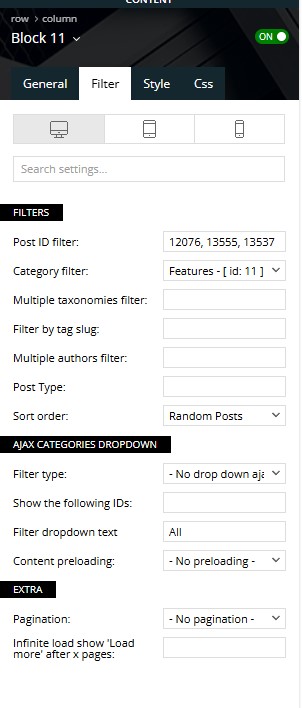
The content in the block consists of posts. If you want different posts to appear there, you need to go to the Filter tab and set the desired filter and sorting options. If you’re experiencing additional issues there, they could be caused by many things—plugin conflicts, specific configurations on the server, and so on.
Additionally, we can provide further assistance, so please contact us via email at contact@tagdiv.com and provide details about your issues along with screenshots. Also, please provide us with WP-Admin and cPanel access so we can investigate the problems.
A solution for sending a screenshot/video is this:
Download, capture, and send: https://www.techsmith.com/jing-tool.html
After making the screenshot, you will have a link; paste it here.
Thank you!
 nikkigaskins
Hi there,
I just recently installed the Newsmag template.
I’m currently facing two dilemmas.
PROBLEM #1: The right side of my posts look so empty right now. (See example: https://www.berkeleyobserver.com/2025/05/02/berkeley-county-enters-drought-as-dry-spell-worsens/) How do I add the widgets that are on my homepage to the posts of my articles?
I attempted to add the widgets to my posts by going to Appearance –> Widgets; however, after uploading this Newsmag, I’m missing A LOT of blocks.
For the homepage, I used the TagDiv Composer to drop/drag the widgets. I don’t appear to have that option with article posts.
PROBLEM #2: Because I appear to be missing a lot of blocks, I believe this is why I also cannot also edit the footer.
Any assistance with these two issues would be greatly appreciated. I have tried to YouTube the solution and Google it, but I’m striking out.
Thank you for your help with this!
Sincerely,
Nikki
 sunsetdaily
 I am trtying to add one link to qa button that was preset in the template. HOW IN FUCKS NUTS DO YOU DO THAT and most of all, why is it so hard? That should take as long as it takes for you to copy it and paste it and press save and yet it is imkpossible to carry out using this asinine theme that is insane. WHY IS EVERYTHING SO HARD? Why? EWhy is it not easy? Why cant we press the mouse and enter the column or function we need to enter with ezase? How do you get intyo these blocks for gods sakes? its a crap shoot. Its unreal.
sunsetdaily I have an idea. Why don’t you explain how to actually do anything?
Hoe do you do anything on your templates?
Tell us how to easily get into a column or a block just to change the filter category.
How do you do that? Because I have three columns, and the only one I seem to be able to alter is the first one.
I press Enter 188 times, I try right-clicking, and I try to get to the layer that controls the second and third columns. What is the actual way to access these things? One click? Double click? Do you press column or row? Again—what the fuck do you do to make one simple change? This is maddening. Something that should take a millisecond is somehow impossible to carry out using this template. I’m an idiot for thinking it might work the next time I try it. This thing is so bad. It’s so bad. It’s not easy. Not even close.
Overall, it shouldn’t be this hard to add a simple link or to change the category content. That should take about 1 to 3 seconds of actual effort. Honestly, it’s exhausting trying to do anything on this template. It’s exhausting.
sunsetdaily You can’t even right-click to try to delete a block. Pressing “delete” on the keyboard doesn’t work either. So now we have this big empty space on a page because we can’t access the block to modify or remove it. The only alternative is to rebuild the entire page from scratch—and at that point, I’m asking myself, why even bother? We need a different design template.
This is what’s so frustrating: our entire workload is at a standstill because your template—or whatever it is—doesn’t work properly. You can barely edit anything in your “tag dev” or whatever it’s called.
By the way, no one set up a listing using tag dev. No one even opened that page until yesterday or the day before. These pages were pre-set, so when you add something, it’s supposed to appear on the correct page. But your platform or theme is not compatible with EventPrime. I had to make changes yesterday, and for your information, that now means we have to re-list about 400 items—creating a massive amount of extra work—because this template is broken.
This isn’t a game. It’s a business. And this is unacceptable. We can’t do anything—we’re stuck, pressing “enter” 88 times for absolutely nothing.
sunsetdaily I understand all of that, but let’s set the volatility aside for now because this thing is incredibly frustrating. I’m on a page right now and, for the life of me, I can’t delete the content in a block. The block is either broken or set up incorrectly, and there’s no way to delete or modify it. This thing is a class-A piece of junk that I unfortunately bought. It’s caused way more trouble than it’s worth.
I’m actually trying to make changes, which is part of the problem too—you can’t even uninstall the thing. It sits there acting as if its uninstalling but it never ends. therfore you have tyo interrup it which is bad. it leaves files and foolders that cause conflict.
If there were a way to show you screenshots, that would really help.
Overall, the point is that it shouldn’t be this hard. When you change a block, it should just delete—boom, end of story. When you switch templates, it should uninstall cleanly so you can move on.
This thing is awful. It really is. Everything is difficult, and on top of that, I have a master’s degree in Telecommunications and Media from Stern/NYU. I manage some of the most complex scripts on the planet. I’ve built everything in my life using open source tools.
Design isn’t my strength—that’s where you come in. You’re supposed to make our lives easier, not harder. You’re supposed to make us look good by building on the solid foundations we bring. This platform doesn’t do that. It’s a total gamble whether something will work or not.
Anamaria Hello,
Unfortunately, I don’t quite understand what you mean by “uninstall the template” — are you trying to install another prebuilt website, or what exactly is the problem? What is not uninstalling?
Also, regarding events, you can’t use the TagDiv Composer to edit the templates. For example, on blocks, you can set the custom post type here to display them, but it also depends on which plugin you’re using for events -> https://i.imgur.com/bzTKr7p.png
Thank you!
 Simion C.
 As long as the result is how you want it, then it’s fine. But the post ID filters should work fine by itself. Assuming the post IDs are correct, the block should display those posts. In case there are further issues I suggest to send us an email at contact@tagdiv.com and provide admin login for the website, so we can take a look as well.
Thank you!
 ICONS
ICONSHi,
We use a custom cloud template for certain categories. Posts in this category should show other custom ads than the standard categories. I can use custom ad placement for this but this only gives me the option to add a custom ad above or below the article text. Is it possible to use an inline ad for this alternative ad block so that it shown in the middle of the article text?
Thanks
 bconrad
Greetings,
We are having severe issues with the them. When dragging Single Post Content to the Composer window it appears to delete the Row that it is dragged to and does not properly save.
I have tried deactivating several plugins to fix this to no avail. Currently no template properly displays the Single Post Content from TD Composer.
The issue is that no [tdb_single_content] block properly loads in any template.
The website is: https://thisisreno.com/reno-nevadas-online-news-and-events-source-updated-daily-2/
Background: Yesterday, the theme was deactivated, requiring my license be re-added. That screwed up the theme settings. Problems continue, and currently posts cannot be seen.
Simion C. Hi,
According to those settings, if all the 3 posts belong to the Features category then they should appear in the block. If only one of them appears, then probably the other 2 do not belong to that specific category.
Try setting the category filter to all categories to see if all 3 posts appear https://prnt.sc/QVoKmBfKrH7z Leave the block like that if your desired posts are displayed then.
Thank you!
 nearview
I’ve seen other threads about this, but we’re stuck using The Events Calendar plugin for most of our media company clients. Has anyone had good results with being able to format various pages for The Events Calendar within cloud templates? I know that Elementor has a lot of blocks that work great with TEC, but those blocks don’t exist on TagDiv.
Pages we’d like to be able to better format:
– Events home page
– Single events
– Event category pages
– Venue pages
– Organizer pages
Thoughts, anyone?
 leagcooks
Hi,
I have added 3 post ids to show randomly on my block on the home page but it only shows the first ID? it does not randomly show all 3.
my settings are below
 <br />host images<br />
Hope you can help.
Thanks
 YoonHo, Lee
Hello. Thank you for your hard work.
BlockChain PRO pre-built theme (including content) has been successfully installed.
After that, the first section of the homepage works normally on large screens. However, on mobile (small screens), there is an issue where the pages overlap behind the menu, or the screen is cut off and overlaps again after a little manipulation.
It seems that the basic settings such as height are different from the example (sample) theme. Please let me know what to do.
* Use the latest version of Chrome browser on desktops (PCs).
* Use iPhone and Chrome browser on mobile devices.
* Please refer to the attached My site, video, and images.
https://xn--9y2bv4wp6fc6a.com/
https://drive.google.com/file/d/1lcgFSIo5L_JNHBdKAO_Gw_bWuz_Gb-FY/view?usp=sharing
https://drive.google.com/file/d/1jJrQVtfd8GlkpnKmr8tAn1jsHQJ0tAPT/view?usp=sharing
 fnewsmag
 I noticed also that raw HTML is not available as a block in the module template builder, so that may be why I was having an issue adding a short code to the module template. Any work around for this? I’d like to use the custom module templates instead of the pre-made flex block elements, since I can customize them further.
Thank you!
fnewsmagMolongui Co-Authors plugin seems to work great for co-authors except for this one critical glitch –
when using the tdb_module_author_name block inside of a custom module, it seems like my admin author is always listed instead of the correct author name. Curiously though, it does seem to link the href to the correct author page. Therefore, on category pages such as fnewsmagazine.com/category/news where i’m using the module template, the author is always fnewsmagazine, although when clicked it does bring you to the correct author. This can also be seen on our homepage and the date archive page. It just says F Newsmagazine as the author rather than the actual authors and co-authors.
In contrast, it works properly (including the multiple authors) on the author page we’ve created, which is using the Flex Block 1 element – td_flex_block_1
shown here: https://fnewsmagazine.com/wp62/author/d-l-adams/
One other curious element of this – when i load the module template editor, it lists the admin author in the box, but when i place a new author name module block in the composer, it does correctly get the name of the author, however when i save and reload the template, it seems to load the admin author name again instead of the correct author.
Disabling the Molongui plugin stops this behavior. I’m using the latest versions of TagDiv and Molongui
Thanks for your time in looking into this!
In the meantime, i’m curious if I can just add a shortcode that molongui provided in this link explaining the integration issues with TagDiv in place of the author module name. The link says to just add a text element with [[molongui_byline]] shortcode in it, however it seems like when I add an inline text with the shortcode as the content, it just shows the shortcode code and doesn’t actually display the data. Let me know if you have any guidance on this as well.
Thanks for your time!


