- NewspaperFlex Block Builder and Flex Loop Builder
- NewspaperHow to use the Flex Blocks cache option
- NewspaperHow to edit modules for Flex Block X
- NewspaperHow to insert a block inside the content of a post
- NewspaperFlex Block Settings Guide
- NewspaperMeta Info on Modules and Blocks
- NewspaperTheme modules and blocks
- TutorialsDefault Block Settings Guide
- NewsmagBlock settings tutorial
- NewsmagCategory tag on modules/blocks
- NewspaperThumbnails – Fix strange looking images on blocks
- NewspaperBlock settings tutorial
- NewspaperCategory Tag on Modules/blocks
- ApiPractical example – How to add a new Block and Module
- Apitd_api_block::delete
- Apitd_api_block::update_key
- Apitd_api_block::update
- Apitd_api_block::add
- ApiAPI – Blocks – Introduction
- NewspaperWP Rocket and Newspaper Theme: Optimization Guide
 Calin
Calin Hi,
The problem with the ads that are not display on your original browser can be related to an extension (maybe an ad blocker or something similar) you have installed on the browser you are using, if so, the same one used in incognito mode should display the ads.
Thank you!
Calin Hi,
I see. This can be a bit tricky to set up. We’ve created a guide that should help you through the process, I hope you find it useful: How to insert a block inside the content of a post
Thank you!
Calin Hi,
Despite us fixing it at the time, attackers may try to exploit it, even if it’s useless to try. Are you perhaps using the Wordfence security plugin? It has an option that can be used to block specific requests – https://prnt.sc/1V-dHi7xTQXk Maybe similar plugins have such an option as well, in case you are using a different plugin. Or are you using cloudflare perhaps? If you do, you could block it there – https://prnt.sc/j97NJi77d5RO This kind of attack doesn’t usually last long, the requests should stop after some time.
Thank you!
 zaildaar
 I started with flex block 1. i removed unwanted things. Now can i add a custom date with every title ?
or should i have to create a module for it
 santiagocalaforra
 Hi Calin,
Thanks again for your reply!
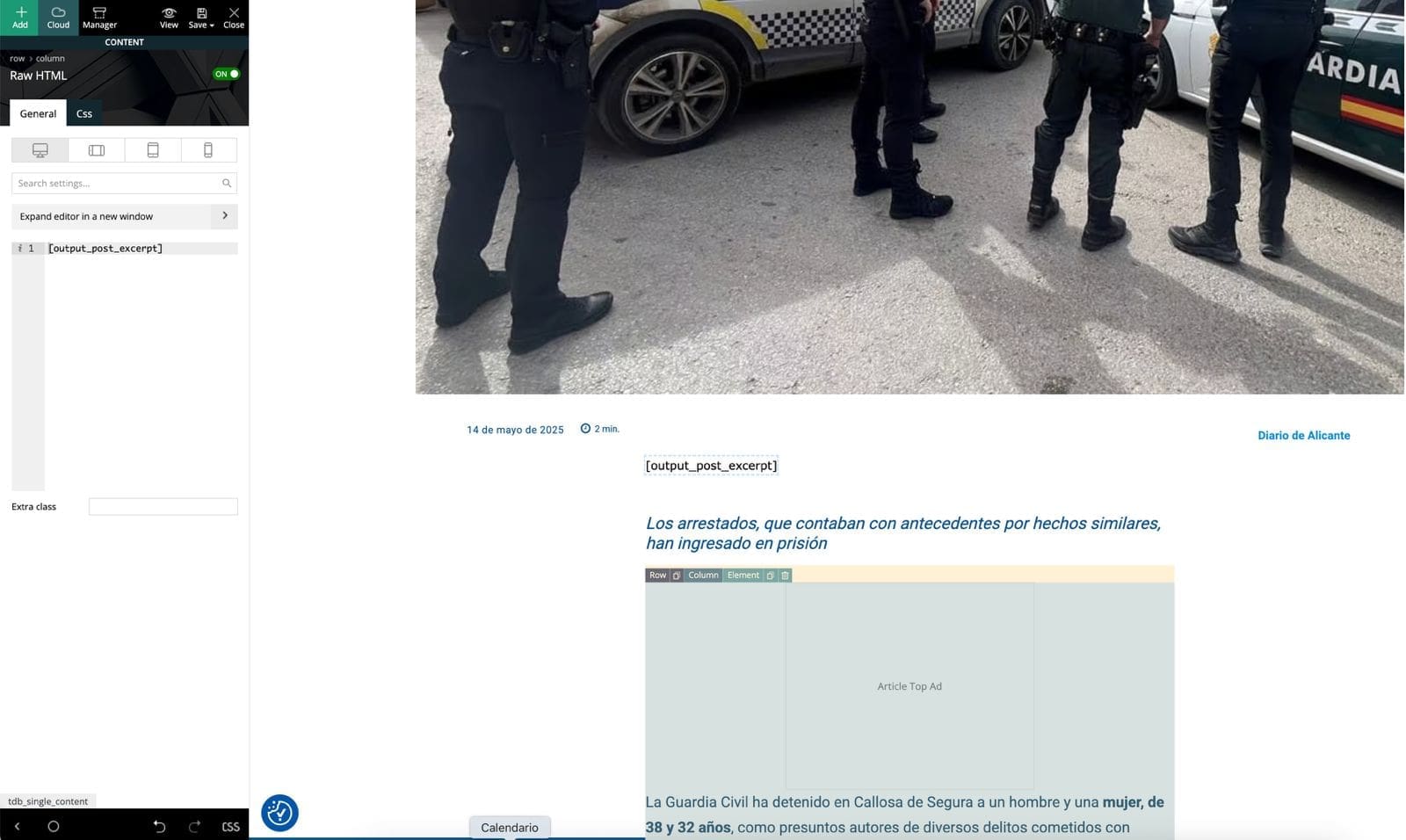
I tried using the method you shared from StackExchange — I added this line to my child theme’s functions.php:
php
Copiar
Editar
add_shortcode( ‘output_post_excerpt’, ‘get_the_excerpt’ );
Then I edited my Single Post Cloud Template in tagDiv Composer, added a Text block, and inserted [output_post_excerpt].
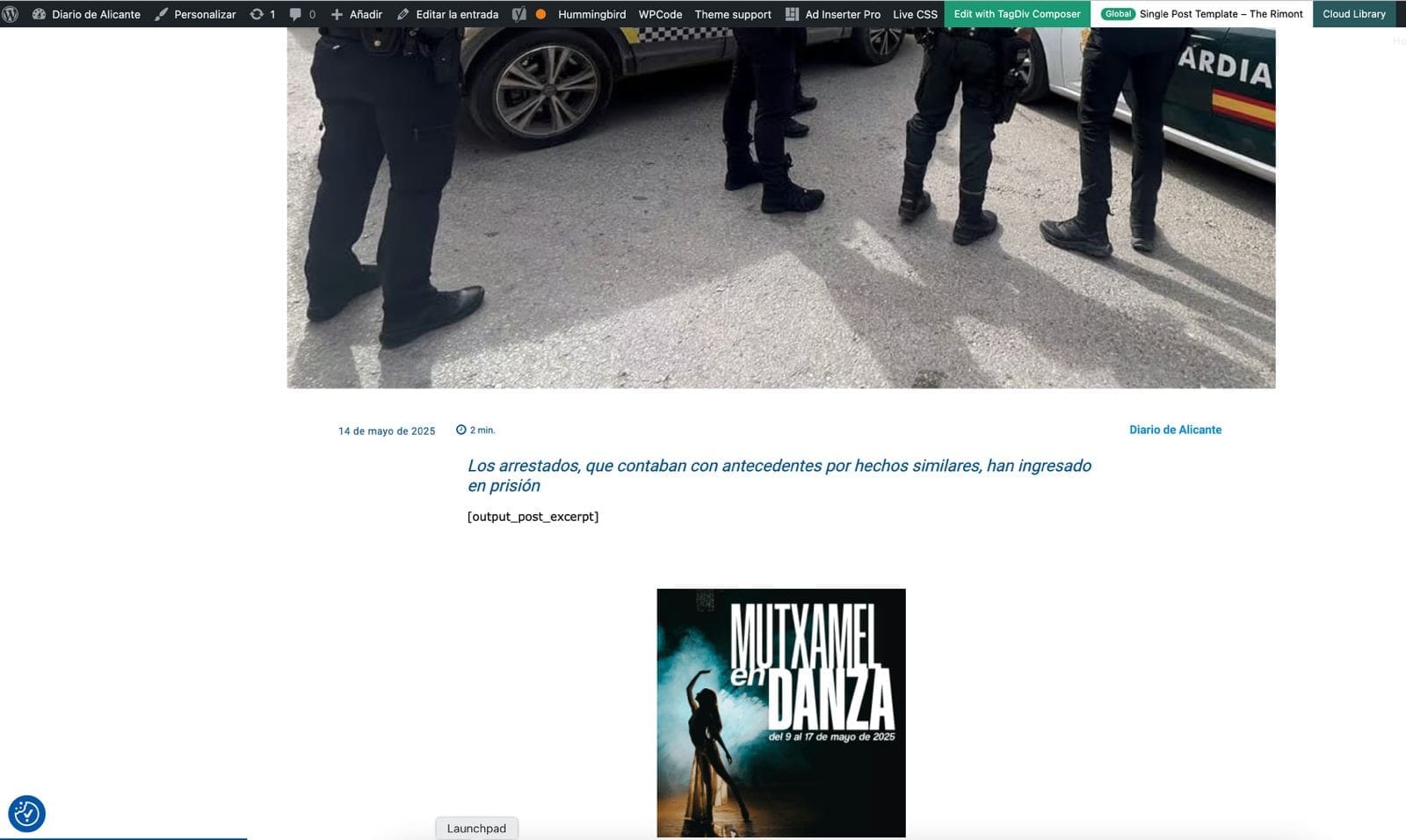
Unfortunately, the shortcode doesn’t render anything on the frontend. It just leaves a blank space where the excerpt should be. I’ve cleared all cache and reloaded everything, but still no result.
Is it possible that tagDiv Composer blocks don’t render shortcodes like this, or do I need a different type of block?
Any ideas or workaround would be greatly appreciated.
https://diariodealicante.net/wp-content/uploads/2025/05/editor.jpeg
https://diariodealicante.net/wp-content/uploads/2025/05/single.jpeg
Thanks!
 Aldis
AldisHi,
I’m using your theme and would really appreciate your help.
I would like to insert a block in the middle of the single post template (similar to how ads are placed) that displays 3–4 of the most read articles — something like (“Others are reading now”) section.
Could you please advise how I can achieve this? Ideally, it should behave similarly to how the ad blocks work within the content — appearing automatically after a certain paragraph.
Thanks in advance!
BR, Aldis
Calin Hi,
You can do that layout in multiple ways, most simple will be to set a row or inner row, set it in 3 columns and set the header and red borders for each column, after that you can use the flex block 1 and hide/removed all elements (category, image, date, author) let only tile, or you can use the module builder to create a module that contains only the title – https://forum.tagdiv.com/modules-builder-newspaper-theme/
Thank you!
Calin Hello,
Auto ads (like Google AdSense) automatically choose where and when to show ads on your site using AI. They scan your page, run real-time ad auctions, and place ads to maximize revenue and user experience.
They might not always display because:
Thank you!
 Polifinus
Hi sir:
Since Sunday we are experiencing a weird issue in our site. If you check the url I attached you, looks like the problem comes from the new WordPress version and the Newspaper theme wich does not clean the css coming from Gutenberg editor:
✅ Main culprit: the WordPress core (block editor)
the Newspaper theme, which doesn’t properly override or disable it.
🧠 Why?
Since WordPress version 5.9 (and especially from 6.1 onwards), the block editor (Gutenberg) automatically injects CSS variables into :root and adds classes like .has-white-background-color, .has-black-border-color, .has-shadow–outlined, etc.
This is part of the global styles system from the block editor—even if you haven’t configured it intentionally.
🔍 What does the Newspaper theme do about it?
Newspaper doesn’t block these Gutenberg global styles like other themes do (for example, by disabling theme.json or the global style system).
It also doesn’t reset or sanitize the CSS to prevent those styles from leaking into the frontend, especially if you’re using custom HTML or manual templates.
As a result, you end up with styles that are invisible in the editor, but visibly affect the live site.
🧩 How can I be sure?
Because in the raw HTML of the page, I found this key variable:
–wp–preset–shadow–outlined: 6px 6px 0px -3px rgba(255, 255, 255, 1), 6px 6px rgba(0, 0, 0, 1);
 sigmadespell@gmail.com
Hello, as title states I am using adsense auto ads but in main pages and other pages as well I can see the ads poping, but when inside articles, sometimes render, sometimes not. Is it known or a newspaper specific issue (with JS block or anything) or it is just Google that not rendering ads?
Things I have already tried:
– When I am testing this, I am not logged in and navigating with a clear browser session.
– I can see the Adsense networks requests in developer tools coming in, they just not rendered.
Calin Hello,
Yes, you should use the filters from flock block – https://forum.tagdiv.com/flex-block-settings-guide/ if that is a taxonomy just add the taxonomy id https://i.imgur.com/pyzPKr4.png also you can set the post type you’ll like to display results – https://i.imgur.com/iG8DSwP.png
Thank you!
Calin Hi,
If you want to use The Events Calendar to display events to tagDiv blocks – https://i.imgur.com/TJpL4uH.png you need to use tagDiv Composer, select the block and set the post type (in your case I think will be event or events).
Thank you!
 JimSmith
It seems shortcodes cannot be used. I use The Events Calendar and any block I have used to display a page using shortcodes does not work.
Please advise which block to use to apply shortcodes.
 nearview
Hi TagDiv team! A site we are building has a custom post taxonomy called “Regions” where they are tagging each post by geographic regions. They wanted this separate from the post categories. We would like to place a Flex Block on a site’s home page, but have it filtered only for posts where the custom taxonomy, region, is “Hartford County” for example. The region slug is hartford-county.
Is there a way to filter a flex block only for posts that are have the region taxonomy equal to Hartford County?
 stavrosgian
 Thank you very much for your reply and the clarification regarding the cache behavior of Flex Blocks.
We are already familiar with the method described in the link you provided, and we have used the theme panel’s cache clearing option under System Status. Unfortunately, this does not resolve the issue we are facing.
The main problem is that the Block Cache Expiration Time setting does not seem to work as intended, as also mentioned by other users in the support thread. As a result, the mobile version of our homepage does not update and continues to display outdated content — which makes it effectively non-functional.
At the moment, we have been forced to disable the mobile frontpage layout entirely, and mobile users are now served the desktop homepage as a fallback.
Please, we kindly ask for your urgent assistance in identifying a working solution. We are running a high-traffic news website and need the mobile homepage to function reliably with fresh content.
Calin Hi,
The cache option from blocks will apply individually for each block in part and it will not be clear when you clear the cache from cache plugin, what you can do to clear the cache from all blocks is to use the theme panel cache option under system status – https://forum.tagdiv.com/use-flex-blocks-cache-option/ this should resolve the problem.
Thank you!
Calin Hi Cloud Hosting,
1. The theme do not provide this option, therefore you’ll need to use an extra plugin to achieve multiple authors in a post, I hope our guide will help you – https://forum.tagdiv.com/adding-multiple-authors-articles/
2. Those can be added using the guide for ads inside post content – https://forum.tagdiv.com/article-ads/
3. If you are referring to the format, this can be set custom as you like – https://i.imgur.com/xOjndDn.jpeg
4. Use tagDiv Composer on single post element and add the reading element on the template – https://i.imgur.com/b6i9REe.jpeg – https://i.imgur.com/6dsjZ5L.jpeg
5. I believe this is best done directly in the post content at the end of start of the article, therefore will no need for extra options.
6. I believe this is related to an article list that can be done using the wordpress editor – https://www.google.com/search?q=lists+style+goutenberg+wordpress#fpstate=ive&vld=cid:c16f3c84,vid:AR4c3BhZr1M,st:0
7. There are a few options in the classic editor and a few in Gutenberg editor that can be used – https://wordpress.com/support/wordpress-editor/blocks/quote-block/
8. This is an option that can be set on theme blocks, for this you need to edit the page or the template using tagDiv Composer – select the block and check in filter tab the settings for ajax categories dropdown – https://i.imgur.com/k79i7H3.jpeg the results will be – https://i.imgur.com/aoOEyBa.jpeg
Thank you!
 besthomegear
 Can anyone else in this forum address the issue with VPN blocking our videos when it is enabled? Again, try this example from a Mobile Device, with your VPN enabled: https://www.besthomegear.com/video/ego-electric-riding-mower/
This or any other video on our site will not open for us. But if you disable VPN, they all open.
Since nearly 70% of all mobile users employ VPN as we do, this is a huge issue, so we appreciate any guidance using Tagdiv “mobile friendly” theme.
 vunt
vuntHello Support Team,
I am currently using the Newspaper theme and encountered an issue with the “Column Text” block. When I click on Edit Content to insert a shortcode (e.g., [contact-form-7]), the editor gets stuck on the loading screen and does not display the content area (please see the attached screenshot for reference).
I have tried refreshing the page and clearing the cache, but the issue persists.
Could you please assist me in resolving this issue?
Thank you in advance for your support.
Best regards,
Vunt
We are using the WP Super Cache plugin on our website, configured according to the official recommendations published by tagDiv.
Recently, due to serious high CPU utilization issues, we investigated our performance bottlenecks and identified that many of the slow queries were originating from the td-composer plugin. The queries were triggered by heavy use of flex blocks across our homepage and category pages. These blocks often regenerate content on each page load, causing significant strain on server resources during traffic spikes.
Following a suggestion by @Simion from tagDiv support, we enabled Block Caching for all Flex Blocks. This adjustment had a noticeable and immediate impact on performance. For a high-traffic news website like ours, this improvement was essential — and we now strongly recommend enabling Block Cache for similar heavy-use cases.
https://postimg.cc/NLQHPdvT
https://postimg.cc/rRyR0wNg
Encouraged by these results, we applied the exact same cache settings to our Mobile Page layout using the mobile theme configuration from Newspaper. However, while the Desktop version properly refreshes and reflects new content over time, the Mobile version remains stale, failing to show newly published articles.
To force the new content to appear on mobile, we are currently manually deleting the entire cache from the admin dashboard — something that is clearly not a sustainable or acceptable solution in production.
We would like to ask:
– Why is the mobile version not refreshing like the desktop version under the same block cache settings?
– Is there a way to independently invalidate or refresh mobile cache when new posts are published?
– Could this be a bug or a limitation in how the td-composer handles caching for mobile themes?
Any help or guidance would be greatly appreciated — especially from other high-traffic sites using similar setups.
Thank you in advance!
Calin Hi,
I understand what you’re saying. To investigate the issue further, we’ll need temporary access to your website’s WordPress admin area (wp-admin).
Please also let us know which specific page and block are using the “Popular filtering (24h/48h/7d)” feature.
If you’re okay with this, please contact us at contact@tagdiv.com with temporary wp-admin credentials and include a link to this support topic so we can identify your request more quickly.
Thank you!
 24h_support
We have followed all the documentation and recommended solutions but the functionality of the filter of Popular filtering (24h/48/7d) is not working correctly. We can identify that the posts which are shown are not the most popular in that timeframe.
For example an article from 1 month ago has total views 50 and another article has 200 views which was uploaded yesterday. The first one is shown in the most popular but the later is not, this is the case for various posts. Also the posts change on each refresh.In this example the filter is set to Most Popular filtering 7d.
See also the following details:
– Website is using WP Rocket cache
– Block Settings > USE LAST 24/48 HOURS & 7 DAYS POST SORTING is enabled
– Post Settings > Ajax view count is enabled
– Post Settings > Post and Custom Post types > SHOW POST VIEWS is enabled
– Sort Order is Popular (last 7 days)
 mbrckn
 Are you able to send here the raw example sourcecode/shortcode for this block to put in the Sourceview in the page, please?
 TomLocke
I’m experiencing a problem with the mobile version of my website using the Newspaper Theme. The issue is that the article pages appear significantly different on mobile devices compared to what I see in the TagDiv Composer editor.
For example, when viewing a specific article on my phone, certain design elements are missing or rearranged compared to the editor view. The structure, typography, and even the spacing between blocks do not match the layout I created in TagDiv Composer.
I’ve attached two screenshots for reference:
One from the TagDiv Composer editor (how the article is supposed to look),
One from a mobile device (how it actually displays live).
Could you please advise how to resolve this inconsistency? Is there a setting or mobile override I might be missing?
Thank you in advance for your help.


stavrosgianI am experiencing serious performance issues on my WordPress website (https://www.kefaloniapress.gr), which is using the Newspaper theme with the td-composer plugin.
According to my PHP-FPM slow log and process traces, there are frequent slow executions (5–6+ seconds) directly tied to MySQL queries triggered by shortcodes and blocks from td-composer. Specifically, I have traced the following function calls in the stack:
– td_block.php → td_data_source.php → WP_Query → get_posts() → mysqli_query()
These queries appear to originate from blocks such as td_block_3 and td_global_blocks, and are responsible for consistently slow responses and elevated server load. The issue becomes more critical during traffic spikes, causing degraded performance, long page load times, and even occasional 502/504 errors.
My server has sufficient resources (32GB RAM, 8 CPU cores), and I have implemented full caching (object cache and page cache). Despite that, the problem persists, and appears to be directly related to the dynamic queries used by the theme/plugin.
Could you please assist with optimizing these queries or advise on best practices to reduce the load caused by td-composer shortcodes and blocks?
Or can someone help me address the problem on a paid plan ?
Thank you in advance for your support.