
- TutorialsDefault Block Settings Guide
- NewspaperWP Rocket and Newspaper Theme: Optimization Guide
- TutorialsFrom WPBakery to tagDiv Composer
- TutorialsOffset Feature
- TutorialsWhat is Ajax preloading?
 Bjerknez
Hello!
Please se my site here:
https://bjerknez.no
Several blocks missing and weird letters etc. shows instead. Header is also feil.
This happend after update to ver. 10. I have also updated Composer etc.
Please help!
 Vlad S
 Hello !
Please try and reset your excerpt as you can see it here: https://www.screencast.com/t/0tVFi1w6n And also we have noticed that you are not using any blocks on your homepage.
Thank you !
 npadrid
When I enable the main menu sticky option, it does not create a zone for me to add any content/blocks to it. I am also not able to remove the row/column from the header menu that comes by default on the blank header template to make room for the header menu sticky zone. If I try to remove it, it gets recreated automatically. I have tried setting the sticky type to both Smart snap and Always, but nothing happens. I have also tried setting the header in the theme panel to – No Template – and set the sticky menu option to both Always sticky and Smart snap, but that does not work. Same goes with the mobile menu sticky.
 Nitneuk
 My website : https://gentlemanmoderne.com
I just have a red block “Instagram Gallery” instead of the Footer Instagram Section. I use the instagram account access configuration in the theme setting but it does not change anything.
 Calin
Calin Hi,
1. Please notice that the Disqus plugin was not tested with our theme, therefore we can not provide technical support for the provide provide by this plugin, please make sure that you are using this plugin only on posts, not pages.
2. Unfortunately there is no settings for the default top bar to change the size ( height ), only the width -> http://prntscr.com/pt9edo
In order to have more control over the header and top bar we recommend to use a cloud header from tagDiv Cloud Library and edit it with tagDiv Composer
3. Unfortunately for the moment there is no option to set the social media in the order you want, sorry!
4. if the H2 is inside the content, then the settings from theme panel should be apply -> http://prntscr.com/pt9hkq, please provide some more details or a link where I can inspect this problem.
5. So if I understand correctly you want to have unique articles on pages, if is so then you can use this option -> https://forum.tagdiv.com/unique-articles/
6. The page templates are these -> https://forum.tagdiv.com/page-templates-2/the unfortunately there is no settings to make a page template, the design nee to be make with tagDiv Composer.
7. Only the the videos from YouTube will work -> http://prntscr.com/pt9ojh, maybe this option will be add in the coming updates.
8. The WP Rocket plugin was not tested with our theme, therefore I can not say how or it will work properly with our theme, sorry! -> https://www.screencast.com/t/cmPkh9jba4sZ
9. The flex can be adjust for all device individual -> http://prntscr.com/pt9qrl -> http://prntscr.com/pt9r37 you can check more about flex blocks in our documentation from here -> https://forum.tagdiv.com/flex-block-settings-guide/
10. There is an general option in theme panel -> http://prntscr.com/pt9s7p but this will not apply only on block headers that do not have set an individual style.
11. That is happen because the standard width of the website is 1068px -> http://prntscr.com/pt9z53 + margin -> https://www.screencast.com/t/FmgLs3wRkAAS when you edit the page will add and extra width from tagDiv Composer sidebar and some padding on the page content, so this will exceed the 1366px.
12. If you are referring to the mega menu next/prev buttons -> https://www.screencast.com/t/xZxnf7Sq2 then you can hide theme only with custom css, you can try this custom css
.td_block_mega_menu .td-next-prev-wrap{
  visibility : hidden;
}
The code need to be set in Theme panel> Custom code> Custom css
If you still have some questions, or I was not clear enough please let me know!
Thank you!
 ahmetekinler
 I know, but no blocks. Where can I add them? for example block 3
Calin Hi,
Please notice that the block 17 will display only the featured image for the first post, the rest of them will be display only the title -> http://prntscr.com/pt8ozd -> http://prntscr.com/pt8pvm -> https://demo.tagdiv.com/newspaper/block-17/ so you’ll need to use the tagDiv Composer -> https://tagdiv.com/tagdiv-composer-page-builder-basics/ and change the block with another one block or flex block. -> http://prntscr.com/pt8qkg
Than you!
Calin Hi,
There is a problem with the “Big Grid Full 8 and Big Grid Style: Grid style 4 – Bottom box” it should look like this -> http://prntscr.com/pt8jxd here is a quick fix -> http://prntscr.com/pt8kkh
.td-grid-style-4 .td-module-meta-info > span {

    display: inline-flex;

}
the code need to be set in Theme panel>Custom code> Custom css; also on some blocks do not gave category on module or is disable from theme panel -> http://prntscr.com/pt8mqe
,or you can use the Big Grid Flex 2 and set it like this -> http://prntscr.com/pt8jdi
Thank you!
 Alina S
Hello, Community!
We know you all want to make your website faster :), we want that for you, too. Newspaper theme 10 brings you a new way to build a faster WordPress website. For the first time in WordPress, you have the freedom to choose how much code the theme is loading and optimize your website’s performance straight from the beginning.
To give you this functionality, we’ve introduced a new plugin called the Standard Pack (available to you for free.) When you update to Newspaper 10, you must activate this plugin, or your website will display the shortcodes on the frontend. We cannot make the plugin automatically activate for you, so you’ll need to go to WordPress Admin area > Newspaper Theme > Plugins and enable the Standard Pack plugin.
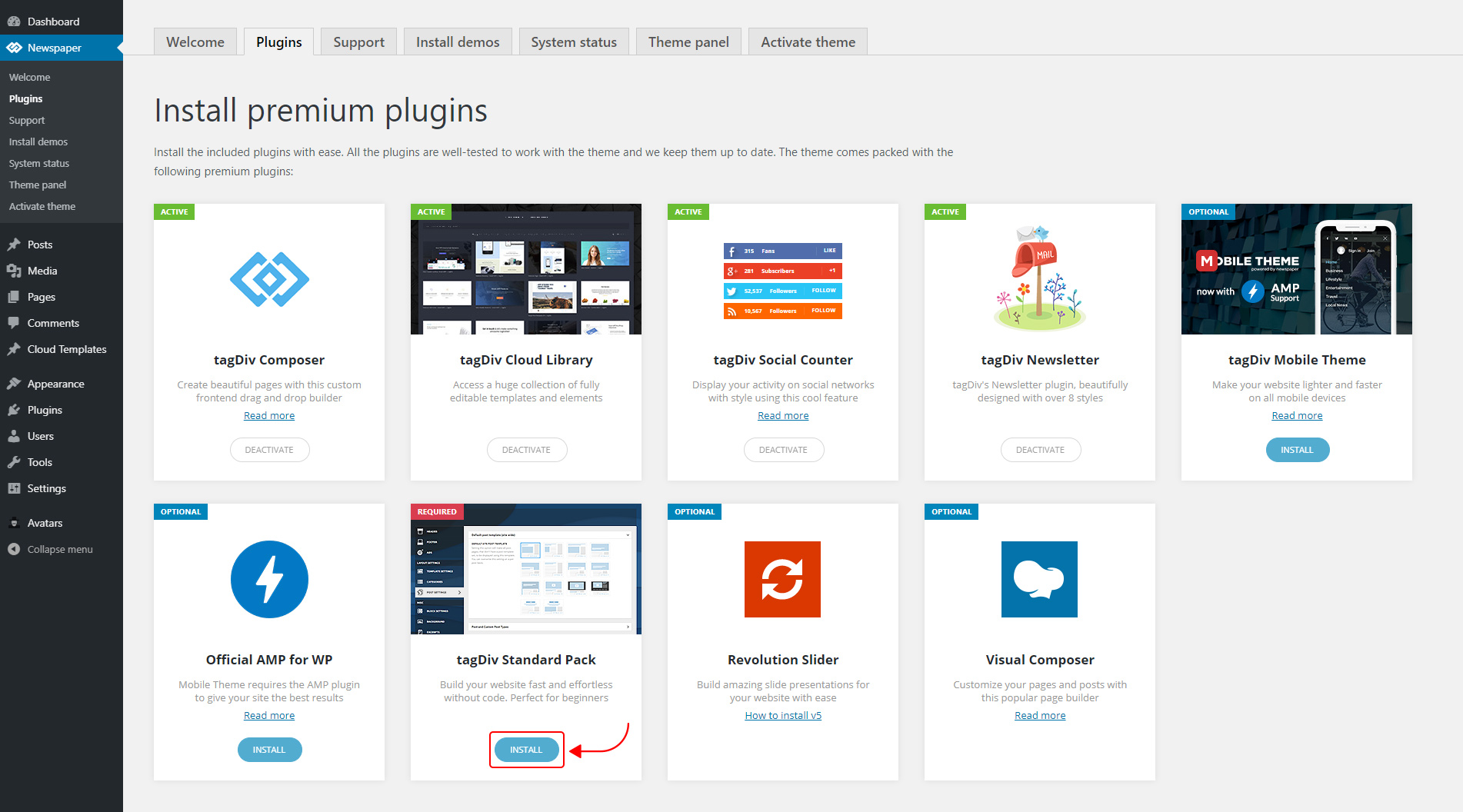
The new Standard Pack Plugin has two functions:
– it brings all the functionality you love in the previous versions
– allows you to separate things when you want to build everything customized and go for website’ performance.
The complete list of templates influenced by the Standard Pack plugin:
In the theme panel:
15 Headers
8 Category templates
10 Big Grids
19 Modules for blocks
14 Single post styles
14 Footer templates
In the tagDiv Composer:
25 Blocks
12 Big Grids
10 Big Grid Full
1 Big Grid Slide
Extra
All the demos that are not marked as PRO Demos.
You can find more details on how to use the Standard Pack Plugin in the dedicated article. When your website has no more dependencies on the Standard Pack plugin, you can deactivate it to increase the page loading time and performance.
If you need the previous version, you can download it from here (Newspaper v9.8).
I hope you’ll enjoy this update!
Thank you!
Calin Hello,
I do not quite understand, you want to show dates for one category and the posts that make part from that category? if is so then you can achieve this with using tagDiv Composer with tagDiv Cloud Library, get from cloud two single post template and two category templates and edit them, let on one category the date and set it in theme panel on the category you need to set the date -> http://prntscr.com/pt84iy, on the second category template remove the date -> http://prntscr.com/pt83zq and set it general in categories templates ( theme panel -> http://prntscr.com/pt84tg), do the same with single post template.
Also from home page you can use flex blocks and remove the date from the blocks you want -> https://forum.tagdiv.com/flex-block-settings-guide/
Hope this will help you!
Thank you!
 jkfriendsnm
First of all, thank you for the Mobile theme for AMP pages. It is a life-saver.
A) Currently, the permalink for AMP pages look like this: site.com/page/?amp. I want to change it to site.com/page/amp/. How do I change it? My hosting platform is NGINX.
B) For AMP Adsense ads, there are 2 code-blocks given by Adsense namely the insertion of the amp ads JS file in the header block and the actual AMP auto ads code-block in the body. However, in the mobile theme setting, there is only 1 box for AMP ads. Where do I put these 2 block blocks in <head> and <body> respectively?
C) Currently, I have Mobile + AMP option enabled in the mobile theme settings page. I notice that time-to-time, the Mobile theme switches back to Mobile only – thus removes the AMP option from the site completely. I don’t know what triggers that to switching. Can you please explain how to stick the option to Mobile + AMP constantly?
D) I want to stick to the text based logo for Mobile and AMP pages however I want an image logo for desktop version. The moment I specify the image under Header > Logo settings for the main theme, it automatically picks it up for Mobile theme too. Can I have text-based logo just for mobile + AMP pages? If so, what settings should be using?
Thanks, JK
ahmetekinlerHow to activate widgets after 10 updates. (Example block_3)
ETC: I don’t use the standard plug-in to make my site very fast.
 markwebbink
 Hi, this solution is not working for me? I have selected row but there is no ‘delete block’ (I know what you mean) popping up, nor can I delete it by clicking ‘delete’.
BTW: I just updated to the new release (X). Great job!
 fabry1979napoli
 Hi Calin, I still have the problem. I should need to change blocks set in widget area but these widgets are the standard widget “Category” and the standard widget “Archive” and these widgets does not have “Title background color” field. Is there a way to set the colors individually (maybe with CSS)? I should need one color for “Archive” widget and another different color for “Category” widget. Thank you for the answer.
Fabrizio.
Calin Hello,
So if I understand correctly you want to have unique articles on pages, if is so then you can use this option -> https://forum.tagdiv.com/unique-articles/ or you can use the offset option from each block or the filter -> http://prntscr.com/pt2r6q -> http://prntscr.com/pt2rm6 -> https://forum.tagdiv.com/flex-block-settings-guide/
Thank you!
Calin Hello,
This effect can be found on flex blocks in this section -> http://prntscr.com/pt2ek8 on big grids flex -> http://prntscr.com/pt2f0k, you can check more in our documentation from here:
– https://forum.tagdiv.com/big-grid-flex-settings/
– https://forum.tagdiv.com/flex-block-settings-guide/
– https://forum.tagdiv.com/block-settings-guide/
Thank you!
Calin Hi,
That depend son the elements, if these were set with tagDiv Composer, then you’ll need to edit the page with this builder, click on the block and change the color like this -> http://prntscr.com/pt2cjr
-> Flex Block Settings Guide
-> Default Block Settings Guide
Thank you!
If the blocks are set in widget area then you’ll need to check this section -> http://prntscr.com/pt2d95
Also there is a general setting in theme panel that will apply on the block headers that do not have set an individual color -> http://prntscr.com/pt2dpp -> https://forum.tagdiv.com/theme-colors-introduction/
Thank you!
 awards-webmaster
Hi,
I have imported the LifeNews demo and made some tweaks to it via fonts, colors, etc..
HOWEVER, my advertisements do NOT show up any longer on the homepage. The header ad is through the theme panel and doesn’t show. In the blocks, I’ve inserted a few, and they also do not show.
In addition, if I try to update the page in order to put SEO for the page, featured images, etc.., it redirects to the posts and nothing holds.
Can you please assist?
 Ryansmccain
 Thanks for the response. When I click on it, all blocks change instead of just the one I am working on. I created a short video but I’m at the library so I couldnt talk loud.
thanks
 vv2005
I want both the flex blocks to load the latest post from the “News” Category, but I don’t want the post to repeat on both the flex blocks. If the latest post shows up on the left flex block, the second latest post should show up on the bottom-right flex block or vice-versa. Can this be achieved?
RyansmccainI am trying to add a widget sidebar to the right of this block:
http://prntscr.com/psqbao
It should look like this where I did it before but I can’t remember how I did it.
http://prntscr.com/psqaz4
I thought maybe adding 2 columns side by side but I can’t figure it out.
Thanks
 ilija1973
Currently our WordPress site is not working because of the plug in – tagDiviComposer. The site is experiencing technical difficulties. https://worldaddictionmagazine.com
When we deactive this plug in, site is working but when we activate it again we have a problem with blocks inside composer. How to fix this problem?
Calin Hi,
The retina is displaying on 4k -> https://www.screencast.com/t/8AKD57Jb please make sure that the thumbs that you are using are enable in theme panel -> http://prntscr.com/pskyg1 also make sure that you regenerate the thumbs using this tool, after that the retina images should display on 4k.
IF there is still a problem, please provide me a link where I can inspect your website.
Thank you!
 jas4512
 you were right
i just spent 2 hours on this.
this culprit was ‘SG Optimizer’ plugin from Siteground.
you have leave everything ON EXCEPT ‘Defer Render-blocking JS’
that will show feat image for post template 8 on mobile and desktop.
fixed. btw, im not sure if ‘Defer Render-blocking JS’ is useful or not but i rather have my feat image show on mobiles.
 Artemide
Hello
I integrated in my page, as from the template demo that we installed, the instagram block. But unluckely we have an issue as you can see from our web page (http://braintechdev.it), that is pictures are not displayed
can you help us?
