- TutorialsDefault Block Settings Guide
- NewspaperWP Rocket and Newspaper Theme: Optimization Guide
- TutorialsFrom WPBakery to tagDiv Composer
- TutorialsOffset Feature
- TutorialsWhat is Ajax preloading?
 VoZz
VoZzHi guys,
So, I’m in the process of converting my WP Bakery pages to tagdiv composer. I couldn’t find the Widgetised sidebar. Then after some searching I found the reply below in another topic. This is a real problem. I can’t just switch from one to the other. I first have to build pages in concept before I can switch. If I turn of WP Bakery while I’m in the process, my current site breaks. If I leave it on I can’t get the widgets I need for the new pages. Is there a workaround for this?
Hi,
1/2. Some elements won’t be available in the composer if WPBakery is active. The widget sidebar and the HTML element are two of them. This was done because they may not function correctly when both composers are active. Maybe this will change, I can’t say for sure at the moment what will happen.
So as long as WPBakery is active, those elements will be removed from the composer element list can can’t be used.3. Depends, how was it added in the page initially? try to edit the page and check if it’s still there, shouldn’t have been removed by itself.
Thanks
REPLY
 Vlad S
 Hello !
You can achieve that by setting the blocks filter. Each block has a filter, you can add only the posts you want in that block using the tag slug as you can see here: https://www.screencast.com/t/rcsz7rHwR4
Thank you !
 Paradoxer
I read the documentation for “Child theme support,” which lists the following:
– Please note that most of the child theme modifications are no longer required as the Cloud Library plugin allows you to create templates for posts, categories, tags, archives, 404 pages, author templates, search templates,etc.
– A child theme is not update proof. The files you add to your child theme will have to be replaced if they have been modified by a theme update.
Does this mean that Child themes are actually not recommended? The current Child Theme installed on my website is “Newspaper 7 Child theme,” and after installing Newspaper Version 9.7.4, trying to activate the Child Theme instead of the main theme results in a lot of problems.
Should I just stick with the main theme and ignore a Child theme moving forward, or should I install the new Child theme for the current theme?
 mx41
mx41Hi! I have drop-down menu on desktop version. But in mobile i don’t have it, i see just main items.
I tried to fix it adding code
.td-mobile-content .td-icon-menu-right {

display: inline-block;

}
But it still don’t work. Please help me
 Simion C.
 Hi,
That is possible, most settings in loops and flex blocks are per device. So as an example while on desktop the loop elements looks like this – http://prntscr.com/ok8yao
On mobile I can make it display in a different way – http://prntscr.com/ok8zjf of course you can fine tune it more, like smaller fonts maybe, some padding etc.
If you need help with it or you have more questions let me know.
Thanks
 mathclash
Hello
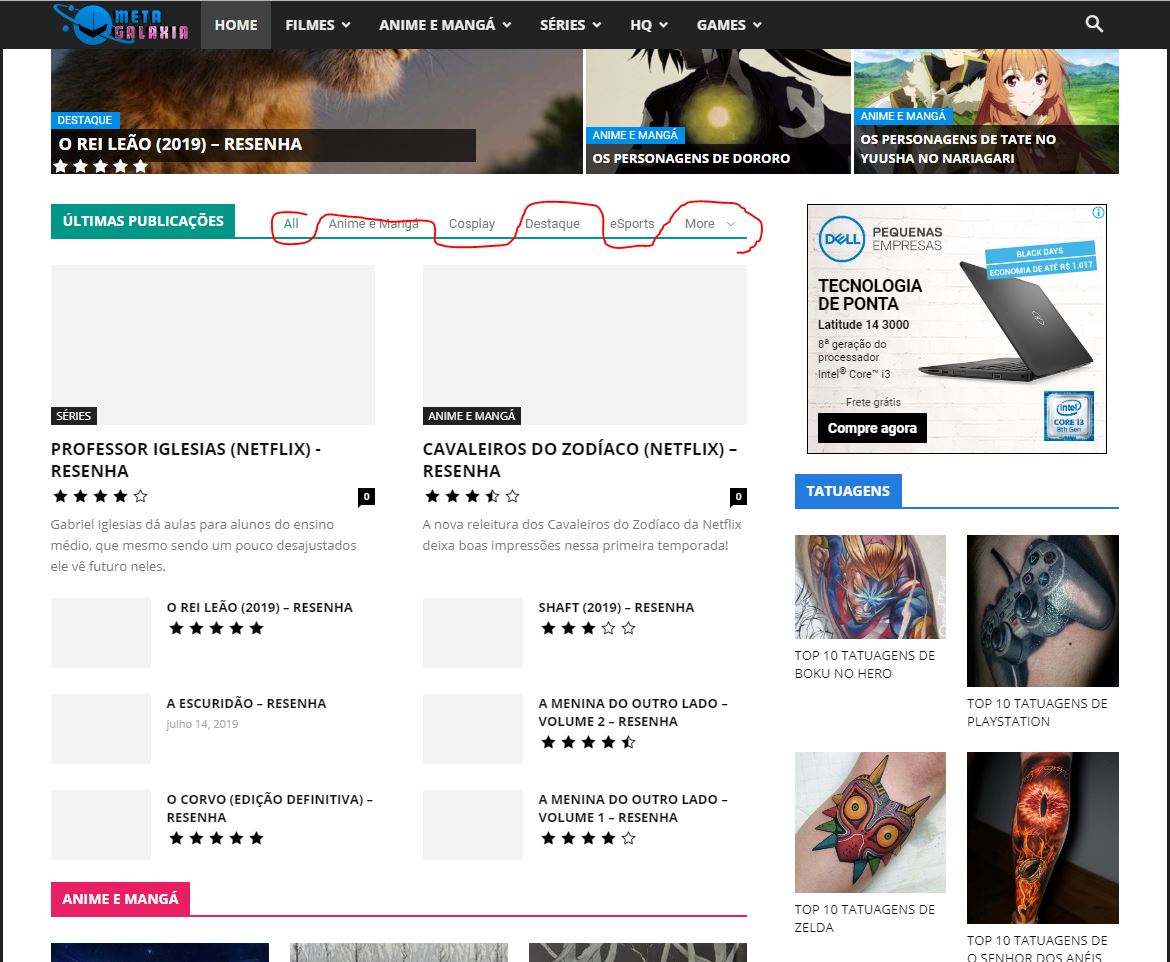
My home page has a block thats doenst show images on posts when i click in the categories
https://metagalaxia.com.br/wp-content/uploads/2019/07/newpaper.jpg
Vlad S Hello !
We are sorry for missunderstanding our issue !
In order to have vertical images you can use Flex Blocks. You can find all the details about it in here: https://forum.tagdiv.com/flex-block-settings-guide/
As you can see the option you seek is available: https://www.screencast.com/t/BWsKc9RVuSr
I hope this was more helpfull !
Thank you !
 barbanouille
 ARE YOU SERIOUS??? it means that your template is made only for Horizontal images!!!???? With all your “beautiful blocks” there is no one which allows Vertical thumbnails ?However VERTICAL PICTURES is such a BASIC need!! isn’t it????
Your answer does not satisfy me at all, showing me a page full of blocks with horizontal thumbnails is not a good way to answer to my question about VERTICAL thumbnails…..
Actually I’ve just found only one block which allows vertical thumbnails, this is the block 24, but no way to change the size… so I guess I have to change the css stylesheet, so can you tell me the way to do it (for example which class in which page and which file ) ? I paid a lot for you theme, for your assistance, so please make an effort…
 trandber
Hi,
This theme is just great !
I’ve got only one request : I’d like the image in categories template style 5 to be constrained in the block as a background (behind the category title and description) and not displaying full screen .
How can I achieve that ?
I can’t find the top style 5 template file in source code.
Please help me.
Thanks
 michelle
Hi
I just installed the mobile menu plugin. But I can not activate it, there is follow warning:
Warning: require_once(/home/httpd/vhosts/michelleboesch.ch/limettenwald.com/wp-content/plugins/td-composer/mobile/includes/td_block_editor_assets_mob.php): failed to open stream: No such file or directory in /home/httpd/vhosts/michelleboesch.ch/limettenwald.com/wp-content/plugins/td-mobile-plugin/td-mobile-plugin.php on line 409
Fatal error: require_once(): Failed opening required ‘/home/httpd/vhosts/michelleboesch.ch/limettenwald.com/wp-content/plugins/td-composer/mobile/includes/td_block_editor_assets_mob.php’ (include_path=’.:/usr/share/pear:/usr/share/php’) in /home/httpd/vhosts/michelleboesch.ch/limettenwald.com/wp-content/plugins/td-mobile-plugin/td-mobile-plugin.php on line 409
What do I need to do?
Thanks and greetings
Michelle
 Calin
Calin Hi,
If you do not want to show the comments number, you’ll need to hide theme from module 2 too, in this moment from your screenshot is hidden only for the module 1, -> http://prntscr.com/ojr62w also there is a problem of displaying the category on flex blocks if you set the ajax filter, but if you save the page and refresh it this will work properly, we’ll investigate this problem and try to fix it in coming update.
Thank you for your understanding!
Calin Hi,
If you want to have more control over the h titles, then you should replace the blocks from your pages with flex blocks, those are more flexible and options -> http://prntscr.com/ojr0yh -> https://forum.tagdiv.com/flex-block-settings-guide/ this will allow you to have more control over the h tag from title.
Hope this will help you!
Thank you!
 jkutasi
 Hi Vlad,
If we use TagDiv’s Mobile plugin (https://tagdiv.com/mobile-theme-automatic-optimization-for-mobile-newspaper-theme/) would this allow us to chose a different block setup for mobile?
Alternatively, is there some css we can add to the mobile device “custom css” that would change the block for mobile devices?
 garyjones
 Hi Simion,
I have taken what you did and extended the functionality.
When added to a module it displays a list of relevant posts, with one set of ACF custom fields, if the block directory category filter is set to either ‘News’,’Features’ or’Tech’ – or it displays posts, featuring other custom fields, if the block directory category filter is set to ‘Research’ and the relevant posts are tagged with any of ‘aged care’, ‘anxiety/stress’, ‘autism’, ‘cognitive’, ‘Dementia’, “Parkinson’s”, ‘sleep’ or ‘well-being’.
******
<?php
$hb1 = in_category(
array(‘News’,’Features’,’Tech’),
$this->post->ID
);
$hb2 = in_category( array(‘Research’), $this->post->ID );
$hb3 = has_tag(
array( ‘aged care’, ‘anxiety/stress’, ‘autism’, ‘cognitive’, ‘Dementia’, “Parkinson’s”, ‘sleep’ , ‘well-being’ ),
$this->post->ID
);
if ( $hb1 )
{
the_field(‘media_outlet’, $this->post->ID);
the_field(‘media_outlet_url’, $this->post->ID);
the_field(‘published_date’, $this->post->ID);
}
else if ( $hb2 && $hb3 )
{
the_field(‘media_outlet’, $this->post->ID);
the_field(‘published_date’, $this->post->ID);
the_field(‘country’, $this->post->ID);
}
?>
******
I thought it might be worth sharing it with the community (btw, I have spent quite a lot of time today going through the support forum. A code snippet section would be useful).
In the TagDiv block editor I added the Class name “editorial_listing_block and tried to use this to apply different a different font family, font size, font weight and colour to each of the custom fields but it didn’t work. My CCS skills are very limited.
Could you give some advice as to how I achieve my desired CSS styling for the displayed field content?
Many Thanks.
Best
G
 martialwarrior
https://www.peopleplacesandpastimes.com
I am using the newest version of the Newspaper Theme. The Flex Block 4 Element is messed up. It still shows the # of comments image even when it is hidden. When you edit the homepage where I am using the block, above the image in the block, it shows all the categories used on the website, not just those chosen for this block. All these categories do not show on the website itself.

Vlad S Hello !
1. Please add this code here: https://www.screencast.com/t/J1Nxw5s5
.td_block_related_posts .td-related-right {

display: none;

}
2. You will have to go into Theme Panel – Block Settings – Meta info on Blocks and Modules and disable the comment count: https://www.screencast.com/t/cjyvWFAz5S
I hope this was helpfull !
Thank you !
Calin Hi,
In order to have those images from post you’ll need to chose some tagDiv Blocks that are using featured image per example [tagDiv] Block 7 -> http://prntscr.com/ojajmd set the filters and settings and check the footer.
Hope this is what you need!
Thank you!
Simion C. Hi,
Blocks and grids can only be filtered as a whole, not by a specific module in them. If you would like to display a specific post in the middle module of flex grid 6, it can be done in a way. Enter the post IDs manually in the post filter – http://prntscr.com/oj9eh1
The third ID entered there will be the one in the middle module
– http://prntscr.com/oj9f6f
Doing this will mean that the grid will always display those posts, until manually removing the IDs or changing them.
You could also create a similar layout from different elements, for example 2 blocks on the side and a flex grid (1 in my example) set to display one module only
– http://prntscr.com/oj9g44
This way the side blocks can have dynamic filtering, and only the grid in the middle must contain the specific post ID.
Let me know if you have more questions.
Thanks
Simion C. Hi,
The child theme was limited after the 9.7 update, but now in the 9.7.4 update it has been greatly improved in terms of functionality. Post templates, blocks, modules, header templates, category templates etc can now be modified in the child theme.
In the coming update we will fix some issues with the child theme, this should be released this week from what I know. Please let me know if you have questions.
Thanks
Simion C. Hi,
Blocks have only ajax pagination. However that can be done, there are a couple of ways. The first one is to simply select the latest articles page template – https://forum.tagdiv.com/page-templates-2/
No need to enter anything in the page, just select the mentioned template. There are also settings for the page template, they are mentioned in the guide.
The second method is to edit the page with the composer and place a loop element
– http://prntscr.com/oj8n9v
Loops have numbered pagination – http://prntscr.com/oj8nrj
With either of these methods the result will be the same, a page displaying latest articles, with numbered pagination.
Please let me know if you have more questions.
Thanks
Simion C. Hi,
Sorry for the confusion, it was not my intention. I was just presenting the current image gallery elements that can be used in the theme.
I have checked the example you mentioned, for example this one https://www.reuters.com/
I see the homepage is built with grids and blocks, most of them set to display articles from specific categories. I can’t see an actual image gallery in that page.
The theme composer has a wide selection of blocks and grids that can display your posts.
There are predefined blocks and grids – https://demo.tagdiv.com/newspaper/block-1/
– https://demo.tagdiv.com/newspaper/big-grid-1/
– https://demo.tagdiv.com/newspaper/full-big-grid-1/
Then there are the flex blocks and grids from the cloud library, which can be imported with the cloud plugin – https://cloud.tagdiv.com/#/load/Blocks
– https://forum.tagdiv.com/tagdiv-cloud-library-plugin/
But the composer doesn’t have a specific gallery element for images. You can either create a tagDiv gallery as mentioned above, try the revolution slider, or use a gallery plugin.
Please let me know if you have more questions.
Thanks
jkutasiIs it possible to show one block style on desktop and another on mobile?
I like how our desktop version looks: https://www.screencast.com/t/GcxhHnM3pZOH
But on Mobile it looks like this: https://www.screencast.com/t/Wb8ceYCD
…and I’d like it to look like this: https://www.screencast.com/t/G1O5TnHUgSn
Thanks!
garyjonesHi,
I am using ACF to create custom fields and want to add a conditional If statement to td_module_9 where it only displays my Media Outlet custom field if the Block 10 filter is set to the “News” category.
When inserted in the td_module_9.php file, this works – <?php the_field(‘media_outlet’, $this->post->ID); ?>
However, I have tried a number of options for the conditional If statement such as –
<?php if (in_category( ‘news’ )) : ?><?php the_field(‘media_outlet’, $this->post->ID); ?><?php endif;?>
Am I missing something as this is a module and not a page?
Thanks.
Regards
Gary
 Leofitz
 Hello Simion,
The current load speeds on GTMetrix are after going through all the recommended site and server adjustments, and running a couple optimization plugins plus reSmushit image compression. I removed one block of news posts and thumbnails which sped up the loading a little. I think the only option left to me to try and get below a 2 seconds load is to use a CDN to cache files and close more of the news blocks.
About the flashing and blue color mentioned; I added the code that Catalin posted and it improved slightly.
Can you tell me where in the theme files the blue color is coded as the default color? I will replace it.
Thank you,
Lon
 stevemanes
 I don’t run a cache plugin nor a CDN and I’ve completely cleared the caches on both Chrome and Firefox on my Mac many, many times and still nothing appears in that block. But if I load Firefox on my Linux box which has never accessed the site before, the block appears. The header appears to be cached somewhere but I don’t know where.
I just found that the header works on Mac Safari too, which I also never use and which has never accessed the site before now.
I even changed that ad link to another image and Chrome and Firefox on the Mac aren’t picking it up.
-
This reply was modified 7 years by
stevemanes.