- TutorialsDefault Block Settings Guide
- NewspaperWP Rocket and Newspaper Theme: Optimization Guide
- TutorialsFrom WPBakery to tagDiv Composer
- TutorialsOffset Feature
- TutorialsWhat is Ajax preloading?
 Mark Gilbert
Is it possible to change the fonts of the review section (below the “Send a letter to the editor” button here – https://jazzjournal.co.uk/2019/03/11/caroline-scott-khoalesce/)?
I want to everything – change case and font of the REVIEW OVERVIEW block, the SUMMARY block, Reviewer rating, Scott is clearly destined for a successful career in whatever aspect of music she chooses to occupy, 3.5 and OVERALL SCORE
Thanks
Mark
 Calin
Calin Hi,
That option is custom made be our developers for tagDiv Composer to give you an option to make more some settings faster (some simple changes to blocks); unfortunately there is no option to create that Pre-Made Style Prsets on website, sorry!
If you want to use the style from one block/element you can use the right click and copy stile.
Thank you for your understanding!
 danielsandj
 Now i’m use AMP for WP – Accelerated Mobile Pages. It is very simple to use. the important thing is that as soon as you have activated this plugin, do not activate tagdiv’s AMP and do not activate the theme setting function because the site is blocked
Calin Hi,
If you want to do this only for one block, then you’ll need to make some changes in theme files to detect that block ( block 9) and open it in new a new windows!
Thank you for your understanding!
 Simion C.
 Hi,
That looks like a recent posts widget, this widget doesn’t display a thumbnail. If you want to show thumbnails you could use a block. A block can show recent articles (f sorted by latest) and also display a thumbnail. You can also filter it, here is a tutorial about the block settings
– https://forum.tagdiv.com/block-settings-guide/
Either use a block as a widget, or edit the page and remove the widget sidebar and use a block directly in the page in that location. Let us know if you have more questions.
Thanks
 jqualey
I am wanting to implement the patreon plugin and it works EXCEPT with the featured image (video) and I am wanting to hide the video/featured image too. Which template would I chop away at in order to do this.
Here is the patreon spiel (knowing you dont provide support for third party stuff) Just wondering if you could tell me the proper template since there are so many:
Patreon WordPress – how to lock any part of your Website
How to lock any section, page, type of content, or template section through the code
Its possible to lock any section of the site, a widget, some content in widget, some piece of meta value shown in the header, footer, or even remote embedded content displayed somewhere by using custom code blocks and developer toggles.
First, it is necessary to turn on the direct unlock mechanism by setting the below global variable somewhere. This may be in your theme’s functions.php, and better yet, a custom small plugin added and toggled with just the below code:
<?php
/*
Plugin Name: Patreon Dev Plugin
Plugin URI:
Description: Plugin to hold any customizations, hooks, filters, settings for development
Version: 1.0.0
Author: Patreon <platform@patreon.com>
Author URI: https://patreon.com
*/
$GLOBALS['patreon_enable_direct_unlocks'] = true;
This global will allow the plugin to skip security checks that prevent sending users to Patreon without supplying post ids, so you can create and use the unlock interface anywhere without having to lock a post.
Afterwards, the below code can be used anywhere to lock/show content. The below code checks for patronage level, and if it is the amount you set in the function parameters, shows the content. This code can be put into header, or, for example in the theme element that shows webcomics in headers or widgets as meta values.
<?php
// Custom lock
// Get current user if it is not already present
if ( !$user ) {
$user = wp_get_current_user();
}
// Check how much patronage the user has
$user_patronage = Patreon_Wordpress::getUserPatronage();
// Check if user is a patron whose payment is declined
$declined = Patreon_Wordpress::checkDeclinedPatronage($user);
// Set where we want to have the user land at - this can be anything. The below code sets it to this exact page. This page may be a category page, search page, a custom page url with custom parameters - anything
$redir = home_url(add_query_arg($_GET,$wp->request));
// If the user has less patronage than, say, $7, or declined, and is not an admin-level user, lock the post.
if ( ( $user_patronage < 700
OR $declined )
AND !current_user_can( 'manage_options' )
) {
// Generate the unlock interface wherever it is
echo Patreon_Frontend::displayPatreonCampaignBanner(
7,
array( 'direct_unlock' => 7,
'redirect' => $redir
)
);
// the first param (7) and direct_unlock param set the unlock value for this interface. Both need to be provided and be the same
}
else {
?>
<!-- Here you put your patron-only content for the header. At this point the patron will see the unlocked content which will be displayed here. This may be anything - it can be a custom meta value taken from somewhere, an embedded post, an embedded content, even remote content - whatever works -->
<?php
}
?>
Patreon_Frontend::displayPatreonCampaignBanner is the function that generates the interface. The added arguments array allow it to be used outside post context.
 Emran Bin Nasir
Hi,
I am facing issues with Block 9 element. I used this block for “Don’t Miss” section on the right side of my page. I want to fix the below problems on my news site: http://newstime24bd.net/
1. I don’t want to show author name, date and response icon on this section. Only title of the post is good enough. if there were any scope of using “>>” before text will be great.
2. I also want to decrease space top and bottom of the text on the same block.
Thanks
 Tomhughvo
When I try to edit any post I got this message:
“Warning: filemtime(): stat failed for /hermes/bosnacweb02/bosnacweb02ad/b1955/ipg.tireaderscom/tireaders/wordpress/wp-content/plugins/revslider//includes/gutenberg-blocks/assets/js/editor.blocks.js in /hermes/bosnacweb02/bosnacweb02ad/b1955/ipg.tireaderscom/tireaders/wordpress/wp-content/plugins/revslider/admin/revslider-admin.class.php on line 2220 Warning: filemtime(): stat failed for /hermes/bosnacweb02/bosnacweb02ad/b1955/ipg.tireaderscom/tireaders/wordpress/wp-content/plugins/revslider//includes/gutenberg-blocks/assets/css/blocks.style.css in /hermes/bosnacweb02/bosnacweb02ad/b1955/ipg.tireaderscom/tireaders/wordpress/wp-content/plugins/revslider/admin/revslider-admin.class.php on line 2228 Warning: filemtime(): stat failed for /hermes/bosnacweb02/bosnacweb02ad/b1955/ipg.tireaderscom/tireaders/wordpress/wp-content/plugins/revslider//includes/gutenberg-blocks/assets/css/blocks.style.css in /hermes/bosnacweb02/bosnacweb02ad/b1955/ipg.tireaderscom/tireaders/wordpress/wp-content/plugins/revslider/admin/revslider-admin.class.php on line 2241 ”
any idea? Look like it has something to do with revslider plugin, but I am not sure.
Thanks ahead.
 bobbymc
Is there a way to exclude posts from showing in a block based on Tag ID?
I can do it with Category ID, but some posts have multiple categories so it’s more difficult to manage that way.
Is there a solution?
 1younes
In the front-end, precisely at the home page, I want to show categories, sub-categories, sub-sub-categories…etc of each block like in the admin, so when I will click on the dropdown menu: https://imgur.com/OMWVT5h, I want all categories, sub-categories…et to be float left and their will be distinguishing between them, like that:
Categorie A
Subcategory AA
Susbsubcategory AAA
Categorie B
Subcategory BB
Susbsubcategory BBB
…Etc
My question, is that my developer doesn’t know where come the categories from, so that he can do that job. thank you
 Muslim
Hi, I would like to know if it is possible to have more control over the Mobile Theme & AMP setup. It would be very great if we could add a “View full version” link in the footer or somewhere because currently when I set up the Mobile Theme & AMP settings it seems it is not possible to view the full version of the site on mobile devices which is such a shame really. The other way around it would also be nice to be ablse to access the mobile version on desktop devices which does not seem possible either at the moment. Now, I know it could be just something wrong on my setup. So, please let me know.
Here is the link to my site: https://mediaronggolawe.id/
When I try to visit the AMP versio (https://mediaronggolawe.id/?amp) it returns:
“This page isn’t working
mediaronggolawe.id is currently unable to handle this request.
HTTP ERROR 500”
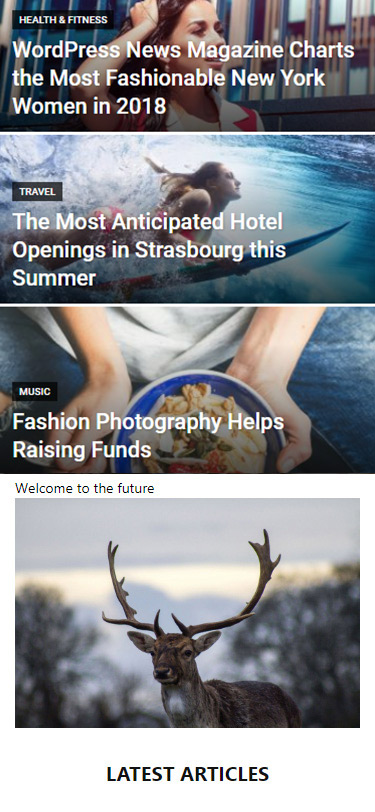
Another question I have is how can I set up the Mobile Homepage to look like this (https://tagdiv.com/wp-content/uploads/2018/11/mobile-theme-welcome-to-the-future.jpg)? because currently it’s just showing the latest posts block. (You can see for yourself if you visit mediaronggolawe.id on your phone).
Last question. Is it possible to have the popular posts widget display on the Mobile Theme & AMP version because visitors love to see what’s popular and it really keeps them on the site much longer.
NB: The current setup I have with the Newspaper theme without the Mobile Theme & AMP version is just perfect and the only reason I’m trying to setup the AMP version is to benefit from Google search results and that super lightning speed experience that visitors get when they first visit the site (AMP version) coming from Google search. Once they are on the site I would like them to have the option to view the full version of the site. In fact I really recommend you check out the plugin “AMP for WP” which does exactly what I just explained.
Looking forwad to more great updates from you guys. Love you all. 🙂
 vapes
vapesI am looking to have my menu exactly as it is but I want to remove the ad block and put my logo in the centre.
I have tried using some of the header settings with the logo in the middle but the black menu bar goes all the way along which i don’t like.
Thanks
 BYS
BYS But can i import category siblings only, or do i have to accept whole category theme.
How do i import block 15 from Business into other demo-theme?!
-
This reply was modified 7 years by
BYS.
 axehorde
 3- I already tried that but the mobile theme is to limited. I can’t control anything. There’s no filters, no page customization and above all it automatically deactivates some plugins that I need like here https://labussolanews.com/eventi/.
However I think it is not normal to have a score of 20 or less without activating the mobile theme. There must be something wrong.
I tried PageSpeed Insights in that page https://labussolanews.com/la-redazione/ where there is practically nothing. No articles, no filters or something that can slow down the site. The score is 17 here… I’m considering to move on to another theme…
5- Ok i’ll try. Thanks.
7- you can find the ads at the top of every article like here (only on mobile, in desktop ver. looks fine.)
https://labussolanews.com/cultura/donne-e-lavoro-al-fulgor/
8- this is my adsense ad code
<script async src=”//pagead2.googlesyndication.com/pagead/js/adsbygoogle.js”></script>
<!– 002- 300×250 –>
<ins class=”adsbygoogle”
style=”display:inline-block;width:300px;height:250px”
data-ad-client=”ca-pub-8390561613148257″
data-ad-slot=”7639744078″></ins>
<script>
(adsbygoogle = window.adsbygoogle || []).push({});
</script>
How can i add that background?
 Padraig
Hey There.
I am hoping to link from one article to another using an image with a Caption of the Article Title. Similar to the “Big Grids” That you have featured on the main pages or Category Pages.
Is this possible within a post/article – or can you recommend a plugin that will allow me to place Text over images and then make them hyperlinks.
Thanks once again.
 Bogdan B.
 Hello,
Please note that separate demos will have a separate style for the different theme elements. If you want to replicate another demo without actually installing it, the alternative would be using cloud library templates. You can import any template from particular demos on your install. Please install and activate the cloud library plugin on your website and use the documentation if you need help understanding the functionality. https://tagdiv.com/category/documentation/cloud_library/
I;m not sure why you say you cannot use 3 columns as the composer can have up to 4 columns. How is the content being pulled left? Please provide a screenshot of what you mean.
As for the specific block 15 you mention, you can also impot it using the cloud library plugin.
Thank you!
Simion C. Hi,
You could regenerate the thumbnails so the theme can create the necessary thumbnails, here is a guide – https://forum.tagdiv.com/thumbnails-fix-strange-looking-images-on-blocks/
Also an useful topic here – https://forum.tagdiv.com/thumbnails-vs-featured-image-size/
Thanks
Calin Hi,
If you want to regenerate the thumbs you can try this plugin -> https://forum.tagdiv.com/thumbnails-fix-strange-looking-images-on-blocks/
Those are the thumbs that theme use in blocks/modules – https://forum.tagdiv.com/theme-thumbs/
Thank you for your understanding!
Calin Hi,
The theme place the ads there -> https://www.screencast.com/t/1QA6VHUfsHan but is look that you get some errors in console ->https://www.screencast.com/t/QkoeLaal -> https://www.screencast.com/t/dGFf0X1df
That means the problem is with the ads, adsense is not delivering them which explains the 400 errors.
I found a possible cause for this to happen
– https://www.kerstner.at/2014/09/multiple-google-adsense-ad-blocks-on-same-page-are-causing-error-400-bad-response/
From what I understand using the same ad code multiple times in a page will lead to 400 errors, same as in this case.
Here are some similar topic
Topic Tag: 400 Bad Request -> https://wordpress.org/support/topic-tag/400-bad-request/
400 Bad Request Error: What It Is and How to Fix It -> https://airbrake.io/blog/http-errors/400-bad-request
Thank you for your understanding!
Calin Hi,
Please try again to regenerate the thumbs -> https://forum.tagdiv.com/thumbnails-fix-strange-looking-images-on-blocks/
If the problem is still there please try to build a new block for this section and replace it -> https://www.screencast.com/t/vyRlK1Xk2Ioq
Also please do note edit with WPBakery only the pages that was build with this composer.
Thank you!
 tszabolcs
Hey guys,
after upgrading to the latest Newspaper theme version (9.6) Disqus comment block finally works on cloud templates! (Instead of the regular WP comment block if disqus plugin is installed on site).
You rock!
Thank you for this fix, it means a lot for my sites.
Sz.
 norbiQue
 no, I just want one block, so how do you set it?
Simion C. Hi,
I see it mainly in the block titles. In some cases that effect may be visible, this is how CSS loads. The block titles have a default color that is loaded initially, the colors set in the theme panel will be loaded after the initial color is loaded, replacing it. Sometimes the transition between the colors is noticeable.
One solution would be to remove the default color (or change it to the color you want there), but this can only be done in the theme stylesheet – http://prntscr.com/mv1iq2
Also some similar topics – https://forum.tagdiv.com/topic/old-css-ghost-colors/
– https://forum.tagdiv.com/topic/theme-flashing-default-blue-top-bar-before-loading/
Thanks
 baranos
Hello,
I want to add this block? How do I add this block?
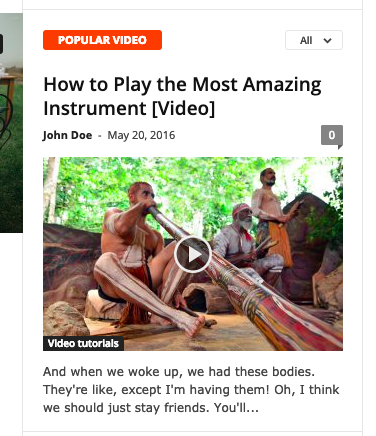
BYS I chose this theme because of the special class work you did on block 15, creating nice design without images, just what i needed for artikles. I would like to know how to create those td-extra-classes, but it seems that you are not offering these information on instruction pages of yours.
Regards Tommy