
- TutorialsDefault Block Settings Guide
- NewspaperWP Rocket and Newspaper Theme: Optimization Guide
- TutorialsFrom WPBakery to tagDiv Composer
- TutorialsOffset Feature
- TutorialsWhat is Ajax preloading?
 Calin
Calin Hi,
If you like to have full width on post/and categories you need to use tagDiv Cloud Library plugin , there chose a category template and a single template, after that open them with TagDiv Composer
https://www.screencast.com/t/mnRm3LsJPvC
Hover the article and click on row, and set Row stretch on Stretch row and content (with paddings or without paddings)
https://www.screencast.com/t/tsYaKv9qlR
Save the template and set in on post:
https://www.screencast.com/t/LcobI6sWfQ1z
Do the same for category ( also you can use full big grids/blocks ).
Thank you for your understanding.
-
This reply was modified 8 years by
 Calin.
 Catalin
 Hello imbob,
Yes, now I see the image! This white space appears because your title length is too big than the second one. If you want to avoid this white space, you should set up the title length from Excerpts to be the same for each of your titles (according to your used blocks/modules). Check the settings from here -> https://www.screencast.com/t/C2hRBpjE2JlB -> https://www.screencast.com/t/fdROwd1Vpxs Set the limit for your title length from Theme panel to be the same for the whole of your website. If you will use a long title, this will be automatic cut by your set up limit.
Thanks for your understanding!
 thelastpoet
Hi, I am getting the following AMP errors on Google Search Console for all my articles.
The extension ‘amp-auto-ads’ was found on this page but is unused. Please remove this extension.
Here is what I did, I followed the example Here The screenshot by Bogdan
Pasted this code in the header of AMP plugin `<script async custom-element=”amp-auto-ads”
src=”https://cdn.ampproject.org/v0/amp-auto-ads-0.1.js”>
</script>`
And I used Insert Headers and Footer Plugin to paste this in the body
<amp-auto-ads type="adsense"
              data-ad-client="ca-pub-******">
</amp-auto-ads>
Where did I go wrong?
 12familyde
 Hi …
I of course do understand, that running processes need to be done. But the thing with custom work – is a long requested discussion on this board. So I also understand, that it’s simply not a wanted part of TagDiv. As other companies are always able to do custom work – just because it’s good money for them – the can be sure, that no nonsense will be done with their themes, and they are having a good payed testdrive for future implementations, which they even got payed for … It’s a kind of a internal political question.
So I will need to hire a freelancer to do this for us. But it’s not what I wanted. For example the Soledad-Team had rebuilt a festure, which I missed from your theme. They have got about 350 dollars from us for this. The next theme update included this feature. Just because it was there – and it was good …
They simply were not able to build homepage blocks from tags – they only used posts. That was a long awaitd feature for the community.
However: I sure do understand, that there is a current timezone in which it is not possible to do sch things. But I do not understand, why this is the case for years now. The newspaper theme is one of the most complex theme on the themeforest market. So I am not willing to believe, that a company, who built such a complex theme, would not be able to fulfill a request within a few weeks, where a freelancer can do this job within a few days …
We have chosen this theme (again) as it’s maybe the most professional designed piece of code on the market. As we are not a blog, but a good running (growing) online magazine, it’s most important for us to stay flexible and open minded – but all this within a stable theme-solution.
Best and warmest regards
Torsten
 Simion C.
 1. My mistake, indeed the smart sidebar doesn’t work on tablets. You are correct.
2. The page doesn’t have an actual height of it’s own. The elements inside the page rows will be the height. So setting a 100% height to a column will not do anything.
If you place a block for example, that has height values, padding, margins. The column containing it will have the height of what is entered in it.
Forcing a defined value would give the column a bigger height than the elements in it
– https://www.screencast.com/t/AgOsbbdmHWLG
That would be the only way to do this.
Simion C. Hi,
That is a big grid in your first screenshot. The title of the posts will appear inside the module. There are no grids that can display the titles bellow the module. Only blocks are designed like that.
You could darken the gradient color that is set to the bottom of the module
Default – https://www.screencast.com/t/ZYWq4o01
With a darker gradient – https://www.screencast.com/t/FKKTqJRW
I could give you a code for that if you should consider it, it will increase the height of the gradient and make it darker, so the titles will be more visible.
With a flex grid for example, you could set a background color over the meta info, directly in the composer
– https://www.screencast.com/t/ADMSjWjkeOO
Thanks
 imbob
imbob I managed to figure it out myself, inner row let me add more of them.
I’ve encountered another issue now though, I added the related posts block and it seems to remove spacing from posts that have only 1 line title. How can I fix this, see screenshot please: http://prntscr.com/la3hxm I want to remove that empty white space.
 alebasur
Hello, you could put the photos of the block flex 1, only the small photos. Could you put the text out of the photo? As I show in the other screenshot. That is, the text appears below the photograph because if it appears inside the letters are not visible.
img1: https://www.screencast.com/t/nQ6VCTID
img2: https://www.screencast.com/t/p5ICyJqba
 jonasorting
I have migrated from Visual Composer to Tagdiv Composer.
I use a handful of plugins on our homepage (Feedzy RSS for instance).
There are text blocks (“Text with title”, “Column Text” etc) where I use shortcodes to display content, like [feedzy-rss feeds=”http://somepage.com/feed”%5D. This works very well.
However, when I later want to edit the page, I no longer get to edit the shortcode but its rendered content.
So where the text block should contain [feedzy-rss feeds="http://somepage.com/feed"] it now contains
<div class="feedzy-rss">
<ul>
<li class="rss_item" style="padding: 10px 0 17px;"><span class="title"> <a href="http://somepage.com/link" target="_blank" rel="noopener"> A thing </a> </span>
<div class="rss_content"></div></li>
<li class="rss_item" style="padding: 10px 0 17px;"><span class="title"> <a href="http://somepage.com/anotherlink" target="_blank" rel="noopener"> Another thing </a> </span>
<div class="rss_content"></div></li>
</ul>
</div> jr_oz
jr_ozHey thanks for your time on this =)
I just bought the theme and love it so far!
I’ve woken up this morning to find:
– The Main Menu (only on the home page)…
– Is showing 3 of my tabs/items “More” “About” “Contact”…
– As though they are on hover effect. Other tabs + other pages no problem.
– News default demo + Header theme 5
–> Would love to KEEP this hover effect, not block it if possible.
I have tried different menus, changing settings in the menu, adding menu items.
I have tried changing the colour settings.
I have tried changing header themes.
But hover effect still remains on for only some menu items.


Calin Hi,
Please use Thumbnails – Fix strange looking images on blocks, here you’ll find the documentation -> https://forum.tagdiv.com/thumbnails-fix-strange-looking-images-on-blocks/
For tagDiv Composer please check our documentation ( https://www.screencast.com/t/RoJ2ufvEVVt ) from here: https://forum.tagdiv.com/tagdiv-composer-tutorial/
Is not necessary to create the page from scratch, you can use tagDiv Cloud Library
Important Note: Do not use both page builders on the same page! ( V Composer and tagDiv Composer )
Thank you for your understanding.
 eduardo
Hello guys!
I’m still not using TagDiv Composer, for now I use Visual Composer, but I’m thinking of using TagDiv Composer.
On the homepage of the site, I use Big Grid 7, but in the square that stands the image and the text, there are some images that are small and a small gray block appears. See image: https://www.screencast.com/t/DJd7XZfis
In the categories, I use the Big Grid 5 and the same problem occurs, the gray block appears on the sides. See image: https://www.screencast.com/t/x4bkImiitm5
How do I not show this gray block? Do the images need to fit to a fixed pattern?
Will TagDiv Composer also have these Big Grid? From what I’ve read, if I use the TagDiv Composer I’ll need to create the page from scratch, if using Visual + tagDiv Composer will conflict.
I await contact.
My site is: https://mobilidadesampa.com.br/
Simion C. Hi,
I have no idea how to do something like that unfortunately, sorry. If you want the latest posts from four different categories use four different blocks filtered by them and sorted by latest.
Calin Hi,
Just place the id of page you want to display in the block https://www.screencast.com/t/aLeu71Ao
Hope this will help you.
Thanks.
 NickDeBaerdemaeker
Hi
I am currently trying to add a custom query in the data source.php file.
One can select in the composer the different categories from which to display posts.
( I set the post limit to four and four categories, “434, 19, 21, 38, 11” ).
What I am trying to achieve is that the query gets the single last most recent post from the four categories that I set in the composer. So I get to see 4 blocks, and they should each be from a different category.
I came this far but currently it is not working. Any thoughts on how to achieve this ?
            case 'one_from_each':
                $wp_query_args['date_query'] = array(
    												'cat' => $category->term_id,
    												'post_type' => 'post',
    												'posts_per_page' => '1',
    												'post__not_in' => $do_not_duplicate
								);
                $wp_query_args['order'] = 'DESC';
break; Sorry again for the inconvenience, we will include more options for the cloud library plugin in the future.
You could create templates for each category, and use normal blocks and grids which can be filtered and sorted. The category grids and the loop element don’t have sorting methods for the moment. Or use default category templates until more settings are added.
Catalin Hello libtetto,
Unfortunately, the theme does not have any such an option that allows you to achieve something like this, sorry! If you want to change the block/module structure, you need to edit the theme’s core files section from the code. Also, if you are not aware of the steps which are needed to take in this case, please consider hiring a freelancer/developer to help you because we cannot provide custom work at the moment, sorry!
Thanks for your understanding!
Calin Hi,
If I’ve understand correctly, you want to have set in modules/blocks pages instead of posts, if is so please follow this guide:
https://www.screencast.com/t/MQQ7OH2ON
https://forum.tagdiv.com/block-settings-guide/
Thank you for your understanding.
Catalin Hello stephenduggan,
Ensure that all of the used thumbs are enabled from Theme panel -> Theme thumbs from here -> https://www.screencast.com/t/s8tTyOXK1P7
You could regenerate the thumbnails for the images used only
– https://forum.tagdiv.com/thumbnails-fix-strange-looking-images-on-blocks/
– https://www.screencast.com/t/BLmW7nID0eF
Check if the thumbnail size is enabled in the theme panel before regenerating
– https://www.screencast.com/t/EobjkbNkpBq
Thanks.
 libtetto
Hello, I am wondering where I can change the mobile view of a certain block.
For example Block 2 uses module 2 and 6 in mobile view but I would like block 2 to show with css from module 11.
How can I change that?
Thank you so much
Chriss
 Portekoi
My SEO expert ask me to change all the html tags h3 to h2.
For example, in the block 11, I need to change the title tag h3 to h2.
How can I do this?
 sejpost
 Where do I see if that is enabled or not. Perhaps since it’s being shown in the first block, then it makes sense that it isn’t seen again. Good catch!! Where do I go to enable or disable that?
 menneskedyr
 Do you have Unique Articles enabled? Then it wouldn’t show again because it’s already shown in a previous block.
sejpostWe have mutliple content blocks on our homepage: http://www.CoronadoTimes.com
We added a new one called “Real Estate”. We have one story in that new category, but when we save the new content block, it doesn’t show on the homepage. Also, in the TD Composer view, it shows up when I add the category id, but then after saving it, it says “NO POSTS” in the TD Composer view – see image:
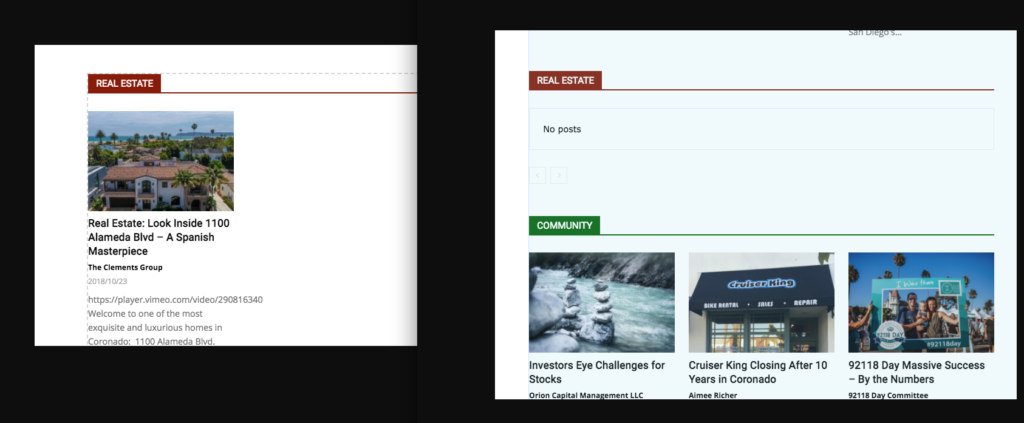
Why isn’t the single post showing? I want this post to show up in the REAL ESTATE NEWS block on the homepage:
https://coronadotimes.com/news/2018/10/23/real-estate-look-inside-1100-alameda-blvd-a-spanish-masterpiece/
Thanks,
Steve
 David Henry
 I’m having this issue, but it’s new. The site has been around for a while so we know the requirements are correct and the server is good.
We’ve also checked the plugins and they are all fresh.
We are not using a security plugin but are behind the Sucuri WAF however that’s not set to block anything like this.
Any ideas how to fix this?
