
- ApiPractical example – How to add a new Block and Module
- Apitd_api_block::delete
- Apitd_api_block::update_key
- Apitd_api_block::update
- Apitd_api_block::add
- ApiAPI – Blocks – Introduction
- Apitd_api_thumb::update_key
- Apitd_api_thumb::update
- Apitd_api_thumb::add
- ApiAPI – Thumbnail – Introduction
- Apitd_api_category_top_posts_style::update_key
- Apitd_api_category_top_posts_style::update
- Apitd_api_category_top_posts_style::add
- ApiAPI – Category top section style – Introduction
- Apitd_api_module::update_key
- Apitd_api_module::update
- Apitd_api_module::add
- ApiAPI – Modules – Introduction
- ApiUsing the Theme API in plugins
- ApiThe Theme API
 EUCMH
EUCMH another question : where can I add css for the post : text-aling: justify ?
same for blockquote : text-align: right
I mean add or change !
thank you
I am using the Newspaper and works direct with the imported demo pages
-
This reply was modified 8 years by
EUCMH.
 Bogdan B.
 Hello,
1) please check: https://forum.tagdiv.com/topic/how-can-i-change-travel-demo-main-bag-ground-image/
2) the big grid used in the travel demo is not available in other demos. If you are trying to re-create the design on an other demo, you will have a hard time doing so as each demo has it’s own custom style. Please install the travel demo and then use this page layout. This is the ‘shortcode’ of the page layout. You can simply paste it inside your page editor in classic mode and text mode: http://screencast.com/t/SUt9ItUc the code: http://pastebin.com/RAA6DkWp
3) That is a block 4 but that is the custom design it gets on the travel demo. This is the default look of the block: https://demo.tagdiv.com/newspaper/block-4/ you have to use it on a full width row without a sidebar in order to get 3 columns of posts.
4) Sorry but the unique articles option does not work with pagination. It only works on the first load. – https://www.screencast.com/t/0epOsh4wR
As for the follow up, it is a cdn issue. it is the mobile background image. Please remove the rocket loader setting on your cdn server.
Thank you!
Bogdan B. Hello,
Our theme adds a margin bottom to all the blocks so using inner rows inside other rows will create multiple margins for the element. Please add a custom class to the row in the page builder and that way you can remove the margins specifically for that row. I will be able to provide the needed code. Simply access the row settings for the row containing the churches content and type in a custom class name like so: https://www.screencast.com/t/U4evR6xT8 It can be any name you want.
Let us know once you do so and I will provide the code to remove the spacing.
Thank you!
 Catalin
 Hello Mariano Jonte,
I guess that you are referring to the different element. The title will cover the images only for Big Grid and if you want the title posts to be under the images, you should use the Blocks. Check our demo tutorial and check the results.
If is not what you mean, please provide more details about what you want to achieve.
Thanks.
 Simion C.
 Hi,
You could try it like this if absolutely needed to display a block in posts
– https://www.screencast.com/t/cr8sPrig1u
– https://www.screencast.com/t/FBqFjgLJBS
– https://www.screencast.com/t/H0EVTpctPlr4
– https://www.screencast.com/t/kGLrQlCw
Thanks
Catalin Hello vitalisv,
If you want to add something like this to your post template page, notice that you should edit the loop-single templated use by you and add the do_shortcode method with a custom ad 1 field, like this -> https://www.screencast.com/t/j6DzLiT48Hv
The code is ->
<?php echo do_shortcode ('[td_block_ad_box spot_id="custom_ad_1"]'); ?>
Also, make sure that your Custom Ad is populated with an ad code.
Hope this helps!
Thanks for the message!
Simion C. Hi,
Seems the issue is still present, the suggestions from that topic should work. Please follow it and enter the code mentioned in it, in the htaccess file. After this clear all caching installed and CDN files if used.
This is a common issue in WordPress, some more information here
– http://crunchify.com/how-to-fix-access-control-allow-origin-issue-for-your-https-enabled-wordpress-site-and-maxcdn/
– https://stackoverflow.com/questions/25577981/font-from-origin-has-been-blocked-from-loading-by-cross-origin-resource-sharing
– https://docs.brainstormforce.com/how-to-allow-custom-web-fonts-to-load-from-other-server/
Thanks
 curmi01
Hi Guys , i am reletively new to this type of job.
I have this code and instructions but don’t know where to input them respectively.
So I just bought a facebook-page about fitness, training etc. I will do some changes to it and post articles to get traffic to the webpage. But I also want people visiting the website to like the fb-page. So I would like this placed in the kind of sidebar on the right within the design.
Code for likebox:
Step 1: Include the JavaScript SDK on your page once, ideally right after the opening body tag.
<div id=”fb-root”></div>
<script>(function(d, s, id) {
var js, fjs = d.getElementsByTagName(s)[0];
if (d.getElementById(id)) return;
js = d.createElement(s); js.id = id;
js.src = ‘https://connect.facebook.net/en_US/sdk.js#xfbml=1&version=v2.11’;
fjs.parentNode.insertBefore(js, fjs);
}(document, ‘script’, ‘facebook-jssdk’));</script>
Step 2: Place this code wherever you want the plugin to appear on your page.
<div class=”fb-page” data-href=”https://www.facebook.com/NorwegianAesthetics/” data-small-header=”false” data-adapt-container-width=”true” data-hide-cover=”false” data-show-facepile=”true”>
</div>
ANY IDEAS?
THANKS SO MUCH
 serambca
Good night and happy new year!
I detect a little problem with an images in my main page.
Let me explain you.
I have a module Big grid Slide in the main page.
When I put some pictures, are dropped by down and only are dropped here. When I clic in the post show correct in the other sites ( for example in the up of the article ).
The image appears fine in the other blocks. For example (Blocks 17)
I invite you to access my website https://www.binaryworld.es and see that I am talking.
I see that the images are resizing but in this module don’t resize correct .. in change in other modules fine…
I hope you can help me.
Thanks and regards
 zeroenigma
Is there a way to get any of your good looking blocks such as block one on my main page but as an RSS feed. Such as latest industry tech news from affiliate sites?
 Mariano Jonte
 I have already uploaded the images to an external and free server. To be able to visualize what I say. In pictures.
There is a problem, especially with the ENTRY titles. In desktop it looks very good, but in MOBILE, the text covers almost the entire image. Please see the screenshots.
BIG GRID 2:
https://image.ibb.co/nDy06b/Big_Grid2_Desktop.jpg
https://ibb.co/f1s4XG
Desktop: OK.
In MOBILE… wrong:
https://image.ibb.co/ji5PXG/Big_Grid2_Mobile.jpg
https://ibb.co/fjtYRb
As an example, in the image, below, you can see how the title would look good on mobile. But it does not adapt the Big Grid 2 … since it does not have this configuration option.
Please, tell me how I can do, since all the Big Grid have the title on the photo for MOBILE. That’s why I wanted to use the BLOCKS, but there’s no possibility that they cover 100% of the desktop width.
In short, a big problem. Please help.
Mariano Jonte Ok there I uploaded the images to an external server.
Please see…
1º) Block1 : Empty space in the right.
Image:
https://image.ibb.co/ekF2Kw/Block_1_Empty_Space.jpg
https://ibb.co/bvVrCG
Why is a space left blank?
2º) Block2:
A “more” note appears on the side, alone. Because it does not occupy 100% of the width with the Block2 format ?.
Image:
https://image.ibb.co/czXSmb/Block_2_Error_Visual.jpg
https://ibb.co/cOgL6b
3º) Block3: Again, a note “ghost. The block does not occupy the entire width.
Image:
https://image.ibb.co/g7DYRb/Block_3_Error_Visual.jpg
https://ibb.co/ccArCG
4º) Block 4: Again.
Image:
https://image.ibb.co/bW47mb/Block_4_Error_Visual.jpg
https://ibb.co/fVGysG
5º) Again… right and down…
Images:
https://image.ibb.co/gnEUzw/Block_5_Error_Visual.jpg
https://ibb.co/cBBWCG
Please, help, the blocks are not shown as they should be.
I put some of the blocks as an example, but the same thing happens with all of them.
Thank you, regrats.
 mvl
mvl Hi, can I ask something on top of this? I managed to remove the read more button from block 20, but I would also like to prevend people from clicking on block 20 to open it. It’s my homepage post, which I don’t want to let people click on it.
Thnx
Mirthe
 deanysus
Hey,
Simion referred me to this forum for help.
I’ve used the “Travel” demo (installed it), but not everything is replicated as in your demo. For the most part, it’s all good, but I’m having issues replicating the following aspects of the homepage:
1. Header background image – I used a background image for Header in Theme Panel, but it doesn’t show up. How do I have a background image the same way you have it in Travel demo?
2. The first three (Big Grid?) most recent posts that are in the style of Photo Card. Cannot do that.
3. The 3-4 rows of the following posts, 3-columns with Category selection on the right and excerpts under each title. I’ve tried all 3-column blocks, but none of them are like that.
Also, a small issue that I’ve encountered:
4. For Pagination, I have “Load More” button and ‘Unique Articles’ is enabled on the Homepage. However, when clicking the “Load More” button, when new articles are loaded, some of them are the same as those above – so we get two rows of the same articles. Basically, ‘Unique Articles’ option doesn’t work. How do I ensure that there are no duplicates on the Homepage?
Thank you for your help guys!
Dean
 capruzza
 Hello,
I’m sorry I think my question wasn’t very clear.
What I meant is that in the widget section, when I use an HTML block I can’t change the content independently in the two languages.
For instance, here is what one of my Italian widgets looks like
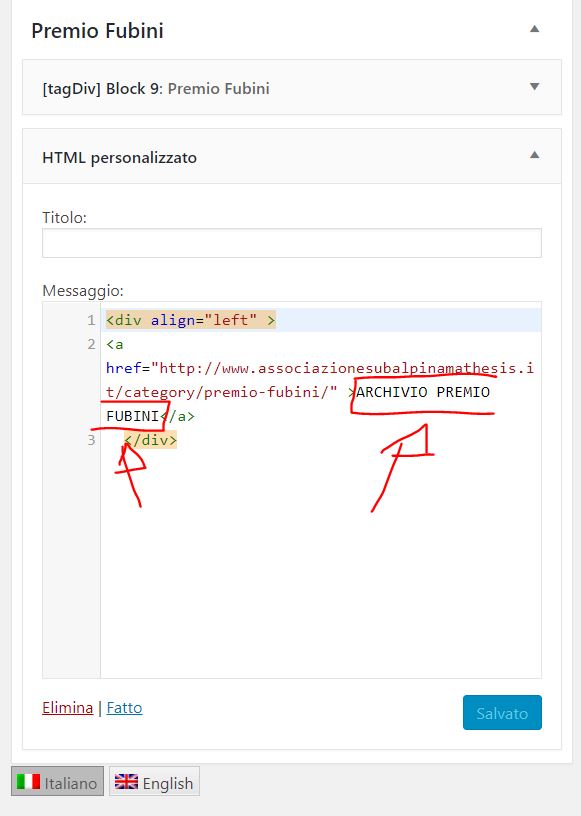
…and here is the English version

If, in the English version, I change “ARCHIVIO PREMIO FUBINI” with “ARCHIVE OF FUBINI PRIZES”, then it becomes the latter in Italian as well.
 airrocker
 Hey Simion – We’re having an issue with very old and outdated posts being shown as related. We were hoping to add some custom coding to td_block_related_posts.php that would help restrict related posts by age… but aren’t having any luck. Was hoping someone could suggest a string of code that might achieve this. Thanks!
 ozgur
ozgur Hi,
I want to display view counter different place, how to ?
For example in blocks after the dates, after the author names etc.
 Pradeep Augustine
 Thank you for the quick response. Is there any way I can include Block 3 by using the shortcodes generated by the tagdiv composer? Please let me know. I tried the block shortcode in a post. The layout fails. I tweaked the shortcode and inserted them only with the [inner_row] block shortcode [/inner_row]. The layout seems to be fine. Is it correct to use this method?
-
This reply was modified 8 years by
Pradeep Augustine.
Pradeep AugustineHello Tagdiv,
At least add minimum support on Posts when using Tagdiv Composer. I have created several posts using Visual Composer. When I switched to Tagdiv Composer, the post created with Visual Composer have layout issues. I recreated every posts without Visual composer. But in some posts, the use of some blocks are mandatory. Kindly add some support for using some shortcodes to some blocks in the future updates. Also two columns support for adding two images side by side. Thanks.
Simion C. Hi,
The tagDiv composer has the same options for rows, columns and individual elements. These are located in the CSS tab. So you could place block 3 below block 12 first
– https://www.screencast.com/t/gb8rL1gDgYa
Hide block 12 on mobile
– https://www.screencast.com/t/YwSTr8taN2m0
– https://www.screencast.com/t/OsZQwGh47
Hide block 3 on desktop
– https://www.screencast.com/t/9pmbDcOiQI
– https://www.screencast.com/t/uiQ94RDcbPB
This would be the result on desktop (block 12)
– https://www.screencast.com/t/8aKN9PQmJzrK
And on mobile (block 3) – https://www.screencast.com/t/NFrm5bNGd2Wr
Thanks
Bogdan B. Hello,
Sorry but the page builder is only available for pages. Posts can only be edited with the standard tiny mce editor.
The mentioned structure can be shown on pages but you can show posts or pages in the theme blocks. You cannot show a category in a theme block. You can only show posts from a specific category .
Thanks
 sgaialand
 Hi| I have a very similar issue with my website: http://www.sgaialand.it
In the “ultimi articoli” (latest articles) section, I have three blocks 13 – identical except for the offset of posts – but only one of out three works properly on mobile. The others are not clickable.
In this case, the page was entirely built with TD composer, not visual composer.
Can you help me?
Thanks!
Simion C. Hi,
To remove those only for the homepage you could create a code like this, since the theme panel option will remove them on the whole website
– https://www.screencast.com/t/GK2hYyFB
The code will apply only for the homepage blocks
.home .td_block_3 .td-module-meta-info,

.home .td_block_14 .td-module-meta-info{

display: none;

}
Thanks
Mariano Jonte Thank you Catalin, my site is http://www.lasopapa.com
Link: http://www.lasopapa.com
I’m sure there’s access, maybe at the time you checked in there was a problem.
Images problems:


 Jose
JoseHello,
I would like to make some publications, showing access to several categories (for example, a publication of “dog breeds” in which I can add “blocks” of the categories “small breeds” “medium breeds” “large breeds”).
It’s possible? Is there any way?
regards



