
No search results were found in Documentation!
 miltonrodas_yum
 Hello,
My apologies on the late reply. The problem with tagdiv Composer persists. There is nothing in the Cloud Library, and if I try to edit the current template Header Template, it ends up in Error 500 throughout the website after a few tries.
My host is saying it could be malware within your template? They said they saw some ‘unrecognized’ scripts running, and when they disabled them, the site came back up. They are running a scan now.
Something is off and I am hoping for your help.
I will send you email to contact@tagdiv.com with access you requested, and I am hoping for your help.
 xelibris
Hello tagDiv team,
After updating my site to WordPress 6.7, I started seeing the following notice when debugging is enabled:
Notice: _load_textdomain_just_in_time was called incorrectly.
The translation loading for the td-cloud-library text domain was triggered too early.
This usually means that some code in the plugin or theme runs before the ‘init’ action.
Translations should be loaded on or after ‘init’.
This message was added in WordPress version 6.7.0.
It seems that td-cloud-library (bundled with the Newspaper theme) is calling load_textdomain() too early — probably during file inclusion instead of on the init hook.
Could you please check this and release an update that ensures translations are loaded at the correct time (after init)?
Environment:
WordPress version: 6.7.x
Newspaper theme version: Version: 12.7.1
td-cloud-library version: Version 3.9
PHP version: 8.1
Site URL: https://www.lunil.com
Thank you for your help and for maintaining this great theme!
Best regards,
 Calin
Calin Hello,
Unfortunately, there is no documentation showing all the theme blocks in parts; there are too many possibilities to be created with our theme flex blocks. You can even create your own modules using the module builder.
The flex blocks from the theme can be adjusted in many ways, and if you want, you can check some pre-made blocks that can be generated from the cloud. You can see them here – cloud.tagdiv.com/#/load/Blocks
Thank you!
Calin Hi,
This situation appears when the theme plugins are not installed/updated. Please go to Newspaper plugins and make sure that the theme plugins you had before the theme update are installed and activated, those should be: tagDiv Composer, tagDiv Cloud Library, in some cases, tagDiv Standard Pack. IN case that there are othere shortcodes appering after you activated those plugins, then please provide some screenshots with them.
Thank you!
Calin Hi,
Could you please provide more details, including screenshots and links to the pages that are not working on mobile? Do you use the mobile theme plugin?
For the problem _load_textdomain_just_in_time from td-cloud-library, please download and reinstall the plugin from here -> https://cdn.tagdiv.com/wp-content/uploads/2025/07/td-cloud-library.zip
Thank you!
 sunnypeter
Hello tagDiv Support Community,
I’m using Newspaper Theme v12.7.1 for my site https://www.diplopolis.com.
I’ve created a custom taxonomy called “Location” using the Custom Post Type UI (CPT UI) plugin. Based on all that I have read, the taxonomy is attached to standard Posts and set to be public, queryable, and has archives enabled.
My goal is to display articles grouped by their Location — for example, all posts tagged “Europe”, “Ukraine”, “Russia”, etc.
What I’ve tried so far:
Confirmed that the taxonomy appears in the WordPress admin and that posts are assigned to their respective Location terms.
Flushed permalinks by going to Settings>Permalinks and Saving Changes.
Enabled the taxonomy in Theme Panel → CPT & Taxonomy. I see Location listed there.
Attempted to use tagDiv Composer → Flex Loop / Loop Grid/Custom Field and couple of other elements, but I cannot find a clear way to filter posts to be displayed by my Location taxonomy.
I also created a Cloud Library → Custom Taxonomy template and assigned it to “Location”, and made it Global but the archive pages still do not display the posts as expected.
I’ve read the documentation on CPT, but I’m still unable to get posts to display per Location on either the archive pages or custom pages.
Could you please guide me step-by-step. It would be very helpful if you could provide me all the steps just in case I have missed something:
Which Element/Module to use for display and the correct way to configure the element/module to show posts filtered by the Location taxonomy.
Any additional theme settings or steps I might have missed to make the taxonomy available to Composer filters.
Whether there are any known compatibility issues with CPT UI in v12.7.1.
Any screenshots or references to the right documentation/video would be much appreciated.
Thank you for your help!
Best regards
 Michelle26
We have different mobile versions of our pages since our traffic is mainly mobile, however, they are not loading, I unplugged the cache, clear cookies, deleted search history and it is not loading some of the mobile versions of the pages. The website log indicates there is an error td-cloud-library.
Do you have any ideas what may be going on and how to fix it?
Calin Hi,
The mentioned demo is using cloud template, so you need to use tagDiv Composer to edit the sidebars and/or add ads https://forum.tagdiv.com/ads-adsense-overview/
Thank you!
Calin Hi,
That means there are problems. And I believe they aren’t related.
For the first issue with editing with the composer I suggest entering the code from the bottom of this guide https://forum.tagdiv.com/requirements-for-newspaper/ meaning this one https://prnt.sc/MQRKxmjITK4V in the htaccess file. You can add it at the bottom of the existing code. Then check if the composer works correctly.
For the other issue, with the cloud library, you could try as a first step to check the wp memory and the rest of these parameters mentioned here https://prnt.sc/flMy0UJQE0W3 If these are lower than recommended, I suggest increasing them, the methods are described in the guide I provided.
Or, if you want, we can check these things on the website directly. You can send us an email at contact@tagdiv.com and provide a link to the website, admin login, also access to cPanel or FTP. We will check as soon as possible.
Thanks.
 David Desreumaux
Hello,
since the Newspaper update I applied the 1st october, shop home page does not work anymore. I have instead the title and nothing else.
It seems it may be related to «tagdiv» things. If I deactivate “tagDiv Composer” and “TagDiv Cloud Library” a page with the product is displayed (but not with a correct layout).
I don’t have any clue about how I can fix that.
I use the last wordpress version, in a php 8.4 server, and I don’t know what other information I should give you.
Can you help me ?
 Simion C.
 Hi,
That means there are problems. And I believe they aren’t related.
For the first issue with editing with the composer I suggest entering the code from the bottom of this guide https://forum.tagdiv.com/requirements-for-newspaper/ meaning this one https://prnt.sc/MQRKxmjITK4V in the htaccess file. You can add it at the bottom of the existing code. Then check if the composer works correctly.
For the other issue, with the cloud library, you could try as a first step to check the wp memory and the rest of these parameters mentioned here https://prnt.sc/flMy0UJQE0W3 If these are lower than recommended, I suggest increasing them, the methods are described in the guide I provided.
Or, if you want, we can check these things on the website directly. You can send us an email at contact@tagdiv.com and provide a link to the website, admin login, also access to cPanel or FTP. We will check as soon as possible.
Thanks.
Simion C. That’s great news. Glad to help.
You can use what you want, we will never remove the standard pack plugin. The differences in performance while using either the standard pack or the newer cloud library are in some cases negligible. With decent caching and optimization and decent hosting, the results are good regardless of using one or the other. Your website will perform in the same way as it did before updating. Then if maybe in the future you want to switch to the cloud library and a PRO demo, then you can always do that. There’s no pressure.
Thanks.
 observatorulprahovean
Hello. We recently found out that we have a huge wp_options table (over 70 GB!!!) and over 12 000 000 rows are filled with td transients. I am attaching you a screenshot here: https://prnt.sc/E806MILYD0T0
We started to delete them batch by batch because, even if we have a cutting edge webserver, it is impossible to run a query to delete 12 M rows.
Can you help us in preventing this situation since, in the past few days, we had few server dropdown because of this?
We are using TagDiv Newspaper 12.7.1, which is the latest version, with tagDiv Composer, tagDiv Cloud Library, tagDiv Mobile Theme, Official AMP for WP and tagDiv Standard Pack plugins activated and updated to the latest build.
Also, we using WordPress LiteSpeed Cache plugin with Litespeed Webserver.
 ROY.wu
 Thanks for your answer
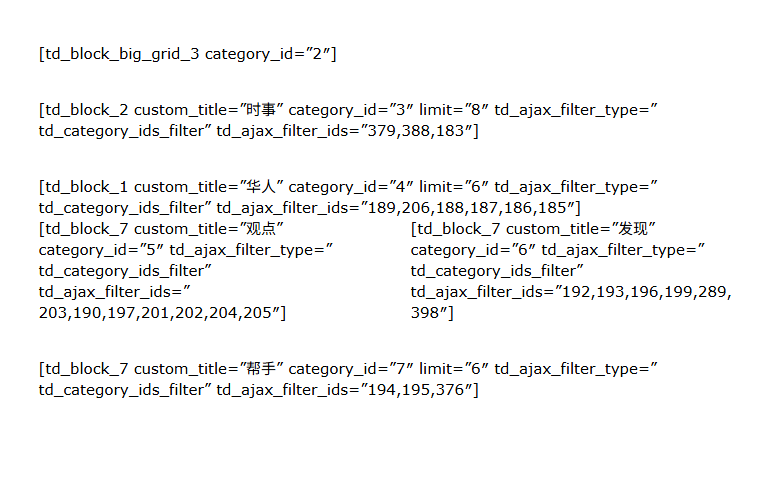
This is the homepage situation after I upgraded the theme
Your answer has solved my problem.
But the article you recommended also illustrates that continuing to use standard plug-ins will slow down the website.
So can I only use tagDiv Cloud Library to redesign the website? I don’t have this kind of experience and I just want to keep it. Are there any more good ways to import and export?
There is another problem:

Simion C. Hi,
You can add anything you want in the header. The cloud header templates can be built with the composer. There are a lot of already made header templates in the cloud library https://cloud.tagdiv.com/#/load/Headers You could import one that you like and customize it https://forum.tagdiv.com/header-manager/ Please try it and let me know if you have more questions.
Thanks.
Simion C. Hi,
Only one demo can be installed at a time. Previewing demos can be done on our live demos https://demo.tagdiv.com/select_demo/newspaper-prebuilt-websites/?demo-type=all An installed demo will look like the live demos.
Or you could install the theme on a staging/testing website or local install, and test there.
Or you could import what you need from the cloud library, most of the homepages and templates are available there separately https://prnt.sc/m3Xvzh0DiM_a
Please take into account what uninstalling a demo or installing a new demo means. Everything that the old demo imported will be removed, and the theme panel will be reset.
Thanks.
Simion C. Hi,
I can’t say unfortunately. Maybe there is a conflict with the theme, we don’t regularly test elementor. You could use the composer we provide with the theme. I see you are trying to built an About page, there are a few ready made pages in our cloud library https://cloud.tagdiv.com/#/load/Pages
We recommend using our composer with the theme if possible. There can be conflicts if other page builders are used. I see the header and footer on the website are built with the composer, so you could use the composer to build the page content as well.
Thanks.
Simion C. Hi,
Maybe the homepage can be restored. Are there revisions available? They should appear in the page edit screen like so https://prnt.sc/M75Cy7VMgDj4 These will allow you to restore older versions of the page, it the page worked before. The other solution would be to import a new homepage from the cloud library and use only the composer to customize it.
As Chris mentioned, it is indeed generally not advisable to edit pages with two builders, the result is usually that the page can’t be edited with neither of them anymore. But please check if you have revisions available and restore the page to working order.
Thanks.
 alejobocetos
 I ran another test and uninstalled the theme plugins and installed them one by one. It seems that the ones causing the conflict are:
tagDiv Composer and tagDiv Cloud Library.
When I activate tagDiv Composer, the page disappears, and when I activate tagDiv Cloud Library, the error appears. However, if I activate only tagDiv Cloud Library, the page is visible, but obviously it says that tagDiv Composer needs to be activated for it to work… I don’t know what other tests to do, and what worries me most is that I have several licenses for this same theme and I don’t want them to start failing.
alejobocetos Hi,
Yes, I had already tried deactivating all the plugins and leaving only the theme plugins, and the problem persists. I deleted the plugins and reinstalled them, and the problem reappeared. Right now, I have all the plugins deactivated and the site is working, but when I reinstall tagDiv Cloud Library, the critical error reappears.
Yesterday I sent an email with access to my site because I don’t know how to fix it.
 projectya
 When adding a new event, a fatal error appears.
Notice: Function register_uninstall_hook was called incorrectly. Only a static class method or function can be used in an uninstall hook. Please see Debugging in WordPress for more information. (This message was added in version 3.1.0.) in /home/fdwhhmkcar/domains/spokorumia.pl/public_html/wp-includes/functions.php on line 6121
Notice: Funkcja _load_textdomain_just_in_time została wywołana nieprawidłowo. Ładowanie tłumaczenia dla domeny td-cloud-library zostało uruchomione zbyt wcześnie. Zwykle jest to wskaźnik, że jakiś kod we wtyczce lub motywie działa zbyt wcześnie. Tłumaczenia powinny zostać załadowane podczas akcji init lub później. Dowiedz się więcej: Debugowanie w WordPressie. (Ten komunikat został dodany w wersji 6.7.0.) in /home/fdwhhmkcar/domains/spokorumia.pl/public_html/wp-includes/functions.php on line 6121
Deprecated: strpos(): Passing null to parameter #1 ($haystack) of type string is deprecated in /home/fdwhhmkcar/domains/spokorumia.pl/public_html/wp-includes/functions.php on line 7360
Deprecated: str_replace(): Passing null to parameter #3 ($subject) of type array|string is deprecated in /home/fdwhhmkcar/domains/spokorumia.pl/public_html/wp-includes/functions.php on line 2195
Fatal error: Uncaught TypeError: array_key_exists(): Argument #2 ($array) must be of type array, null given in /home/fdwhhmkcar/domains/spokorumia.pl/public_html/wp-content/plugins/td-subscription/includes/td_subscription.php:3276 Stack trace: #0 /home/fdwhhmkcar/domains/spokorumia.pl/public_html/wp-includes/class-wp-hook.php(324): td_subscription::td_post_theme_settings_mb_save_filter(NULL, ‘1975’) #1 /home/fdwhhmkcar/domains/spokorumia.pl/public_html/wp-includes/plugin.php(205): WP_Hook->apply_filters(NULL, Array) #2 /home/fdwhhmkcar/domains/spokorumia.pl/public_html/wp-content/plugins/td-composer/legacy/common/wp_booster/wp-admin/external/wpalchemy/MetaBox.php(880): apply_filters(‘wpalchemy_filte…’, NULL, ‘1975’) #3 /home/fdwhhmkcar/domains/spokorumia.pl/public_html/wp-content/plugins/td-composer/legacy/common/wp_booster/wp-admin/external/wpalchemy/MetaBox.php(2081): WPAlchemy_MetaBox->apply_filters(‘save’, NULL, ‘1975’) #4 /home/fdwhhmkcar/domains/spokorumia.pl/public_html/wp-includes/class-wp-hook.php(326): WPAlchemy_MetaBox->_save(1975) #5 /home/fdwhhmkcar/domains/spokorumia.pl/public_html/wp-includes/class-wp-hook.php(348): WP_Hook->apply_filters(NULL, Array) #6 /home/fdwhhmkcar/domains/spokorumia.pl/public_html/wp-includes/plugin.php(517): WP_Hook->do_action(Array) #7 /home/fdwhhmkcar/domains/spokorumia.pl/public_html/wp-includes/post.php(5110): do_action(‘save_post’, 1975, Object(WP_Post), true) #8 /home/fdwhhmkcar/domains/spokorumia.pl/public_html/wp-includes/post.php(5212): wp_insert_post(Array, false, true) #9 /home/fdwhhmkcar/domains/spokorumia.pl/public_html/wp-admin/includes/post.php(453): wp_update_post(Array) #10 /home/fdwhhmkcar/domains/spokorumia.pl/public_html/wp-admin/post.php(227): edit_post() #11 {main} thrown in /home/fdwhhmkcar/domains/spokorumia.pl/public_html/wp-content/plugins/td-subscription/includes/td_subscription.php on line 3276
Calin Hi,
Can you please do a test using only tagDiv plugins? This will check if there is a plugin conflict with an extra plugin that is not part from the theme.
If the problems still persist, please download and reinstall the plugin from here -> https://cdn.tagdiv.com/wp-content/uploads/2025/07/td-cloud-library.zip
Thank you!
alejobocetosThe site was working fine, but an error was reported on the site. After testing all the plugins, I realized that when I deactivated this tagDiv Cloud Library, the error disappeared.
When activated, it causes this error: “There has been a critical error on this website.”
Calin Hi,
For the problem _load_textdomain_just_in_time from td-cloud-library, please download and reinstall the plugin from here -> https://cdn.tagdiv.com/wp-content/uploads/2025/07/td-cloud-library.zip
Thank you!
 seanie2k
Hi, I’m having a few issues with my site and noticed this in debug.log. Is it something that needs to be fixed and could it be causing issues with my site going down intermittently?
PHP Notice: Function _load_textdomain_just_in_time was called incorrectly. Translation loading for the td-cloud-library domain was triggered too early. This is usually an indicator for some code in the plugin or theme running too early. Translations should be loaded at the init action or later.
PHP Notice: Function _load_textdomain_just_in_time was called incorrectly. Translation loading for the td-cloud-library domain was triggered too early. This is usually an indicator for some code in the plugin or theme running too early. Translations should be loaded at the init action or later.
