
- NewsmagRequirements for Newsmag
 Calin
Calin Hi,
Normally, with the provided version of tagDiv Cloud Library, the notice _load_textdomain_just_in_time should no longer be displayed.
Also, the fatal error “Fatal error: Uncaught ValueErro” is coming from the comment element, do you use any extra plugins for comments?
Can you please replace the tagDiv Composer too with the one from here – https://cdn.tagdiv.com/wp-content/uploads/2025/05/td-composer.zip
And please make a test using only tagDiv plugins to see if the problems persist.
Thank you!
 bts026
 I have copied files from zip and this is the new error message:
Notice: Function _load_textdomain_just_in_time was called incorrectly. Translation loading for the media-library-organizer domain was triggered too early. This is usually an indicator for some code in the plugin or theme running too early. Translations should be loaded at the init action or later. Please see Debugging in WordPress for more information. (This message was added in version 6.7.0.) in /home/milosbts/public_html/wp-includes/functions.php on line 6121
Logo
VESTI
BTS PODCAST
KONCERTI I DOGAĐAJI
RECENZIJE
RAZBIJANJE TIŠINE
O NAMA
More
Fatal error: Uncaught ValueError: Unknown format specifier ” ” in /home/milosbts/public_html/wp-content/plugins/td-cloud-library/parts/tdb-comments.php:177 Stack trace: #0 /home/milosbts/public_html/wp-content/plugins/td-cloud-library/parts/tdb-comments.php(177): sprintf() #1 /home/milosbts/public_html/wp-includes/comment-template.php(1629): require(‘/home/milosbts/…’) #2 /home/milosbts/public_html/wp-content/plugins/td-cloud-library/state/single/tdb_state_single.php(2110): comments_template() #3 /home/milosbts/public_html/wp-content/plugins/td-cloud-library/shortcodes/single/tdb_single_comments.php(470): tdb_state_single->{closure}() #4 /home/milosbts/public_html/wp-content/plugins/td-cloud-library/shortcodes/single/tdb_single_comments.php(470): Closure->__invoke() #5 /home/milosbts/public_html/wp-content/plugins/td-composer/legacy/common/wp_booster/td_global_blocks.php(27): tdb_single_comments->render() #6 /home/milosbts/public_html/wp-includes/shortcodes.php(434): td_global_blocks::proxy_function() #7 [internal function]: do_shortcode_tag() #8 /home/milosbts/public_html/wp-includes/shortcodes.php(273): preg_replace_callback() #9 /home/milosbts/public_html/wp-content/plugins/td-composer/includes/tdc_composer_block.php(222): do_shortcode() #10 /home/milosbts/public_html/wp-content/plugins/td-composer/includes/shortcodes/vc_column.php(440): tdc_composer_block->do_shortcode() #11 /home/milosbts/public_html/wp-content/plugins/td-composer/legacy/common/wp_booster/td_global_blocks.php(27): vc_column->render() #12 /home/milosbts/public_html/wp-includes/shortcodes.php(434): td_global_blocks::proxy_function() #13 [internal function]: do_shortcode_tag() #14 /home/milosbts/public_html/wp-includes/shortcodes.php(273): preg_replace_callback() #15 /home/milosbts/public_html/wp-content/plugins/td-composer/includes/tdc_composer_block.php(222): do_shortcode() #16 /home/milosbts/public_html/wp-content/plugins/td-composer/includes/shortcodes/vc_row.php(1204): tdc_composer_block->do_shortcode() #17 /home/milosbts/public_html/wp-content/plugins/td-composer/legacy/common/wp_booster/td_global_blocks.php(27): vc_row->render() #18 /home/milosbts/public_html/wp-includes/shortcodes.php(434): td_global_blocks::proxy_function() #19 [internal function]: do_shortcode_tag() #20 /home/milosbts/public_html/wp-includes/shortcodes.php(273): preg_replace_callback() #21 /home/milosbts/public_html/wp-content/plugins/td-composer/includes/tdc_composer_block.php(222): do_shortcode() #22 /home/milosbts/public_html/wp-content/plugins/td-composer/includes/shortcodes/tdc_zone.php(771): tdc_composer_block->do_shortcode() #23 /home/milosbts/public_html/wp-content/plugins/td-composer/legacy/common/wp_booster/td_global_blocks.php(27): tdc_zone->render() #24 /home/milosbts/public_html/wp-includes/shortcodes.php(434): td_global_blocks::proxy_function() #25 [internal function]: do_shortcode_tag() #26 /home/milosbts/public_html/wp-includes/shortcodes.php(273): preg_replace_callback() #27 /home/milosbts/public_html/wp-includes/class-wp-hook.php(324): do_shortcode() #28 /home/milosbts/public_html/wp-includes/plugin.php(205): WP_Hook->apply_filters() #29 /home/milosbts/public_html/wp-content/plugins/td-cloud-library/wp_templates/tdb_view_single.php(189): apply_filters() #30 /home/milosbts/public_html/wp-includes/template-loader.php(106): include(‘/home/milosbts/…’) #31 /home/milosbts/public_html/wp-blog-header.php(19): require_once(‘/home/milosbts/…’) #32 /home/milosbts/public_html/index.php(17): require(‘/home/milosbts/…’) #33 {main} thrown in /home/milosbts/public_html/wp-content/plugins/td-cloud-library/parts/tdb-comments.php on line 177
There has been a critical error on this website.
Line 177 looks the same as the previous error:
esc_attr( sprintf( __td( 'Logged in as %s. Edit your profile.' , TD_THEME_NAME), $user_identity ) ),
-
This reply was modified 1 year by
bts026.
Calin Hi,
This Notice: Function _load_textdomain_just_in_time was called incorrectly…. please get the plugin from here – https://cdn.tagdiv.com/wp-content/uploads/2025/07/td-cloud-library.zip this should be used only with Newspaper v12.7.1 and will resolve that notice.
Let me know the results!
bts026 This is what I get:
Notice: Function _load_textdomain_just_in_time was called incorrectly. Translation loading for the media-library-organizer domain was triggered too early. This is usually an indicator for some code in the plugin or theme running too early. Translations should be loaded at the init action or later. Please see Debugging in WordPress for more information. (This message was added in version 6.7.0.) in /home/milosbts/public_html/wp-includes/functions.php on line 6121
Notice: Function _load_textdomain_just_in_time was called incorrectly. Translation loading for the td-cloud-library domain was triggered too early. This is usually an indicator for some code in the plugin or theme running too early. Translations should be loaded at the init action or later. Please see Debugging in WordPress for more information. (This message was added in version 6.7.0.) in /home/milosbts/public_html/wp-includes/functions.php on line 6121
Logo
VESTI
BTS PODCAST
KONCERTI I DOGAĐAJI
RECENZIJE
RAZBIJANJE TIŠINE
O NAMA
More
Fatal error: Uncaught ValueError: Unknown format specifier ” ” in /home/milosbts/public_html/wp-content/plugins/td-cloud-library/parts/tdb-comments.php:353 Stack trace: #0 /home/milosbts/public_html/wp-content/plugins/td-cloud-library/parts/tdb-comments.php(353): sprintf() #1 /home/milosbts/public_html/wp-includes/comment-template.php(1629): require(‘/home/milosbts/…’) #2 /home/milosbts/public_html/wp-content/plugins/td-cloud-library/state/single/tdb_state_single.php(2110): comments_template() #3 /home/milosbts/public_html/wp-content/plugins/td-cloud-library/shortcodes/single/tdb_single_comments.php(470): tdb_state_single->{closure}() #4 /home/milosbts/public_html/wp-content/plugins/td-cloud-library/shortcodes/single/tdb_single_comments.php(470): Closure->__invoke() #5 /home/milosbts/public_html/wp-content/plugins/td-composer/legacy/common/wp_booster/td_global_blocks.php(27): tdb_single_comments->render() #6 /home/milosbts/public_html/wp-includes/shortcodes.php(434): td_global_blocks::proxy_function() #7 [internal function]: do_shortcode_tag() #8 /home/milosbts/public_html/wp-includes/shortcodes.php(273): preg_replace_callback() #9 /home/milosbts/public_html/wp-content/plugins/td-composer/includes/tdc_composer_block.php(222): do_shortcode() #10 /home/milosbts/public_html/wp-content/plugins/td-composer/includes/shortcodes/vc_column.php(440): tdc_composer_block->do_shortcode() #11 /home/milosbts/public_html/wp-content/plugins/td-composer/legacy/common/wp_booster/td_global_blocks.php(27): vc_column->render() #12 /home/milosbts/public_html/wp-includes/shortcodes.php(434): td_global_blocks::proxy_function() #13 [internal function]: do_shortcode_tag() #14 /home/milosbts/public_html/wp-includes/shortcodes.php(273): preg_replace_callback() #15 /home/milosbts/public_html/wp-content/plugins/td-composer/includes/tdc_composer_block.php(222): do_shortcode() #16 /home/milosbts/public_html/wp-content/plugins/td-composer/includes/shortcodes/vc_row.php(1204): tdc_composer_block->do_shortcode() #17 /home/milosbts/public_html/wp-content/plugins/td-composer/legacy/common/wp_booster/td_global_blocks.php(27): vc_row->render() #18 /home/milosbts/public_html/wp-includes/shortcodes.php(434): td_global_blocks::proxy_function() #19 [internal function]: do_shortcode_tag() #20 /home/milosbts/public_html/wp-includes/shortcodes.php(273): preg_replace_callback() #21 /home/milosbts/public_html/wp-content/plugins/td-composer/includes/tdc_composer_block.php(222): do_shortcode() #22 /home/milosbts/public_html/wp-content/plugins/td-composer/includes/shortcodes/tdc_zone.php(771): tdc_composer_block->do_shortcode() #23 /home/milosbts/public_html/wp-content/plugins/td-composer/legacy/common/wp_booster/td_global_blocks.php(27): tdc_zone->render() #24 /home/milosbts/public_html/wp-includes/shortcodes.php(434): td_global_blocks::proxy_function() #25 [internal function]: do_shortcode_tag() #26 /home/milosbts/public_html/wp-includes/shortcodes.php(273): preg_replace_callback() #27 /home/milosbts/public_html/wp-includes/class-wp-hook.php(324): do_shortcode() #28 /home/milosbts/public_html/wp-includes/plugin.php(205): WP_Hook->apply_filters() #29 /home/milosbts/public_html/wp-content/plugins/td-cloud-library/wp_templates/tdb_view_single.php(189): apply_filters() #30 /home/milosbts/public_html/wp-includes/template-loader.php(106): include(‘/home/milosbts/…’) #31 /home/milosbts/public_html/wp-blog-header.php(19): require_once(‘/home/milosbts/…’) #32 /home/milosbts/public_html/index.php(17): require(‘/home/milosbts/…’) #33 {main} thrown in /home/milosbts/public_html/wp-content/plugins/td-cloud-library/parts/tdb-comments.php on line 353
There has been a critical error on this website.
Calin Hi,
Can you please provide some examples?
It is possible to be something related to the locker https://forum.tagdiv.com/lockers/ or maybe the single post template https://forum.tagdiv.com/cloud-library-templates/ no longer has the content element.
 Horrormovies.gr
Hello, I just installed Yoast SEO Premium, and I see that no schema is passing through nor breadcrumbs list.
In the Theme Panel the “enable article schema” is disabled, and in Yoast SEO I use the default article for all posts.
The URL of my post is https://horrormovies.gr/movies/final-destination-bloodlines-2025-review/.
I disabled all plugins also except the tagDiv Composer, tagDiv Cloud Library, and Yoast SEO. Nothing changed.
Calin Hi,
Unfortunately there is no convertor tool, but what can be done is to import from the cloud templates a page, section and templates that are similar with the old one you have (if you want the same layout), those can be edited on frontend using tgDiv Composer.
 borgelastreet
Hello,
I’m experiencing an issue when trying to modify an article template that’s in the cloud library. Every time I attempt to edit it using the TD Composer, I’m redirected to a 404 error page.
Could you please assist me with resolving this?
 crashcult
 Hello, if I import a prebuilt footer template from the Cloud Library, how do I make it show up on all pages and not just the homepage? I did try to import a prebuilt footer but it only shows up on the homepage, no other pages. I did check the website manager, and I made sure it shows the new prebuilt footer I imported , also checked Theme Panel to make sure the new footer is in the dropdown, but still only shows up on the homepage. This new prebuilt is a black footer, and there is a picture or background image of trucks, I want to delete that background picture, how do I do that? I have been looking all over, and I even asked Ai but they have me looking for links in your sidebar that are not even there. LOL. I do appreciate all of your help. Thank you.
Calin Hi TeamBDT, the pre-build website News Week pro needs the tagDiv Composer, tagDiv Cloud Library and tagDiv Opt-in Builder https://i.imgur.com/8A4BDDT.jpeg
Hi crashcult, please check the answer from here https://forum.tagdiv.com/topic/change-footer-colors-font-colors-and-sizes/ the theme panel settings are not for the demo you have, hat one should be edited using tagDiv Composer.
Thank you!
Calin Hi,
The demo you have was builder using tagDiv Composer and cloud templates, therefore everything can be edited using the theme builder on frontend. The theme panel settings are normally added by tagDiv standard pack, please check if this plugin is installed if you have it, please disable, this brings old templates that are not editable on frontend with the builder.
– https://www.youtube.com/watch?v=SoGQ0d5kIBg
Thank you!
 CreekWalker7291
Designing and using post templates is pretty straight-forward. What am I missing when trying to use a page template? I imported a premade page template, designed it to my liking, and saved it. It’s in my Cloud Templates library. Now I’d like to use that template for all my pages so I don’t have to go through the design process again for every page on my site…but I’m not finding a way to do that. What am I missing?
Calin Hi,
The mentioned prebuilt website use cloud templates for articles, so you’ll need to use tagDiv Composer to add/remove something from the template https://forum.tagdiv.com/sidebars-tutorial/ – https://www.youtube.com/watch?v=fa7GenCHcBU&list=PL6CsDkMaejhoHETIWoxnRB4zefz8L8PYg&index=8
Thank you!
 KonstantinosMetaxakis
 Hi again,
Thank you for your previous response. I understand that there is currently no native support for a global Page template similar to how Single Post templates work via Cloud Library.
However, duplicating a designed page manually for each of our pages is unfortunately not a scalable or maintainable solution for our workflow.
Here’s why:
We have over 80 static Pages (not Posts) — such as “Rankings”, “Terms of Use”, “Privacy Policy”, etc.
We need all these pages to have a consistent layout, identical to our Single Post template (header, featured image, date, sidebars, etc.).
Editing and managing 80 separate copies of the same layout breaks maintainability — any design update means repeating changes manually 80 times.
The current Cloud Library approach works great for posts, but we’re specifically trying to apply it to WordPress Pages.
We’ve tried using custom page.php templates in the theme or plugin folders, but TagDiv Cloud Library always overrides the page output.
What we’re asking:
Is there any method — through PHP, a filter, or even a workaround — to assign a single Cloud Template (or custom template) globally to all WordPress Pages and have it pull each page’s content automatically?
We believe this would be extremely useful for many use cases, and perhaps there’s an internal way or workaround that we’re missing.
Thank you again for your support and time — we really hope there’s a way to make this work.
Best regards,
 Archerix
Hello, I’m optimizing my website with the theme to run as efficiently as possible and with ngnix + Redis + MariaDB + database indexes + WPsupercache it’s very fast despite a high number of visitors.
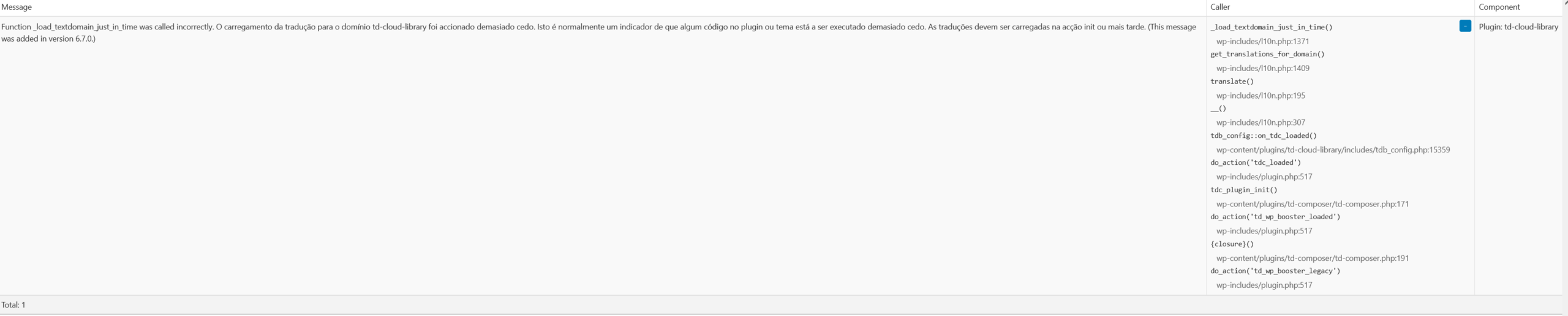
Although it’s not a problem, Query Monitor is giving a warning “Function _load_textdomain_just_in_time was called incorrectly. Loading the translation for the td-cloud-library domain was triggered too early. This is usually an indicator that some code in the plugin or theme is being executed too early. Translations should be loaded in the init action or later. (This message was added in version 6.7.0.)
_load_textdomain_just_in_time()
Plugin: td-cloud-library”
Is there anything I can do about it?
Calin Hi,
If you have the last Newspaper version, 12.7.1 then please replace the td cloud library with this one https://cdn.tagdiv.com/wp-content/uploads/2025/07/td-cloud-library.zip
Thank you!
KonstantinosMetaxakisHello TagDiv Team,
We are using the Newspaper theme and would like to ask for guidance on something quite important for our website workflow.
What we want to achieve:
We would like to design a custom layout for static pages (WordPress Pages, not Posts) using TagDiv Composer or Cloud Library, and then:
Apply this layout to multiple pages — not just one.
Ideally, set it as a default or reusable page template.
Ensure that each page loads its own content from the WordPress editor (Gutenberg or Classic Editor).
Is there a supported method to create a global layout/template for Pages, using TagDiv Composer, that can be reused across multiple pages, showing the content of each page automatically?
We are not referring to blog posts or single post templates — we’re specifically asking about WordPress Pages (e.g. About, Contact, Rankings, etc.).
If there is a recommended approach to achieve this (either through Cloud Templates, PHP page templates, or TagDiv Composer settings), we’d really appreciate your step-by-step guidance.
Thank you very much for your time and support.
Best regards,
Calin Hi,
It looks like you imported a page that was part of a demo, and then deleted it afterward. This action doesn’t affect your actual website pages, so there’s no need for concern.
Please note that these are not page templates like category or article templates. The pages available in the tagDiv Cloud Library are pre-built demo pages created using the tagDiv Composer. When you import them, they are added as standalone pages that can be edited directly with tagDiv Composer, but they are not linked to your theme’s structural templates.
Let me know if you need further clarification.
Thank you!
Calin Hi,
Please use tagDiv Composer to edit the single post template, select the ad box element and check in image tab – https://i.imgur.com/iBGxVut.png – https://i.imgur.com/TEh4HuE.png
To translate the Most Popular, Recent Comments select the blocs and change the titles – https://i.imgur.com/F36FNma.png – https://i.imgur.com/Fhe2rE6.png
I hope this will help you!
Calin Hi,
This notice will be resolved in the coming theme update, but until then if you want you can get the plugin td cloud library with the fix from here – https://cdn.tagdiv.com/wp-content/uploads/2025/07/td-cloud-library.zip this should be used only with Newspaper v12.7.1
Thank you!
 E K
E KI am running Newspaper theme version 12.7.1 and am getting a persistent PHP notice in my logs:
PHP Notice: Function _load_textdomain_just_in_time was called incorrectly. Translation loading for the td-cloud-library domain was triggered too early. This is usually an indicator for some code in the plugin or theme running too early. Translations should be loaded at the init action or later.
I have already performed extensive troubleshooting with an active child theme, but the notice cannot be resolved externally. We have confirmed that:
Loading the text domain via load_plugin_textdomain() on the init hook does not fix it.
Loading the text domain via a direct-path load_textdomain() on the init hook (with priority 99) does not fix it.
Attempting to unload_textdomain() and then reload it on the init hook also does not fix it.
This proves the td-cloud-library plugin is making a hard-coded call to a translation function before the init hook fires, making it impossible to override from a child theme.
Please escalate this to your development team to have the text domain loading function within the td-cloud-library plugin moved to the init action hook to comply with modern WordPress standards and resolve this notice.
Thank you.
Calin Hello
The demo you are using can be edited integrally using tagDiv Composer https://forum.tagdiv.com/tagdiv-composer-tutorial/ you can use it to edit pages and cloud template to add/remove what you mean.
Here are some video guides – https://www.youtube.com/watch?v=SoGQ0d5kIBg&list=PL6CsDkMaejhoHETIWoxnRB4zefz8L8PYg
Here is our documentation – https://forum.tagdiv.com/newspaper-theme-documentation/
Thank you!
Calin Hi,
Those are ads that are coming with the pre-built install. You need to check in the theme panel in ads sections – https://i.imgur.com/CaGpKlT.png and also using tagDiv Composer per pages and cloud templates https://i.imgur.com/QFW7uzW.png
Thank you!
Calin Hi,
Our theme offers the possibility to display any ads and banners using the ad box element, this element can be set using tagDiv Composer on pages and cloud templates.
To create slider ads or other type or ads it will be need to use a dedicate plugin for ads or to have the code that can rotate the banners. All those can be displayed using the ad box element, the shortcode/ code can be set in the theme panel ads section and from the ad box element can be choose that source from the ad should be read or it can be set directly on ad box element in custom ad tab.
Thank you!
 birdway
Hello,
I’m facing an issue while working with the Custom Post Types UI plugin.
What I did:
Installed and activated Custom Post Types UI;
Created a new Custom Post Type called Services;
Added several entries (posts) to the Services CPT;
Assigned a Cali Sight template (from the Cloud Library) to display the single service posts using the Newspaper → Cloud Templates section;
The template loads correctly and displays blocks with custom fields like “Sample field data”, icons, gallery images, advantages, etc.
The problem:
When I open a single “Service” post in the admin editor, I don’t see any custom fields to control or edit this content
Only default theme fields appear (Sidebar, Subtitle, Source URL, etc.)
I don’t understand how or where to input the actual values for those template fields (like the icons, sample data text, or images shown in the front-end)
I’m also unable to upload or manage the images used inside the template
What I want to achieve:
Use a single Cloud Template (Cali Sight) for all my service posts;
Show unique content (text, icons, images, advantages) for each service post using dynamic custom fields;
Screenshots(https://prnt.sc/Xwf_va4rD9lG https://prnt.sc/BENFP4B35R4y)
Thank you in advance!



