- NewsmagRequirements for Newsmag
 Calin
Calin Hi dataconurbano, sorry, but I do not understand why you need that code? The theme provides the option to display pagination for categories.
If you want more control over categories, you can use a cloud template for categories, which you can edit using the frontend builder tagDiv Composer.
 jovjovan
Hi tagDiv team,
I’m experiencing severe scroll stuttering/lag on Safari (macOS 15.5) on my website built with Newspaper theme 12.7.3. The issue occurs on all pages immediately when scrolling begins.
Environment:
Newspaper Theme: 12.7.3
WordPress: 6.8.3
PHP: 8.3.27
Server: LiteSpeed/Apache
Browser affected: Safari (macOS 15.5)
Browser NOT affected: Chrome, Firefox
What I’ve tested:
✅ Disabled all plugins except tagDiv Composer and Cloud Library – issue persists
✅ Disabled tagDiv Composer – issue persists
✅ Switched to Twenty Twenty-Four theme – scroll is smooth (confirms issue is theme-related)
✅ Disabled Raptive Ads – no improvement
✅ Tested CSS fixes:
animation: none !important – no improvement
transition: none !important – no improvement
-webkit-overflow-scrolling: auto – no improvement
✅ Object Cache Pro with Relay is configured and working
URL: https://simscommunity.info
The scroll is perfectly smooth in Chrome and Firefox, but Safari has consistent frame drops and stuttering. This is affecting user experience for a significant portion of our visitors.
Is this a known issue with Safari? Are there any recommended fixes or theme settings I should adjust?
Thank you!
Calin Hi,
For pages, you cannot create templates the same way you can for categories, articles, authors, or tags. You can create a page and, if you like its layout, duplicate it and edit the copy but full template creation for pages is not supported.
Regarding the process you mentioned, both methods achieve the same result; they just come from different places in the interface. You can use either method. However, creating cloud templates directly in the Cloud Library helps you clearly see all your templates in one place and easily identify which ones are set as global.
Calin Hi Chris Baird, yes, that it is right!
Having a category template that is global will display elements for each category in parts that are related to that category, for example, category image, description articles…
Now if you have a cloud category template, this can be edited with tagDiv Composer and make sure that you use the category elements.
Thank you!
 regio-online
I am experiencing a critical issue with the Featured Image display on our Single Post Template.
The image is being cropped at the top and bottom with the Single Post Bg Featured Image, (e.g., faces are cut off) because the container height is fixed and incompatible with the image’s aspect ratio.
Also using Single Post Featured Image with custom CSS (see below) does not contain the image but cuts off below half of image:
.tdb_single_featured_image img.entry-thumb {
object-fit: contain !important;
width: 100% !important;
height: auto !important;
max-width: 100% !important;
}
.tdb_single_featured_image {
max-height: 500px !important;
overflow: hidden;
}
Good to understand that all images are served through the plugin WP Media Folder Cloud add-on from Google Drive, all images are resized offline with XN-Resize, before uploaded in media library folder in WPMF Google Drive, to be constrained to max 1400x600px size. So images have no seperate thumbnails created in Google Drive. The are coded as thumbnails automaticly inside Big Grid and Flex blocks.
Technical Cause and Conflict
Fixed Height Conflict: The core problem lies in the theme block used to display the header image. Specifically, the tdb_single_bg_featured_image block (which was previously used, or its properties are still inherited) has a hard-coded default height value (600px) that cannot be removed or set to ‘auto’ in the TagDiv Composer settings. This fixed height creates an inflexible CSS container.
Rendering Override: The theme’s rendering engine (or the WP Media Folder Cloud Add-on) applies a height constraint via an inline style or theme JavaScript (JS) that executes with the highest priority, forcing the image to fit the limited height while applying overflow: hidden.
CSS Failure: All attempts to override this constraint using standard CSS (Child Theme, Customizer, and direct Block CSS injection) fail to work against the theme’s rendering logic.
Desired Outcome and Required Solution
The required behavior is the precise inverse of the current rendering. The image must behave exactly like the CSS rule object-fit: contain.
Goal: The image must scale down proportionally based on the available width of the column, ensuring the entire image (full height and width) is visible within the container without any cropping. The container’s height must then dynamically adjust (height: auto) to accommodate the image’s resulting proportional height.
I require assistance in disabling the internal hard-coded height constraint (600px) on the Featured Image block within the TagDiv Composer’s source files, as external CSS solutions are being ignored, or have a workaround presented with custom code that can do the job.
Since Single Post Bg Featured Image is a background image this is difficult. The element is placed inside Single Post Featured Image, to be able to show caption. In the Extra Class of CSS of Single Post Featured Image we no have placed remove-image. When showing the image in this element it only shows with setting 485×360 but then doubles in height strangly.
Any help and solution in this would be much appreciated!
Calin Hi,
This was fixed and is present only in versions smaller than 3.9.2, which is the current plugin version in Newspaper 12.7.3 – https://i.imgur.com/0flN6ED.png
Here are the tools that mention that the fix is in 3.9.2
– https://wpscan.com/vulnerability/0ecaeb97-4f67-4e79-bea8-9c9a6ab7add3/
– https://vdp.patchstack.com/database/wordpress/plugin/td-cloud-library/vulnerability/wordpress-tagdiv-cloud-library-plugin-3-9-cross-site-scripting-xss-vulnerability
– https://www.wordfence.com/threat-intel/vulnerabilities/wordpress-plugins/td-cloud-library/tagdiv-cloud-library-39-authenticated-contributor-stored-cross-site-scripting
Another solution is to manually change the plugin version – https://i.imgur.com/2V5Okji.png
Thank you!
 Sam
Sam We’ve detected potential vulnerabilities in installed plugins. Please check them and keep them updated.
Plugin: tagDiv Cloud Library
tagDiv Cloud Library [td-cloud-library] < 4.0
[+] CVE-2025-62032
 criticalgg
Hi Newspaper theme, we are getting pinged by Jetpack that your theme has a strong security flaw. This has been reported for at least a month now. Is anyone working on this?
Vulnerable Plugin: td-cloud-library (version 3.9.2 | built on 22.10.2025 10:59)
Vulnerability found in plugin
 xposedigital
 Hello, I have deactivated all plugins except the tagDiv Cloud Library & tagDiv Composer and the newspaper theme activated. But the issue persists. I can’t edit anything with the builder on a new test page. I need help with this.
Kindly help look into it.
Cheers
Calin Hi,
If the footer displays a text that can not be edited (when you hover it), then you are using a standard header, not a cloud header/footer, and it can be edited using the theme panel settings. In case you want to edit it with the theme builder, use cloud templates.
Thank you!
Calin Please check this identical topic – https://forum.tagdiv.com/topic/tagdiv-cloud-library-plugin-3-9-2-cross-site-scripbility/#post-537051
 sebaslucas10
Hi there as i see the plugin has a vulnerability, are u planning to fix it anytime soon ?
WordPress tagDiv Cloud Library plugin < 3.9.2 – Cross Site Scripting (XSS) vulnerability
Cross Site Scripting (XSS) vulnerability discovered by João Pedro S Alcântara (Kinorth) in WordPress Plugin tagDiv Cloud Library (versions < 3.9.2)
 thesenegambiao
Hello,
I am using the Newspaper Theme on my domain:
https://thesenegambiaobserver.com
I am facing a major problem:
Whenever I try to edit any page with tagDiv Composer OR open the Cloud Library, it shows a 404 page.
I have tried the following steps already:
1.Regenerated permalinks (saved twice)
2.Deactivated all plugins, only Newspaper Theme plugins kept active
3.Switched to default .htaccess
4.Increased PHP limits:
5.max_input_vars = 5000
6.memory_limit = 256M
7.Cleared CDN and browser cache
8.Disabled RankMath SEO plugin
9.Tried switching to parent theme only
10.Deleted custom code from functions.php
11.Reinstalled tagDiv Composer and Newspaper theme
But the problem continues:
Cloud Library always returns 404. Nothing loads.
Please help me check what is blocking the tagDiv Cloud Library from loading on my site.
If you need:
– System Info
I can provide it.
Thank you.
Calin Hello,
1. Please edit the cloud category template and select the first block, then look in the filter tab and set the filter on the current category. Also, check the second block, the posts loop, and in general, look for offset, make sure that the number of articles is set above, so those will not repeat – https://i.imgur.com/HQp7gF8.png – https://i.imgur.com/Qqia5ii.png
2. Are you referring to the fact that the articles are repeated? If so, then there are 2 options:
– use the unique article option.
– edit the page using tagDiv Composer and on each block set a category filter.
Thank you!
 brockpod
When I activate the AMP plugin is lists nearly all my activated plugins as incompatible. It includes some very popular plugins, like AIOSEO, Advanced Ads Pro, Smush Pro, Jetpack, tagDIV, Wordfence, Woo Commerce.
Even Bluehost’s simple plug-in is listed as incompatible. What do I do? These other plugins are needed. List is below,
tagDiv Composer
by tagDiv
Version 5.4.2 | built on 22.10.2025 10:59
Advanced Ads
by Advanced Ads
Version 2.0.14
tagDiv Cloud Library
by tagDiv
Version 3.9.2 | built on 22.10.2025 10:59
Jetpack
by Automattic
Version 15.2
Real Media Library
by devowl.io
Version 4.22.57
tagDiv Opt-In Builder
by tagDiv
Version 1.7.3 | built on 22.10.2025 10:59
Advanced Ads – Slider
by Advanced Ads
Version 2.0.2
Wordfence Security
by Wordfence
Version 8.1.2
WooCommerce
by Automattic
Version 10.3.5
Advanced Ads – PopUp and Layer Ads
by Advanced Ads
Version 2.0.2
WPMU DEV Dashboard
by WPMU DEV
Version 4.11.29
All in One SEO Pro
by All in One SEO Team
Version 4.9.0
Smush Pro
by WPMU DEV
Version 3.22.1
The Bluehost Plugin
by Bluehost
Version 4.7.2
Broken Link Checker by AIOSEO
by All in One SEO Team
Version 1.2.6
Advanced Ads Pro
by Advanced Ads
Version 3.0.8
 newspatron
Hello Team,
I’m running a local development environment of my production site newspatron.com using Docker.
The site and database were cloned from the live website.
Theme + required plugins are installed and activated:
Newspaper theme 12.7.3 (active)
Newspaper Child theme
td-composer 5.4.2
td-cloud-library 3.9.2
td-standard-pack 2.7.1
td-social-counter latest
Everything is working except:
❌ “Edit with TagDiv Composer” button is missing
❌ TagDiv frontend editor won’t load
⚠ Editing a page only shows a blank white screen
This happens only on the local site.
The live site works perfectly with the same setup.
Other info:
Local URL: http://newspatron.local
Database cloned from Jetpack backup
wp_debug enabled, no TagDiv-specific errors yet
Capabilities granted using WP-CLI
Request:
👉 Please provide any additional required settings, database flags, or licensing constraints needed to restore the TagDiv Composer button and frontend editor in a local dev environment.
Thanks.
Calin Hi,
Our theme does not have an element for FAQ, but we have a page that can be imported from the cloud libraryhttps://i.imgur.com/AhGIx9i.png (custom-made). This can be used for creating a nice FAQ, but the schema will be need to be created and add to the page (in a raw HTML element)
Thank you!
Calin Hi Claudio Souza, how are you?
I believe you are referring to this section – https://i.imgur.com/jhItDSn.png right? I se that there the elements are one under the other and normally should be one beside other. Unfortunately, only changing the page, I do not know exactly what settings are there. If you can contact us via email at contact@tagdiv.com and provide temporary WP-Admin access, we’ll check it and adjust the layout to be displayed nicely.
The child theme is provided with the theme in the theme package – https://forum.tagdiv.com/the-child-theme-support-tutorial/ but can you please let me know for what you’ll like to use it? I’m asking because the pre-built website you have installed can be entirely edited in front-end with tagDiv Composer and is using cloud templates, which can be edited using the builder, without needing to touch the code.
Thank you!
 developer@idees-digital.gr
 I purchased the Sucuri Security Platform Basic today (18/11/2025) for $229.00 per year, and it is reporting that the tagDiv Cloud Library has issues, as are the free versions of MalCare and Wordfence. All security-related plugins indicate that the tagDiv Cloud Library has a problem. As a result, my website is not functioning correctly. What else can I do? Also, users visiting the site are receiving warnings from their antivirus software stating that the site has an issue.
The website is hosted on a server by the company called Hetzner. Even from there (Hetzner), they are reporting that the website contains malware.
 tbmedia
Hello tagDiv Support Team,
I need to restrict access to Cloud Templates for users with the Editor role on my Newspaper theme website. Currently, editors can still see and edit Cloud Templates in the backend, which I need to prevent.
What I’ve tried:
– Installed “User Role Editor” plugin and adjusted capabilities
– Added custom code to functions.php to remove menu items and capabilities
– None of these solutions have successfully hidden or blocked access to Cloud Templates
What I need:
– Only Administrators should be able to access, view, and edit Cloud Templates
– Editors should be completely blocked from accessing Cloud Templates (both in the admin menu and via direct URL access)
– Editors should still be able to create and edit regular posts and pages
Questions:
1. Is there a built-in setting in Newspaper theme to restrict Cloud Templates access by user role?
2. What is the correct capability or hook to use to prevent editors from accessing the Cloud Templates custom post type (tdb_templates)?
3. Can you provide the recommended code solution to implement this restriction?
Theme Details:
– Theme: Newspaper
– Plugins: tagDiv Composer, tagDiv Cloud Library (both active)
– WordPress Version: 6.8.3
– Theme Version: 12.7.3
Thank you for your assistance!
Best regards
 happypeoplepickleball
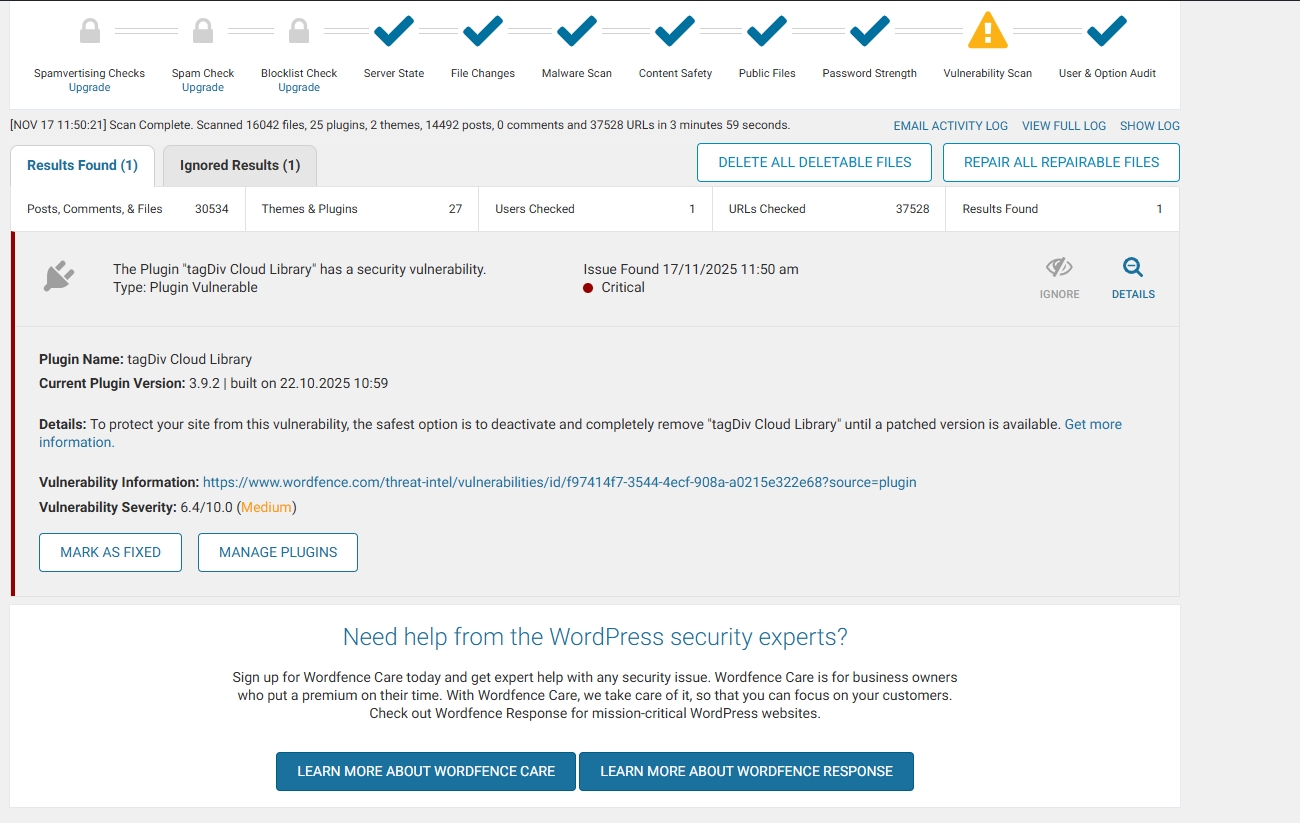
Received this warning from WordFence …
The Plugin “tagDiv Cloud Library” has a security vulnerability.
Type: Plugin Vulnerable
Issue Found November 16, 2025 9:10 am
Critical
Plugin Name: tagDiv Cloud Library
Current Plugin Version: 3.9.2 | built on 22.10.2025 10:59
Details: To protect your site from this vulnerability, the safest option is to deactivate and completely remove “tagDiv Cloud Library” until a patched version is available. Get more information.
Vulnerability Information: https://www.wordfence.com/threat-intel/vulnerabilities/id/f97414f7-3544-4ecf-908a-a0215e322e68?source=plugin
Vulnerability Severity: 6.4/10.0 (Medium)
developer@idees-digital.grSince yesterday, 16/11/2025, my site has been hacked.
My site is a blog with 14,482 articles and 14 page.
With the help of Wordfence, I have managed to locate all the malicious files and delete or replace them with new ones. The only thing I still cannot address is the tagDiv Cloud Library plugin. Can you help me with this? I have deleted all the files of the Newspaper theme and reinstalled them from scratch, as well as all the WordPress files and the other plugins.
It is very important for me to solve this problem quickly, because the site has very high traffic.
link: https://exostis.gr/wp-content/uploads/2025/11/tagDiv-Cloud-Library.jpg
After scab with Wordfence and the same from malcare
Plugin Name: tagDiv Cloud Library
Current Plugin Version: 3.9.2 | built on 22.10.2025 10:59
Details: To protect your site from this vulnerability, the safest option is to deactivate and completely remove “tagDiv Cloud Library” until a patched version is available. Get more information.(opens in new tab)
Vulnerability Information: https://www.wordfence.com/threat-intel/vulnerabilities/id/f97414f7-3544-4ecf-908a-a0215e322e68?source=plugin(opens in new tab)
Vulnerability Severity: 6.4/10.0 (Medium)
Calin Hi,
I think that you are referring to the fact that you have installed a different pre-built website, right? If so, then all content that has been added with the previous install will be removed https://i.imgur.com/SH6Zg73.png – https://forum.tagdiv.com/installing-demos/
What can be done to keep everything you have and change the website layout is to get only the cloud template you like and keep the current install.
– https://forum.tagdiv.com/tagdiv-cloud-library-plugin/
– https://forum.tagdiv.com/how-use-tagdiv-cloud-library-templates/
Thank you!
Calin Hi,
The Chained News PRO is made using tagDiv Composer and cloud templates and it can be edited using the theme builder.
– https://forum.tagdiv.com/tagdiv-composer-tutorial/
– https://forum.tagdiv.com/header-manager/
– https://forum.tagdiv.com/tagdiv-cloud-library-plugin/
-> https://i.imgur.com/9ioGHfF.png – https://i.imgur.com/4ZZ7tTo.png also the logo from that demo is an SVG, so you need to remove the SVG from the logo tab.
Thank you!
Calin Hi,
Our theme do not use no-cache or DONOTCACHEPAGE.
Also, testing with a theme like “Twenty Twenty-Four” that does not have any features and comparing it with the Newspaper theme that you can build almost anything, I think, is not a good comparison, but if this is indeed something related to our theme make some tests like this. Use only the Newspaper theme without any extra plugins except the cache plugin. If it’s ok, go on with tagDiv Composer, this is the hard part of the theme. Then, with tagDiv Cloud Library and so on, until you test it with all the theme plugins you are using.
The text step after you identify the plugin that is interfering with the cache is to check the cache settings. From my experience, setting ‘/’ in cache fields will be interpreted to not cache the homepage, but this is maybe only my interpretation.
As a suggestion you can try a code like this one in the child theme (the code needs to be adjusted):
add_action( 'template_redirect', function() {

    if ( class_exists( 'LSCache\\LSCWP' ) ) {

        // Remove any DONOTCACHEPAGE flag that may have been set earlier

        if ( defined( 'DONOTCACHEPAGE' ) && DONOTCACHEPAGE ) {

            // Un-define the constant (only works if not locked), or override via filter

            // Note: PHP doesn't allow undefining a constant, so we use filter below

        }

        // Use our filter to override caching logic

        add_filter( 'litespeed_cache_allow_cache', function( $allow ) {

            return true;

        }, 99 );

        // Clear any HTTP headers forcing no-cache

        header_remove( 'Cache-Control' );

        header_remove( 'Pragma' );

    }

}, 0 );
Thank you!