- TutorialstagDiv Social Counter Tutorial
 vikasnangia
We have 2 websites. Both need to look alike. Separately hosted.
The global templates / cloud templates cant be shared between 2 live sites can they?
If we make a change to the header on site A, can site B’s header also change?
 jeffreytszchung
 I have the 3 install, I finally get the cloud template and import a product page, but it cannot be linked and while i press the product the link shows a blank page.
(konggokhk.com/store)
 Bettina
 Hello @marcorroma!
Just to be sure, are you referring just to the featured audio on posts or soundcloud embeds from post content also? Please advice!
Thank you!
Bettina Hello @takara!
Please try to refresh the page Cloud Templates(CTRL+Shift+R) and try again.
Also, check this guide too: https://forum.tagdiv.com/general-options-may-interfere-newspaper-theme/
Please check if the problem is not from a plugin conflict, that’s why, please deactivate ALL plugins except tagDiv ones, also if you are using a cache plugin, deactivate it, clear all cache and try again.
Let me know the results!
Thank you!
Bettina Hello @rostyslav!
The cloud/PRO templates that you use are stored on your server, not our server.
Thank you!
 Takara
 Hello,
i have the same problem, i have set memory_limit and
post_max_size / upload_max_filesize to 600 and it tells us the same problem in tagDiv Cloud Library (
Invalid reply from server endpoint.)
The tag div composer plugin doesn’t work either, and I can’t even install the tagDiv Multi-Purpose, it gives me an error.
 Rostyslav
 Hello @Bettina!
Did I understand correctly that all the designs I create are stored on your server? If I use the cloud TagDivComposer?
Bettina Hello @Olawax!
In a cloud post template, you have some settings for the subtitle: https://www.screencast.com/t/SkHWkKxCGk
For more customizations, we recommend to use cloud/PRO templates in order to have the possibility to edit them with the TagDiv Composer which contains a lot of functions and features, please check our tutorial here: https://forum.tagdiv.com/tagdiv-composer-tutorial/
Documentation here:
– https://forum.tagdiv.com/cloud-library-templates/
– https://forum.tagdiv.com/design-post-pages-using-cloud-library-templates/
– https://forum.tagdiv.com/cloud-library-category-templates/
Check also our video tutorials here: https://www.youtube.com/c/tagdivThemes/videos and more theme documentation on the left side: https://forum.tagdiv.com/newspaper-theme-documentation/
You can choose a demo from here: https://demo.tagdiv.com/select_demo/select_demo_newspaper/ -> https://www.youtube.com/watch?v=ezaaE2VP7V8
Check this video tutorial, it could help you with some tips: https://www.youtube.com/watch?v=SoGQ0d5kIBg
Thank you!
Bettina Hello @yukiy531!
RAW CSS is a shortcode/element: https://www.screencast.com/t/yi3uDpLdDd -> https://www.screencast.com/t/EjVkCjmN and you can place it in every cloud template or page. You can’t access the head with the TagDiv Composer.
Thank you!
Bettina Hello @xekinima!
Please use a cloud/pro post template, edit it with the TagDiv Composer and add this element in order to achieve what you need: https://www.screencast.com/t/jU2Z96TTkx
For more customizations, we recommend to use cloud/PRO templates in order to have the possibility to edit them with the TagDiv Composer which contains a lot of functions and features, please check our tutorial here: https://forum.tagdiv.com/tagdiv-composer-tutorial/
Documentation here:
– https://forum.tagdiv.com/cloud-library-templates/
– https://forum.tagdiv.com/design-post-pages-using-cloud-library-templates/
– https://forum.tagdiv.com/cloud-library-category-templates/
Check also our video tutorials here: https://www.youtube.com/c/tagdivThemes/videos and more theme documentation on the left side: https://forum.tagdiv.com/newspaper-theme-documentation/
You can choose a demo from here: https://demo.tagdiv.com/select_demo/select_demo_newspaper/ -> https://www.youtube.com/watch?v=ezaaE2VP7V8
Check this video tutorial, it could help you with some tips: https://www.youtube.com/watch?v=SoGQ0d5kIBg
Thank you!
Bettina Hello @cavalrydesign !
If you use a cloud template, then you can add the element called “Ad box” from TagDiv Composer and there you need to add the ad.
Thank you!
 Anamaria
 Hello,
Please use a Single Post Template from tagDiv Cloud Library and then you can adjust/remove the blocks with tagDiv Composer.
Also, please check this topic https://forum.tagdiv.com/topic/remove-more-from-the-same-author/
Thank you!
Anamaria Hello,
Please make sure the tagDiv Standard Pack plugin is updated and activated.
Those shortcodes and the error are from tagDiv Standard Pack, and this plugin is not required from version 10.4, because the new demos are using cloud templates.
Thank you!
Bettina Hello @expos!
Please check this topic where I explained how to integrate an ACF field in a cloud post/page: https://forum.tagdiv.com/topic/display-advanced-custom-fields-on-post-pages/
Hope that helps you!
Thank you!
Bettina Hello @jeffreytszchung!
If you are referring about this setting: https://www.screencast.com/t/Z7Fba3cfJ ; then this will apply for default post templates and not for cloud/pro ones.
For the cloud/pro post templates, you should access the post, edit it with the tagdiv Composer and add, customize the element called “Flex Block” as in this video: https://www.screencast.com/t/iHnNCerv
Thank you!
Anamaria Hello Charlie,
You can find a header template in the tagDiv Cloud Library looking the same as the Theme Panel.
Unfortunately, only if you make changes to the theme files, but they will be overwritten with each update.
Also, using a cloud template you have several options.
Thank you!
Anamaria Hi,
If you want to add Patreon as a social icon, what you can do is to use a cloud header and a cloud footer, in this way you add an icon using tagDiv Composer, then set the SVG icon for Patreon and the full link -> https://i.imgur.com/eSSrFYq.png
Also, this social network will be added in the next update.
I hope this will help you!
Thank you!
Anamaria Hello,
Please check this topic with the same issue https://forum.tagdiv.com/topic/tagdiv-cloud-library-plugin-deactivated/ and follow the steps.
Let me know the results!
Thank you!
 ljc73
ljc73Like this: https://ketology.net/recipes/cloud-bread/
please help!
 sosnews
i have problems with the instalation of the plugin
tagDiv Cloud Library – Plugin deactivated.
This plugin is not supported by the current theme!
Dismiss this notice.
 Charliemiller694
 Hi Anamaria,
Thanks for the reply but i cant seem to get that working (I’m sure I’m just being stupid), I’ve tried installing cloud headers but much prefer the look of ‘no template’ and managing the look of the header through the theme panel. Is there no way to have the logo responsive or adjustable using the header section in the theme panel and no cloud template?
Cheers,
Charlie
 marcorroma
 Hi, is there any news about it?
It is absurd that from mobile you cannot click on the “play” to listen to the podcast, but you have to ignore the screen that wants to download the Soundcloud app every time!
It would be enough to insert a function where you can disable this, I have also suggested the code to insert. It’s just the “show_teaser = false” line to add to the iframe
Thanks
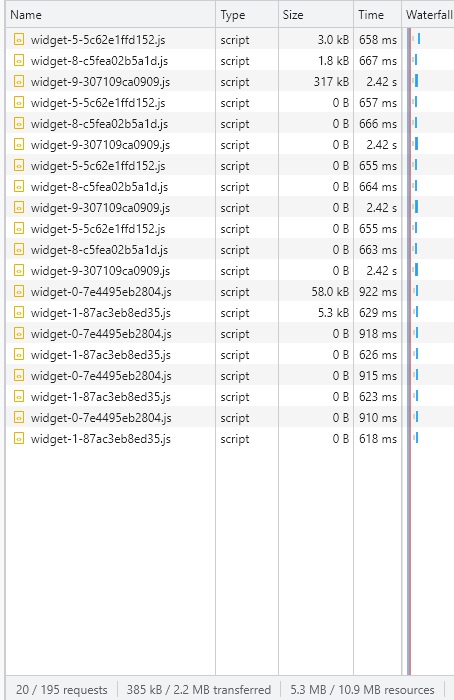
marcorromaHi, I have 4 Soundcloud players on my homepage.
This involves loading many soundcloud site widgets. About 385kb of .js uploads for these podcasts alone.
Screenshot:
https://i.ibb.co/tpdfZw3/widg.jpg
Is it possible to delay the loading of these scripts? Lazy load?
Currently, this script is loaded when accepting cookies.
I await support.
Thank you
 mlavan
Hi All
hope all’s good.
The pagination is active on my website for any “single post template” downloaded from cloud library. How can i deactivate this? If i choose a single post template from the standard library this is deactivated as default. I don’t seem to be able to find this setting.
thanks in advance
Mark
Bettina Hello @ikaris!
Normally, if you use a cloud/PRO template, then you can edit the homepage for example with the tagdiv Composer and you can edit the elements in header and footer too.
If you use a default header, then you can’t edit it with the TagDiv Composer. So, you need to import a cloud one from Cloud Templates: https://tagdiv.com/how-to-use-the-header-builder-and-tagdiv-cloud-header-templates/. You can do it from scratch also: https://www.youtube.com/watch?v=SoGQ0d5kIBg
Thank you!