Abraham John
 The same issue happened for me as well, I had to reinstall the supporting plug-ins coming with the theme, like tagdiv cloud library, tagdiv editor etc., then it was working. But still I am facing issue to add new page or edit existing page, it leads to a blank page.
 dave@snacksafely.com
I’ve used newspaper for years, but am having a problem using an edited page template.
I’ve used the WP admin “Cloud templates” tab and have imported and edited a template, then saved and renamed it. It appears under “Page templates.” So far, so good.
Now I want to use that template to create a series of pages. I create a new page using TagDiv Composer and go to select my template under “Cloud”, but the dialog box does not show me my saved templates, only the canned Newspaper templates from the cloud.
Any ideas?
 digilogue
Hi I have deleted an old site with a licensed copy of Newspaper. Then I created a new site (new domain) and installed the theme again. I have two problems.
1. How can I transfer my license?
2. tagDiv Cloud Library plugin will not activate.
 Simion C.
 Hi,
There isn’t unfortunately. There is no relation between our composer and elementor. You must either build the page with elementor or with the composer. Our composer is old if we refer to when it was released, so is elementor. We introduced it in Newspaper 8, but that doesn’t mean we haven’t improved it a lot. Please check the theme demos and the cloud library https://cloud.tagdiv.com/#/load/All Everything you see there is built with the composer. It’s quite a capable builder. You could consider building the page with it if you want to use blocks and grids from the theme. Let us know if you need help with it.
Thank you!
 Laosdailynews
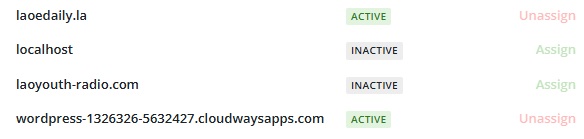
Previously, I extracted the license key from the main website to use on 2 trial websites, but I forgot to remove it and have already deleted the websites. The license key is still active, and I cannot use the license key again. How can I resolve this?
The 2 websites that are currently linked to the license key:
– wordpress-1326326-5632427.cloudwaysapps.com
– laoedaily.la
https://i.postimg.cc/nrdJDcvN/picture.jpg
 GulfAiMagazine
Some posts are articles with a unique layouts. Can they be assigned individual nonglobal templates from the cloud library?
 juler1
I want to be able to set a different cloud template for each tag-linked page. I have downloaded 2 templates but whichever one I tick appears to become the default template for both/all tag pages. How can I assign specific tag templates to each tag with specific text?
Thank you for your guidance…
 Assia75
 [STDERR] PHP Fatal error: Uncaught TypeError: Unsupported operand types: int – string in /home/livingin1/public_html/wp-content/plugins/td-cloud-library/state/single/tdb_state_single.php:1338\nStack trace:\n#0 /home/livingin1/public_html/wp-content/plugins/td-cloud-library/shortcodes/single/tdb_single_date.php(216): tdb_state_single->{closure}()\n#1 /home/livingin1/public_html/wp-content/plugins/td-cloud-library/shortcodes/single/tdb_single_date.php(216): Closure->__invoke()\n#2 /home/livingin1/public_html/wp-content/plugins/td-composer/legacy/common/wp_booster/td_global_blocks.php(27): tdb_single_date->render()\n#3 /home/livingin1/public_html/wp-includes/shortcodes.php(434): td_global_blocks::proxy_function()\n#4 [internal function]: do_shortcode_tag()\n#5 /home/livingin1/public_html/wp-includes/shortcodes.php(273): preg_replace_callback()\n#6 /home/livingin1/public_html/wp-content/plugins/td-composer/includes/tdc_composer_block.php(222): do_shortcode()\n#7 /home/livingin1/public_html/wp-content/plugins/td-composer/includes/shortcodes/vc_column.php(440): tdc_composer_block->do_shortcode()\n#8 /home/livingin1/public_html/wp-content/plugins/td-composer/legacy/common/wp_booster/td_global_blocks.php(27): vc_column->render()\n#9 /home/livingin1/public_html/wp-includes/shortcodes.php(434): td_global_blocks::proxy_function()\n#10 [internal function]: do_shortcode_tag()\n#11 /home/livingin1/public_html/wp-includes/shortcodes.php(273): preg_replace_callback()\n#12 /home/livingin1/public_html/wp-content/plugins/td-composer/includes/tdc_composer_block.php(222): do_shortcode()\n#13 /home/livingin1/public_html/wp-content/plugins/td-composer/includes/shortcodes/vc_row.php(1204): tdc_composer_block->do_shortcode()\n#14 /home/livingin1/public_html/wp-content/plugins/td-composer/legacy/common/wp_booster/td_global_blocks.php(27): vc_row->render()\n#15 /home/livingin1/public_html/wp-includes/shortcodes.php(434): td_global_blocks::proxy_function()\n#16 [internal function]: do_shortcode_tag()\n#17 /home/livingin1/public_html/wp-includes/shortcodes.php(273): p
2025-08-12 06:39:54.154375 [NOTICE] [100585] [T0] [213.183.63.23:44728>87.97.241.170#APVH_livinginashoebox.com:443] [STDERR] reg_replace_callback()\n#18 /home/livingin1/public_html/wp-content/plugins/td-composer/includes/tdc_composer_block.php(222): do_shortcode()\n#19 /home/livingin1/public_html/wp-content/plugins/td-composer/includes/shortcodes/tdc_zone.php(771): tdc_composer_block->do_shortcode()\n#20 /home/livingin1/public_html/wp-content/plugins/td-composer/legacy/common/wp_booster/td_global_blocks.php(27): tdc_zone->render()\n#21 /home/livingin1/public_html/wp-includes/shortcodes.php(434): td_global_blocks::proxy_function()\n#22 [internal function]: do_shortcode_tag()\n#23 /home/livingin1/public_html/wp-includes/shortcodes.php(273): preg_replace_callback()\n#24 /home/livingin1/public_html/wp-includes/class-wp-hook.php(324): do_shortcode()\n#25 /home/livingin1/public_html/wp-includes/plugin.php(205): WP_Hook->apply_filters()\n#26 /home/livingin1/public_html/wp-content/plugins/td-cloud-library/wp_templates/tdb_view_single.php(189): apply_filters()\n#27 /home/livingin1/public_html/wp-includes/template-loader.php(106): include(‘…’)\n#28 /home/livingin1/public_html/wp-blog-header.php(19): require_once(‘…’)\n#29 /home/livingin1/public_html/index.php(17): require(‘…’)\n#30 {main}\n thrown in /home/livingin1/public_html/wp-content/plugins/td-cloud-library/state/single/tdb_state_single.php on line 1338\n
Assia75Hello Tagdiv,
I’m currently running PHP 7.4.33 because updating to a newer version results in a critical error. My web host identified the issue as being related to two Tagdiv plugins — I believe Tagdiv Cloud Library and Tagdiv Composer.
Could you advise on how I can resolve this so I can safely update PHP? I got an error log, if that helps
Url:https://www.livinginashoebox.com
 iancollins
This relates to this site https://airtekbroadcast.com/ for which i have purchased a new subscription (actually reallocated it). I have a cloud header template set as default and all page headers set to global. The menus look correct. I have a Solutions item on the menu and i have a “Main” menu setup with x6 sub items. From the home page I can see the Solutions drop down showing all six items. When I click any sub item it takes me to a page like this https://airtekbroadcast.com/solutions/state-radio-remote-stations/ which is correct. However, the page title on that page is not visible suggesting that it is not pointing to my page. I have checked the slugs are correct. Oh and from that page, only one item is visible in the Solutions menu drop down. It appears that you only get the full set of items when at the home page. There is one exception. From the home page if you select Solutions – Private Commercial Stations, when that page renders you can see all items. Please can you help?
 Calin
Calin Hi,
For this, you need to use tagDiv Composer and edit all page and cloud templates to set them to the width you liek. For this, each row must be stretched – https://forum.tagdiv.com/tagdiv-composer-tutorial/ https://i.imgur.com/jqr86aY.png
Thank you!
Calin Hi,
If you are using cloud templates, then you can use tagDiv Composer, edit the template, select the element you want to remove, and press the delete button from the keyboard, or use the right click on the element to remove it. – https://i.imgur.com/ZyNY3bN.png – https://i.imgur.com/REJtpgx.png
Thank you!
Calin Hi,
Usually that should be a cloud header and you should be using tagDiv Composer to edit the page, select the elements, and you can use the right click on the theme to remove them.
IN case that you use a standard header, then you can remove the socials from the theme panel – https://i.imgur.com/9MkfgIK.png
Thank you!
Calin Hi,
Please make sure that all theme requirements are set as in our guide https://forum.tagdiv.com/requirements-for-newspaper/ and also what you can do is to go to Newspaper > plugins and make sure you have installed tagDiv Composer, tagDiv Cloud Library, and tagDiv Opt-in builder, after that try to reinstall the pre-built website.
Thank you!
Calin Hi,
If you see only code, is because a demo from the theme has been installed and one of the theme plugins (tagDiv Composer, tagdiv Cloud Library) are disabled now.
The pages and cloud template scan be edited using tagDiv Composer, which is the theme builder and can be used to edit/create pages and templates (not articles)
Calin Hi,
What you did was not saving the cloud header instead, you saved a section from the header as an element in the TagDiv Composer. You can access this from the TagDiv elements panel; it should appear after the last elements in the Composer (in the left sidebar).
If you want to have more cloud headers, you can import them from the Cloud Library or duplicate an existing cloud header. These will then be displayed in the header manager. Also, you can set a global header to apply across all pages and templates on your website, and only change it if you need a different header for a specific page.
https://forum.tagdiv.com/header-manager/
Thank you!
Calin Hi,
It will need to use tagDiv Composer, edit the page or cloud template, and select the ad box to set your ad code or banner in. You can check more about the settings ads in our theme by checking those guides:
– https://forum.tagdiv.com/article-ads/
– https://forum.tagdiv.com/using-other-ads-non-adsense-ads/
Thank you!
GulfAiMagazine I saved the header as an element and the theme asked me for a name for the shortcode. Now how do I load the saved header on another page? On another page, If click the manager, the import header option only lists the cloud headers. Not the customized header I saved.
Calin HI,
This is no issue, you chose a standard template in your image, and the standard template uses for sidebar widgets, those can be set from the appearance widgets. The single post template is a cloud template https://forum.tagdiv.com/how-use-tagdiv-cloud-library-templates/ that can be edited on frontend using tagDiv Composer and you can create the layout as you like https://forum.tagdiv.com/tagdiv-composer-tutorial/
Thank you!
Calin Hi,
There is no bug, the Old Fashioned demo is an old demo of ours and it was made before the cloud template to be in the theme, this is why this does not have cloud templates and it is using standard templates from tagDiv Standard Pack and can be edited using the settings from the theme panel.
Thank you!
 gergef
I can see the page with TagDiv Composer but it appears blank when published.
https://www.antalyasahaneyapi.com/kepenk/
I import a section from cloud.
 Seb
SebBonjour,
J’ai installé le template Old Fashioned sur mon site. J’ai personnalisé et travaillé sur le thème pour le personnaliser.
Je suis surpris car lorsque je suis arrivé aux articles de blog, je vois qu’il ne m’est pas proposé de “cloud template”. Je n’ai également pas de template pour la page 404, la page auteur, etc… Est-ce un bug ?
Sinon, comment puis-je faire pour personnaliser les pages concernées ? Exemple, sur les articles de blog, apparait toujours une publicité pour une newsletter qui ne mène à rien. Comment faire pour la retirer ?
Merci à vous.
Calin Hi,
Yes, that one is a standard header. To use a cloud header, you need to have tagDiv Cloud Library installed, and you can edit it using tagDiv Composer.
But what you can do is to enable the boxed version for the website, and this will adjust the ad on your current header https://forum.tagdiv.com/background-introduction/, just set a background color, for example, white.
Thank you!
 duck1970
 Hi Calin, I think I’m using standard, but I’m not sure.
Here’s the link to the new one:
https://new.radiomarcabarcelona.com
If it’s standard, how do I delete it and replace it with cloud?
Thanks
Calin Hi,
As far as I know, the WP_User_Query is used in a single plugin from the Newspaper theme, which is the tagDiv Cloud Library https://i.imgur.com/cegZL4k.png. The strange thing is that I can not recreate this situation on my install. Could you please contact us via email at contact@tagdiv.com and provide a temporary wp-admin access to investigate this situation?
Thank you!