
 dennisjpitocco
We are using the Fast News Single Post Cloud Template for all of our posts. Questions:
1. What is the ideal image Size for the big (Featured) image within this Cloud template?
2. Although we have run Regenerate Thumbnails, the Featured Image appears to be centered to the right in all of our posts.
3. Here is an example where the image size is 640 x 341 yet the right side of the image is barely visible: https://www.bizcatalyst360.com/what-would-mlk-say-on-the-57th-anniversary-of-the-march-on-washington/
 Calin
Calin Hi,
Please try not to reply multiple times in the topic if possible, this will only delay our response. Replying multiple times will refresh the topic date and move it to the back of the line, we answer from oldest to newest. Also please note the allocated support hours mentioned in the top banner.
I’m not very sure, but last time when I seen this was on mobile version when the user used an classic header style an not cloud header template.
Please check with a cloud header and if the problem persists, provide a link where I can inspect from where is coming the login text.
Thank you!
Calin Hi codinghasan,
To create easier and fact a website, after you install the theme and theme plugins, you can install a demo with content -> https://forum.tagdiv.com/installing-demos/ if is a pro demo, then it was made using cloud templates and can be edited entirely with tagDiv Composer.
If there is still a problem, let me know!
Thank you!
 Vlad S
 Hello !
Please note that all the Cloud library templates are fully editable using tagDiv Composer. Also for ads you can use the inline ads or adboxes as you can see here: https://www.youtube.com/watch?v=biTpVVlr8j8&t=2s ; https://www.youtube.com/watch?v=fa7GenCHcBU&t=15s
Thank you !
Calin Hi,
This is because you are using a PRO demo that is using cloud templates, that is why the theme panel settings are not apply. Using cloud template from tagDiv Cloud Library, you’ll need to edit the cloud template using tagDiv Composer and set on the elements the color and style you want
For example in order to change the share style, please edit the single post template witj tagDiv Composer, like this -> https://i.imgur.com/ZpxtjbP.jpg click on the share buttons and choose a style https://i.imgur.com/jyYrNlL.png after that do not forget to save the changes.
If you want to remove the view counter and comments use tagDiv Composer to edit the teplate -> https://i.imgur.com/2WTC8nR.png and use the right click on these elements and remove them -> https://i.imgur.com/9TJgyv4.png
Let me know the results!
Thank you!
Vlad S Hello !
I personally recommend to take a look at our guide here: https://forum.tagdiv.com/newspaper-theme-documentation/ and also take a look at our videos here: https://www.youtube.com/user/tagdiv
Most of the demos, all PRO demos and all the Cloud library templates are fully editable using tagDiv Composer: https://forum.tagdiv.com/tagdiv-composer-tutorial/
I hope this was helpful !
Thank you !
Calin Hi,
What I mean, is that if you are using this post style https://www.screencast.com/t/U0vqr5pde3Gx there is no option to set an image in this place -> https://i.imgur.com/w6w0Df0.png in that place you can add only an ad -> https://i.imgur.com/4JTgOcE.png
If you want you can try a single post template from tagDiv cloud library and you can use tagDiv Composer to edit it how you want.
Hope this will help you!
Calin Hi,
What I can suggest is to try with a standard header not cloud header too see if in this way this problem still persists on facebook app.
Also, I add this as request on our list of features.
Thank you for your understanding!
Vlad S Hello !
If you are using a Cloud library post template you will be able to remove the element using tagdiv composer: https://www.screencast.com/t/N7qcafhrt
If you are using standard templates you can achieve this from theme panel as you can see here: https://www.screencast.com/t/mDiEZmtm
Thank you !
Thank you !
Calin Hi doddm, as I said above the Gadgets Pro demo is using two cloud headers, one is set as default in theme panel for and one is set individual per cloud templates with tagDiv Composer. One of these cloud header is an overlay header and the other one is a normal header.
If you import the cloud header template 62 and you set it in theme panel this should look like this -> https://i.imgur.com/ZAM7bVl.png also you can set the header individual with tagDiv Composer from here -> https://i.imgur.com/mSaMiLf.png -> https://i.imgur.com/5VNrhaL.png -> https://i.imgur.com/Cg2TlaA.png -> https://forum.tagdiv.com/header-styles/
If there is still a problem, let me know!
Thank you!
Vlad S Hello !
That option is possible when using Cloud Library post templates: https://www.youtube.com/watch?v=I1R3j1QYod0 And you can activate or deactivate the infintie scroll from here: https://tagdiv.com/infinite-loading-for-single-posts/
Thank you !
Calin Hi,
to remove these element from pages/homepage you can do it in two ways:
– you can use the option from theme panel (this is a general option) -> https://i.imgur.com/0oSs7ys.png and -> https://i.imgur.com/jPVCJmA.png
– using tagDiv Composer -> https://i.imgur.com/Vq4wv7H.jpg this can be use on flex blocks and flex grids -> https://i.imgur.com/dSC4Kmj.jpg
To remove these elements from inside a posts, there are also two methods, one for standard templates, for these you can use the options from theme panel -> https://i.imgur.com/ykka05g.png or if you are using a pro demo or a single post template from tagDiv Cloud Library, then you can edit it with tagDiv Composer and use the right click to remove the elements you do not need -> https://i.imgur.com/PpkdQOF.png -> https://i.imgur.com/zvZfWyg.jpg
Hope this will help you!
Thank you!
Calin Hi,
I think that this problem can be solve by adding an extra parameter in a theme file, the file path is wp-content/plugins/td-cloud-library/shortcodes/header/tdb_header_logo.php on line 792 set before getimagesize and ‘@’ like this -> https://i.imgur.com/VOWmTCI.png
Also make sure that allow_url_fopen = On;
-> https://chemicloud.com/kb/article/how-to-enable-or-disable-allow_url_fopen-in-cpanel/
-> https://www.a2hosting.com/kb/developer-corner/php/using-php.ini-directives/php-allow-url-fopen-directive
For the problem with Mailchimp, please make sure that you set it as in our guide from here -> https://forum.tagdiv.com/the-newsletter-plugin/
If there is still a problem, let us know, also if you want we can make the changes for you for getimagesize, just send us an email at contact@tagdiv.com and provide admin login. Include a link to this topic in the email.
Let me know the results!
Thank you!
 SVPrasad
Hi, I’m Downloaded Template From Cloud After that i’m customized the template, and added conditional menu (This Menu Is some conditions like restricts menus for registered/unregistered users Created with Indeed ultimate membership pro ) previously worked but now i’m getting this problem.
Sc
Website Url : https://www.viswamvoicenews.in/
 ShubhamManoharSasane
I want to limit the number of authors shown in the Authors list box of tagdiv cloud components.
 James David
I followed your API page at /youtube-api-key/ and you cover all the things except one that is somewhat important.. I think?
After Step 9 when you click “What credentials do I need?” button to retrieve your API key, the API key comes up but so does a warning. You can see it in your screen shot as well.
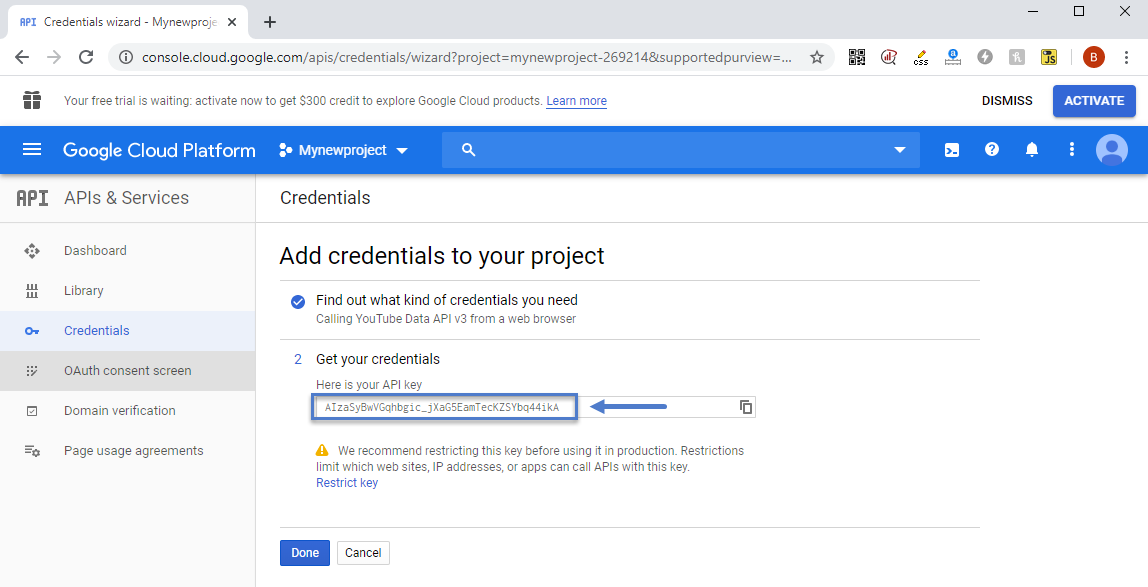
“We recommend restricting this key before using it in production. Restrictions limit which websites, IP addresses, or apps can call APIs with this key.”
In the past I did not restrict a key on previois APIs assuming my sites is small, it’d be fine, I was wrong. I was using the API in a simple YT plugin called Yottie and my site, with little to no traffic somehow had YT emailing me, suspending the API. They wanted me to resubmit an application and detail how/where it’s being used etc. Jump through hoops basically. I’m happy to copy/paste those emails if curious. I assumed it was the plugin, so I tried other plugins, and again.. same thing, too many calls, all over Quota.
I removed all YT API’s and plugins and was going to just copy/paste the URL for each video into a post as needed, knowing WordPress would embed it properly, it’d work, all would be fine.
I tried this, it worked fine, but.. the social counter I think needs the API doesn’t it? Can it work just with a channel name?
If I enter channel/yt-channel-code-here, will that work or do I absolutely need an API key?
So with those answers, I’ll know if I need the key for the counter.
Also – If I add the key in the theme panel under networks, when a video is loaded on a post I make, is that referencing my API key so YT is adding that page load against my quota?
That seems odd given I can just copy/paste the url in and it works so no api is needed etc.. am I missing something?
If I need the key, and I chose to restrict as Google suggests, any suggestions on how to restrict? As in, will this work against the theme at all? Easy to restrict using http/https as noted on their page https://cloud.google.com/docs/authentication/api-keys so that would be it.. right?
Thanks in advance
 Dedi Ariko
There are several problems that I encountered when using Cloud Templates.
1. Ads from Google Adsen don’t work perfectly. I can’t use the automatic settings for google ads on posting pages.
2. I can’t set custom colors for Cloud Templates.
 5i2i2u5h
I’m seeing all these locations to configure the header, how do I know which one to pick?
1. Creating the Header as a block in Cloud Templates via tagDiv Composer
2. Creating the Header on the home page via tagDiv Composer
3. Website manager in tagDiv Composer > Choose header template
4. Theme Panel > Header > Header Style or Set a Cloud Library header template for all website
5. Theme Panel > Global Block Header Template
 theincredibleyaya@gmail.com
Hi, I’m using “Gourmet Pro”. The post template is set up with 3 columns. How can I change this to 2 columns? I tried deleting the blocks in TD composer and dragging the center column to expand so there’s more room for the main text of the post but the text then gets messed up and overlayed onto the featured image …
I realize you have 2 column templates in other demo’s in the cloud library but they have different fonts and style … I want to keep the “Gourmet Pro” style and fonts but change to 2 columns.
 alexieb
Hello,
I installed the corona PRO demo on my wordpress (newly provisioned) and get this error at the top of the page:
Warning: getimagesize(https://…/wp-content/uploads/2020/08/logo-png.jpg): failed to open stream: HTTP request failed! HTTP/1.1 503 Service Unavailable in /home/clients/796e55f2124c039dda3361fa02a967fb/web/wp-content/plugins/td-cloud-library/shortcodes/header/tdb_header_logo.php on line 792
Can you let me know what to do to fix this?
Thanks,
A
Calin Hi,
1. You can remove these element using tagDiv Composer -> https://i.imgur.com/PO3m4lJ.png click on the menu and change it -> https://i.imgur.com/cs9sVrX.png or use the right click to remove it -> https://tagdiv.com/right-click-menu-tagdiv-composer/
2. Please do not use WPBakery with tagDiv Cloud Library, this will not work correctly. please disable the WPBakery plugin and the layout will be display correctly.
3. To remove the author you need to edit the single post template with tagDiv Composer and use the right click on author to remove it.
4. You can remove the comment count from the blocks using this option from theme panel -> https://i.imgur.com/F5Q1tDg.png also in order to remove it from posts you can use these settings for standard templates -> https://i.imgur.com/iRudzRZ.png if you are using a PRO Demo or just a single post template from tagDiv Cloud Library for posts, then you need to edit it with tagDiv Composer and use the right click on the elements you want to remove. -> https://i.imgur.com/tEctz6F.png -> https://i.imgur.com/eZNPb6Q.png using other ads.
Thank you!
Calin Hi TkLbIY,
You can do this if you are using a single post template from tagDiv Cloud Library, this can be edited with tagDiv Composer and you can choose to display the author image https://i.imgur.com/lbtGolO.png -> https://i.imgur.com/TKYRnTs.png
Hope this will help you!
Calin Hi,
I think that you are using a PRO demo or cloud templates, that is why the theme panel settings are not apply. Using cloud template from tagDiv Cloud Library, you’ll need to edit the cloud template using tagDiv Composer and set on the elements the color and style you want
For example in order to change the share style, please edit the single post template wit tagDiv Composer, like this -> https://i.imgur.com/ZpxtjbP.jpg click on the share buttons and choose a style https://i.imgur.com/jyYrNlL.png after that do not forget to save the changes.
If you want to remove the view counter and comments use tagDiv Composer to edit the teplate -> https://i.imgur.com/2WTC8nR.png and use the right click on these elements and remove them -> https://i.imgur.com/9TJgyv4.png
For blocks like these from homepage -> https://i.imgur.com/4OoKykw.jpg check the layout tab from tagDiv Composer -> https://i.imgur.com/2qcT7ah.png -> https://i.imgur.com/xjphqay.png for more details about these options you can check our guide from here -> https://forum.tagdiv.com/flex-block-settings-guide/
Let me know the results!
Thank you!
Calin Hi Curtis407,
What I mean above is that we have two types of demos that you can use/import/install and these are normal demos and PRO demos -> https://i.imgur.com/hLlkT7C.png when you are installing a normal demo, then you can edit it using the settings from theme panel and when you are importing a PRO demo you can adjust the cloud templates from that demo using tagDiv Composer -> https://i.imgur.com/TUt4wwC.jpg.
Also if you want you can create your own design and you can import -> https://i.imgur.com/GoFhglJ.png from cloud templates pages/sections/blocks templates to make it easier.
Thank you!
Vlad S Hello !
I have removed the text and added the image, but the size cannot be adjusted. When I add a width, it does nothing and when I return to the page it has defaulted to ‘auto’. When I try to delete an element in the header that I don’t want (eg the social icons), the screen goes dark and opaque and freezes, nothing is deleted.
This should not happen, there may be a plugin conflict on your website. please deactivate ALL plugins except tagDiv ones, also if you are using child theme or cache plugin, deactivate them, clear all cache and try again.
Can you provide a screenshot of your editor and show us what you are looking to change and how?
On posts you will have to use cloud library templates that are fully editable using tagDiv Composer: https://forum.tagdiv.com/design-post-pages-using-cloud-library-templates/ Once the templated installed you can open it using tagDiv Composer and remove the feature image element ( right click on it and delete )
You can import multiple templates and design each one to fit your taste. Each post can have only 1 design and it has to be set manually as you can see here: https://www.screencast.com/t/emXJrV3dO
For sidebars you can follow our guide here that will help you find lots of informations about how to use the tagDiv Composer more advanced: https://www.youtube.com/watch?v=fa7GenCHcBU&t=14s
The recommended image sizes are 800x600px or 1920x1080px this will create the image ratio that is needed.
That can be found in the ROW layout as you can see here:https://www.screencast.com/t/BVfRiPkUBAz
I hope this was helpful !



