
- TutorialstagDiv Social Counter Tutorial
 dennisjpitocco
Although we have adjusted the font sizes to Default for Pull Quotes and Block Quotes via the Cloud Template for all posts AND via the Theme Panel for Post Content Font, the size of the font increases dramatically whenever viewed on a screen less than 12 inches wide. Please use this post as an example.
https://www.bizcatalyst360.com/leading-with-intention-and-gratitude/
 inqusitive-stha
 Any rough estimation, when it should be available as a cloud template?
 Vlad S
 Hello !
You will have to install the required plugins from theme panel – plugins. Make sure that TagDiv Composer plugin is active.
Homepage can be edited from here on frontend: https://www.screencast.com/t/nMsrX9jxka49
And from here on the backend: https://www.screencast.com/t/S3M8DyYz
Cloud library templates can be edited from here: https://www.screencast.com/t/h3q6AT14
This will enable the drag and drop options from tagDiv Composer.
Thank you !
 syscoid
Hi,
how to modified or custom widget sidebar menu?
after we choice this widget sidebar -> https://prnt.sc/tu8p9q for tags cloud,
this menu default like this -> https://prnt.sc/tu8q8h
how do I change the appearance that I gave this box, can be the same as the appearance that I gave a blue arrow to display the menu
 mrdragon9
Hello!
The recent theme update prompted the following PHP error email from WordPress:
An error of type E_ERROR was caused in line 2753 of the file /home/gnndev/public_html/wp-content/plugins/td-composer/legacy/common/wp_booster/td_util.php. Error message: Uncaught Exception: DateTime::__construct(): Failed to parse time string (@) at position 0 (@): Unexpected character in /home/gnndev/public_html/wp-content/plugins/td-composer/legacy/common/wp_booster/td_util.php:2753
Stack trace:
#0 /home/gnndev/public_html/wp-content/plugins/td-composer/legacy/common/wp_booster/td_util.php(2753): DateTime->__construct(‘@’)
#1 /home/gnndev/public_html/wp-content/plugins/td-composer/legacy/common/wp_booster/wp-admin/panel/views/td_panel_social_networks.php(54): td_human_readable_ts(NULL)
#2 /home/gnndev/public_html/wp-content/plugins/td-composer/legacy/common/wp_booster/wp-admin/panel/panel_core/td_panel_core.php(143): require_once(‘/home/gnndev/pu…’)
#3 /home/gnndev/public_html/wp-content/plugins/td-composer/legacy/common/wp_booster/wp-admin/panel/td_view_panel.php(2): td_panel_core::render_panel(Array, ‘theme_panel’)
#4 /home/gnndev/public_html/wp-content/plugins/td-composer/legacy/common/wp_booster/wp-admin/panel/td_panel.php(72): include(‘/home/gnndev/pu…’)
#5 /home/g
Query monitor also prompts the following 3 PHP error locations:
wp-content/plugins/td-cloud-library/includes/tdb_functions.php:1964
wp-content/plugins/td-cloud-library/includes/tdb_functions.php:1965
wp-content/plugins/td-composer/css-live/css-live.php:30
The PHP errors are not allowing me to update the theme panel. The rest of the site works fine from what I’ve gathered but the theme panel is all greyed out and won’t let me make any updates. I’ve also tried deactivating all non-tagdiv plugins without any success. Also contacted my hosting and toggled the site’s PHP version but didn’t see any effect. Any advice on how to fix this is much appreciated.
 andxtagdiv
I want to re-use the Flex Block from homage page of your GOSSIP demo on another template. The block where the meta is on white over the image in three columns, two rows.
When I save that as a custom block, the output is corrupted. This would be my 1st support question. Why is that?
I then tried to recreate it manually and I can never get the image to not extend outside of the column. This would be my 2nd support question. How?
Thirdly, as a general question: When importing a cloud template, do I always get all and any custom CSS in the front-end, or is there stuff hidden in files in the back-end?
inqusitive-stha Ok, then I think I will update it once it is available on cloud library.
 AlbertoJR
Hi.
I would like to edit my post template so it could look more like the post template 10, which displays a video, and also at the thumbnails.
Would it be possible?
If I edit the post template from the Cloud Template I can add a video embedded element, but then I can not manage to associate a video link from the post to that template element.
Could you confirm if the only way of showing video posts (even in the thumbnails) is to select one of the video post styles?
Thanks in advance.
 HarrisonBands
 I’ve tried setting a new Instagram ID, but I can’t select it from the theme panel. The button is “greyed out” and not selectable. I also received the following message from WordPress after the upgrade. Note this says I’m running 10.3.5, but my theme panel confirms 10.3.6
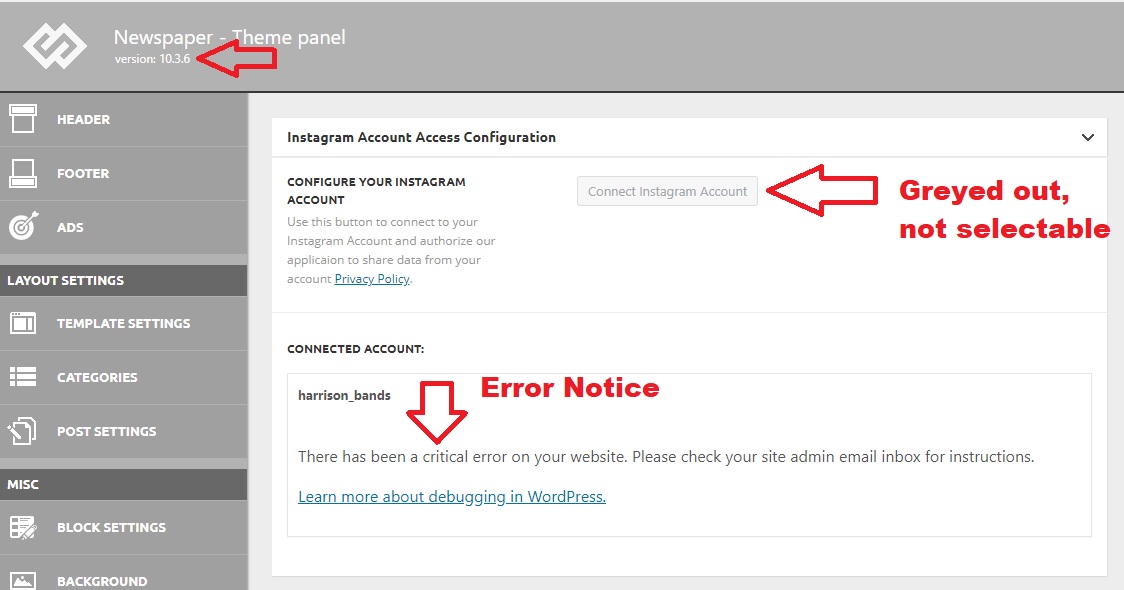
When seeking help with this issue, you may be asked for some of the following information:
WordPress version 5.4.2
Current theme: Newspaper (version 10.3.5)
Current plugin: tagDiv Cloud Library (version 1.5 | built on 06.05.2020 14:38)
PHP version 7.3.20
Error Details
=============
An error of type E_COMPILE_ERROR was caused in line 1358 of the file /home4/harritf2/public_html/wp-content/plugins/td-cloud-library/includes/tdb_functions.php. Error message: require_once(): Failed opening required ‘tdb_template_import.php’ (include_path=’.:/opt/cpanel/ea-php73/root/usr/share/pear’)
 Calin
Calin Hi inqusitive-stha, the inline ads that Vlad suggested are on single post templates from tagDiv Cloud Library and can be edited with tagDiv Composer.
standard post templates -> https://i.imgur.com/1rfZZ6z.png
cloud templates -> https://i.imgur.com/bABB0WZ.png
Also for the moment only using cloud templates you can set more the 1 inline ad (you can set 3 inline ads).
Thank you!
Calin Hi,
This is disposable as a demo and we’ll add the cloud template in tagDiv Cloud Library as soon as possible.
When you use a demo the current settings for the one that you have will be lost -> https://i.imgur.com/vOcoYID.png, when you use only cloud templates then the settings will remain.
Thank you!
Calin Hi, if you want to make change for flex block 1 you need to check this file wp-content/plugins/td-composer/legacy/Newspaper/includes/shortcodes/td_flex_block_1.php also the files for post loop can be found this path -> wp-content/plugins/td-cloud-library/shortcodes/common/tdb_loop.php
Maybe you can integrate the pagination from posts loop on flex block.
Hope this will help you!
Calin Hi Genkokov, unfortunately I do not have the skills of developers therefore the only thing that I can do is to announce our developers about this situation and they will deal with it. I’m sorry for this inconvenience! but if the infinite loading is not improve the position/rank on google index, the only solution for the moment is to disable it until our developers will check the problem.
Also the problem with indexing the ?tdb_action=tdb_ajax was solved in last version -> wp-content/plugins/td-cloud-library/includes/tdb_functions.php -> https://i.imgur.com/Ft4mnaH.png
Thank you for your understanding and sorry for the inconvenience!
Calin Hi,
Usually the font family can be set in theme panel -> https://i.imgur.com/LvqPmJM.png -> https://i.imgur.com/HFj0KBm.png this will be apply on all elements that has set the font family on default, but if you are using a pro demo you need to check the cloud template with tagDiv Composer too -> https://i.imgur.com/GNqglDI.png -> https://i.imgur.com/aXURkxS.png -> https://i.imgur.com/03SBY1y.png
Hope this ill help you!
inqusitive-stha Is it the demo or the cloud template? Is it something that will just new magazine pro page, or will it modify the whole website and database?
Calin Hi,
This tdb_action=tdb_ajax is related to the infinite loading functionality, the ?tdb_action=tdb_ajax can be found in wp-content/plugins/td-cloud-library/includes/tdb_ajax.php but once that is remove it will no longer work correctly the infinite loading.
I will make a note to our developers to check the infinite algorithm/code and to see if is not a better way to implement the code.
Thank you for your understanding!
Calin For other 3 problems:
1. To solve the problem with the log title you need to add an inner row and set the layout like this -> https://i.imgur.com/EduX1C4.png and set the left inner column the icon and in the right one the post title after that in css tab set for the icon inner column a fix width -> https://i.imgur.com/aVN2tbC.png and for the other one sit it 100% – that fix width -> https://i.imgur.com/oHx2xan.png
2. For the number of subcategories, you need to edit the cloud header with tagDiv Composer and change the -> https://i.imgur.com/HBfJDew.png
For 3 problem, you need to activate the og: image, you can use our guide from here -> https://forum.tagdiv.com/facebook-share/ use yoast seo (in this guide you will know how to display the og image using yoast plugin).
Hope this will help you!
Thank you!
Calin Hi,
What you can do is to edit the cloud header with tagDiv Composer and add and z-index on mega menu -> https://i.imgur.com/HrQtcBC.jpg -> https://tagdiv.com/tagdiv-composer-page-builder-basics/
Hope this will help you!
Thank you!
Vlad S Hello !
This is the correct name for the related posts element: https://www.screencast.com/t/6byjdIae4 Also please note that this is available only on cloud library post templates.
Thank you !
inqusitive-sthaI have updated the newspaper theme to the latest version, however, I couldn’t find https://demo.tagdiv.com/newspaper_magazine_pro/ on cloud template. How can I use it?
Calin Hi Aveine, as long you can continue editing the website using tagDiv Composer, you do not need to worry about that message.
Also what demo are you using? only pro demos are full editable using tagDiv Composer, if you are using the one mentioned above (Classic Blog Demo) this is using classic templates not cloud templates, therefore you’ll be able to edit with tagDiv Composer only the page content -> https://i.imgur.com/yNDPXBk.jpg.
Thank you!
Vlad S Hello !
Yes, for the logo only you can use SVG. In order to upload a SVG logo you will have to use a Cloud Library header. All the cloud library templates ( including headers ) are fully customizable using tagDiv Composer. Save your logo as .SVG ; open the saved file using notepad ( for example ) and copy the logo text and paste it in here: https://www.screencast.com/t/7iiOpnu7uoiR
Thank you !
Calin Hi Aveine,
“The current content hasn’t been created by TagDiv Composer” – that notice isn’t be the result of actual issues in most cases. If you can successfully edit the page or could template then there is no problem, despite the message.
It could also mean that the page contains elements that was saved using other method (like in your case) and not tagDiv Composer, or that the page contains elements that are not part of the tagDiv composer, or the page has been built with with a different method, this can create problems.
To edit a page with tagDiv Composer -> https://i.imgur.com/Qtco1zz.png and for cloud templates -> https://i.imgur.com/T698gxq.png
Thank you!
Calin Hi,
You need to use a single post template from tagDiv Cloud library, edit it with tagDiv Composer and add and icon -> https://i.imgur.com/OOLezZd.jpg set it inline -> https://i.imgur.com/OOLezZd.jpg and set the page title inline from css tab -> https://i.imgur.com/X9kdiYd.jpg
Hope this will help you!
Calin Hi be2name,
If this is the archive page, then you can import it from cloud template and assign it in theme panel -> https://i.imgur.com/FaERFeG.png -> https://i.imgur.com/Fr0zdjw.png these templates can be edited using tagDiv Composer -> https://i.imgur.com/5MYYnUZ.png and you can use the post loop for pagination -> https://i.imgur.com/LPx34mr.jpg
Hope this will help you!



