
- NewsmagRequirements for Newsmag
- NewsmagtagDiv Social Counter tutorial
 diegocoru
 I am picking the template for cloud, then i save but I can’t select it in the top of the page as you said. I get this message: No cloud templates. Please import one or more templates from Cloud Library.
 raagdelhiadmin
Suddenly I can’t edit posts and create new posts. When I click on the link, the URL comes like this < https://www.raagdelhi.com/wp-admin/post-new.php>.
After this, earlier, there was a blank page.
I asked the host, GoDaddy to help. After they worked on the issue, the following type of text is being repeated many times, and GoDaddy want me to buy a premium service before they can try to resolve the issue:
Notice: Function register_rest_route was called incorrectly. The REST API route definition for td-cloud-library/new_template is missing the required permission_callback argument. For REST API routes that are intended to be public, use __return_true as the permission callback. Please see Debugging in WordPress for more information. (This message was added in version 5.5.0.) in /var/www/wp-includes/functions.php on line 6078
 eg49991
 I don’t remember setting a maxwidth and I don’t think I changed anything right before this started happening … can you tell me where to look for this setting? I don’t see it in the cloud template editor. I definitely have not added any code; I’ve been doing everything through the template editor.
-
This reply was modified 2 years by
eg49991.
 AVNation
Hello, I am facing an error while using the tagdiv page builder. In tagdiv while editing a page when I go in Cloud library and go to any element then when I click on Import Template the yes or no popup box appears behind the Popup of the element preview so i am not able to Click Yes or No. How do I fix this issue? Can you please help me resolve this issue.
Our website link is avnation.tv
 Thomas
Hello
I created a template for the Shop page:
https://www.virtualmagie.com/boutique/
and of course I want to use the same for a category because it is the same thing.
Example : https://www.virtualmagie.com/etiquette-produit/mentalisme
In the setup, how I can use the same template I already created for Woo shop base templates?
I already one named Boutique VM – test and I want to use it for Woo categories archive templates, Woo archive tag templates and Woo archive attribute templates.

I didn’t find how to use my template on other pages templates.
 Bettina
 Hello!
Normally, the plugins should remain installed and active. Our plugins are not set up to deactivate themselves. Make a test and deactivate ALL plugins except tagDiv ones. If you are using a cache plugin, deactivate it and see if the problem goes away.
Delete the plugin and re-install it again: https://forum.tagdiv.com/newspaper-how-to-update-a-plugin/
Follow these threads: https://forum.tagdiv.com/topic/tagdiv-plugins-automatically-deactivate/ -> https://forum.tagdiv.com/topic/tagdiv-cloud-library-auto-deactivated-a-few-minutes-after-i-activated-it/
I hope that helps you!
Thank you!
 smartwebdesign
TagDiv Cloud Library keeps getting automatically disabled which then breaks some elements on my website.
Is anyone else having this issue? Is there a known plugin conflict that causes this? I can’t check every plugin for a conflict cause this error occurs randomly. One time it happened twice in the span of 1-2 days, then it seems to be doing fine until it broke again 8-9 days later. There isn’t a pattern it just randomly disables the plugin and the elements break until i enable it again
 petar777
 Thank you for answering. One more question that I have – I created a custom post template that I need. From the cloud templates I set a specific template that would work for it. Now when I create an instance of this custom post type, by default “From Panel” is chosen as a template, is there a way to set this template by default?
 Anamaria
 Hi,
Please disable the mobile theme plugin, clear the cache and check after.
Using our theme, you can choose from 3 mobile versions
-> mobile responsive => https://www.screencast.com/t/oJ2ShOp47
-> mobile theme plugin => https://forum.tagdiv.com/the-mobile-theme/
-> mobile page => https://tagdiv.com/newspaper-10-3-7-update-brings-customizable-and-fast-mobile-pages/ The option that you need to use.
Suppose you created the mobile pages with tagDiv Composer. In that case, when you install the Mobile Theme plugin, your pages will be overwritten by the plugin (the mobile theme comes with its templates for page, post, category, etc, so your current templates from the desktop theme will get converted to the mobile theme layout, the page content is made without builders in mobile editor => https://www.screencast.com/t/xbgZG8kH also, the options that are provided to edit the mobile theme version are limited (this keeps the things simple)).
This is a video about Responsive Newspaper Theme, AMP & Mobile Theme, Mobile Pages & Templates -> https://www.youtube.com/watch?v=SpGkOnJeNZY.
So, the mobile responsive is what you see when that you select the viewport on phone => https://www.screencast.com/t/matV17hH, so some settings may apply for each viewport(where is the border blue), and others are not(where the border is black).
The mobile page has the mobile templates from Cloud Library => https://www.screencast.com/t/YCcZ8rL8
The Mobile responsive version of the theme and the mobile page editor can be edit with tagDiv Composer, the mobile theme plugin cannot.
For example, you can have the mobile theme plugin activated and use the mobile page/mobile responsive version for the homepage/pages, but for the categories pages/404 page, you can’t use the mobile page/mobile responsive version if you have the mobile theme plugin activated.
So, if you want to design the pages with tagDiv Composer, you can use the mobile page or mobile responsive version.
Thank you!
 tyenews
I set up a website (twline365.com) on the wordpress website and installed the Newspaper theme on this website, but I designed the Header templates in cloud templates, which have four device display effects that can be adjusted. After I designed them, I tried them on the mobile phone. Looking at the results, there is no response to the style I designed.
I tried deleting the cache or opening it with a different browser, but the result was the same. It did not display according to the design of the mobile phone in the Header templates, but the computer responded normally.
There is a MOBILE setting in the background Theme panel of Newspaper. I have adjusted the settings, but the result of the content modification here is not the style I designed, so it can only be temporary.
Why can’t the styles designed by cloud templates be displayed in MOBILE?
Anamaria Hi,
For the problem with the author links, maybe the author archives are disabled in the Yoast plugin; if they are, author links will be redirected to the homepage. Check if that is the case: http://prntscr.com/mbwwuk -> https://forum.tagdiv.com/general-options-may-interfere-newspaper-theme/ after that clear all cache, purge CDN(if you are using) and check the results.
For author template, please make sure that the cloud template is set global -> https://i.imgur.com/BhXV265.png
Thank you!
diegocoru Well, now it shows. However, i don’t like the template of the author page. I ve been trying to change it but it remains the old one.
I tried by going to the authors page, selecting cloud library and chose Magazine author template. I change it and save it, bus still shows the previous template. How I can change?
 gomakeout
 @simchris Thnaks for ur reply!
@ytgaw i think we fixed it with this tutorial:
https://turbofuture.com/internet/Cloudflare-Firewall-Rules-for-Securing-WordPress
now is 9 AM and all CPU usage is normal;
Any news I’ll let you know
 Calin
Calin Hi petar777, from what I saw in your screenrecord you are referring to mega menu. Normally this is loading only after the page content is loaded and this is why it’s taking one second. Unfortunately, there is no option to can load it faster; the js used is the one on this path – wp-content/plugins/td-cloud-library/assets/js/tdbMenu.js maybe you can load it faster or exclude from delay, but I do not think this sill resolve the 1 second load for the mega menu.
Thank you for your understanding!
Anamaria Hi,
You have a header template from Cloud Library, then you need to edit with tagDiv Composer https://www.screencast.com/t/Y5j6ArY8Ug, select the row on the top, and with right-click you can delete it => https://www.screencast.com/t/fdBMaqQevyo
Hope this helps you!
Thank you!
gomakeoutHello everyone,
I’ve been facing a challenging issue for the past 3 days and I’m at a loss for what to do next. Could someone please help me?
We’re running a server with the following specs: 16vCPU, 16GB RAM DDR4, PHP 8.2, LiteSpeed, and our theme is Newspaper with WP-Rocket. We also use Cloudflare with the latest WordPress version 6.5.5 and only essential plugins.
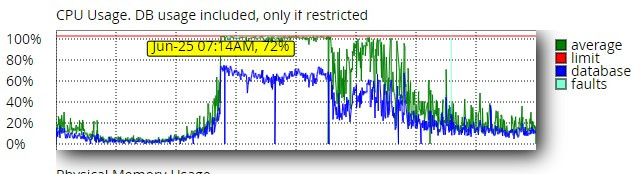
Here’s the problem: Around 7:14 AM, we’re experiencing a high CPU usage, hitting 100% across all 16 vCPUs. At this time, our Google analytics 4 show around 1200 concurrent users, though we’ve comfortably handled 3000 users before with CPU usage well below 50%.
30 days
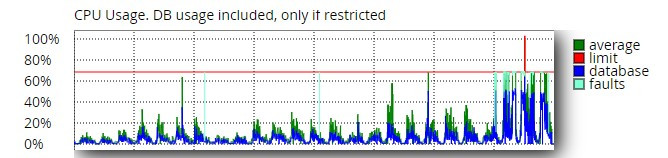
Interestingly, even with Cloudflare’s “Under Attack” mode activated, our server resource usage remains high.
I’ve attached a screenshot of the last 30 days for reference.
24 hours
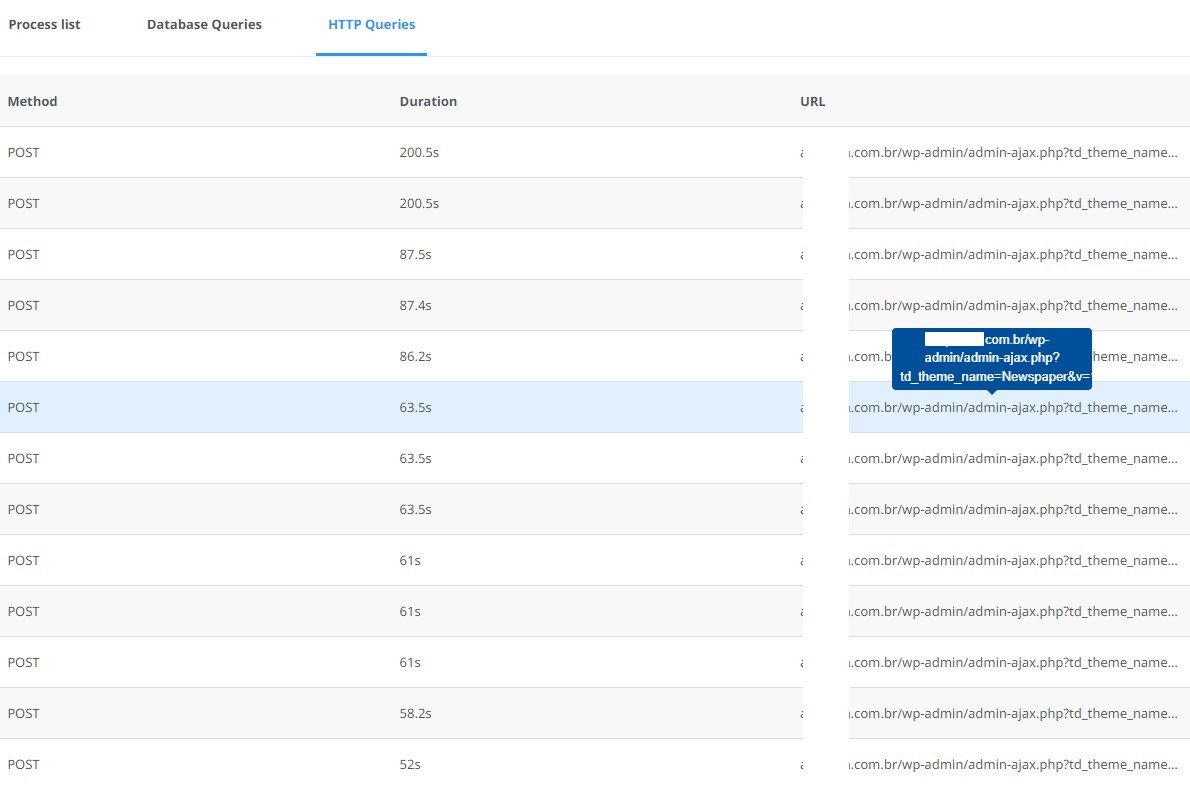
Snapshot: Http queries 07:26
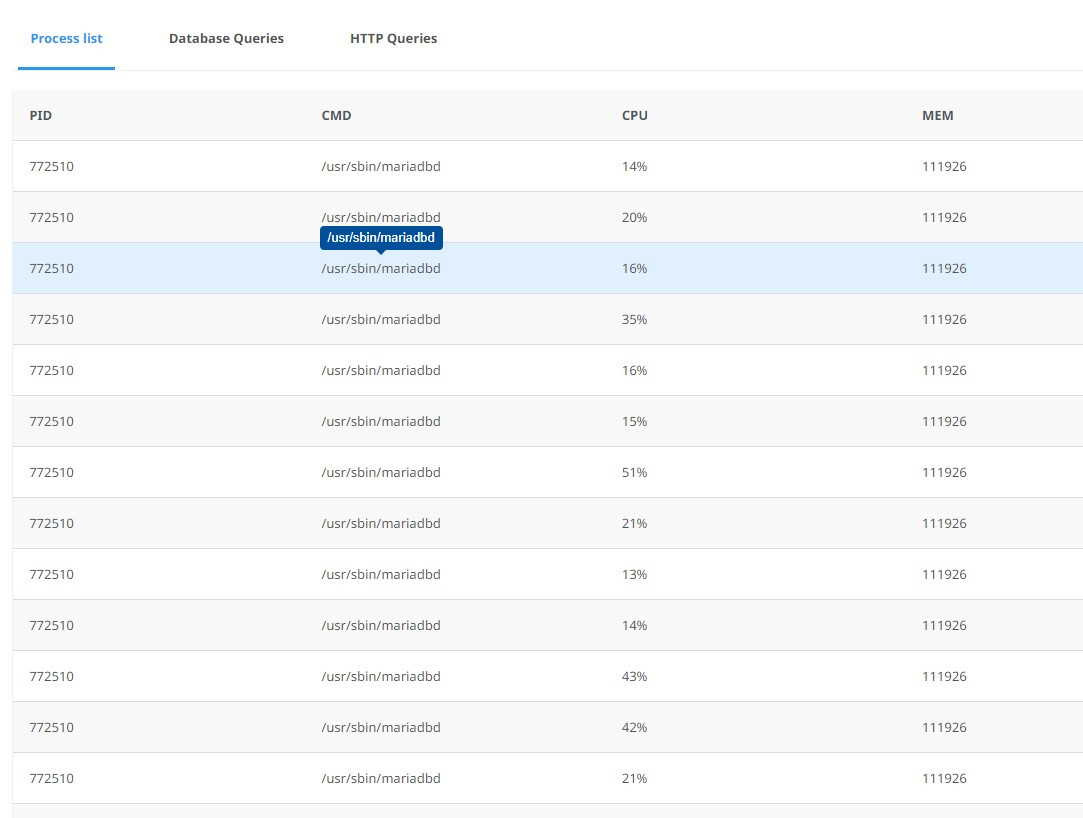
Process
Queries
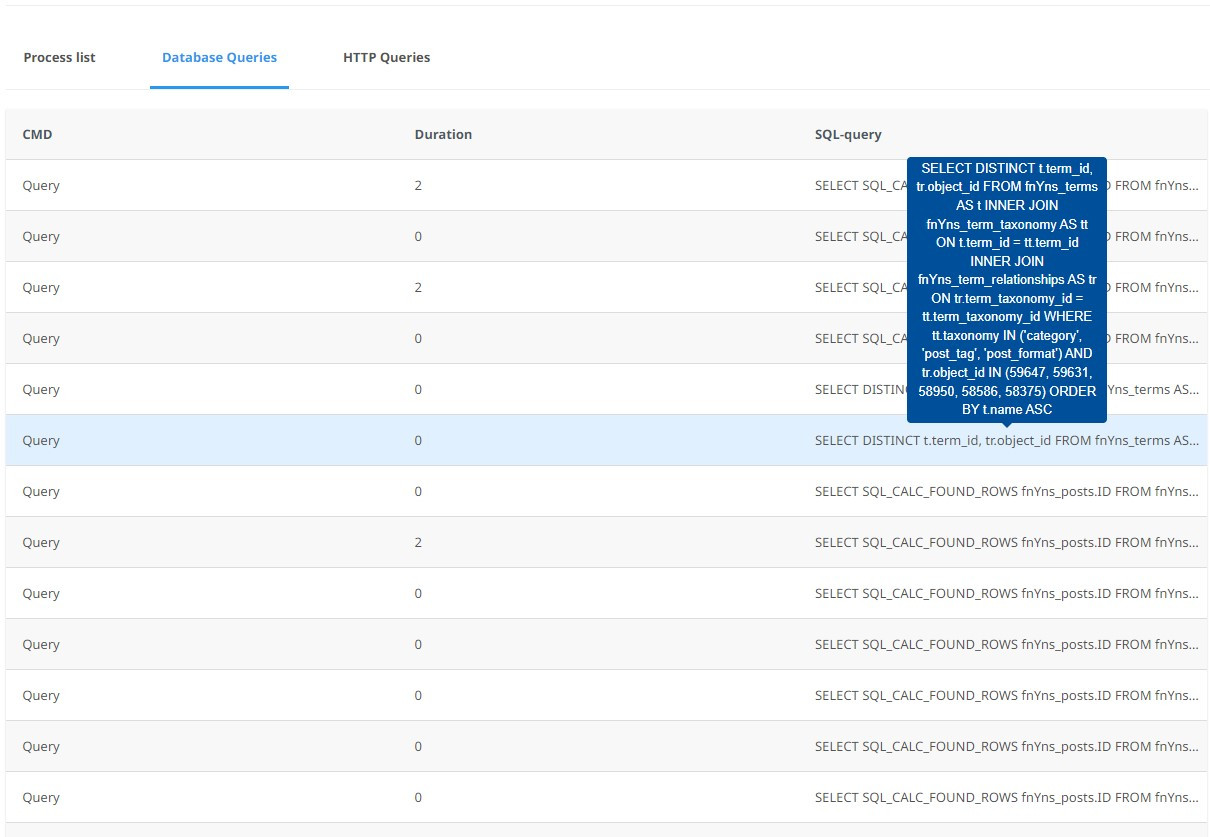
We’re open to suggestions and are even willing to consider paid solutions if they can help resolve this issue efficiently.
Does anyone have any insights or tips that could help us troubleshoot and resolve this issue?
Thank you in advance for your assistance!
 viberna
 thank you for your quick reply.
I try editing the cloud template and get this:
Error at rows: 3(models) : 2(dom). The model does not match the content Current state has involved an issue. You could try an UNDO operation (CTRL+Z / CTRL+SHIFT+Z)
 allerenitalie
Hi, I have newspaper theme, on https://www.allerenitalie.com
if I change the cloud template header, the same I choose in theme panel for header, for example i make the row with 2 columns it’s break all my site like if I have 2 colummns in header all site have 2 columns, but when I see on editor it’s appare to be ok.
In the meantime I see on mobile the header not open the menu but in the desktop it’s ok (search and menu) why?
Bettina Hello @thanhtan09!
Go to the Cloud Templates -> Modules: https://app.screencast.com/SYbTBMFjmo9Dw and add the module template – World Matters Standard: https://app.screencast.com/77u9XbVvmlf3T
Edit the homepage with the tagdiv Composer, click on that block message and choose the module from here: https://app.screencast.com/LuuBf7MzIuU6o in order to display the block design with your own content.
Thank you!
Anamaria Hi,
You need to make the changes with tagdiv Composer. We can not disable it because some users still use the standard templates, but you have cloud templates. Please also edit the header sticky -> https://forum.tagdiv.com/header-manager/ to change the logo tagline forum.tagdiv.com/add-logo-newspaper/
Thank you!
 av
av I found out how to do this via “Cloud templates” and copy/pasting source code to a new template, which I then applied as global. But, how can I also carry over the locked content functionality from the default “posts” type to the new custom post type?
 Joe
JoeHello. I’m having a problem adding a video template from the cloud library to my homepage.
Some notes. I’m using the Tagdiv Composer instead of wpbakery. I load up my homepage in the editor, I click the ‘Load Template’ button from the left side menu, and select the option “Latest Videos Section – Town Talk” and click the green ‘Import Section’ button. Nothing happens. I’ve tried this repeatedly on several different computers, browsers, etc.
If I use X to get off the Load Template screen, I very briefly see a pop-under window that says Load Template with a Yes or No choice on it. However, that disappears as quickly as ‘Load Template’ screen when I close it.
Your help would be greatly appreciated.
 reloaded
 i have probably found the issue: somehow tagdiv cloud library was not installed, that was causing the loading error and i don’t know why was causing the license key error too…
once i activated it everything went back to normal.
 kodro
kodroHi,
I don’t know how to erase this gray blank space in the top of the header of the Mobile version of my website (appears just on the home page in mobile version).
When I’m going to edit the header in the Cloud Templates area, and I’m using the mobile view, I can’t see this space.
Thanks.
reloadedHi,
since yesterday i noticed a problem with my website mytechnology:
initially i though could be some plugin error td_011_remote_cache which is something i’m fighting with and that slows down everything… so i did the same database clear i’ve been doing since weeks/months which is:
DELETE FROM wp_options` WHERE option_name LIKE 'td_011_remote_cache';
DELETE FROM <code>wp_options` WHERE option_name LIKE '_transient_wp_cloudflare_page_cache_all_languages';
(i've problem pasting code up here wtf)
followed by table optimisation...
but the website still was looking broken so i went in admin page to see available plugins and i notices a weird behavior in newspaper admin panel with says "registered" as always but than it says no updates available because no license is associated...
Whats?? Any idea why is telling me this? I didn't do any recent update, and it was a couple of days i was not posting new articles.
Thanks...

