
- NewsmagtagDiv Composer Tutorial
- NewsmagHow to use the Visual Composer plugin
- NewsmagHow to update a plugin
- NewsmagWhat’s included in Newsmag theme package
- NewsmagRequirements for Newsmag
- NewsmagInstall via WordPress
- NewsmagInstall via FTP
- NewsmagBlock settings tutorial
- NewsmagtagDiv Social Counter tutorial
- NewsmagHow to update the WPBakery plugin
- NewsmagPage Menu
- NewsmagCustom ad spots
- NewsmagSmart sidebar
- NewsmagVideo playlist
- NewsmagPage templates
- NewsmagHomepage – How to build and set it
 Vlad S
 Hello !
Please try remove it and add a new one using the tagDiv Composer.
Thank you !
 Calin
Calin Hi,
You can add it from tagDiv Composer like this -> http://prntscr.com/ptlx9m -> http://prntscr.com/ptlxhz -> https://forum.tagdiv.com/tagdiv-social-counter-tutorial/
If you set the social count with tagDiv Composer then this will not come from widgets, but to be sure please check in Appearance > Widgets in sidebars if you have set some social counter or not -> http://prntscr.com/ptlz8m
Thank you!
 Mercurial
 Had the same surprise when you switched off Visual Composer and i had to work 2 months for fix everything.So before updating i’ve tried on the staging version of our news website with high traffic, a lot of templates, more than 354.000 articles, completely optimized for speed, with a good ranking on google.
It will take months of debugging for have it back to normality, and in the meantime the speed with this Standard Pack it’s completly gone and so the rankings and the time and money we invested in the website.
What’s wrong with you TagDiv? I’m not going to switch to X cause this will take the same time to switch to a new and more stable template.
It will be nice from you to set a real SMOOTH Transition to this messy update.
In the meantime i’m searching for a plan B.
Best.
Antonio
 Bjerknez
Hello!
Please se my site here:
https://bjerknez.no
Several blocks missing and weird letters etc. shows instead. Header is also feil.
This happend after update to ver. 10. I have also updated Composer etc.
Please help!
 imkimc
 Hi Vlad, I don’t what you just said is true. At least it’s not universally true. We have designed our site using the version 9 and TagDiv Composer. So even if we load the Default Pro demo design in, if we deactivate the Standard Plugin, all we see are the shortcodes on the screen. How do we go about updating the site so that we can take advantage of the new speed functions of Newspaper X?
Will we have to redesign the site all over again?
Thanks,
Kim
-
This reply was modified 6 years by
imkimc.
 Desukiri
If I want to connect the account via “Connect Instagram Account”, I authorize the application, but nothing happens. I have already connected it via “smashballoon” and if I use the widget as shortcode it works, but the integrated widget in TagDiv Composer does not work and says it is not connected.
 Adilosadil
please help me to fix this error that appears after the update
syntax error, unexpected ‘.’, expecting ‘)’ in /home1/dishesdeli/public_html/wp-content/plugins/td-composer/legacy/common/wp_booster/td_global.php on line 415
AdilosadilHi everyone,
after updating the theme I receive this msg:
syntax error, unexpected ‘.’, expecting ‘)’ in /home1/dishesdeli/public_html/wp-content/plugins/td-composer/legacy/common/wp_booster/td_global.php on line 415
The first time I made the update using the Envato Market plugin, to fix the problem I deleted the old version of the theme and plugins.
The second time I installed the theme from WordPress panel, the theme installation was successful but plugins are showing an ajax error, but I did it manually and they were ok except Tagdiv composer.
Please help, my website is showing a maintenance page
Calin Hi,
A) The link for amp are like this site.com/page/?amp only for testing the actual link from google amp will look like this -> https://www.screencast.com/t/BqlFLsYx5
B) Please check this similar topic -> https://forum.tagdiv.com/topic/how-to-implement-adsense-amp-ads-in-amp-posts/
C) Usually this a plugin conflict that reset the mobile theme settings.
D) This can be achieve if you are using the a header template from tagDiv Cloud Library and responsive version in mobile theme ( set the option “Amp” ) in this way the logo set with TagDiv Composer will be display on desktop and mobile and the logo for mobile set in theme panel will be show only on amp version.
Hope this will help you!
Thank you!
Calin Hi,
1. Please notice that the Disqus plugin was not tested with our theme, therefore we can not provide technical support for the provide provide by this plugin, please make sure that you are using this plugin only on posts, not pages.
2. Unfortunately there is no settings for the default top bar to change the size ( height ), only the width -> http://prntscr.com/pt9edo
In order to have more control over the header and top bar we recommend to use a cloud header from tagDiv Cloud Library and edit it with tagDiv Composer
3. Unfortunately for the moment there is no option to set the social media in the order you want, sorry!
4. if the H2 is inside the content, then the settings from theme panel should be apply -> http://prntscr.com/pt9hkq, please provide some more details or a link where I can inspect this problem.
5. So if I understand correctly you want to have unique articles on pages, if is so then you can use this option -> https://forum.tagdiv.com/unique-articles/
6. The page templates are these -> https://forum.tagdiv.com/page-templates-2/the unfortunately there is no settings to make a page template, the design nee to be make with tagDiv Composer.
7. Only the the videos from YouTube will work -> http://prntscr.com/pt9ojh, maybe this option will be add in the coming updates.
8. The WP Rocket plugin was not tested with our theme, therefore I can not say how or it will work properly with our theme, sorry! -> https://www.screencast.com/t/cmPkh9jba4sZ
9. The flex can be adjust for all device individual -> http://prntscr.com/pt9qrl -> http://prntscr.com/pt9r37 you can check more about flex blocks in our documentation from here -> https://forum.tagdiv.com/flex-block-settings-guide/
10. There is an general option in theme panel -> http://prntscr.com/pt9s7p but this will not apply only on block headers that do not have set an individual style.
11. That is happen because the standard width of the website is 1068px -> http://prntscr.com/pt9z53 + margin -> https://www.screencast.com/t/FmgLs3wRkAAS when you edit the page will add and extra width from tagDiv Composer sidebar and some padding on the page content, so this will exceed the 1366px.
12. If you are referring to the mega menu next/prev buttons -> https://www.screencast.com/t/xZxnf7Sq2 then you can hide theme only with custom css, you can try this custom css
.td_block_mega_menu .td-next-prev-wrap{
  visibility : hidden;
}
The code need to be set in Theme panel> Custom code> Custom css
If you still have some questions, or I was not clear enough please let me know!
Thank you!
Adilosadil hi,
after the installation of the theme, plugins are not installed they show an ajax error.
I tried to do manually but i receive this msg:
Parse error: syntax error, unexpected ‘.’, expecting ‘)’ in /home1/dishesdeli/public_html/wp-content/plugins/td-composer/legacy/common/wp_booster/td_global.php on line 415
Calin Hi,
Please notice that the block 17 will display only the featured image for the first post, the rest of them will be display only the title -> http://prntscr.com/pt8ozd -> http://prntscr.com/pt8pvm -> https://demo.tagdiv.com/newspaper/block-17/ so you’ll need to use the tagDiv Composer -> https://tagdiv.com/tagdiv-composer-page-builder-basics/ and change the block with another one block or flex block. -> http://prntscr.com/pt8qkg
Than you!
Adilosadilafter the last update, I got this error:
Parse error: syntax error, unexpected ‘.’, expecting ‘)’ in /home1/dishesdeli/public_html/wp-content/plugins/td-composer/legacy/common/wp_booster/td_global.php on line 415
how to fix that please
Vlad S Hello !
That is not editable with Theme colors or TagDiv Composer, That will require CSS code, please provide a link to your website and we will take a look.
Thank you !
 Alina S
Hello, Community!
We know you all want to make your website faster :), we want that for you, too. Newspaper theme 10 brings you a new way to build a faster WordPress website. For the first time in WordPress, you have the freedom to choose how much code the theme is loading and optimize your website’s performance straight from the beginning.
To give you this functionality, we’ve introduced a new plugin called the Standard Pack (available to you for free.) When you update to Newspaper 10, you must activate this plugin, or your website will display the shortcodes on the frontend. We cannot make the plugin automatically activate for you, so you’ll need to go to WordPress Admin area > Newspaper Theme > Plugins and enable the Standard Pack plugin.
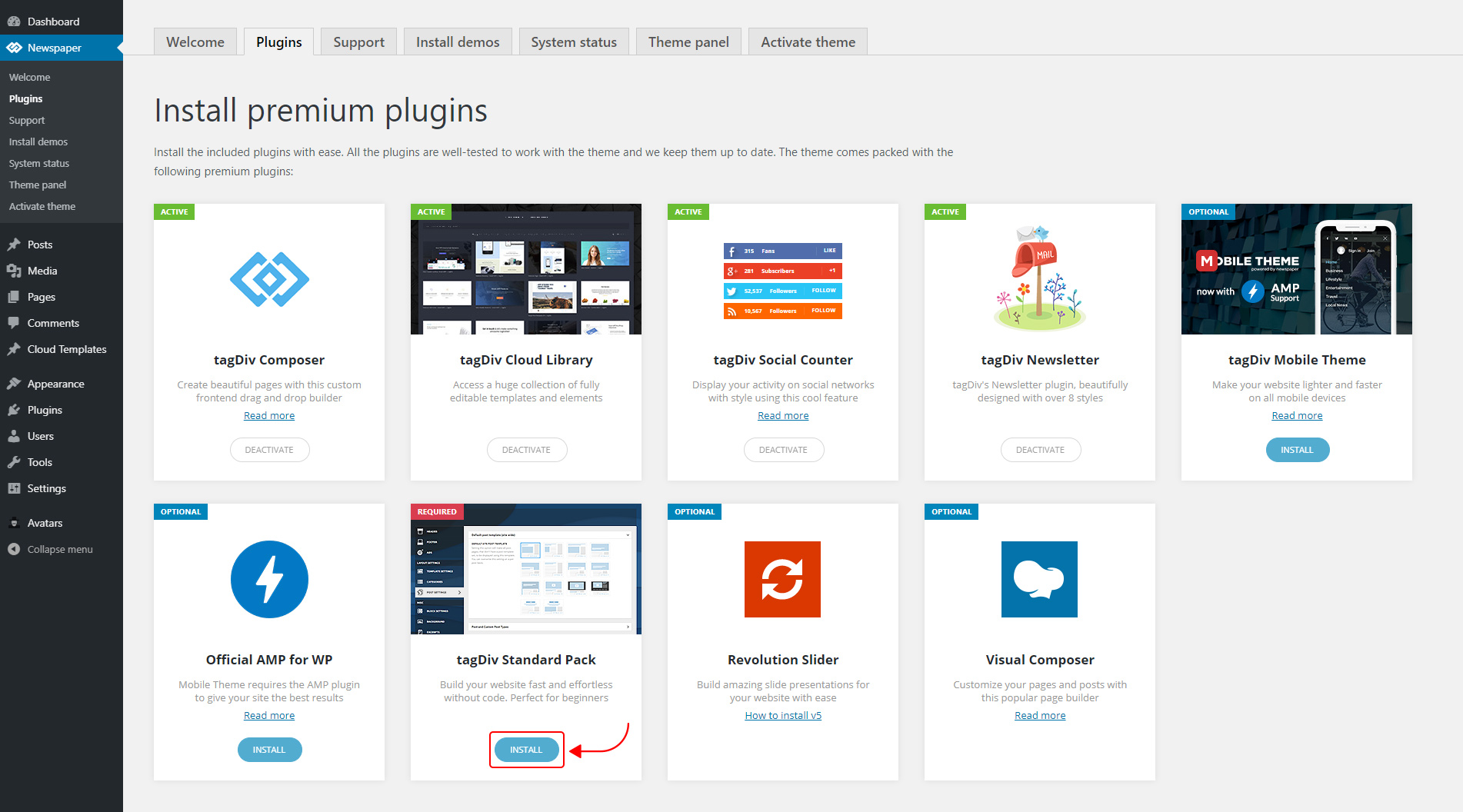
The new Standard Pack Plugin has two functions:
– it brings all the functionality you love in the previous versions
– allows you to separate things when you want to build everything customized and go for website’ performance.
The complete list of templates influenced by the Standard Pack plugin:
In the theme panel:
15 Headers
8 Category templates
10 Big Grids
19 Modules for blocks
14 Single post styles
14 Footer templates
In the tagDiv Composer:
25 Blocks
12 Big Grids
10 Big Grid Full
1 Big Grid Slide
Extra
All the demos that are not marked as PRO Demos.
You can find more details on how to use the Standard Pack Plugin in the dedicated article. When your website has no more dependencies on the Standard Pack plugin, you can deactivate it to increase the page loading time and performance.
If you need the previous version, you can download it from here (Newspaper v9.8).
I hope you’ll enjoy this update!
Thank you!
Calin Hello,
I do not quite understand, you want to show dates for one category and the posts that make part from that category? if is so then you can achieve this with using tagDiv Composer with tagDiv Cloud Library, get from cloud two single post template and two category templates and edit them, let on one category the date and set it in theme panel on the category you need to set the date -> http://prntscr.com/pt84iy, on the second category template remove the date -> http://prntscr.com/pt83zq and set it general in categories templates ( theme panel -> http://prntscr.com/pt84tg), do the same with single post template.
Also from home page you can use flex blocks and remove the date from the blocks you want -> https://forum.tagdiv.com/flex-block-settings-guide/
Hope this will help you!
Thank you!
Vlad S Hello !
The PRO stands only for the name, You can easily switch from one demo to another and if you want to make changes you can make them using the tagDiv Composer.
Thank you !
 aure
aureHi guys,
First of all congratulations for your great theme, i bought Newspaper a few months ago and i only found the courage to remake my website last month.
So, as you can guess i met tons of details that need to be cleared, even after reading the documentation.
Please can you help me with these questions ?
1. If the plugin Disqus is activated, the main menu bar takes long time to appears, how to resolve that ?
2. Is it possible to modify the size of the top menu bar ? Can’t find this option in the TagDiv Composer,
3. Is it possible to change the order of the social medias ? (on the top menu for exemple),
4. When i try to change the H2 title style, to make it bold from the theme panel, it doesn’t looks like it works,
5.I have 3 articles at the top of the welcome page (Big Grid Flex 4), then the list of the newest article (Posts Loop) : is it possible to start this second list, with exception of N-3 article ? In other words, to start this Posts Loops from the 4th newest article, to avoid repeating the top 3 newest articles,
6. Is it possible to parameter a template page for all pages at once ? Because for now it looks only possible one by one,
7. Is it possible to make a background video without Vimeo or Youtube ? For exemple a local video, or it would be too heavy ?
8. Is the plugin “Lazy load by WP Rocket” is still usefull if the lazy load option included in the theme is actived ?
9.The Flex Box 1 element is not responsive, it appears well on the computer but not on my smartphone : do you have a solution please ?
10. The sidebar widget looks like it appears different from the native theme widget, for exemple the title : how it is possible to have the same widget title style for everything ?
11. On Chrome with a resolution of 1366*768, i have to unzoom to have full complete page composer and make the scrollbar to appear, do you know about this bug ?
12. How is it possible to disable the arrow in each title of the main menu when i choose to activate the mega sub-menu ?
I know it may be a long email but i have all my questions here 🙂
Thank you very much for your help, i highly appreciate your theme and keep the good work.
See you
 joeyjou
Hi,
got a problem with my search on my side: in the composer it is working fine and got a dropdown but on the live page it isn’t working? what can I do?
thanks guys!
Calin Hi,
Please notice that the Influencer PRO is made only with tagDiv Composer and cloud templates, so the settings from the theme panel will not affect the pro demos.
In order to change the logo you need to edit the header template with tagDiv Composer -> http://prntscr.com/pt32m2 -> http://prntscr.com/pt331k
Hope this will help you!
Thank you!
Calin Hi,
If you are using a header cloud from tagDiv Cloud Library, then you need to edit it with tagDiv Composer. You’ll need to do the same setting for sticky menu as you made for main menu, you’ll need to edit the sticky zone and set that image -> http://prntscr.com/pj1qw7
Thank you!
Calin Hi,
I think that your social counter is not set in widget sidebar -> https://more.myextrapages.com/wp-content/uploads/2019/11/counter.png I think that this was set using tagDiv Composer on home page -> http://prntscr.com/pt2wc5, click on the social counter and press delete -> http://prntscr.com/pt2xbs
Thank you!
Calin Hi,
The theme comes with two preset default fonts, Open Sans and Roboto. You can find more information about the themes fonts here – https://forum.tagdiv.com/font-customization/ if you do not want to use the google fonts please deactivate it from theme panel -> http://prntscr.com/pt2lhg also please notice that there are no settings in our theme that allow you to change all the font family style.
Also there are elements set with tagDiv Composer that can have set individual fonts -> http://prntscr.com/pt2mo1
Thank you for your understanding!
Calin Hi,
That depend son the elements, if these were set with tagDiv Composer, then you’ll need to edit the page with this builder, click on the block and change the color like this -> http://prntscr.com/pt2cjr
-> Flex Block Settings Guide
-> Default Block Settings Guide
Thank you!
If the blocks are set in widget area then you’ll need to check this section -> http://prntscr.com/pt2d95
Also there is a general setting in theme panel that will apply on the block headers that do not have set an individual color -> http://prntscr.com/pt2dpp -> https://forum.tagdiv.com/theme-colors-introduction/
Thank you!
Calin Hi,
I’ve made some quick searching and to can display retina image you’ll need to have a device that have that had retina:
Retina display -> https://en.wikipedia.org/wiki/Retina_display
Retina Display vs. 4K vs. True Tone -> https://www.lifewire.com/retina-display-vs-4k-1994107
Is retina better than 4k resolution? -> https://www.quora.com/Is-retina-better-than-4k-resolution
Also a part of retina is set in this file -> http://prntscr.com/pt251i -> wp-content/plugins/td-composer/legacy/common/wp_booster/td_util.php and this file -> http://prntscr.com/pt25ns -> wp-content/plugins/td-composer/legacy/Newspaper/js/tagdiv_theme.js if you change the tagdiv_theme.js you’ll need to mimify the code en replace the one from tagdiv_theme.min.js
Thank you for your understanding!

