
- NewsmagtagDiv Composer Tutorial
- NewsmagHow to use the Visual Composer plugin
- NewsmagHow to update a plugin
- NewsmagWhat’s included in Newsmag theme package
- NewsmagRequirements for Newsmag
- NewsmagInstall via WordPress
- NewsmagInstall via FTP
- NewsmagBlock settings tutorial
- NewsmagtagDiv Social Counter tutorial
- NewsmagHow to update the WPBakery plugin
- NewsmagPage Menu
- NewsmagCustom ad spots
- NewsmagSmart sidebar
- NewsmagVideo playlist
- NewsmagPage templates
- NewsmagHomepage – How to build and set it
 Prateek
 I can’t see why it’s necessary, Sir.
I’ve already explained everything in detail. Having a look at my website wouldn’t be of more use. That’s why I provided the screenshots.
I can try once more.
In CSS, if you add background color to an element along with border radius, that element will have background of that color and it will have round borders, but most importantly the color that is applied would not flow outside of the corners. Refer to the SECOND screenshot. It has round corners and the color is contained properly within the element.
Now, if I add background color and radius to a column using TD Composer instead of writing custom CSS myself, it doesn’t work very well. The background color flow out of the element’s rounded corners. Refer to the FIRST screenshot. The corners are round but the color is flowing out.
So, when I add background color using .custom-class { background-color: #f22b29; } instead of TD-Composer, it works fine.
I think it’s easier to understand now. If, for whatever reason, you’re unable to help without having to have a look at my website, please forward this to someone else. It’s that easy. I’d be extremely grateful.
Thanks.
 Anamaria
 Hello,
For the moment there is no general option that can be set in one place and to change the fonts over the entire website, you can do it only using the options from theme panel -> https://i.imgur.com/CiY2BzW.png and for cloud templates, you need to do it with tagDiv Composer -> https://i.imgur.com/W0x6va3.png
This is a video about how to change the fonts => https://www.youtube.com/watch?v=rbkYVyj1__Q
If this is not what you mean, please provide more information.
Thank you!
 samsenalumni
error 404 page tagDiv Composer not switch edit mode . check console show url site ERR_EMPTY_RESPONSE
Anamaria Hello,
Usually, the problem is from a cache plugin, because you are using the mobile theme plugin => https://www.screencast.com/t/mpbsqaVtX2kL, the mobile layout will have a different design and most of the cache plugins do not recognize this and provide the mobile version for desktop (or vice versa). We recommend using WP Super Cache plugin with the settings from our guide -> https://forum.tagdiv.com/cache-plugin-install-and-configure/
If you created the mobile pages with tagDiv Composer, then when you install the Mobile Theme plugin, your pages will be overwritten by the plugin (the mobile theme comes with its own templates for page, post, category, etc so your current templates from the desktop theme will get converted to the mobile theme layout, the page content is made without builders in mobile editor => https://www.screencast.com/t/xbgZG8kH also, the options that are provided to edit the mobile theme version are limited (this keeps the things simple)).
Better deactivate the plugin and see the results.
Also, if you create a mobile page, please check if is set correctly => https://tagdiv.com/newspaper-10-3-7-update-brings-customizable-and-fast-mobile-pages/
You can check this video about the Newspaper theme version on mobile and how to edit them -> https://www.youtube.com/watch?v=SpGkOnJeNZY.
Hope this helps you!
Thank you!
Anamaria Hello,
If you have a Single Post Template, the settings from Theme Panel will be ignored.
This is a video on how to customize your sidebar with tagDiv Composer =>
https://www.youtube.com/watch?v=fa7GenCHcBU also, if you have created a sidebar like a widget then you can set it in the element called “Widget Sidebar” => https://www.screencast.com/t/x7b90ioLJhUi
Hope this helps you!
Thank you!
 harish.bhathee
Question 1. Why can’t I use Tagdiv composer to write/edit/design Blog Posts if I choose DEFAULT POST TYPE to “DEFAULT”.
Question 2. However, if I use a template from the cloud library for the post then it shows Edit with Tagdiv Composer.
So now, in this case, I am on my post and click on Edit With tagDiv Composer, then is it going to edit the template of the post itself. If I edit here Is it going to affect the template itself.
In this post link above, I have applied 2 categories and now it seems like they are one, not Two.
1.PHOTOGRAPHY > 2.REVIEWS. There is no difference between them. I want that them to look different.
for example:- Main category with Bold font then secondary with normal font. So that there is a difference in them visually.
Question 4:- Every time I refresh the Page, Then looks like the website first displays few pixels on the right side in the browser and then comes to its actual place means exactly in the center.
I tried this on Your official Demo and seems there is the same issue.
Question 5:- Currently I haven’t enabled the tagDiv Mobile Theme and AMP plugin.
So, What you recommend in 2021. Like is it mandatory to use these plugins.
What will be the difference and benefits if I use these plugins.
If all go well, I will be using Google Adsense in the future. So what would be your recommendations about these plugins.
Thank You in Advance!
 katsar0v
 An update on this issue would be really helpful, thank you! I have tried adding the code here:
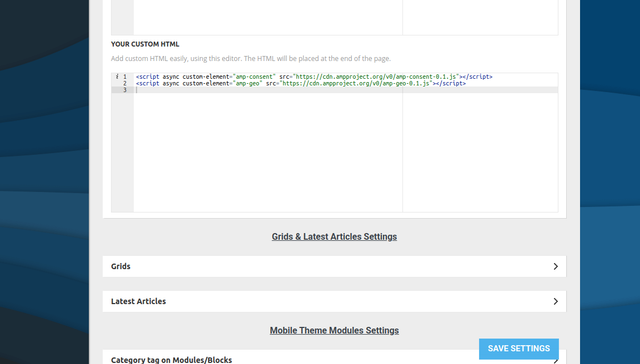
But it does not seem to show. I also tried adding it here (wp-content/plugins/td-composer/mobile/header-amp.php):
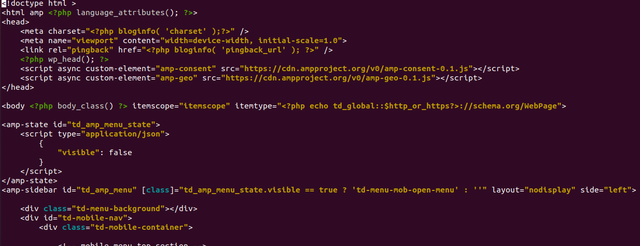
But it also does not work unfortunately. Any help would be appreciated!
Anamaria Hello,
Please do these steps
1. disable tagDiv Composer
2. uninstall tagDiv Composer
3. clear cache (if cache plugin exists)
4. re-install tagDiv Composer it again from Newspaper plugins => https://www.screencast.com/t/WLy01lbc
5. activate tagDiv Composer
6. clear cache (if cache plugin exists)
Also, make sure your WordPress and plugins are up to date.
Sometimes, the issue can be from a plugin conflict, that’s why, please deactivate ALL plugins except tagDiv ones, also if you are using a cache plugin, deactivate it, clear all cache and try again.
Let me know about your results!
Thank you!
Anamaria Hello,
Please do these steps
1. disable tagDiv Composer
2. uninstall tagDiv Composer
3. clear cache (if cache plugin exists)
4. re-install tagDiv Composer it again from Newspaper plugins => https://www.screencast.com/t/WLy01lbc
5. activate tagDiv Composer
6. clear cache (if cache plugin exists)
Also, make sure your WordPress and plugins are up to date.
Sometimes, the issue can be from a plugin conflict, that’s why, please deactivate ALL plugins except tagDiv ones, also if you are using a cache plugin, deactivate it, clear all cache and try again.
Hope this helps you!
Thank you!
 celluv
 If you look at the “More from author” item, the same error is displayed.
I want to know the cause and solution.
——– error ———-
wp_booster error:
mc1_title_tag – Is not mapped in the shortcode that uses this module ( tdb_module_related)
/opt/bitnami/apps/wordpress/htdocs/wp-content/plugins/td-composer/legacy/common/wp_booster/td_module.php
 caminoel
I tried fixing everything has been posted on the webboard
1. Deactivate ALL plugins except tagDiv ones, clear all cache
2. Latest version of WP and PHP
3. Deactivall all TagDIV composer, clear cache and try again.
But the problem still exist
Errors at columns elements: 7(models) : 8(dom). The model does not match the content Current state has involved an issue. You could try an UNDO operation (CTRL+Z / CTRL+SHIFT+Z)
Kindly check please
celluv“More from author” 항목을 보면 아래와 같은 에러가 표시된다.
원인과 해결방법을 알고 싶다.
——– error ———-
wp_booster error:
mc1_title_tag – Is not mapped in the shortcode that uses this module ( tdb_module_related)
/opt/bitnami/apps/wordpress/htdocs/wp-content/plugins/td-composer/legacy/common/wp_booster/td_module.php
 Gatso
Gatso Hi there,
I did what you recommended. But still not working.
I used column text & title etc from TagDiv composer & inserted it to my page. Then it looks like this:
https://imgur.com/bzx2eAK
Then I clicked on edit page & then it is like this. Still Yaost not able to get data from the page. See below picture:
https://imgur.com/LmPx6iU
Please tell me how can I solve this problem.
Best regards,
 ArchTFL
 Hi,
I’m also having the same problem. In fact, I even manually created mobile pages using the tagdiv composer, and a generic homepage is still displaying
 Breinblik
Hi there!
I want something specific and i hope i can achieve this using TagDiv composer. I want a layout with 6 squares containing a title and an image. When you hover or click on this square i want the square to be animated and show a text (aprox. 250 words) and an image. How can this be done? I’m trying to achieve this now using the element ‘Image info box’ but i’m using to much text for what this element is designed for. Is there a way i can do more modifications? Or are there perhaps extensions available for TagDiv composer?
Thanks a lot!!
BreinblikHi! Sorry if this has been asked a dozen times before.. but how do i implement an shortcode from another plugin for example: Ninja forms?
I;m trying now to do it via TagDiv Composer, add a inline text block and add the shortcode, but it doesn’t render. Even when i save and close the TagDiv composer.
What should do?
 jlkinaz
URL: https://cullenh1.sg-host.com/
I am having troubles with the site holding its configuration after clearing cache. It appears to be reverting to a mobile theme on a desktop view. Here is an example of a page that is now displaying as a mobile page on a PC:
https://cullenh1.sg-host.com/information-center/.
This is happening randomly and it has impacted all screens. Any suggestions?
Temporary fix has been to open each page in TD Composer, save it, then clear cache. It seems to last an hour or so before it breaks.
The issue is readily visible when using a cellphone as well.
 wicky37
hello,
I have a youtube video playlist on my site with one video in it. now I want to add a second video but the video doesn’t display.
it’s about this video https://www.youtube.com/watch?v=OoTa6x3jqyU
so I took this OoTa6x3jqyU and placed it behind the comma. But the video doesn’t display.
it looks like this: KB238IvVmp8, OoTa6x3jqyU
I’m not using wpbakery, only tagdiv composer.
do you know what’s going on here?
the site is https://www.zoektocht.net/
thanks, Sander Noorman
 JJ0000
 Nvm found it in plugins > tdcomposer > legacy
 Bettina
 Hello!
In Composer you can save elements or rows as a reusable element. For example, select the row in the sticky header, right-click and save as element, and when you will want to add the element again, you can find it in the ADD list.
Hope that helps you!
Thank you!
Anamaria Hello,
It depends on what you want to edit. You can edit the pages with tagDiv Composer ,
You can find more tutorials on our channel on youtube =>https://www.youtube.com/user/tagdiv which can help you to redesign.
Also, you can ask us, if you don’t know how to edit and we will try to help you.
Thank you!
 develery
 Thank you, it solved the issue but now I have another one.
When I tried to add a text block with title to my page and I tried to edit the content I cannot edit the text in the popup and I have the following error in my server log:
Uncaught Error: Call to undefined function schema_wp_is_admin_page() in /srv/dev/kriptoakademia.co
m/wordpress/wp-content/plugins/schema/includes/admin/settings/register-settings.php:1668\nStack trace:\n#0 /srv/xxx.com/wordpress/wp-includes/class-wp-hook.php(292): schema_wp_admin_footer_
scripts(”)\n#1 /srv/xxx.com/wordpress/wp-includes/class-wp-hook.php(316): WP_Hook->apply_filters(NULL, Array)\n#2 /srv/xxx.com/wordpress/wp-includes/plugin.php(484): WP_Hook
->do_action(Array)\n#3 /srv/xxx.com/wordpress/wp-content/plugins/td-composer/includes/wpeditor.php(404): do_action(‘admin_print_foo…’)\n#4 {main}\n thrown in /srv/xxx.com/
wordpress/wp-content/plugins/schema/includes/admin/settings/register-settings.php on line 1668
Anamaria Hello,
You can’t remove the empty column, you can remove the empty row, edit the page with tagDiv Composer and with a right click remove the row => https://www.screencast.com/t/9nWg97KsS.
Also, the empty columns will not be displayed on the desktop.
Hope this helps you!
Thank you!
Anamaria Hello,
You can enable the option the Auto Loading on the Single Post Template with tagDiv Composer -> Show site wide settings => https://www.screencast.com/t/4RnV1CnxiuA
Thank you!
Bettina Hello!
You can build this with TagDiv Composer settings:
– https://i.imgur.com/4j61tbq.jpg
– https://i.imgur.com/tPTlymU.jpg
You need just to add/click a row and set up the width and the paddings you can insert them in the CSS tab of the row.
Also, you can adjust the values to fit in mobile viewport too: https://www.screencast.com/t/XDQJedlggSB
Hope that helps you!
Thank you!



