
 geraldho81
Hi I actually added a “slider” to my home page via Tagdiv Composer–> add Elements
-> http://culturedecoder.asia/
But at the same time, the slider is also appearing on every other page on the site, how can I ensure that the slider only appears on the homepage?
 ARJunaid
hello,
I have been trying to solve this and really need your support. When TagDiv composer is enabled, I can not read any articles on my mobile (although I can see the thumbnail). This should be a very minor issue, BUT VERY important. Could you please please respond?
Best,
Anas
 Mark Gilbert
Hello – I’m trying to change the brown background colour in the Old Fashioned theme – https://cloud.tagdiv.com/homepage-old-fashioned/
But I can’t see any parameter for this is tagDiv Composer. Can you tell me to get a different colour?
Thanks
Mark Gilbert
 jwellemeyer
 Three Hours Ago Calin from tagdiv posted the following.
Calin
Apr 19, 2020 at 3:05 pm
Hi,
If covid elemnts display 0 data:
To fix the covid counter you need to dactivate and delete tagDiv Composer plugin and install int again from Newspaper > Plugins -> https://i.imgur.com/3nvXhlS.png, after that clear all cache and the covid counter will work again.
Thank you!
_________________________
I have deactivated, un-installed, re-installed, re-activated and flushed all the caches and it is still not working on two different implementations.
Please fix this!
Jeff
jwellemeyer Three Hours Ago Calin from tagdiv posted the following.
Calin
Apr 19, 2020 at 3:05 pm
Hi,
If covid elemnts display 0 data:
To fix the covid counter you need to dactivate and delete tagDiv Composer plugin and install int again from Newspaper > Plugins -> https://i.imgur.com/3nvXhlS.png, after that clear all cache and the covid counter will work again.
Thank you!
_________________________
I have deactivated, un-installed, re-installed, re-activated and flushed all the caches and it is still not working on two different implementations.
Please fix this!
Jeff
jwellemeyer Three Hours Ago Calin from tagdiv posted the following.
Calin
Apr 19, 2020 at 3:05 pm
Hi,
If covid elemnts display 0 data:
To fix the covid counter you need to dactivate and delete tagDiv Composer plugin and install int again from Newspaper > Plugins -> https://i.imgur.com/3nvXhlS.png, after that clear all cache and the covid counter will work again.
Thank you!
_________________________
I have deactivated, un-installed, re-installed, re-activated and flushed all the caches and it is still not working on two different implementations.
Please fix this!
Jeff
jwellemeyerThree Hours Ago Calin from tagdiv posted the following.
Calin
Apr 19, 2020 at 3:05 pm
Hi,
If covid elemnts display 0 data:
To fix the covid counter you need to dactivate and delete tagDiv Composer plugin and install int again from Newspaper > Plugins -> https://i.imgur.com/3nvXhlS.png, after that clear all cache and the covid counter will work again.
Thank you!
_________________________
I have deactivated, un-installed, re-installed, re-activated and flushed all the caches and it is still not working on two different implementations.
Please fix this!
Jeff
 Calin
CalinHi,
If covid elements display 0 data:
To fix the covid counter you need to deactivate and delete tagDiv Composer plugin and install it again from Newspaper > Plugins -> https://i.imgur.com/3nvXhlS.png, after that clear all cache and the covid counter will work again.
Thank you!
 SquallSFU
Hi guys, I’m new here.
Sorry for the stupid question, but how do I customize this menu in tagDIV Composer? I can’t find it anywhere.

Thanks for your help.
 waqarahm3d
Hi,
Unable to Import cloud templates from the composer edit section. if i try to import them from the cloud templates they are find but when importing from composer the popup menu is opening behind the template section making it almost impossible to click. you will only see the popup if you click the import few times and the number of confirmation message increases.
thought it was licensing issue though de-activated and reactivated again but still no joy. removed wp-rocket with super cache as per instructions and not using any security plugins. it’s a vanilla build.
 nunoduarte
 Hi, I´m with the same problem as Moses1998, I can’t change anything on tagDiv Composer, every time I try to save a new change, it keeps loading and nothing happens.
nunoduarte Hi, I´m with the same problem as Moses1998, I can’t change anything on tagDiv Composer, every time I try to save a new change, it keeps loading and nothing happens.
 moses1998
Hi, I can’t save any change made with tagDiv Composer, when I try to make changes and click save, nothing saves the thing keeps on rotating but not saving.
 Jose
JoseHi guys,
I’m working with the edito composer, but he doesn’t keep the changes well.
I select the H4 option for the posts, I save the changes. I empty the cache, but they are not saved as H4, they are saved as H3, always.
https://fotos.subefotos.com/2e87c704570137c487decc4a10521195o.jpg
https://fotos.subefotos.com/1f4832d74a41bc1b1a18a02ffdc99eb9o.jpg
How can I solve this problem?
Is there any way that these posts, are not of any kind of H?
Cheers
JoseHi guys,
I’d like to leave some suggestions for new updates, and also some serious bugs I’m seeing in the theme (latest version).
ERRORS
1. If we’re not using a custom header: The logo is set by default as H1. This is a very serious error, most posts and pages now have several H1s, due to this error. In addition, the H1 in the logo is image based, it doesn’t make sense, it’s absurd.
2. Cloud templates, the cloud templates for categories, are not resposives. If we use the tagdiv mobile plugin, the cloud templates do not work. This doesn’t make sense either, at present, 90% of web traffic is from mobile sources. It is useless to have a perfect design in PC, if then in Mobile we cannot use it.
3. Header cloud , when editing with tagdiv composer the header cloud, in many occasions the changes are not saved properly, it hangs while saving.
4. The H2 / H3 tag in the “Flex Blok 1” block with a div composer tag cannot be removed. You need to add another option, it doesn’t make sense that this content is H2 or H3, it’s a SEO error.
https://fotos.subefotos.com/c5e5d672262afcb73b576fb2e5a813c1o.jpg
5. In “Flex Blok 1” and in all other blocks, of tag div composer, the links to the content are duplicated. For example, if I show my articles, each article has 2/3 links to the same site. A link in the image (error) and a link in the title (this if ok). So there are a lot of meaningless, useless links that are stealing link juice.
https://fotos.subefotos.com/132a5be412f0d095455330c044aa22c6o.jpg
6. All templates created with the cloud are indexed by default. This is a serious SEO error, they should be NOINDEX by default.
https://fotos.subefotos.com/52265f8e40dc242cb9fb1b871afa21b0o.jpg
SUGGESTIONS
1. It is very important to improve the rendering speed. This will make the total load faster, much faster. The render is one of the most important parts of the load, analyzed by google.
2. Many templates have been added lately (e.g. Coronavirus). But it has been a long time since anything seo has been worked on. It would be great to have one or two templates for SEO (SEO Agencies / SEO Services).
I hope all this serves to improve the theme. The errors mentioned may not be serious at a structural level, but they are very serious at the SEO level of a website.
Cheers, Jose
 spezialcom
Theme panel – Post Setting – Sharing – Social Network – NAVER
I NAVER activated and then saved. it is displayed. I have NAVER deactivated and saved. after updating, the mark / activated is still there. I’ve tried it many times. also on another computer. no success. I uninstalled and reinstalled tag composer. no change. it remains activated. the save has no success. I sometimes experience that in other settings. it doesn’t always save. it’s a mistake. what can I do?
 WhiteMoth8259
Hi there,
I want to edit the author box (about us picture) in my SIDEBAR but I can not edit it through TD Composer and I can not find the function to change or upload a picture in the widget neither. I use the Baby Blog template. Can you help me please?
 marko3000
hi, I wrote yesterday in a private email but I still have not received a reply. I have a serious problem with thema, more precisely with td composer. If you can please answer me. Thank you
 mehedi57
Hello support team, I am facing a few problems in my site that I need to be fixed As soon as possible. Before going into the details, I would like to tell you that the theme’s system status is showing some mismatch information where WordPress site health information is correct. Please check the attachment https://prnt.sc/s0y0k4 and https://prnt.sc/s0y0vs . Now I will describe the problem.
1. Numbering page layout is not working on anywhere except homepage. You can check here https://www.ubuntupit.com/?s=programming , https://www.ubuntupit.com/category/linux/ ,https://www.ubuntupit.com/tag/linux-themes/
2. TD composer and tb cloud library are taking too much resources and exceding the requests in my server. Which makes the site unusable. see the screenshot given by the hosting provider. https://prntscr.com/s0xxtn and https://prntscr.com/s0xxrk
3. Is this much request is normal with this Theme? https://prnt.sc/s0y5a5
I am hosting my site on Kinsta.
 hqcarcare
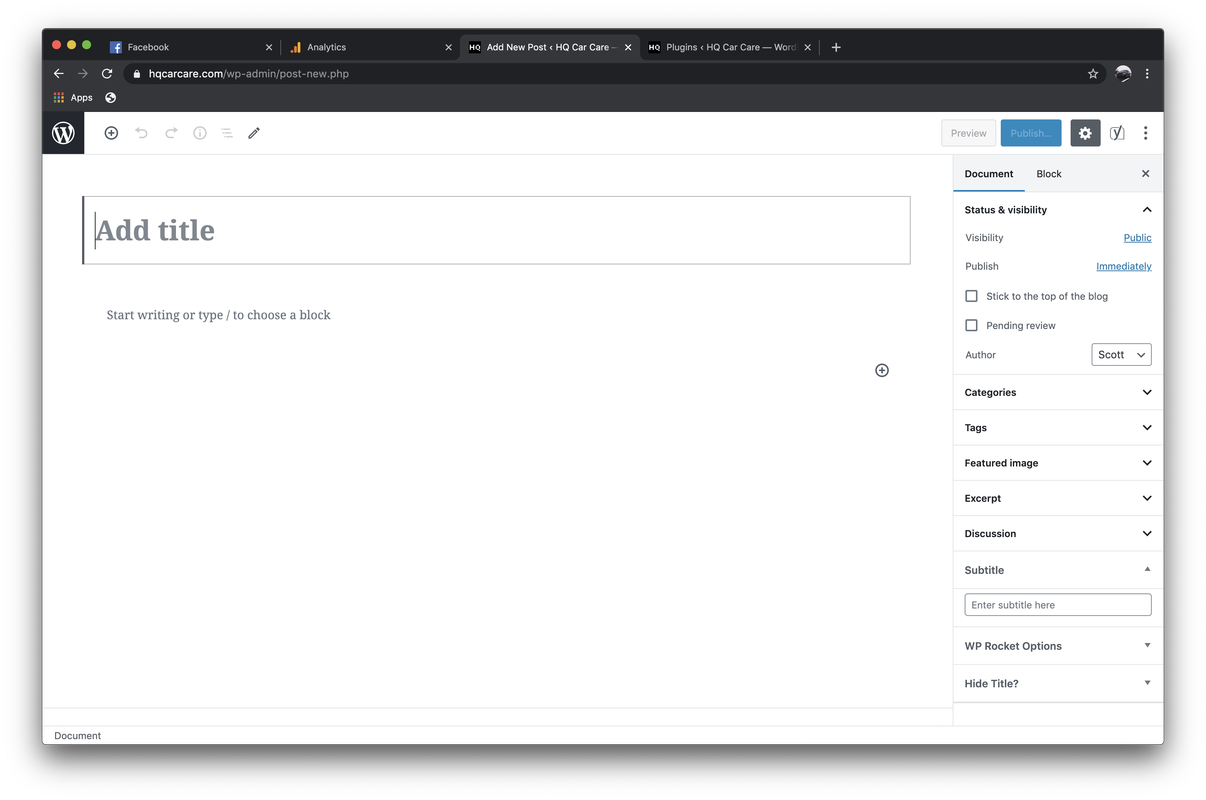
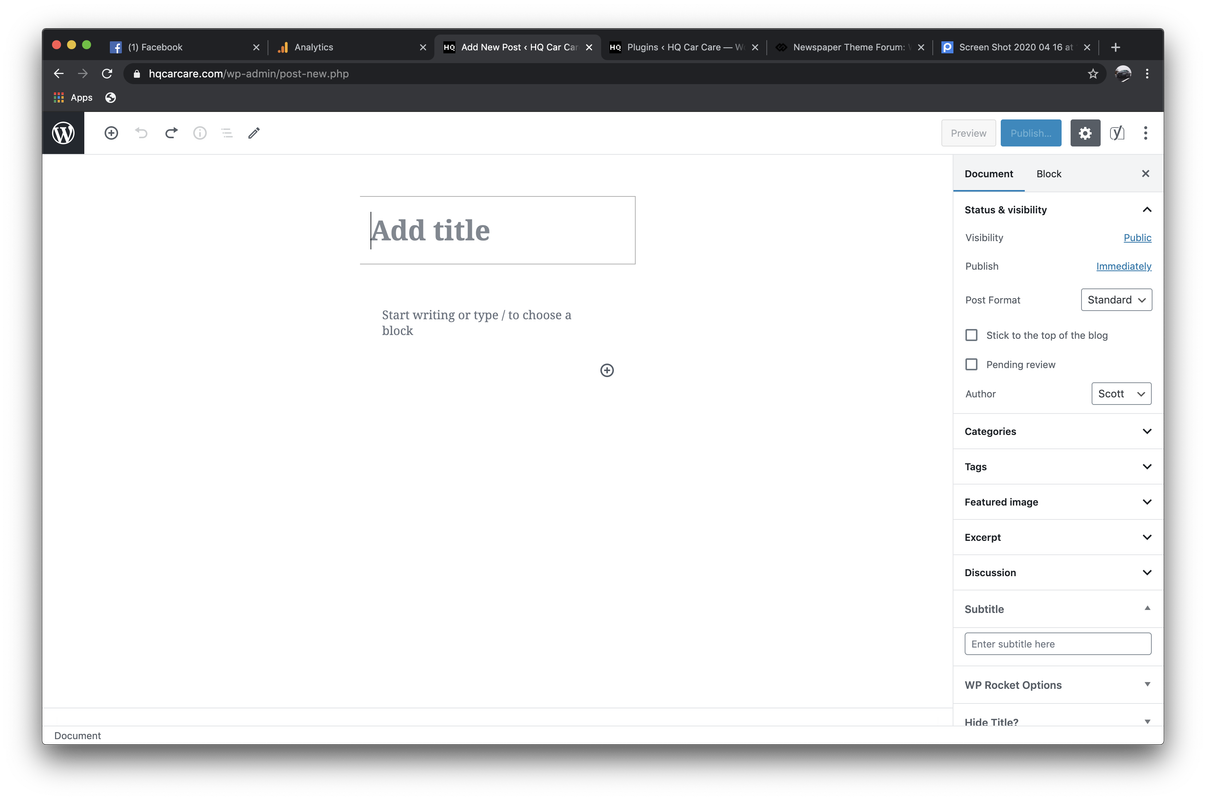
For some reason, my block editor when I’m creating new posts is very narrow. Something is messing with the CSS of the block editor pages that messes it up big time. If I disable the TagDiv Composer plugin, the block editor returns to normal.
With TagDiv Composer Off:
With TagDiv Composer On:
 Retail SEE Group
I have added a button to my footer using tagdiv composer. I have put in the URL address to go to my About Us page, but every time a click save it doesn’t save the URL. Same with other URL for twitter. I have no active plugins that are not recommended and no child theme. Do you know what could be the problem?
 dailydream360
I have tried reloading the theme over again and I’m still getting Fatal erros on my site:
Fatal error: Uncaught Error: Class ‘td_style’ not found in /home/dailydre/public_html/wp-content/plugins/td-composer/td-multi-purpose/styles/tds_title/tds_title1.php:9 Stack trace: #0 /home/dailydre/public_html/wp-includes/template.php(723): require_once() #1 /home/dailydre/public_html/wp-content/plugins/td-composer/legacy/common/wp_booster/td_autoload_classes.php(42): load_template(‘/home/dailydre/…’, true) #2 [internal function]: td_autoload_classes->loading_classes(‘tds_title1’) #3 /home/dailydre/public_html/wp-content/plugins/td-composer/td-multi-purpose/shortcodes/tdm_block_column_title.php(49): spl_autoload_call(‘tds_title1’) #4 /home/dailydre/public_html/wp-content/plugins/td-composer/legacy/common/wp_booster/td_global_blocks.php(27): tdm_block_column_title->render(Array, ”) #5 /home/dailydre/public_html/wp-includes/shortcodes.php(343): td_global_blocks::proxy_function(Array, ”, ‘tdm_block_colum…’) #6 [internal function]: do_shortcode_tag(Array) #7 /home/dailydre/public_html/wp-includes/shortcodes.php(218): p in /home/dailydre/public_html/wp-content/plugins/td-composer/td-multi-purpose/styles/tds_title/tds_title1.php on line 9
There has been a critical error on your website
 ricardomena
 Hi Calin
Thank you very much for your answer.
The page is this: https://blogdecomics.com/blog/
The problem is that I can’t modify this page whith the Theme Panel or the tagDiv Composer.
If I go to Edit Page Ifind this:
TD Composer is disabled on Posts Page
And if I go to Theme Panel and I choose what you told me, the design doesn’t change.
https://imgur.com/a/o8blqE5
FYI I’m using a child theme, but I have tried whith the parent and the problem is the same.
It’s strange.
Thanks.
-
This reply was modified 6 years by
ricardomena.
 ludyma
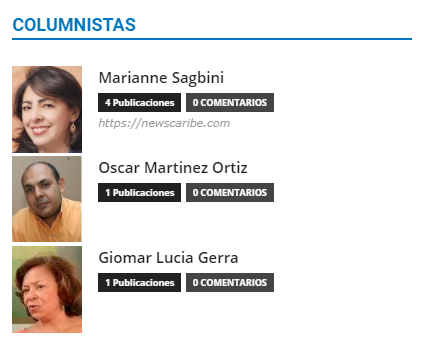
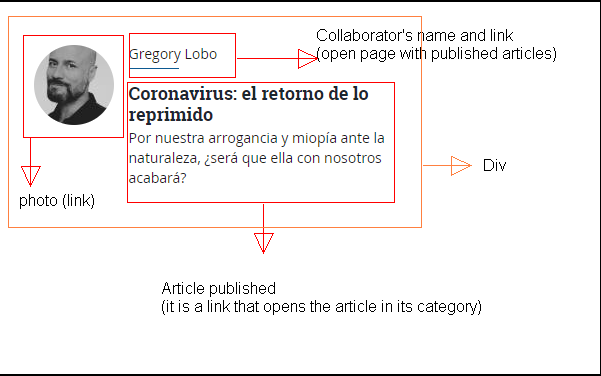
 Hello, how can I create a new block in the TD Composer?
The block that exists is this Authors box.
I want to create one like this.
 adeniyioa
I am unable to create a new page and edit with tagDiv Composer!
First I click on “Add New” on the “pages”, page as indicated here https://forum.tagdiv.com/homepage-how-to-build-and-set-it/. Then I click tagDiv Composer to edit using tagDiv Composer.
Next I get the following error message and I unable to do anything else.
Error at zones: 6(models) : 5(dom). The model does not match the content Current state has involved an issue. You could try an UNDO operation (CTRL+Z / CTRL+SHIFT+Z)



