
 Vlad S
 Hello !
The author can be shown by editing the block using tagDiv Composer as you can see here: https://www.screencast.com/t/yEzE2n3dU
Thank you !
Vlad S Hi,
Please make sure that you do not have a plugin conflict, please deactivate ALL plugins except tagDiv Composer, also if you are using child theme or cache plugin, deactivate them, clear all cache and try again.
At the moment the Support team is not 24/7 available. Please note that we answer the topics from Latest to Newest Monday – Friday from 08:00AM to 05:00PM GMT+2 So multiple replies to your topic will only make us to get harder to your topic.
Thank you !
Vlad S Hello !
Any cloud library template is fully editable using tagDiv Composer: https://www.youtube.com/watch?v=I1R3j1QYod0 You can import a template and adjust it. Please follow our video tutorials. They might be more helpful !
Thank you !
Vlad S Hello !
You will need to use a migration plugin but please make sure that your migration will be done correctly. After the migration is finished I would suggest removing and reinstalling only the tagDiv Composer plugin. In that way it will save all the new urls correctly.
Thank you !
Vlad S Hi,
Please make sure that you do not have a plugin conflict, please deactivate ALL plugins except tagDiv Composer, also if you are using child theme or cache plugin, deactivate them, clear all cache and try again.
If the problem persist, please set this code in functions.php -> wp-content/plugins/td-composer/legacy/Newspaper/functions.php
add_action('admin_head',function() {

echo '<style>.td-gutenberg-editor .editor-styles-wrapper .wp-block {max-width:726px;}</style>';

});
Or you can send us an email at contact@tagdiv.com and provide admin login, as well as cPanel or FTP if possible. We will take a look. Include a link to this topic in the email.
Thank you!
Vlad S Hello !
You can create a custom page using tagDiv Composer: https://www.screencast.com/t/CHAKQHxdGd and set it as you primary page: https://www.screencast.com/t/kyPZzBXUCYFt
Thank you !
 Calin
Calin Hi,
Usually all the website have set on logo the link to homepage, this is a standard.
Why is it standard for a website logo to navigate to the home page?
If you are referring to this page ->https://i.imgur.com/cYj89sx.jpg, then you can edit it using tagDiv Composer
Also I can see that you are using the blog as homepage -> https://i.imgur.com/Pht5naX.jpg this section can be changed from here -> https://i.imgur.com/xHy4f36.png
Hope this will help you!
Thank you.
Calin Hi,
I just checked your website and this is set good -> https://i.imgur.com/VHPfFqt.jpg
All the changes in website design can be made using tagDiv Composer, if there is something else, let me know!
Thank you!
Vlad S Hello !
Please note that Mega menus can render pages. So you can create your menu in a page and then render it in the menu option. Unfortunately that is the only way to have the menu as you wish.
Pages can be created using tagDiv Composer: https://www.screencast.com/t/CHAKQHxdGd
Thank you for your understanding !
 jovan
jovanRender failed – no data exists for chosen country. Tried changing the country… Same result… Did as another user suggested – delete and reinstall the composer plugin… same error.
It was working before.
I also installed a local copy and having the same results.
Vlad S Hello !
Unfortunately those options can’t be edited using tagDiv Composer. In order to edit Post content you will have to use a 3rd party plugin. We haven’t tested any so you will have to test and see which one fits your taste.
Thank you !
 Jenny
Jenny Can’t save changes in tagDiv composer. Clicking the SAVE button results in a never-ending buffering image on that button.
 YanivAssas
Hi TagDiv. I purchased the newspaper theme and I am very disappointed. I cant edit with TD composer and its very frustrating. Please contact me via Facebook or assasyaniv@gmail.com Thank you
 Howardblast11
Hello –
For my Newspaper theme, whenever I post a story, url page posts more than one story. For example, my Martha Stephens interview is not just the post, there are several stories that go all the way to the bottom. Here’s a bit.ly link for reference: https://bit.ly/2VoJtd5
Also TD Composer is Disabled on My Posts Page. I can only use TD Composer for Front Page, Home Page, Footer, and Header.
 SquallSFU
 Thank you for your time. In tagDIV Composer (or in another location), how can I personalize the menu that opens by clicking on this icon? The same by clicking on the “search” icon. I want to partially customize the style.
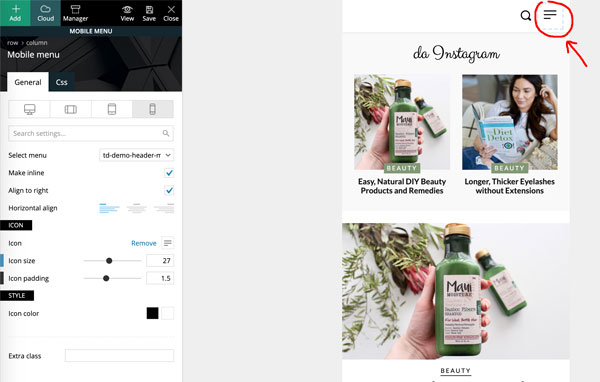
-
This reply was modified 6 years by
SquallSFU.
 Tounizino
why it takes forever for the save button and never stops loading, sometimes it saves my work.. sometimes not
is there anyway to fix ti??
screenshot: https://i.imgur.com/3xb0Kla.jpg
 ludyma
Hello, how can I create a new block in the TD Composer?
The block that exists is this Autres list box.
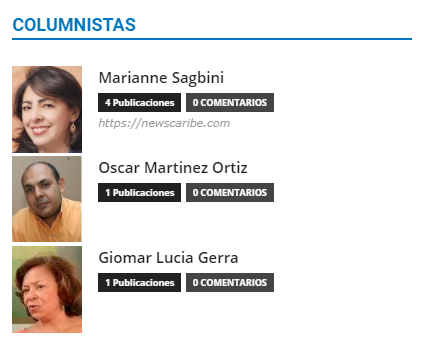
I want to create one like this.
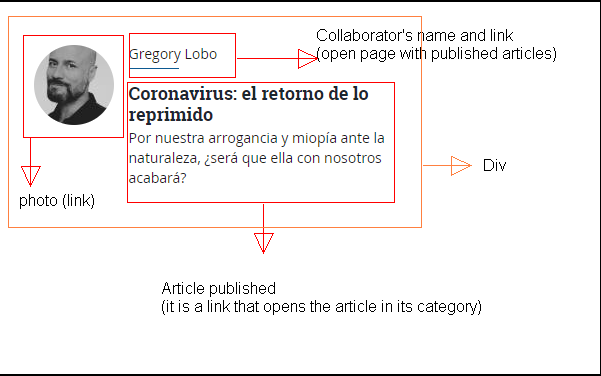
 envatosh101
 Until when you will be keeping Visual Composer along side TagDiv Composer?
 Thomas Stodulka
 Hi, I could not found an answer in case of my problem 4 days ago…:
I added a new page from the cloud tample and in my pages (theme newspeper). Now I cannot chagne the pictures in the TD composer – when i will upload a new jpg, it does not work: Invalid data Current state has involved an issue. You could try an UNDO operation (CTRL+Z / CTRL+SHIFT+Z)
any idea, whats the problem?
best regards tom
-
This reply was modified 6 years by
Thomas Stodulka.
 michele-r
  waqarahm3d
 I deactivated cloud template and TD composer plugin and re-added them they fixed the cloud template issue but now every element i have added to the page is showing in CSS visual can’t see a visual display.
 Mario Carrera
 Hi
Thank you but I’m using Bakery composer. So with your tagdiv info is not possible.
So now I’m trying with CSS at the Newspaper Theme Pannel / custom css. I just deleted the padding of all the web but I only wanted for the top slider. My god! I’m getting carzy.
Is there any CSS I could use to make full width slider (mobile version)?
Thanks again
I wrote this:
.tdc-row
{
padding-left: 0;
padding-right: 0;
}
 liberoarbitrio
Hi I’m currently using version 7.2 of php.
Quary monitor detects me 3 php errors related to your plugins:
wp-content / plugins / td-cloud-library / includes / tdb_functions.php: 1362
wp-content / plugins / td-cloud-library / includes / tdb_functions.php: 1363
wp-content / plugins / td-composer / live-css / css-live.php: 30
Thx Marco
 r1kay
r1kayHi,
Today I noticed the pagination on homepage and category pages is not working. So homepage.com/page/2 doesn’t show any content, same with the category pages. I designed the whole website with the TagDiv composer using the Tech Pro templates. I did some troubleshooting and noticed that switching Cloud Templates to a different Cloud Template fixed the issue. So there seems to be bug in the Tech PRO template that somehow breaks pagination. Could you guys please provide a fix? I can’t just switch templates because then I need to redesign the whole website.
waqarahm3dWhere is the support how to access it. I have purchased this thinking this is going to make life easy but i am spending more times searching for answers to problems through forums now.
A. Can’t import cloud templates
b. every blog post i click on is giving me the following error
wp_booster error:
td_api_base::get_key : a component with the ID: single_template_8 Key: file is not set.
/home/customer/www/chumarkhan.com/public_html/wp-content/plugins/td-composer/legacy/common/wp_booster/td_api.php
would really appreciate if you can kindly reply please !!!



