
- NewsmagtagDiv Composer Tutorial
- NewsmagBlock settings tutorial
- NewsmagLogo & Favicon
- NewsmagFooter templates
- NewsmagUsing other ads
- NewsmagUsing Typekit fonts
 NexusFred
 Sorry for the delay.
I can’t give you an URL because my shop is not open yet, but I found another issue.
I can’t customize any Newspaper Woocommerce CSS because the Newspaper Woocommercer CSS file is loaded after the Newspaper Child Theme CSS !!!
<link rel=’stylesheet’ id=’td-theme-child-css’ href=’https://www.mywebsite.com/wp-content/themes/Newspaper-child/style.css?ver=9.6.1c’ type=’text/css’ media=’all’ />
<link rel=’stylesheet’ id=’td-theme-woo-css’ href=’https://www.mywebsite.com/wp-content/themes/Newspaper/style-woocommerce.css?ver=9.6.1′ type=’text/css’ media=’all’ />
Newspaper CSS Child Theme should be loaded last !
So how can I override the CSS in “Newspaper/style-woocommerce.css” ? Most of them have a “!important” tag …
Best Regards
 keithohara
Hi folks,
I’m having issues with how my images are displaying. See this post for an example
https://www.theirishroadtrip.com/mcdermotts-castle-roscommon/
I’ve disabled several plugins to try and identify the culprit, but I can’t resolve the issue.
Is there something I can do to fix this?
Thanks,
Keith
 mikevic80
Hello,
We have a wallpaper advertisement up on our website but there is a big chunk of white space hiding it. Is there a custom css code that we could add to remove it. Example here:
http://www.victoriabuzz.com/category/events/
Thank you!
 Rildo
Rildo but can I expand this via ‘css’, if so, which class to use?
 fabaff
 Hi, just another question, always related to woocommerce category image.
If I need to center the image in a certain category page where what is the correct CSS?
i tried with this but doesn’t work
.woocommerce.term-app-ios .aligncenter a img{}
Thx in advance/ Fabio
Note: that the “neighbour” images have the sime size
-
This reply was modified 7 years by
fabaff. Reason: Additional info
 Calin
Calin Hi,
You can try this fix
#td-mobile-nav {
position: fixed;
}
Paste the code in Newspaper>Theme panel>Custom code>Custom css
But also is possible to be others elements broken in RTL
Our theme was does not support RTL so simply changing the direction will not work properly. Lots of theme elements have to be adjusted for the thee to support RTL.
Thank you!
 hdasilva
 Hi,
I solved it. It was a cache conflict as I am using SG Optimizer plugin as the web is in Site Ground.
The conflict was with “Minimizar archivos CSS”.
Thank you for your attention
Isabel
 Simion C.
 I tried to create a CSS for it, I wasn’t successful unfortunately. Seems to be quite difficult without damaging the quality of the image itself.
I will however add this as an issue so it will be investigated for cases when the image is set co contain. A solution will be found. I am sorry for this inconvenience.
Calin Hi,
I do not quite understand what you want to achieve, you want to hide the image from smart list, if is that you can do it using a custom css.
Please provide some more details and a link were I can inspect this.
Thank you!
hdasilva Hi
I tried to do so before I sent you the question but there must be an error in the author template because when I am log in and edit the template from library with tag composer something wrong happens and I can see the information but if it like the css style file is missing.
Can you help me to solve it?
Isabel
 davidemorini
 Hi, actually I work on Newspaper – Theme panel version: 9.2.2. It’s ok for me at the moment.
Now I need to know how solve this issue:
In home page phone I need to have control about space between ads.
In advanced css I insert this code in phones field and work fine
.td-a-rec-id-sidebar > div{
margin-bottom: 10px!important;
}
You have a similar code for have control about space between ads in homepage.
tnk
Calin Hi,
If this is related to a plugin and we didn’t tested any such a plugin with our theme, all I can do is to provide you a custom css to hide that content -> https://www.screencast.com/t/lbYgu4ADXl
.td-footer-page .code-block,

.td-footer-page .yasr-visitor-votes{

  display: none!important;

}
Thank you!
Simion C. Hi,
So the product images in a specific category should have half the width. I have a category “clothing” the page looks like this – http://prntscr.com/n7samw
To make that CSS apply only to the images in this category page, something like this would work – http://prntscr.com/n7sbuw
.woocommerce.term-clothing ul.products li.product a img{

width: 50%;

}
If that is indeed what you want to do, the code should do it, just change the “clothing” to the desired category name.
Thanks
Calin Hi,
I checked this problem and is look like for this header style the css from demo is stronger and is need to be set manually in Newspaper>Theme panel>Custom code>Custom css
-> https://www.screencast.com/t/53JqToECy2hu
.td-week .td-header-style-10 .td-logo-text-container .td-logo-text {

  color: #00a597

}
Or you can import from tagDiv Cloud Library this header and set it in -> https://www.screencast.com/t/YDZHINPF you can edit this with tagDiv Composer and make it like you want.
Thank you!
Calin Hi,
How I said using custom css to force the width of website will break the website or part of theme.
Unfortunately our theme do not have an option in order to achieve this, you can use TagDiv Composer and templates from tagDiv Cloud Library were you can stretch and change the row layout.
Using custom css to make the entire website meas to make a custom work and we do not provide custom work.
Thank you for your understanding!
 minghadi
 Hi Catalin,
Thanks for the reply. The page URL is on https://www.1001malam.com/travel/dari-malang-ke-bromo-fun-trip-experience/
I would like to make the header & the footer not displayed. Where can we put on the CSS? I meant through which settings?
Thanks,
Simion C. Hi,
If you would remove the arrows it will remain an empty square, with no indication about what it does – http://prntscr.com/n7rptr
I can give you a code for it if this is what you want to do, a setting for it is not available unfortunately
.page-nav .td-icon-menu-left:before,

.page-nav .td-icon-menu-right:before {

display: none;

}
This code can be entered in the theme panel->custom code->custom CSS section. Let me know if you have more questions.
Thanks
Simion C. From what I know there are no CSS issues like the one you mention at the moment, with the mobile theme. There were no other reports.
How can I recreate the issue on my end exactly? Let me know.
fabaffHi,
I’m using Newspaper 9.6.1, in combination with Woocommerce plug-in. I need to apply – to one category of Woocommerce – a different attribute; the size of the images showed in the category page must be 50% (ans only for this category). I tried in different ways with CSS but without success. Could you have look to the CSS that I used:
.woocommerce .category-<category-name>
ul.products li.product a img { width: 50%;}
Note that from the same page I removed the “read more” button applying this CSS that works fine.
.woocommerce ul.products li.product .button {
display: none;
}
Note that the site in under development and isnt’ in the net.
I’m stuck on this issue from two days and I need help.
Thx
Calin Hi,
You can use a custom css for this
.td-category-header .td-page-title {

  display: none

}
set the code in Newspaper>Theme panel>Custom code>Custom css or you can use a category template from tagDiv Cloud Library and edit it how you want.
Thank you!
 Modo
Modo I see. There is a problem with margins.
.td-module-meta-info {
margin: -50px auto 0 auto;
}
This CSS does not work using composer. It overrides with style.css line number 8550
.td_module_wrap.td-meta-info-hide .td-module-meta-info {
min-height: 1px;
/* margin-top: -4px; */
}
As you can see I commented this out. Can you guys do something about it in next update?
Calin Hi,
The default font settings are set in theme files in wp-content/themes/Newspaper/style.css also if you are using demos those have special style file for example -> https://www.screencast.com/t/9hrkhYPPLR wp-content/themes/Newspaper/includes/demos/animals/demo_style.css so when the settings from theme panel are set to default will be apply those settings.
Thank you for your understanding!
Modo 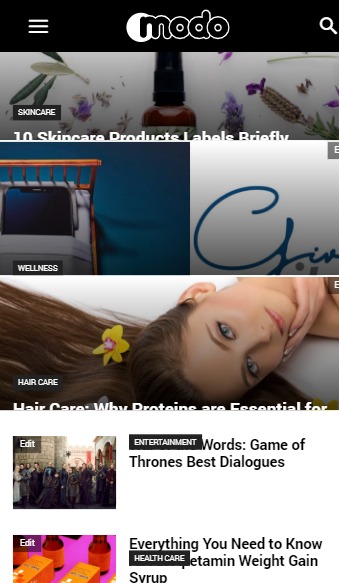
Something is wrong with CSS, please have a look at the attachement and Modo Stories
 artimag
Hello,
I now use the mobile theme on my site.
The featured article will appear twice on the homepage.
See screenshot https://drive.google.com/file/d/1_pFzq38xxvOwn4VXWRImdgWrSAOXHiFE/view?usp=sharing
Do you have a CSS code that hides the featured article in the latest article list on the homepage (as on the desktop version)?
Many Thanks!
 Catalin
 Hi,
I have checked your posts and I saw that you are using the MSO functionality of Microsoft Office product to take your posts content and that’s why the Excerpt section is working bad. Notice that the theme has not been tested with this functionality and therefore, we cannot say for sure if it will work or not as expected, sorry! Please take a look at this topic -> https://stackoverflow.com/questions/7507002/what-is-the-mso-prefix-for-in-css
Thank you!
