
- NewspaperWP Rocket and Newspaper Theme: Optimization Guide
- TutorialsFrom WPBakery to tagDiv Composer
- TutorialsDefault Block Settings Guide
- TutorialsHow to use custom fonts
 Bettina
 Hello!
However, page loading speed can depend on many factors, and each website is unique from this point of view.
Unfortunately, we can only help you with some advice.
Please note that page speed or optimization are not covered by the support team. https://forum.tagdiv.com/newspaper-theme-support/
Our developers are aware of this issue and try to synthesize the composer, which is big, and fix the major problems of the theme and speed.
I recommend you use fewer features on the page, so the requests will be less as well.
Improving page speed in WordPress is crucial for providing a better user experience and optimizing your website for search engine rankings. Here are some tips to help you enhance your WordPress site’s page speed:
Optimize Images: Compress images before uploading them to your WordPress site. You can use plugins like WP Smush or EWWW Image Optimizer to automatically optimize images without losing quality.
Utilize Caching: Implement caching to reduce server load and speed up page loading times. WordPress caching plugins like WP Super Cache or W3 Total Cache can generate static HTML files of your pages to serve users instead of dynamically generating them each time.
Minify CSS and JavaScript: Minify your CSS and JavaScript files to remove unnecessary characters and reduce file sizes. This can be done manually or through plugins like Autoptimize or W3 Total Cache.
Enable GZIP Compression: Enable GZIP compression on your server to reduce the size of files sent from your server to users’ browsers. Most hosting providers offer GZIP compression, but you can also enable it through plugins like WP Rocket or W3 Total Cache.
Optimize Database: Regularly clean up and optimize your WordPress database to remove unnecessary data and improve performance. You can use plugins like WP-Optimize to automate this process.
Limit External Requests: Minimize the number of external requests your website makes by reducing the use of external scripts and widgets. Each external request adds overhead to your page’s loading time.
Enable Lazy Loading: Implement lazy loading for images, videos, and iframes so that they are only loaded when they are visible on the user’s screen. This can significantly reduce initial page loading times.
Optimize Server Response Time: Choose a reliable hosting provider with fast server response times. Consider using a content delivery network (CDN) to serve your content from servers closer to your users.
Regularly Update Plugins and Themes: Keep your WordPress core, plugins, and themes updated to the latest versions to ensure compatibility with the latest performance optimizations and security patches.
Ads can significantly impact the speed of your WordPress website since they often involve loading external resources and scripts. You can try to limit the number of ads, optimize ad sizes and formats, and implement lazy loading on your ads.
By following these tips, you can significantly improve the page speed of your WordPress website, leading to better user engagement, higher search engine rankings, and overall improved performance. Please check out the tips from those platforms: GTmetrix and Google Pagespeed Insights.
We will try to improve the shop part page speed issues and the JS issues in the next updates.
Thank you!
 waleed9
 Hello Dear, disable Guest Optimization see here https://prnt.sc/5UgfaniCauij
And cancel all options on JavaScript except minify see here https://prnt.sc/g3BgwXIGX5mr
Make sure not to exceed this setting in css, see here https://prnt.sc/eAR9OsoKPaT2 or disable all options except minify
Then click here https://prnt.sc/kxTVp-uItmpc
Tell us if the icons do not appear
 JhonnySan
 The solution you have given me does not work as well as it should.
And to eliminate duplicate content on individual pages, what is the solution?
Another thing, I want to eliminate the columns that I no longer use but it is impossible to do so. The css keeps appearing.
Please is it possible to use a child theme. I urgently need to do it.
Thank you very much for your kindness.
 kevinwebdesign
Hi Support Team
Website – https://hkct.asia/
refere – https://www.awesomescreenshot.com/image/47308372?key=1d4b61d5591bd5c315401e8dddd08101
(1)
I would like to change the color – Playlist Icon (cursor: pointer)
but we cannot change color (play and pause), even if I tried custom css
(2)
Is it possible to put more video on the play list, because there are only display 5 video on list.
 shuddhatm9
Hi, I am using the Gossip Child theme where I have been facing LCP issues since last month we figured out that your cloud library and composer are taking time to load so it will be a great help if you can help in optimising the plugins and minifying CSS.
my site URL is https://www.tellymantra.com
 llaporte
Hello, I recently had a problem with social sharing and Litespeed Cache. I think I need to exclude the CSS and JS modules from the social sharing module but I don’t know which JS and CSS I need to identify and exclude them from the cache system.
I tried to exclude the JS by entering /wp-content/plugins/td-composer/legacy/Newspaper/js/tdSocialSharing.js in the exclusion field but that has no effect.
This is the only theme module that stops working when I activate the Advanced preset. The social sharing icons and function no longer display at all.
Could you help me.
Thanks in advance
Luc Laporte
 Anamaria
 Hello,
Unfortunately, this tool has caused more problems than it has helped. I’m glad it was useful for you, but for the majority of users, it wasn’t, and there have been requests for it to be removed. The code has been optimized; please go to the theme panel -> block settings -> inline css https://i.imgur.com/cwwmOPu.png and disable the option to minify the css.
Thank you!
Anamaria Hi,
Usually, the color and image are set on the row, so please edit with tagDiv Composer and select the row and go in the tab CSS https://i.imgur.com/UkgqKNM.jpg -> https://forum.tagdiv.com/topic/background-color-of-the-main-menu-be-changed/
Thank you!
 VZ
VZHello, I recently updated to versions 12.6.4 and 12.6.5. I noticed that the TagDiv CSS Analyzer feature has been deprecated. Firstly, could you explain why this decision was made? This tool was quite helpful in optimising speed, so understanding the rationale behind its removal would be beneficial. Secondly, is there a replacement for this tool available, or should I consider restoring a backup to regain access to it?
I must express my frustration with the removal of a useful feature from the theme without any consultation with members who have purchased it.
Anamaria Hello,
Please check those guides https://www.wpbeginner.com/wp-tutorials/how-to-remove-unused-css-in-wordpress-the-right-way/ -> https://themeisle.com/blog/remove-unused-css/#gref
Thank you!
waleed9 Oh, Bettina
Thanks, I will review this file
In fact, I pursue CSS and JavaScript as if they were a serial killer ^_^
Bettina Anamaria Hello,
How did you add the list? I think that you can change it only with custom code css -> .listing-item a.title
{
font-family: ROBOTO;
}
Set the code in Theme panel>Custom code>Custom css
Thank you!
 ethicalexpert
in your demo other only main default demo “DEFAULT NEWSPAPER PRO” works fine with https://pagespeed.web.dev/
that default demo “DEFAULT NEWSPAPER PRO” , other than it ,all demo has errors.please check yourself.
it only works fine in your hosting or in your side…
——————————-
my problem is
1 – i had reset my server several times.
2 – checked all demos by installing them in my wordpress site.
3 – installing uninstalling all extra plugins like jet, seo ,css, bla bla bla
but “DEFAULT NEWSPAPER PRO” in my site has errors in “pagespeed”
68 – 91 – 72 – 93
this type of score i found everytime.
i don’t know why.
if i don’t install any plugins than also i found less score.
please help me…………………………………..
please.
thank you
god bless you.
 haipo
haipo Hi Bettina
I can’t do that as I have 100,000 pages already
And it work perfect in my old template
As you can see the same page looking good in my old template:
https://haipo.co.il/item/135665
–
Looking like error in TAGDIV
https://dev2.haipo.co.il/item/135665
–
This should be aligned in you CSS.
-
This reply was modified 2 years by
haipo.
 davidjrfoster
I’m struggling to work out how to change the main container width using the Theme options. I went into template settings in the theme panel and changed the page template but that didn’t do anything. So I did it with custom css in the end. But the problem I’m having is that the placeholder advert is behaving erratically; resizing, not sitting in the right place when ‘fixed’ etc. Is there something I’m missing.
Here’s a page I’ve been working on on my dev site:
https://africanreview.alaincharlesdemo.com/sew-eurodrive-builds-support-and-trust-in-africa/
Also is there any way to change the placeholder advert graphics?
Many thanks in advance,
Dave
 frankiefop
Hello,
I have highlighted four issues I needed to fix below.
Site URL: https://converseer.com
1. After analysing my site, I realised fonts make up 57.8% of the total page size. This is a lot just for fonts. Please, how do I reduce this?
2. The DOM is very large and it’s causing high TBT time. How do I fix this – which HTML element do I need to fix or remove?
3. How do I preload the LCP image on the homepage? The theme is also using CSS background image, which I’ve realised can’t be preloaded. Is there an option to load these images inline instead?
4. The tagdiv JS file is very large and can’t be delayed. It should be more modular but everything seems to be in one big JS file. How do I optimise it? Is there any way you can load more of your CSS in an external file?
Please, I need help with this. I have been stuck, instead of creating content, I am stuck with optimisation. 👉 https://pagespeed.web.dev/analysis/https-converseer-com/ty7j496bq7?form_factor=mobile
See screenshots via the links:
i. https://paste.pics/dc62669811dc058f56da1886394f408e
ii. https://paste.pics/310b4a236e5dd1a960ad287335ce139e
iii. https://paste.pics/ed5381602eaea936e8b930e1c4deca66
iv. https://paste.pics/943b1b809d1c784b2d3b4b849b04c81b
v. https://paste.pics/ce6eb42f1377f5c2eff08c041d73f002
I know you’ll say speed optimisation is not covered by you, however, I am asking you to do it, just show me how, and I will but the one you can, please, I help by doing it.
Thank you.
Bettina Hello!
1. You should edit an article with the tagdiv composer and use the element Single Post Tags. Make sure you have tags assigned to your article as well. Also, check if you have a tag template in Cloud Template and set it global.
2. Please check the console if you have any errors when you click Save Settings.
A similar situation has already been discussed here; please check: https://forum.tagdiv.com/topic/theme-panel-settings-are-not-saving-2/
3. You can hide it on mobile, and you’ll have it on the other viewports. You can hide every element from the CSS tab: https://prnt.sc/1FJiMub9ke4s for each viewport: https://www.screencast.com/t/XDQJedlggSB
I recommend you turn this option on: https://app.screencast.com/R9qXYOO0g44lO before anything else.
4. You should place it in the content zone and not in the header or footer zones that are global, and it will display on all pages.
Thank you!
Bettina Hello!
Select the inner row and change the CSS settings and not the post view element.
Thank you!
 Calin
Calin HI,
Unfortunately for the blockquote within comments it is need to use a custom css, something like this one:
.single .comment-content blockquote p {

    font-family: 'Roboto', sans-serif;

    font-size: 18px;

    line-height: 24px;

    font-weight: normal;

    font-style: italic;

    text-transform: inherit;

    color: #4db2ec;

}
This code needs to be set in the theme panel > custom code > custom css.
I hope this will help you!
 dharma3d
I’m having some undesired spaces in the hearder of my mobile theme, and I’m tryin to resolve that through custom css and that works when I load the mobile theme on desktop but on mobile phone I don’t see those changes.
For example
:
.td-a-rec-id-header_mob {
margin: 0;
}
This is how it looks on mobile phone:

And this is the result is see in DevTools when I switch to mobile view:
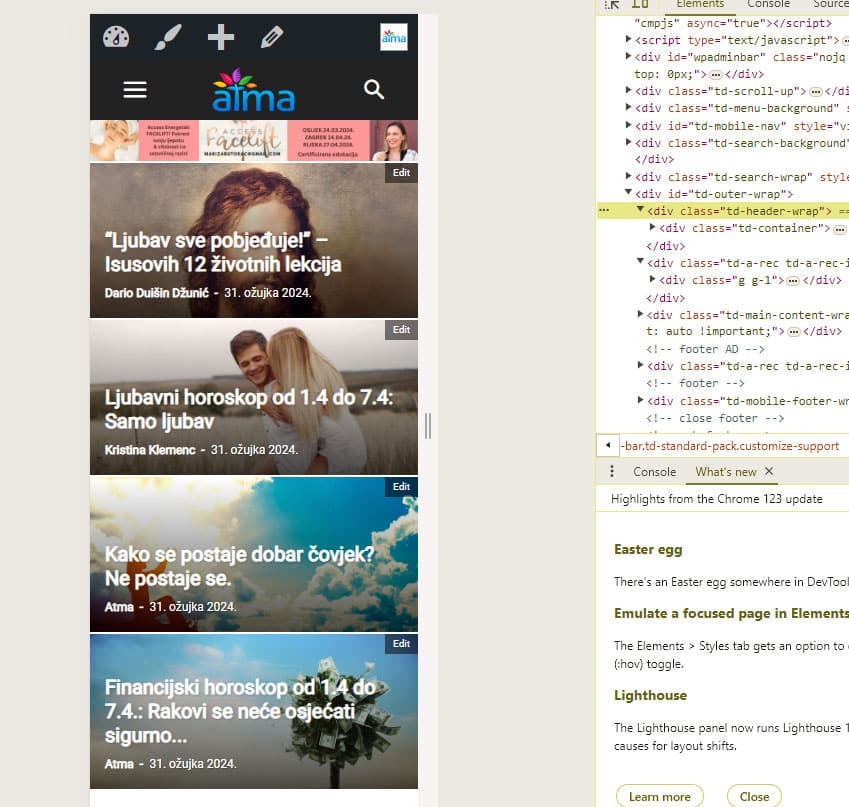
Or is there another way to get rid of those spaces?
Thanks!
My site is https://atma.hr/
haipo Hi Bettina,
Thanks for your reply
However, as I wrote you, I have over 100,000 pages\
Adn now I’m preparing a migration to TAGDIV
And some images are not aligned with the mobile width
I cant scan 100,000 pages
I need a central CSS fix for that, as your mobile code is missing some images.
–
Thanks,
Yaron
 tritue

Hello, when I use the Prebuilt Website function, I encounter an error as shown in the image. I tried deleting the theme and reinstalling it from scratch, but the issue persists. I also tried installing a different demo version, but the error still occurs. Please help me check.
 Infoblendr
 I just installed and integrated mycred plugin to my website (infoblendr.com) but I don’t want to use an external plugin because of the cost.
Am trying to create an HTML and CSS dashboard that will display the points rewarded to my respective users based on referring people, viewing posts, commenting and other activities and I wish I edit that easily myself.
 simchris
 You can use online tools to scan your site for unused CSS, then output new CSS file, then upload that to your site. We did this several years back. Worked very well. All themes thst offer a lot of choices for coding, have larger CSS files; these can be highly compressed via various tools, but the online tools to remove unused CSS are best choice.
(I don’t work here)


