- NewsmagtagDiv Composer Tutorial
- NewsmagBlock settings tutorial
- NewsmagLogo & Favicon
- NewsmagFooter templates
- NewsmagUsing other ads
- NewsmagUsing Typekit fonts
 Bogdan B.
 Hi,
For SEO there should be no implications if the description is simply hidden with css. The markup is still there only it’s not shown on the screen.
Thank you!
 Simion C.
 Hi,
To make it exactly like that other font and also change the color (there is no need to enter the code provided in your other topic, just use this one), please try this code
.td-footer-wrapper

.td_block_text_with_title {

color: white;

font-size: 14px;

line-height: 21px;

}
Your website seems to be in maintenance so I cannot test this, but it should work as intended. Just enter it in Theme panel->Custom Css.
Thanks
Simion C. Hi,
Please try this code to change the color of the text, only on the Block text with title. You can change the color to what you like in the code
.td-footer-wrapper

.td_block_text_with_title {

color: white;

}
Enter it in Theme panel->Custom Css. Please let me know if this works for you.
Thanks
Bogdan B. Hello,
If you want to have rounded navigation numbers you can add this css to the theme panel-> custom css box:
.page-nav a,

.page-nav span,

.page-nav:first-child > div {

  border-radius: 20px;

}
Thanks.
Bogdan B. Hello,
The mobile theme custom css box is different than the main theme. Please use the css here:
https://www.screencast.com/t/fhHejZ9vV
Thank you!
Bogdan B. Hello,
For featured images, you cannot add the class, but you can add the css using the class already in use for the featured images.
For example:
.td-post-featured-image{

border: solid 1px #1f3aa3;

}
You can add the code in the theme panel-> custom css box
Thanks.
Simion C. Hi,
You could set a background color for the title on that block. Like in this example
– https://www.screencast.com/t/YADFukGzuTz
This is the code used, you can change the color to what you want, and then enter it in Theme panel->Custom Css
.td_block_14 .entry-title {

background-color: rgba(77, 178, 236, 0.7);

}
Thanks
Bogdan B. Hello,
Our page builder was not meant to copy or imitate visual composer. If you want to hide a block from a specific viewport it can be done with css.
You can assign a custom class to every element in the tagdiv composer and then simply use your class in this css adding it in the theme panel-> custom code-> advanced css section. Here is an example:
https://www.screencast.com/t/IvXwT6w2vYTf and you can use the class to hide the block on a specific device like so: https://www.screencast.com/t/lqdAM8nu
Thank you!
 Catalin
 Hello techpostz,
I guess that you want to hide your menu and top bar menu, right? If you want to achieve this, please use the code below and place it in Theme panel->Custom CSS area.
.td-header-style-7{

display:none;

}
Thanks for the message!
Simion C. Hi,
This is proving to be quite difficult to do. Please make the modification like this
– https://www.screencast.com/t/6NSClQWt
And then enter this code in Theme Panel->Custom Css
– https://www.screencast.com/t/yHpRXDUeWqzf
It should display it like you want
.td_block_big_grid_fl_1

.td-module-comments,

.td_block_big_grid_fl_1

.entry-title {

float:none;

display:inline-block;

top: -5px;

}
Thanks
Bogdan B. Hello,
If you want to change the color of the text in that particular block, you will have to assign an extra class to the block: https://www.screencast.com/t/dG5p6LNV7eF
Then you can use the custom class to target the block with css and change the colors for that block in particular.
For my example the code would be:
.mycustomclass .td-module-title a, .mycustomclass .td-excerpt, .mycustomclass .td-post-author-name a{

color:white!important;

}
Thanks.
Catalin Hello Szentmaxi,
1)Unfortunately, our theme does not have any such an option that allows you to display the subtitles of your posts in blocks/modules, sorry! If is not what you mean, please provide more details so I will be able to provide a more accurate response.
2)Please check all of our list of blocks and you will see that only one block has active this button ->Read More, like Block 12, as you can see here -> https://demo.tagdiv.com/newsmag/block-12/
3)If you want to remove the More from Author tab for each post, you should use the code below and place it in Theme panel->Custom CSS area.
The code is ->
.td_block_related_posts .td-related-right {

display:none!important;

}
The result is here -> https://www.screencast.com/t/dYFZ2m2NP4
4)Notice that our theme has an option which allows you to hide the date from blocks/modules and from post pages, like this -> https://www.screencast.com/t/OwarQc7Nsej -> https://www.screencast.com/t/KH3nNG4EoHMa If you want to hide the date only in certain places, you should use a bit of CSS code (by category IDs) to do this.
5)If you are using the same post template for the entire website, notice that you can do this from Theme panel. First of all, at the post template, you should leave just active From panel -> https://www.screencast.com/t/gzNCZvvW and then, from panel you should choose your general post template which will be used on your site, like this -> https://www.screencast.com/t/gCDwW7toZi1J For more information about this feature, please consult the documentation here -> https://forum.tagdiv.com/newsmag-post-templates/
Thanks for your understanding!
 fatihben2
 Hallo #vidweb and #Chris S;
i’m using “wp supercache” plugin and tagDiv Composer,tagDiv Mobile Theme,tagDiv Social Counter,tagDiv Speed Booster,GZIP Output
my htaccess codes:
# BEGIN WordPress
<IfModule mod_rewrite.c>
RewriteEngine On
RewriteBase /
RewriteRule ^index\.php$ – [L]
RewriteCond %{REQUEST_FILENAME} !-f
RewriteCond %{REQUEST_FILENAME} !-d
RewriteRule . /index.php [L]
</IfModule>
<IfModule mod_deflate.c>
AddOutputFilterByType DEFLATE text/html text/xml text/css text/plain
AddOutputFilterByType DEFLATE image/svg+xml application/xhtml+xml application/xml
AddOutputFilterByType DEFLATE application/rdf+xml application/rss+xml application/atom+xml
AddOutputFilterByType DEFLATE text/javascript application/javascript application/x-javascript
AddOutputFilterByType DEFLATE application/x-font-ttf application/x-font-otf
AddOutputFilterByType DEFLATE font/truetype font/opentype
</IfModule>
# END WordPress
please help me
 valiente123
 Thank you Bogdan, fix it for theme, but mobile theme still like this, i use mobile plugin, and i tryed mobile theme custom css to write it but it wasnt work for mobile plugin
 TheY
TheYHey guys,
I used some custom CSS to make the body semi transparent. Now I would like to know how I could use a transparent header. I tried to use a .png with transparent background, but that doesn’t seem to work. Do I need to add some additional CSS make the transparent background of the png show?
This is the site > http://bit.ly/2rD5IOW. (At the moment its a jpeg not a png)
 arrezzo
 Ok, I did it. it looks good. resolved. still wondering why we had to revert to CSS to do this though :/
arrezzo that worked but i’d like it to be #ffa33a do I just replace that with the word orange? sorry not good with CSS. please advise
 kpkurankar
Hello,
I can not open “New Post” page. it remains blank and I can’t add or type anything there and following message appears at the bottom of the page. however I can edit the already created posts.
Please tell me how to solve the issue. I didn’t upgraded Visual composer but this message appeared automaticaly from 1 day.
deprecated and are no longer supported in newer versions of Visual Composer.
o Contact Form 7Place Contact Form7
o RowPlace content elements inside the row
o Text BlockA block of text with WYSIWYG editor
o SectionGroup multiple rows in section
o IconEye catching icons from libraries
o SeparatorHorizontal separator line
o Separator with TextHorizontal separator line with heading
o Message BoxNotification box
o Facebook LikeFacebook “Like” button
o Tweetmeme ButtonTweet button
o Google+ ButtonRecommend on Google
o PinterestPinterest button
o FAQToggle element for Q&A block
o Single ImageSimple image with CSS animation
o Image GalleryResponsive image gallery
o Image CarouselAnimated carousel with images
o TabsTabbed content
o TourVertical tabbed content
o AccordionCollapsible content panels
o Pageable ContainerPageable content container
o SectionSection for Tabs, Tours, Accordions.
o Custom HeadingText with Google fonts
o ButtonEye catching button
o Call to ActionCatch visitors attention with CTA block
o Widgetised SidebarWordPress widgetised sidebar
o Posts SliderSlider with WP Posts
o Video PlayerEmbed YouTube/Vimeo player
o Google MapsMap block
o Raw HTMLOutput raw HTML code on your page
o Raw JSOutput raw JavaScript code on your page
o Flickr WidgetImage feed from Flickr account
o Progress BarAnimated progress bar
o Pie ChartAnimated pie chart
o Round ChartPie and Doughnat charts
o Line ChartLine and Bar charts
o Empty SpaceBlank space with custom height
o Post GridPosts, pages or custom posts in grid
o Media GridMedia grid from Media Library
o Post Masonry GridPosts, pages or custom posts in masonry grid
o Masonry Media GridMasonry media grid from Media Library
o Old TabsTabbed content
o Old TourVertical tabbed content
o Old AccordionCollapsible content panels
o Block 1
o Block 2
o Block 3
o Block 4
o Block 5
o Block 6
o Block 7
o Block 8
o Block 9
o Block 10
o Block 11
o Block 12
o Block 13
o Block 14
o Block 15
o Block 16
o Block 17
o Block 18
o Block 19
o Block 20
o Block 21
o Block 22
o Block 23
o Block 24
o Block 25
o Big Grid 1
o Big Grid 2
o Big Grid 3
o Big Grid 4
o Big Grid 5
o Big Grid 6
o Big Grid 7
o Big Grid 8
o Big Grid 9
o Big Grid 10
o Big Grid 11
o Big Grid 12
o Big Grid Full 1
o Big Grid Full 2
o Big Grid Full 3
o Big Grid Full 4
o Big Grid Full 5
o Big Grid Full 6
o Big Grid Full 7
o Big Grid Full 8
o Big Grid Full 9
o Big Grid Full 10
o Big Grid Slide
o News ticker
o Video Playlist
o Video Playlist
o Ad box
o Image box
o Author box
o Authors box
o Homepage post
o Popular category
o Slide
o Text with title
o Weather
o Exchange
o Instagram
o Pinterest
o List Menu
o Social Counter
o Revolution SliderPlace Revolution slider
o Revolution Slider 5
o WP SearchA search form for your site
o WP MetaLog in/out, admin, feed and WordPress links
o WP Recent CommentsThe most recent comments
o WP CalendarA calendar of your sites posts
o WP PagesYour sites WordPress Pages
o WP Tag CloudYour most used tags in cloud format
o WP Custom MenuUse this widget to add one of your custom menus as a widget
o WP TextArbitrary text or HTML
o WP Recent PostsThe most recent posts on your site
o WP CategoriesA list or dropdown of categories
o WP ArchivesA monthly archive of your sites posts
o WP RSSEntries from any RSS or Atom feed
 pavel@earnware.com
 Hey,
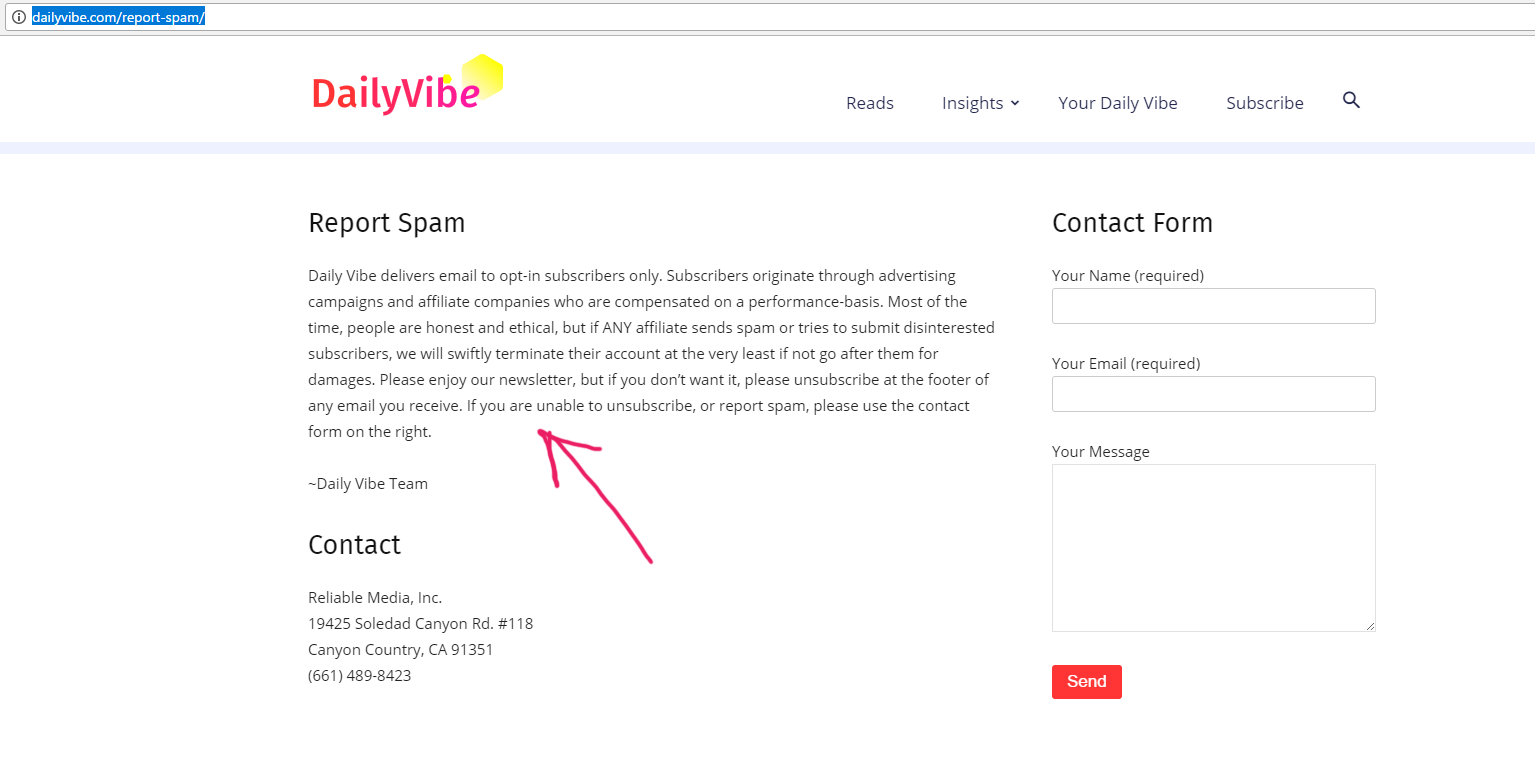
Here is the page: http://dailyvibe.com/report-spam/
So front end screenshot: Here
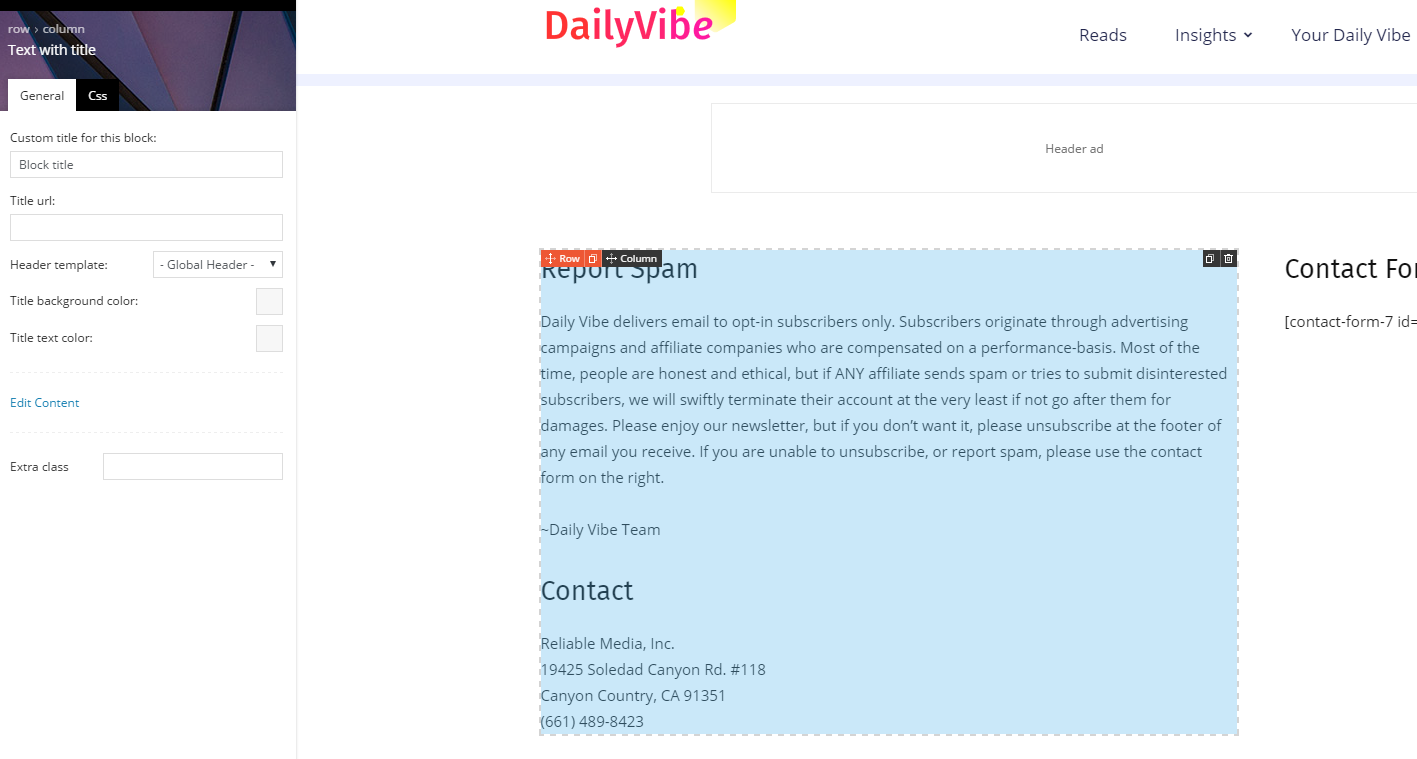
Backend of the page (So I used Text with title to put that text in there): Here
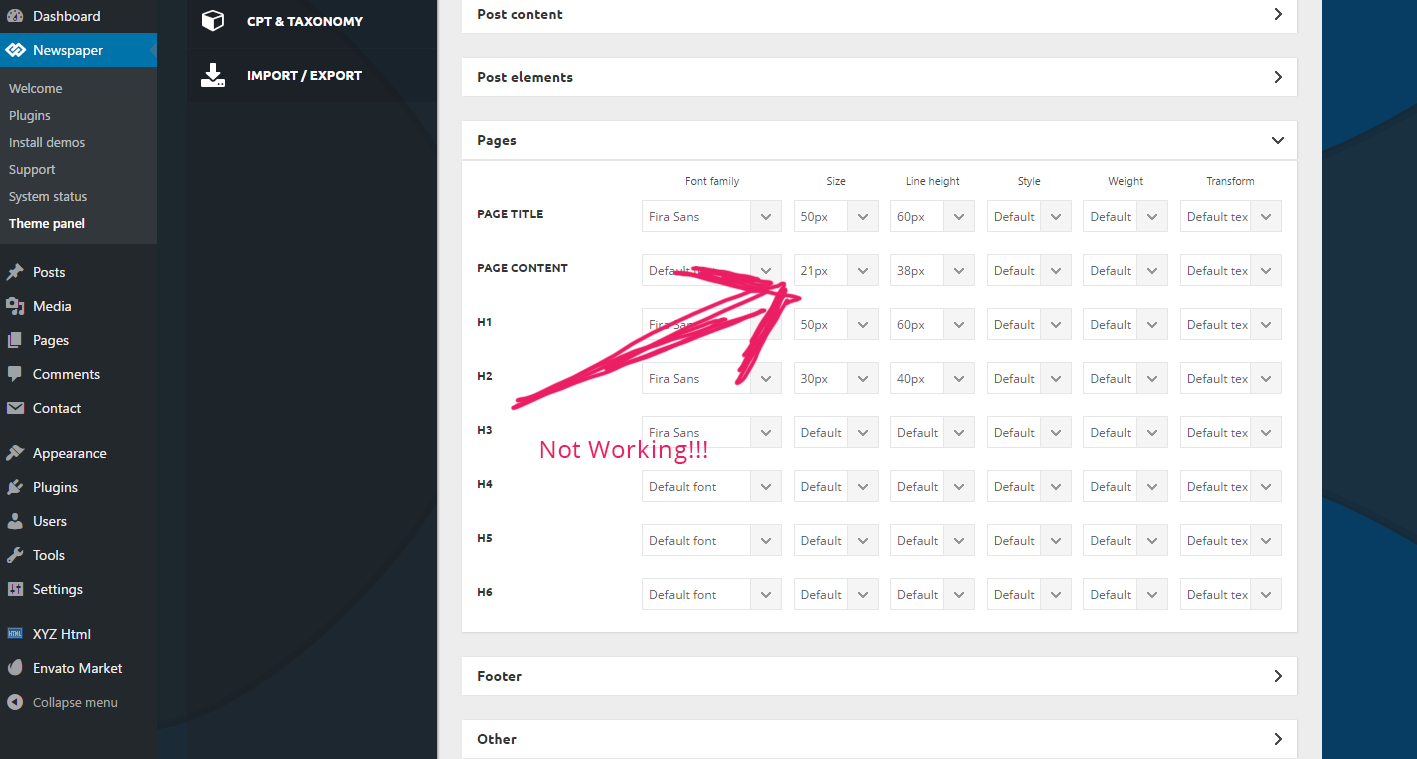
And the Dashboard of the font-size not working: Here
See I used 21px for page content, and it’s not working. Please fix it in the next release!
I am not using html, or some weird stuff, but your text+title block. Not working! On another site I had to manually add css to modify this text size – it’s ok for me, but the clients are angry that they cannot do it with their backend. I had to modify these classes to make it work:
.td-page-content p, .td-post-content p, .wpb_text_column p, .td_block_text_with_title p, .woocommerce #tab-description p, .mce-content-body p, .td-page-content li, .td-post-content li, .wpb_text_column li, .td_block_text_with_title li, .woocommerce #tab-description li, .mce-content-body li {
font-size: 19px!important;
line-height: 1.9em!important;
}
But we need it to work via BACKEND!
valiente123 Thank you Bogdan, fix it for theme, but mobile theme still like this, i use mobile plugin, and i tryed mobile theme custom css to write it but it wasnt work.
Bogdan B. Hello,
Please add this css in the theme panel->custom css box:
@media(max-width:392px){

.td-post-source-via .td-post-small-box a{

height:40px;

line-height:16px

}}
Thank you!
Simion C. Hi,
You could create tables using standard HTML and simply insert them in the post content
– https://www.screencast.com/t/qD8zVzOe5a
– https://www.screencast.com/t/RrWLod2hHN
Then maybe further customize them with some Css
– https://www.screencast.com/t/g5WCQLuQs4h
I used table example from here
– https://www.w3schools.com/html/html_tables.asp
Of course there are plugins as well that you can use use to insert tables in the post content and have more customization options.
Thanks
Catalin Hello brenbrinkman,
Unfortunately, our theme does not have any such an option that allows you to change the design for search option, sorry! If you want to tune your website sections you should edit the style.css because there you will found all the theme style. Also, if you are not aware of the steps which are needed to take in this regard, please consider hiring a freelancer/developer to help you because we cannot provide custom services at the moment, sorry!
Thanks for the message!
 Ernum
Ernum Or there must be done some css? Because I need in all blocks and modules to get that comment number after the title. I can change that but I need just to know what to do, as 1 block as example 🙂
ErnumHello.
At the moment in TagDiv composer there are filter options like: “Ajax dropdown – filter type: Filter by Popularity: Featured | Most viewed ” articles. Can I somehow show Latest News | Most Viewed too?
Somehow like this: http://prntscr.com/fkftc3
I can CSS it later but I mean about functionality for Latest News | Most Viewed articles tab option at sidebar 🙂
Best wishes!