- NewsmagtagDiv Composer Tutorial
- NewsmagBlock settings tutorial
- NewsmagLogo & Favicon
- NewsmagFooter templates
- NewsmagUsing other ads
- NewsmagUsing Typekit fonts
 rcallejonvillalobos
1. Top menu does not appear on mobiles, how to fix it?
I can not change it with Custom CSS 🙁
2. How to do that the header menu scroll it on phones but not on PC?
 markn
markn That’s great – that’s what I mean, thank you. I notice, though, that the transparency doesn’t also appear in the main body on posts – it’s still a solid white block that’s shown. How would I update the CSS to include that too?
 hcnsupport
I am trying to place a widgetized sidebar on my home page. The widget loads but it also calls a popup window that is larger than the widget area. This causes the popup to be clipped and not show all of the content.
The widget is at the bottom left on this test site: txcraigs.com
I have been able to get the widget working on my current site (which uses a different theme) but have not been able to get it to work with the latest Newspaper theme on this test site.
I tried creating a special CSS rule for the widget and gave it this style:
.ownlocal_sidebar{
overflow:visible;
}
But it still will not expand outside the widget area.
http://www.screencast.com/t/OqIMLQGMYDa5
Any help would be appreciated.
Thanks,
Rick
 Albert
 Hello
I have put the Custom CSS below this piece of code in style.css and it works. But, when I have installed Speed Booster many things on the website have changed. The issue that I mentioned before still happens and many other things like some blocks out of place, footer and breadcrumbs don´t fix correctly.
I have to say that I have removed the piece of code mentioned on tutorials (step 5.1), I don´t know if I have to do any other thing. I have seen on tutorial that there is a 5.2 step, which I haven´t done. Could be that the problem?
Thanks
 Tihulu
I’d replaced the default comment system with Facebook’s, but I’ve encountered a problem.
When someone wants to comment as a page you have to pick that page from a dropdown menu and this dropdown menu disappears behind the footer.
Is there a way to easily fix this with custom css?
I’ve added an image to show you what’s going on. If you want to reproduce this error you can do it on this page.

 Vesa
Vesa Hi Catalin,
I appreciate your continued help.
I had to restore a recent backup. Maybe you could have a look at our current layout and contrast it with that in the picture.
I do have Visual Composer installed; it’s just not the latest version. The funny thing was that the settings seemed to be correct (=the same as before theme update), yet for some reason there were additional, unwanted categories like “Latest articles”, “The most popular posts” and “Popular category” (all in Finnish, of course) at the bottom of the front page. They were not there before the update.
I also noticed that my translations were missing.
TagDiv’s instruction video says “Delete the old version of the theme.” At that stage I deleted the “Newspaper 4 child theme”, which was active. Afterwards I have wondered if I should have deleted the Newspaper 4 main theme, not the child theme. Which should one delete?
Note that I have made customizations to a number of php files – for example, td_block_8.php – and added customizations in the CSS Editor. Does this cause problems when updating?
Best,
Vesa
 joyceloh
Hi Bogdan,
link:http://www.sansan-bizconnect.com.sg/?s=search
Can you provide me the CSS code to make the category title box in these respective colours on the search results page?
Desired colour codes
Explore: #59b1ff
Expand: #214572
Excel: #666666
Thanks!
 alexschneiderru
 I still cannot get it working sorry 🙁
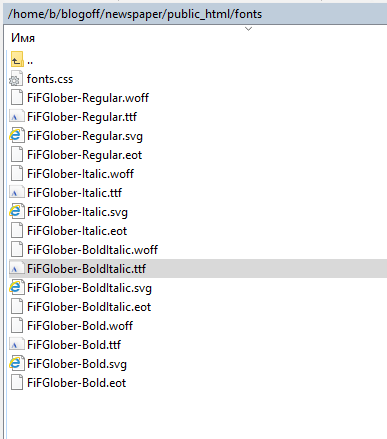
1) I have webfonts files on the site http://c2n.me/3tJ4xkE.png
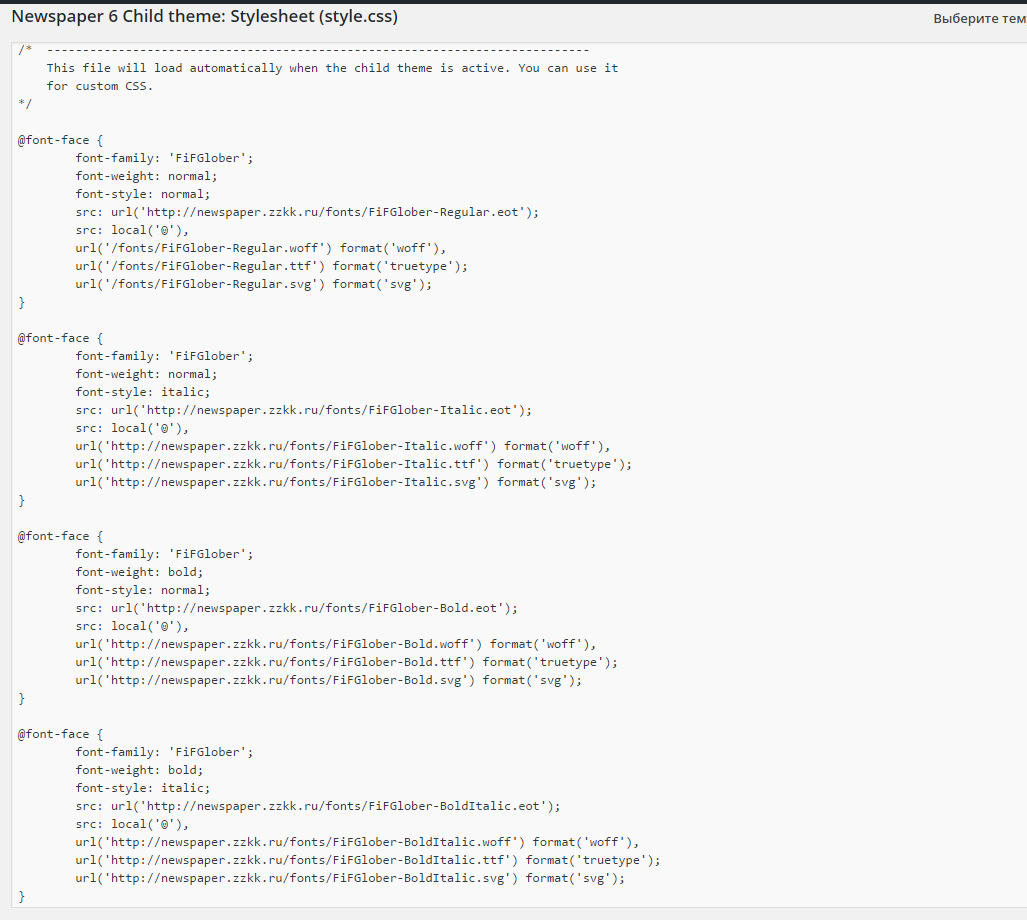
2) I have loaded 4 files for my custom fonts family through css of my child theme: http://c2n.me/3tJ3nG0.png
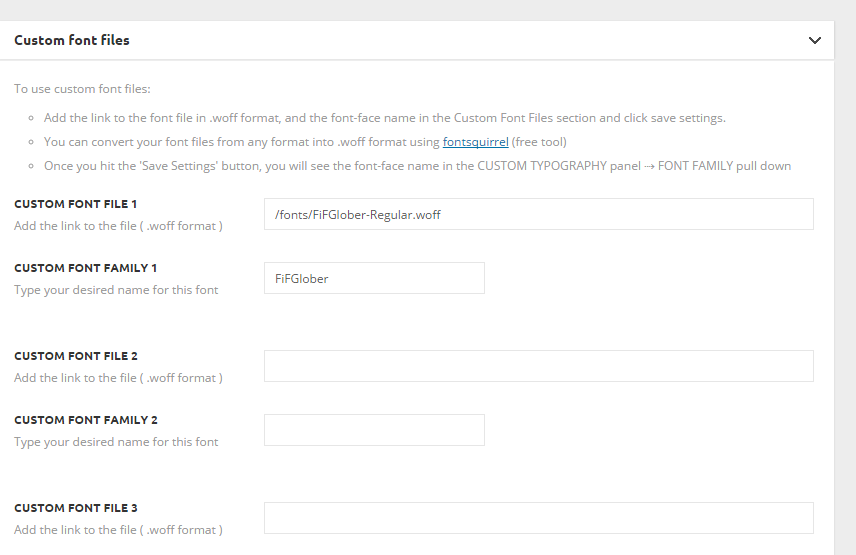
3) I insert one font family in Custom Fonts panel http://c2n.me/3tJ3zQn.png
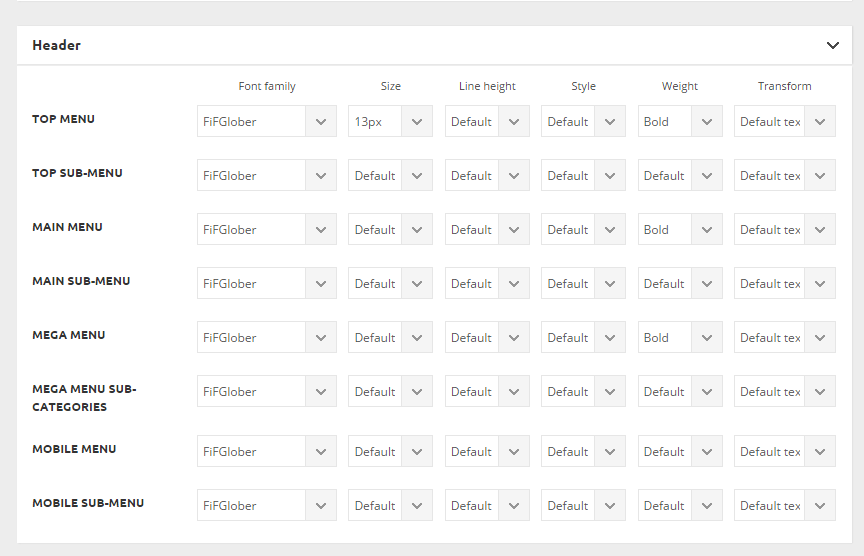
4) I set fonts for menu as ‘bold’ http://c2n.me/3tJ3HlQ.png
5) In front-end menu is still in ‘normal’ weight in Chrome http://c2n.me/3tJ48gA.png and browser-generated faux bold in Firefox http://c2n.me/3tJ4kyB.png
What am I doing wrong?
Please help me.
-
This reply was modified 10 years by
alexschneiderru.
 Catalin
 Hello Albert,
Please try to add this Custom CSS below of this piece of code that you found as related to block 18 and check the results.
Hope this helps!
Thank you for the message!
 liziweb
 Hello Catalin,
That’s the result i search for, but your custom css doesn’t solve the issue … 🙁
Catalin Hello liziweb,
Please try the code below and add it in Theme panel->Custom CSS area.
The code is ->
.sf-menu > .current-menu-item > a{

color:black!important;

}
The result you should see here-> http://screencast.com/t/lHqLy9Dn0sUo
If is not what you mean, please provide more details about this.
Thank you for the message!
 Andrei L.
 Hi
Try this css in theme panel > custom code > custom css: http://screencast.com/t/rMR35vuj7qvO
@media (max-width: 767px){

.td-header-top-menu {

    display: block;

}

}
Thanks!
Andrei L. Hi
To remove the header from the pages you need to edit the file corresponding with the header style used and add a condition like here: http://screencast.com/t/5BO7ShL3B – http://pastebin.com/KKdusNXM Also you will need this css in theme panel > custom code > custom css:
.td-header-menu-wrap {
min-height: 0;
}
This code will hide the header in all pages.
The same step must be done for footer: http://screencast.com/t/9O3A21aRpve9 – http://screencast.com/t/QePMMbva7m
Please note that I’ve test this only with header style 1 and footer template 1. For a different header style or footer template you may need additional conditions. If you can’t manage to this by yourself my advice is to look for someone to help you as we can’t offer custom work at the moment.
Thanks!
-
This reply was modified 10 years by Andrei L..
Catalin Hello BigN0701,
Please try the code below and add it in Theme panel->Custom CSS area.
@media (max-width:767px){

.td_block_big_grid_4 {

padding-bottom: 2px;

}

}
Thank you for the message!
 Bogdan B.
 Hello,
The top menu does not appear on the mobile version by default. This was a design choice. It can however be activated with custom css:
@media (max-width: 767px){

.td-header-top-menu-full {

display:block!important;

}

.td-header-sp-top-menu{

display:block!important;

}

.td-header-sp-top-widget{

display:none!important;

}

}
I hope this helps.
Thank you!
Catalin Hello Sayeed,
If you want to hide the More Article Box for Desktop version, please try the code below and add it in Theme panel like in this image -> http://screencast.com/t/IUyMu7xvu
.td-more-articles-box {

display:none;

}
If you want to decrease the space below the title in the More Article Box, please try the code below and add it in Theme panel->Custom CSS area like this -> http://screencast.com/t/obtLEeHjc
The code is ->
.td-more-articles-box-title {

margin-bottom: 5px;

}
The result you should see here -> http://screencast.com/t/ANyGXR68
Thank you for the message!
Catalin Hello
If you want to reduce those paddings, you have to decrease the width of the td-outer-wrap container. Please try the code below and add it in Theme panel->Custom CSS area.
The code is ->
.td-boxed-layout #td-outer-wrap {
width: 1116px;
}
The result -> http://screencast.com/t/0T2gpO9V
If you need more assistance in this regard, please provide your website URL so I can further inspect it.
Hope this helps!
Thank you for the message!
Bogdan B. Hello,
Please provide more details to what you want transparent. The background image or the page/post content?
You can use css to do it.
For example if i want the background to be visible through the main content I would use css like so:
.post, .td-main-content-wrap{

background-color: rgba(255, 255, 255, 0.5)!important;

}
I hope this helps.
Thanks.
 gaby
gaby Hi,
we tried with absolute path too.
But as you can see on source, for example, on that page http://www.aerospatium.info/un-marche-en-plein-essor-mais-plein-dincertitudes/ the generated code still appears
<!-- Header style compiled by theme -->
<style>
@font-face {
font-family: "neosanspro";
src: local("neosanspro"), url("css/fonts/NeoSansPro.ttf") format("woff");
}
@font-face {
font-family: "neosanspro";
src: local("neosanspro"), url("css/fonts/NeoSansPro.ttf") format("woff");
}
@font-face {
font-family: "neosanspro";
src: local("neosanspro"), url("css/fonts/NeoSansPro.ttf") format("woff");
}
@font-face {
font-family: "neosanspro";
src: local("neosanspro"), url("css/fonts/NeoSansPro.ttf") format("woff");
}
whereas fonts are declared into child theme css as:
@font-face {

    font-family: 'neosanspro';

    src: url('/wp-content/themes/Newspaper-child/css/fonts/NeoSansPro.ttf');

    font-weight: normal;

    font-style: normal;

}
It’s like there are cache issue.
Thanks for your help
Albert Hello
I added this code to Custom CSS in order to change the title size on mobile, block 18:
@media(max-width:767px){

.td_block_18 .td_module_mx8 .td-module-title a{

font-size:20px!important;

}
I have been looking for in style.css, and I have seen this piece of code related to block 18:
Block 18
*/

.td_block_18 .td-block-span12 {

  width: 100%;

}

.td_block_18 .td_module_mx8 .td-module-thumb {

  /* responsive portrait phone */

}

@media (max-width: 767px) {

  .td_block_18 .td_module_mx8 .td-module-thumb {

    margin-bottom: 20px;

  }

}

.td_block_18 .td_module_mx8 .entry-title {

  /* responsive portrait phone */

}

@media (max-width: 767px) {

  .td_block_18 .td_module_mx8 .entry-title {

    font-size: 18px;

    line-height: 24px;

  }

}

.td_block_18 .td_module_mx8 .td-module-meta-info {

  /* responsive portrait phone */

}

@media (max-width: 767px) {

  .td_block_18 .td_module_mx8 .td-module-meta-info {

    padding: 0 14px;

  }
I can´t see exactly the same code to replace here, where I should put the custom CSS?
Thanks
Bogdan B. Hello,
You can use this custom css to change the link color:
.td_module_wrap:hover .entry-title a{

color:red!important;

}
I hope this helps.
Thank you!
Catalin Buna nicolai,
Am verificat la mine pe tema si pentru Stilul 12 se aplica toate setarile ce le introduc in Theme panel la Active & Hover Color…ar putea fi o problema cauzata de alte plugin-uri folosite de dumnevoastra si care ar putea interfera cu aceste setari. Incercati fara alte plugin-uri, doar cu Visual Composer activat si verificati daca eroare persista.
Am verificat site-ul dumneavoastra si am vazut problema cu meniul pe bara de menu sticky. Va rog sa incercat codul de mai jos si sa-l plasati in Theme panel->Custom CSS area. La fel, pe tema default, fara alte plugin-uri functioneaza corespunzator…functionalitatiile altor plugin-uri ar putea deranja pozitia meniuluisi sa rezulte aceasta eroare. Cu codul de mai jos ar trebui sa se repare aceasta problema.
.sf-menu, .sf-menu ul, .sf-menu li {

margin-left: 20px;

}
Rezultatul il puteti vedea aici -> http://screencast.com/t/gYPB2nKnG
Sper ca sfaturile mele v-au fost cu folos si astept sa imi spuneti cum va functioneaza!
Multumesc pentru mesaj si o zi frumoasa in continuare!
liziweb I used this custom css but maybe a mistake ?
.sf-menu > .current-menu-item > a, .sf-menu > .current-menu-ancestor > a, .sf-menu > .current-category-ancestor > a, .sf-menu > li > a:hover, .sf-menu > .sfHover > a {
background-color: #F5F5F5;
z-index: 999;
border-bottom : 2px solid black;
border-top: 2px solid black;
}.td-header-menu-wrap .sf-menu > li > a:hover, .td-header-menu-wrap .sf-menu .current-menu-item > li > a:hover, .td-header-wrap .header-search-wrap .td-icon-search {
color: #000;
}
.td-header-menu-wrap .sf-menu > .current-menu-item > li > a, .td-header-menu-wrap .sf-menu .current-menu-item > li > a:hover, .td-header-wrap .header-search-wrap .td-icon-search {
color: #000;
}
Bogdan B. Hi,
Unfortunately this is the default behavior of the smartlists. You could add some caption manually after each image, inside a container and use css to style it and hide the default caption for that particular smartlist like so:
.td-slide-smart-list-7 .td-sml-caption{

display:none!important

}
We have this on our list and we’re looking for a solution, we will release a fix as soon as we find a solution for this.
Thank you!
Catalin Hello carringtonb,
Unfortunately, our theme does not have such an option to display the views only for certain posts article but another possibility, in this case, would be to use a bit of CSS to hide it for a certain post. Please try the code below and add it in Theme panel->Custom CSS area. In order to achieve for a specific post, you have to target it by post id. You have to do this manually for each post.
.postid-145 .td-post-views {

display:none!important;

}
The result you should see here -> http://screencast.com/t/pCT2eVSaSe2
If you want to make it automatically, it is necessary to implement some conditions in the core file and this entails custom work. If you are not aware the with the steps in this regard, please consider hiring a freelancer/developer to implement this functionality for you in our theme because we cannot provide custom services at the moment, sorry! Also, you can find some plugins with this functionality and test it and check how it works for you.
Hope this helps!
Thank you for the message!