
No search results were found in Documentation!
 Lou
Lou I also have just purchased The Newspaper 7 theme and cannot get Slider Revolution to work. Spent an entire day on it and tried everything. I have manually uploaded it through the FTP solution HOWEVER, that does NOT work for uploading a slider from the slider demo files. ERROR on everyone of them. It’s ridiculous how difficult this is for a premium theme. I am very disappointed. Looking forward to a solution soon before I have to move on.
 Xiluvanogcosta
Hello!
I was checking the Demos and I saw a slider on the Demo (politics): http://demo.tagdiv.com/newspaper_politics/
How can I choose/use only the slider and not the Demo?
Thanks in advance
 betapolar
 Hi there,
thanks for your answer. After a few days of testing, I still don’t know how to apply a slider on my start page as in your example here: http://demo.tagdiv.com/newspaper_blog_travel/
Applying a slider to a post or page works so far, but I don’t need it. I would like to show a slider at the main page.
Jan
 pvergados
Hi,
The Category pull-down filter is partially hidden on category template style 8
Similar category style 6 fix needs to be applied to style 8
https://forum.tagdiv.com/topic/category-pull-down-filter-partially-hidden/
.td_category_template_8 .td-category-header {

    z-index: 1!important;

}
You can see a live example on your demo.
http://demo.tagdiv.com/newspaper/category/template-style-8/
 BoraGursel
Hİ,
How can I add, delete or change the name of the sidebar templates in the widgets area? (td_demo_sidebar_fashion, td_demo_sidebar_fashion etc.)
 giahancute2013
I just bought your template. i try to build same this website but i dont know how to make this.
Please guild it help me. Thank you too much..
demo : http://pastebin.com/kU13kSgu <– Open it to view demo
Thank you
Regards,
 Bogdan B.
 The problem is not in the source code of the theme and this is the proof: http://demo.tagdiv.com/newspaper/
We only recommend these plugins: https://www.screencast.com/t/hGdEB2zgRv
Mybe you have updates set to automatic and a plugin was updated and is no longer compatible. Untested plugins can become incompatible at any time. The tested ones also do, but we also check them on each theme update and make the proper adjustments every time. Unfortunately wer cannot do this for every plugin out there. That is why there is a list of compatible plugins to use. Not all plugins will be compatible with our theme.
If the error is still there without plugins. then maybe it is a chiuld theme or a cdn server with js minification or a custom code you added to the theme. The theme does not come with that error.
Thank you!
 Simion C.
 Hi,
The politics demo features the revolution slider, you can read more about the slider here – https://forum.tagdiv.com/how-to-install-revolution-slider-v5/ and here – https://forum.tagdiv.com/import-revolution-sliders-on-demos/ Also you can find more in the documentation provided by the plugin author – https://www.themepunch.com/revslider-doc/slider-revolution-documentation/
Thanks
 Catalin
 Hello irlandacenter,
Please notice that our sidebar for Author Page is simply created using settings of the theme from the panel. You should use our Inspector Browser guide inspecting our demo page because in this way you can see what blocks were used. Check the tutorial here -> https://forum.tagdiv.com/create-custom-code-using-the-browsers-inspector/ For example, you can see the following screenshot like this -> https://www.screencast.com/t/FzYUMIQo6W0z
Thanks for your understanding!
 carpathia
Hi:
Where do I set separate sidebar widgets for Posts and the home page just above the global footer?
Right now the Newspaper Default is showing both on Posts as well as just above the global footer on the home page.
For reference, on your demo, http://demo.tagdiv.com/newspaper/, it is showing “most popular” and “recent comments”, and on posts and “ad” and “must read”. On mine both locations have the same widgets.
Website under development is http://www.redryder200.com/pacifcapaddler/
Mahalo,
Loren
carpathiaHi:
Where is the reference for the image dimensions used in the Big Grid on the http://demo.tagdiv.com/newspaper/ demo?
Mahalo,
Loren
 cosmicDD
 Edit to above comment – To be more clear, I want to replace the statue of liberty image in the world political demo with a full width image of my own. Just can’t seem to figure out how to do it!
Thanks
cosmicDD Hi
Sorry, Newb here! I cannot get a full screen image to display on my home page no matter what I do. Ive tried multiple different demos and ways. The instructions above do not work for me. Any suggestions?
Thanks!
 matthews
 I turned off the other plug ins, I haven’t added any extra code, I tried switching to the parent theme.
My url still shows: /# for all the nav items
The sample theme url says: http://demo.tagdiv.com/newspaper_recipes/blog/
In the all of my nav items is /#
 irlandacenter
Hello, I want a Sidebar on Author page same as your Demo.
ex: http://demo.tagdiv.com/newsmag/author/marius/
A sidebar where shows all my Authors and some Featured posts.
At the moment my sidebar on Authors page are like this: https://www.irlandacenter.com/author/cecilia
Thanks,
Willian
 Lucian
 Hi,
Yes, the revolution slider will do it, you can see a full width slider added using the rev slider plugin on the newspaper wedding demo: http://demo.tagdiv.com/newspaper_wedding/
Concerning your error message please note that If you’re receiving this message it means your hosting provider is restricting access to some of WordPress’ native functionality so get in touch with your hosting provider and ask them to remove this restriction.
Hope this helps!
Thank you!
Simion C. Hi,
From inspecting you site I can see that it has a width of 1068px, the default size of the theme – https://www.screencast.com/t/zFQsYf7W like in the demo – https://www.screencast.com/t/RMsdrDv1yRS
Thanks
 kdannay
Hi –
Is is possible to have a full width basic slider with the NewsPaper 7 theme?
I know you can do a full width post, but I cannot seem to do a full width slider. I tried to install a demo revolution slider from the travel demo theme, but I get error messages when I try preview:
“Not Acceptable!
An appropriate representation of the requested resource could not be found on this server. This error was generated by Mod_Security.”
Is there any slider that will provide this option? Will Revolution Slider work in this capacity – if i can get it working? Help.
 techdigg
 We just want the width to be what you stated it was: 1068
That’s also the same width that’s shown in the demo. Why is our site by default not that width? And how do we make it that width?
 d2inspire
Hi,
Sorry if this has been asked before.
I need a page same look as the demo. I need some of categories and pages on top as a buttons like this page. http://demo.tagdiv.com/newspaper/block-3/#
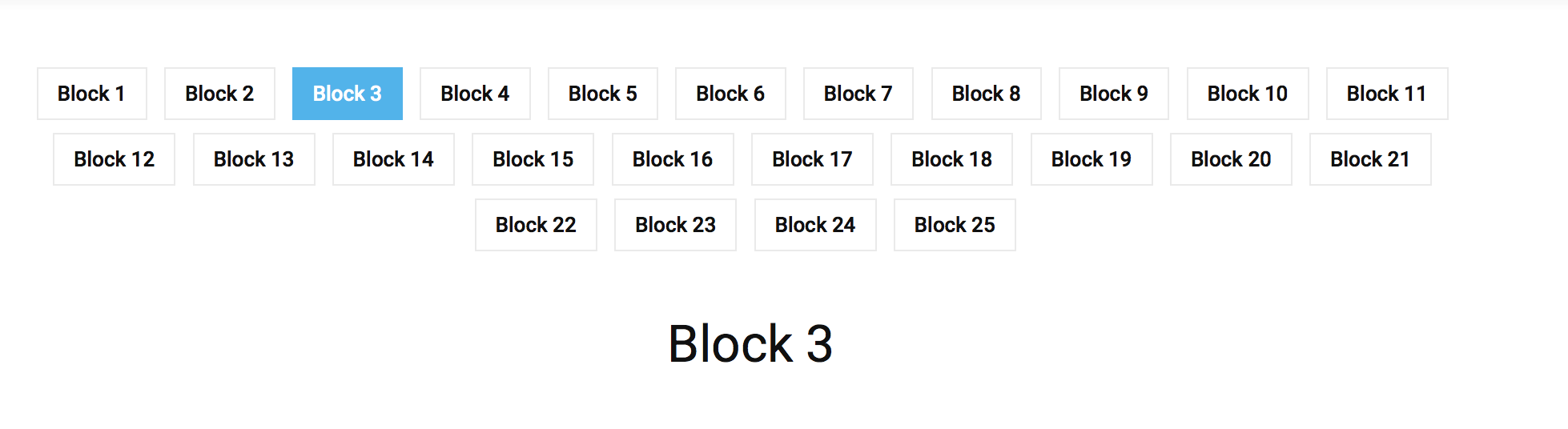
So once I click the button ‘Section 1’ (on the demo it’s Block 1) it displays on the bottom. So basically I need my 20 sections to be visible as 20 buttons on a page like Block 1 to Block 25. Please help me to create a page same as this (http://demo.tagdiv.com/newspaper/block-3/#)
Thanks
Haneef
Catalin Hello newsmaguser,
Please keep in mind that the yellow color which is present in Scandal Magazine Demo is the main theme color which is available for the entire theme. So, if you want to change this color for your above-presented section, you should use the code below and place it in Theme panel->Custom CSS Area.
The code is ->
.td-scandal .td-post-template-4 header {

background-color: red!important;

}

blockquote p {

color:red!important;

}
The result is -> https://www.screencast.com/t/LsGbaNKeb5QN
Also, if you want many changes for this demo version, you should try to check the style.css core file for this demo and you should do it yourself all of them because we cannot provide customization services at the moment, sorry! -> https://www.screencast.com/t/125CQ8zI
Thanks for your understanding!
 logdog08
 Hello, I am having similar issues, but only with the header ad.
I just want to put a static image and all of a sudden it is gone. They are even gone from your demo themes too.
Please reference http://globaldisposal.com/events-page
 mmeida
Hi, love the theme, but I have a problem. I’m using header style 8 because I like the ‘Travel blog’ demo header, but the height of the header doesn’t look like the demo. It’s so small and fixed at the top of the page. I would like more space, more white in my case, above and below. Thanks ind advance!
Simion C. Hi,
You do not have to change the demo. What I am saying is that header style 10 does not have a limit for the logo size. The logo will show as big as you upload it, also make sure you use the full size and not a thumbnail of your logo – https://www.screencast.com/t/xnScsdBx
Your site using the car logo – https://www.screencast.com/t/MOEverOxdg6
 crialta
 yes but use the fashion demo and and don’t want to break I just want to have a large image in the header.
If i use the demo of car, i loose all no ?
