
No search results were found in Documentation!
 msakande
 Dear,
I would like to add Box Quote Center as show in this link TAGDIV Blocks
an image caputure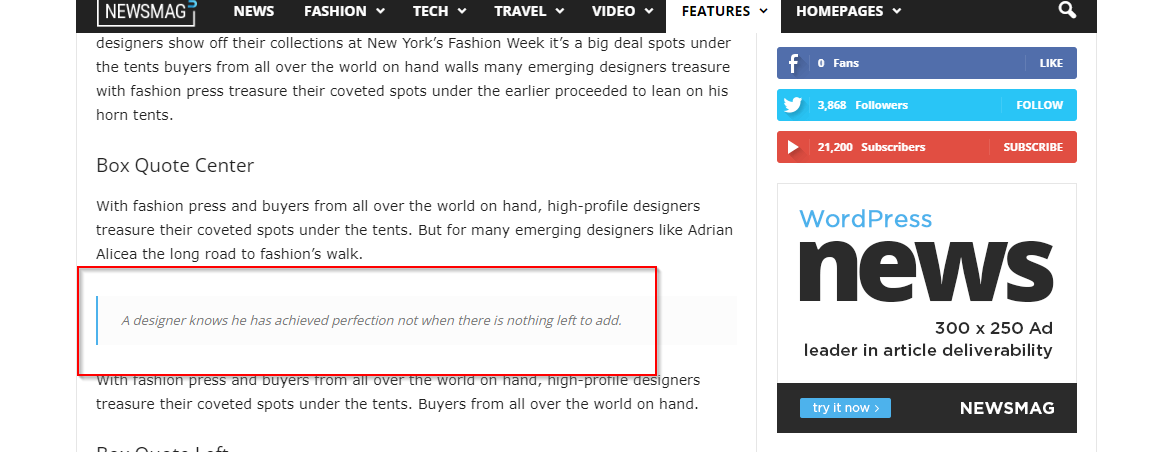
 Calin
Calin Hi aashishlowanshi,
Yes, you can utilized the directory with all pro demos, as long as those can be edited using tagDiv Composer the directory can be used – https://forum.tagdiv.com/introduction-cpt-acf-newspaper-theme/
The problem that you faced I think that it was related to the type that needed to be filtered in the flex block, by default the theme blocks are filtering the posts, but you can set the type you need, for example, posts, pages, books ….
Also, you can import from cloud the template, blocks, modules you need. If you want we can take a look together to this situation.
Using the App Find Pro plugin will need to do change to the plugin to change the url and other structures, in my opinion it will be better to use the CPT Ui to can make the cpt and taxonomies like you need.
Thank you!
 aashishlowanshi
Is it possible to create a directory on a news website that is already utilizing the Newspaper theme’s demo site? Let’s use Chain News as an example. We have imported its demo and have also created several custom post types (CPT) using CPT UI.
We are currently attempting to establish a directory using one of the newly created post types called “Tools.”
However, when we attempt to filter the flex blocks using content published under the “Tools” category, it doesn’t seem to work. It appears that only content published under WordPress’s default post type is being filtered. Hence it’s not serving our purpose.
As a workaround, I installed the App Find Pro plugin. But when I add content, the URL structure appears to be like this: https://site.com/tdcpt_app_listing/tool-name/, and it redirects to the homepage.
Have I overlooked something in this process?
Calin Hi,
I just checked the link but for my everything looks ok now – https://i.imgur.com/o0J7OiB.jpg – https://i.imgur.com/1TQeLIc.jpg do you still see the problem on your device?
The only thing that I have in my mind is that the demo you are using used for articles a single post template and now I see that you have a standard post template (the problem was with the single post template?)
Thank you!
 Bettina
 Hello!
The feature you need is the same as the one created in this demo because the forget password will work in the same modal. My colleague replied to you here: https://prnt.sc/q5MnFqW6CVP-
Thank you!
Bettina Hello!
Yes. An example can be seen in the newest demo of Korean News Insight: https://app.screencast.com/Z3e9lABauEUVf.
You should specify in the element’s settings (in the tagdiv composer) which modal should be closed.
Thank you!
 nerevargio@gmail.com
 Thank you for your answer. it goes normaly itself.
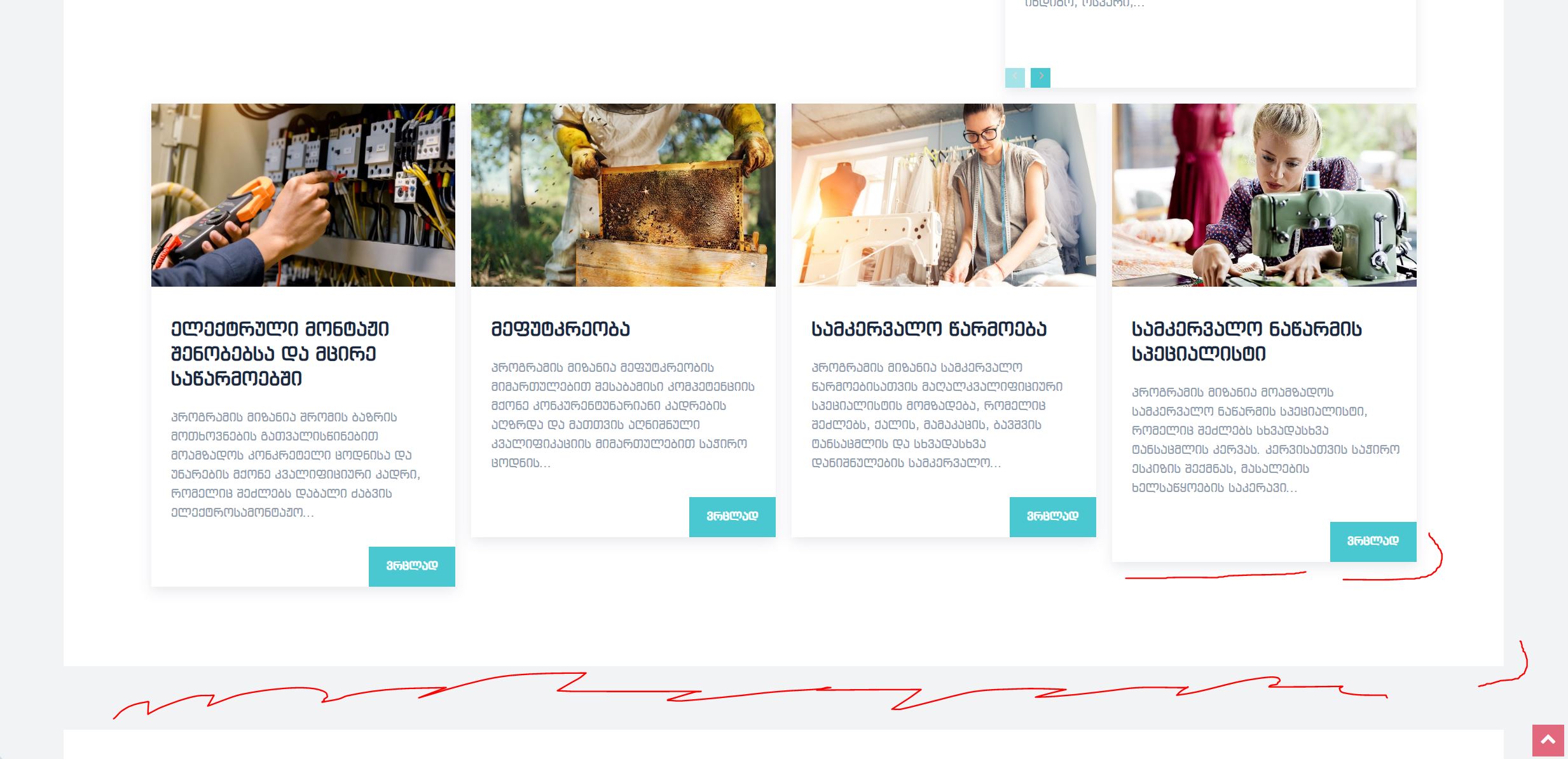
all this borders and shadows was disappeared and all of this elements was white colors, without borders. This problem was not only at my website, we have few websites developed by your theme, and everywhere was same issue. even at your live demo.
But now it comes back normally itself.
nerevargio@gmail.comHello, Im using Gadgeds Pro prebuilded website theme. (blacksea.edu.ge).
everithing is fine but one day all shadows, item borders and background is dissappear. I thought it was some css mistake, or i ruined something. then I go to look on your website demos, and there is disappear same elements!
I have side popup plugin, when popup appears all this elements is shown as well, when I close the popup window, then every shadow and border and background dissappear. But repeat, same issua happens to your live demo preview. maybe you use some online css files that theme taks parameters from there? anyway, I will appretiate if it turns normal again.
I have left 5 days support, please help. Thank you.
Bettina  kapow
kapow I can’t see anything in the Newspaper theme on how to uninstall the demo. Can you point me to the right spot please?
Bettina Hello!
Yes, you can add a gif.
You can build a gallery from Gutenberg: https://prnt.sc/vkba4y86CeJo -> https://prnt.sc/AygXR5fPX0dR (you can choose to use an ACF field too)
Try to use the revolution slider: https://forum.tagdiv.com/import-revolution-sliders-on-demos-prebuilt-websites/ -> https://forum.tagdiv.com/how-to-install-revolution-slider-v5/
Thank you!
Bettina Hello Yanko!
Yes. You can have a cloud template for tags or categories. In their pages, you can use flex loop to display the posts automatically. You can create something like this: https://prnt.sc/OQgTIn0c2sP6 similar as in this demo: https://demo.tagdiv.com/newspaper_app_find_pro/ -> https://prnt.sc/YlrS68z1TXED
Thank you!
Bettina Hello!
You are right! We didn’t optimize the demos and their templates.
We will take into consideration your query!
Thank you for your feedback!
 webarts
Hello in this demo https://demo.tagdiv.com/newspaper_real_estate_pro/tdcpt_properties/house-10/
the gallery (https://prnt.sc/7QQ0XNURkG-D) can open with ligthbox?
 Romi
RomiIni this page https://demo.tagdiv.com/select_demo/newspaper-prebuilt-websites/ I found a template called Momentum, which is in this link https://demo.tagdiv.com/newspaper_momentum_pro/ but I couldn’t find in the cloud template?
Where to find and install the template
Thank you
Muhammad Nagib Alaydrus
 the-website-builder
 Thanks a bunch for your prompt reply.
Ok referring to the same numbers above again:
1) Ok I understand its pro-services then for this piece. If I pay for something, can you also make it available in all future releases for everyone? I dont just want to buy a one-off custom fix that I will have to support forever on my own or with pro services through future product updates. I know this is a simple feature that will benefit everyone.
2) Regarding this https://prnt.sc/gjfNEMD7RE7I Can you please see if the same thing happens to you when you install the full Crypto Pro Template Demo with all example data? Im just trying to get the Posts Loop on the Home Page to work properly in the way I described. I agree it doesnt make sense why the excluded posts that I specified from one category, that I dont want to show up on the Posts Loop element, are still showing up only when logged out. I do need to use the Numbered Page Pagination…so I think the easiest solution is to figure out if theres a bug or something, and just get the Posts Loop Element working, since that Element already has what I need and I just need it to function properly. The Flex Block 1 works perfectly fine when excluding individual posts, so you would think that if this issue was with another plugin conflict on my site or something, that even the Flex Block 1 Elements woukd be having the same difficulty hiding specific posts with no category filter enabled, and it works perfect. The fact that this Posts Loop Element looks fine in admin mode/logged-in and then completely ignored the hidden posts properties when logged-out is very strange. I checked for plugin issues and CSS conflicts but Im not seeing anything.
3) How would you go about adding/creating a new block with new features? Are you referring to pro services here for this as well?
4) Are there any other blocks that you know of, where I can style them exactly the same as the Posts Loop, but still exclude categories? What other Elements could I try? There’s so many elements that I havent looked through every single one yet. Again Im just trying to stylize another Element to look the same as Posts Loop, with Numbered Pagination, and I can filter categories or posts from it. Pretty simple I hope.
5) Aside from pro services, and with the understanding that you folks can only provide support here, how does tagDiv go about taking feature requests in-general? I feel like every user of Newspaper Theme would want to be able to have the ability to use Numbered Pagination on a block of posts while being able to filter posts and categories. Im not sure sure how much pro services costs for this but if its not a lot of extra money then sure I maybe I’ll considee funding it. From a coding perspective, everything already exists and is written, I just need a Posts Loop Element with category filters, OR I need a Flex Block 1 Element with Pagination, and if that means just merging the functions of both into a new Block then that sounds possible and not that difficult to do in the future. Flex Block 1 already supports pagination, just not Numeric Pagination, so I just dont understand why its a difficult think to add the extra form of Pagination to Flex Block 1. Once again though, if there’s any other alternatives, Im happy to try it. Im just very curious how tagDiv handles feature requests. It sounds like there arent feature requests and just pro-services for anything that doesnt currently exist in terms of functionality? I just want to make sure I understand the full picture.
Thanks in advance one more for your time and help. 🙂
Bettina Hello @jcmlny !
It shouldn’t depend on the demo. I do not have access to your drive, so I can’t see your issue.
A solution for sending a screenshot/video is this:
Download, capture, and send: https://www.techsmith.com/jing-tool.html
After making the screenshot, you will have a link; paste it here.
Thank you!
the-website-builder Ironically, I have the same question today, and I found this post while searching the forums for an answer.
In addition to the questions above, can you tell me if is possible to just hide the sign-in/login/register options completely from the hamburger menu in mobile mode? I’m using a third-party membership plugin and I dont want to show the users this sign-up or login prompt from the mobile menu. Note: I answered this part of my question here: https://forum.tagdiv.com/topic/how-to-remove-sign-in-from-the-top-of-the-mobile-menu/
I’d also like to know how do I edit the mobile-menu for the social media icons that show-up within the mobile hamburger menu on the Crypto Pro Template, please? I cant click them and edit them from the TagDiv Composer, and all the links to Twitter/Facebook/etc are still just “#”. EDIT: I found this part in the forums, so this piece of my question is solved: https://forum.tagdiv.com/topic/how-can-i-edit-these-icons-on-mobile/
Unfortunately, after I tried both of the solutions that I noted here (in the links above), neither of these changes got rid of the mobile sign-up/login option, nor did my social media icons/links change. I have the Crypto Pro Template Demo installed. Help with this would be appreciate. Thanks!
FINAL EDIT: Okay, I figured out both my issues. The links above DO work, however, in order for me to TURN-OFF the sign-in from the HEADER section, I had to repeatedly hit save…like over and over without refreshing to make it “stick”. What i realized was I was turning off the Header => Sign-in/Join and clicking “Save”….if I refreshed my page, the setting was set back to “ON” again… Drove me crazy. I finally decided to just keep clicking “SAVE”, SAVE, SAVE, SAVE and then finally refreshed and the setting remained off. I’m on a very vanilla installation of WordPress 6.3.1 and on a good web host with PHP 8+ installed, I dont think its my site or server or caching causing this issue. I can even repeat this issue by trying to toggle this setting ON *or* OFF, and if I only click save once…the setting never sticks.
Regarding the social media icons, same issue…just need to hit the SAVE button like 10 times in a row before refreshing or leaving the page.
Not sure if this is only an issue on my side…but maybe this will help someone else in the future who finds my post here.
-
This reply was modified 3 years by
the-website-builder.
the-website-builderHi there!
So I went down a deep and dark rabbit hole and I’m going crazy. I hope that you can please help me with this, even if its a feature request, I believe this is a simple change for you folks and I hope that you’ll implement this option/feature in your next release…and if you can please tell me what I need to modify as of right now to get this working…
I installed your Crypto News Pro Premade Template demo on my website and I absolutely love it. I’m trying to keep the original look and feel while just customizing my colors right now.
The issue that I ran into, is with the Posts Loop showing certain categories and posts that I didnt want to show up.
I did notice that your Posts Element has an “Exclude Post IDs” field, and this was good enough for me. I happily entered in -234, -456, -567, and so forth and I watched my Posts disappear one by one, which was exactly what I wanted. It was a pain to have to list all of the individual posts though. I do wish and hope that you folks can please consider adding an “Exclude Category IDs” option to the Posts Loop Element in the future.
I thought everything was fine, I saved my changes, and while logged-in as the WordPress admin, everything on the Homepage looked great, the posts I didnt want to see were not showing up.
Then I went to the front-end view of my website as a non-logged-in-user, and ALL of the posts that were hidden from my Posts Loop Element are still showing up. I cleared my WordPress cache, I completely disabled my WordPress cache, I flushed my browser cache, I tried multiple browsers and multiple PCs and multiple devices….somehow the “Exclude Post IDs” option works perfectly fine while logged-in as the WordPress Admin and editing the Homepage…but non-logged-in end-users still see all of the posts. Sad times for me 🙁 I spent many hours playing around with this to no avail.
Next, I searched in your forums and found another post with an answer from tagDiv staff stating that the Posts Loop does not support the filtering of categories, and I’m not sure if that was old and outdated info because there was no mention of excluding posts, which the Posts Loop Element cleary looks like it can/should at least filter Posts (even though its not working properly for me right now)… the result of this tagDiv forum post was to instead use another Element type like a Block, so that you can filter categories properly.
In my case, I prefer using the Flex Block 1, so I chose that and I began painstakingly recreating my new Flex Block 1 Element on my Homepage to look EXACTLY like the original Posts Loop Element on the Crypto News Pro template. I then tested that filtering my categories and posts per my preferences is working perfectly, and that’s good to go….
Everything is now perfect, EXCEPT for the fact that the Flex Block 1 Element does NOT offer a “Normal numbered” Pagination option like your Posts Loop Element does. The only options I have are to use left and right arrows (Next Previous ajax), load more, and infinite load….
1) So I need your help please. I really, really, really want/need to have the Page Numbers for pagination on the Flex Block 1 Element Is this something that you can help me enable right now? If so, I can be on my happy way and move forward. (PLEASE!).
2) If this cannot be done with making the Flex Block 1 user Numbered Pagination, then can you please explain and help me figure out why I’m having that particular issue that I described above, where the Posts Loop Element has the “Exclude Posts” option, and its works while I’m logged in as the WordPress Admin, but it doesnt work while I’m looking at the website as a regular non-logged-in user?
3) Also, can you please consider adding Category Filtering to the Posts Loop element in a future release as well?
Thank you very much in advance, for your time and help with explaining this issue to me. I hope you can help me get either my unwanted posts hidden properly on the Posts Loop Element, or that you can help me get Numbered Pagination working on the Flex Block 1 element.
This is the only issue preventing me from going-live on my website right now. I would be very grateful if you can help me resolve this soon.
the-website-builderHi there!
I’m having an issue where pages are not any showing list-items on the Crypto News Pro Premade Template (I installed the demo site and have been performing on minor work to it, so its a very basic install).
What I mean more specifically is in the following example:
I simply go into my wordpress (brand new 6.3.1 installation and vanilla with no extras except your template right now), and I create a new Page.
Within my new Page I add some text and I create a simple list within Gutenberg (here’s the HTML of it):
<li>List item one.</li>

<li>List item two.</li>

<li>List item three.</li>
Then, whether I preview the page or save/publish/view the page, all of the normal/regular text and content on the page looks perfectly fine, EXCEPT the list is just a big missing blank area. If I highlight over the “blank” / empty area where the list lives, I see my list text.
So for whatever reason, when I add any list items to any pre-existing or brand new pages, the text is all invisible when you visit the live webpage as admin or non-logged-in user.
Posts work perfectly fine for list items and whatnot.
Can you please explain to me why this is happening and how I can fix it?
I’ve read through some other older posts around different issues, I’d prefer to not have to manually edit the “Live CSS” on every Page I create. I’m hoping for a root-cause/permanent fix to this issue.
Thank you in advance for your time and help! 🙂
 cyberhrc
Hi
I’ve just updated on latest version and there is a BIG difference in page look from Edge / Safari / Chrome / Opera
I’ve worked whole day on edge and now I went to try and see how it looks like on other browsers and I was puzzled about the difference [ since they are all chromium afaik? ]
I’ve activated https://demo.tagdiv.com/newspaper_downtown_pro/ theme and changed categories for my needs
Please open http://www.sisak.info in different browsers or check here https://imgur.com/a/NSKOcn2
Any ideas what is happening that render is so different ?
Also, my global header got top bar and it just appears for a sec and than disappears ..
 odddic
Hi there, I just import demo Calisight Pro. Then I found it automatic create post type of Tourism. How I can remove this post type and the taxonomy?
Thanks
Bettina Hello @kapow!
There are some false-positive warnings. If you do not use the coaching demo, you can uninstall it or install other demo.
Thank you!
kapowHi, my malware scanning plugin has identified 2x suspicious functions in this theme:
https://prnt.sc/1ccfzvd0W7V1
https://prnt.sc/ZUJEkwNnJmSb
It looks like these may be parts of demos – so just confirming that these demo folders are safe to delete in the theme?
 nuggsog
hello, when i go to customize and then home page settings, my home page seems to have dissapeared. I tried uninstalling and re installing the nft demo but still nothing is showing up.
how can i fix this ? i currently activated the mobile version


