No search results were found in Documentation!
 Bettina
 Hello!
Which template is that one? Because the single template from the School PRO demo is looking like this: https://prnt.sc/s4I4BTQVBLyZ
Please delete the cache and see the results! If the alignment is good in the composer editor, it should be good in the front end as well. Make sure you do not have any extra CSS.
Thank you!
 insumedical
 Anamaria
CLASSIC PRO demo.
I want to hide the feature image only on mobile.
Check the question above again!
Please tell me how.
CLASSIC PRO demo!!!
-
This reply was modified 3 years by
insumedical.
 Anamaria
 Hello,
You are probably uploading the whole theme package. You have to upload only the theme zip file, not the whole package which contains other items
– https://help.market.envato.com/hc/en-us/articles/202821510-Theme-is-missing-the-style-css-stylesheet-error
Install via WordPress -> https://forum.tagdiv.com/install-via-wordpress/
Install via FTP -> https://forum.tagdiv.com/install-via-ftp/
Requirements for Newspaper => https://forum.tagdiv.com/requirements-for-newspaper/
After installing the theme and activating it you will find in the Prebuilt websites all the theme demos and you can import whatever demo you want => https://www.screencast.com/t/6rf5g0Dxc0K
Thank you!
insumedicalHi!
I want to configure the home screen like the picture below.
↓↓↓↓↓↓
https://being-money.com/wp-content/uploads/2023/02/02-10-1.jpg
Please tell me how.
thank you
—
DREAMLAND NEST PRO Demo
HOME DECOR Demo
 sameerkhan
Dears, I have an issue with the demo, it’s not coming nice on the screen,here is the link https://freeopenhub.com/
 ncrispen
 It’s not working. Do you not have a demo that I can use that looks like the demo I looked at and chose to buy the theme. The whole point is that I have no prior knowledge and the instructions you have given me are not working or perhaps There is something I am missing. Is there any other way around this other than me wasting time with trial and error
 ttalleur
ok, I realize this should be self evident within the theme program but, I do not see a way to delete excess columns on my homepage within the composer. I can delete everything else. There are no menu items or keystroke combinations I see that will allow me to do this. Note: My site is based off of the old travel demo template. Still, I can add and delete everything else but row and columns.
Tips are appreciated.
 SAPO
SAPOGreetings.
Probing one of our websites, running Newspaper 12.2 with WordPress 6.1.1, we have found that there is a security vulnerability on category pages that use infinite loading.
This option:
Theme Panel > Categories > Category global settings > Pagination style > Infinite loading
When this infinite loading is active Newspaper does a POST request to wp-admin/admin-ajax.php with a loopState action to retrieve more posts, and the response is not properly escaped leading to an opening that can allow a reflected cross-site scripting attack.
Here’s an example on your own demo site:
The request:
curl 'https://demo.tagdiv.com/newspaper_pro/wp-admin/admin-ajax.php?td_theme_name=Newspaper&v=12.2' \

  -H 'content-type: application/x-www-form-urlencoded; charset=UTF-8' \

  -H 'x-requested-with: XMLHttpRequest' \

  --data-raw 'action=td_ajax_loop&loopState%5BsidebarPosition%5D=no_sidebar&loopState%5BmoduleId%5D=17&loopState%5BcurrentPage%5D=2&loopState%5Bmax_num_pages%5D=2&loopState%5Batts%5D%5Bcategory_id%5D=1&loopState%5Batts%5D%5Boffset%5D=3&loopState%5Bajax_pagination_infinite_stop%5D=%3Cimg+src%3DBOGUS%3E&loopState%5Bserver_reply_html_data%5D='
The (truncated) response:
HTTP/1.1 200 OK

...

Content-Type: text/html; charset=UTF-8

...

{

  "sidebarPosition":"no_sidebar",

  "moduleId":"17",

  "currentPage":"2",

  "max_num_pages":"2",

  "atts": {

    "category_id":"1",

    "offset":"3"

  },

  "ajax_pagination_infinite_stop":"",

  "server_reply_html_data":""

}
Notice how parameters sent for the loopState action via ajax are reflected back to the client unescaped. In this example, the parameter ajax_pagination_infinite_stop was altered to include a bogus image tag instead of a number. Because HTML tags are not being properly escaped when the response JSON is encoded, and combined with the fact that the Content-Type of the response is text/html, this results in the malformed request being reflected towards the client and rendered as HTML, which can be abused by a malicious actor.
A possible solution:
On your td-composer plugin, the function on_ajax_loop of the class td_ajax deals with loopState requests. Currently it returns with the following statement:
die(json_encode($loopState));
Supplying the flag JSON_HEX_TAG to encode the symbols for opening and closing HTML tags seems to mitigate the issue:
die(json_encode($loopState, JSON_HEX_TAG));
Best regards.
Anamaria Hello,
You need to add the cryptocurrency -> https://forum.tagdiv.com/add-cryptocurrency-price-ticker-widget/ and this is the image https://demo.tagdiv.com/newspaper_crypto_pro/wp-content/uploads/2021/09/xxx_menu_xxx.png you can set it on the row in the css tab for the background image -> https://tagdiv.com/flexibility-rows-columns-newspaper-theme/
-> https://tagdiv.com/how-to-add-delete-and-duplicate-row-newspaper-theme/
Thank you!
ncrispenI just bought the Newspaper Blockchain Crypto Pro theme but the demo is not loading up properly and is different to the preview version you give us. There is no price ticker bar at thetop and there are no images at the top of the pages in the menu when I go on them. I need the price ticker and the main image at the top of the pages, if that’s possible to fix. https://demo.tagdiv.com/newspaper_crypto_pro/category/blockchain/” alt=”” />
 pi
pi Hi,
thanks for your remply. Unfortunately I don’t really understand.
Maybe it helps to show what kind of result I want: https://demo.tagdiv.com/newspaper_pro/td-post-10-fabulous-over-the-ankle-shoes-to-wear-this-cold-season/
I want to look it like that. How can this be done?
Thanks
 autodesign
Not able to install ‘tagDiv Composer
Getting below error
Downloading installation package from https://cloud.tagdiv.com/td_plugins/td-composer/969f3bb4333afe45565e713582b6de14/td-composer.zip…
Unpacking the package…
Could not copy file. td-composer/legacy/Newspaper/includes/demos/showcase/td_media_3.php
TGMPA v2.6.1
Return to tagDiv plugins panel
What could be done, any video help for the issue?
 Rant
RantIn this demo page:
https://demo.tagdiv.com/newspaper_doctors_pro/specialties/
the listings show profile pic, ratings, title, specialty with Location and price icons + text.
How can I change the price Icon + Text to Telephone Icon + telephone number text?
Also is there a way to get rid of the ratings.
In addition, on the doctor page:
https://demo.tagdiv.com/newspaper_doctors_pro/tdcpt_doctors/terry-ravinder/
How to get rid of the reviews tab and “get in touch” form section?
 newspulpaper
 Hi @Anamaria
As the post by the user @Luzi, i have the same scenario, the API Key doesn’t work on the newspaper theme, but work perfectly on the Live Demo from Fixer API ( https://apilayer.com/marketplace/fixer-api?live_demo=show )
Thanks
David
-
This reply was modified 3 years by
newspulpaper.
-
This reply was modified 3 years by
 kmzafar
hi,
i have update Newspaper them
in Categories
i create Menu “td-demo-header-menu”
How and where i can add menu icon
 tassos
 Hi again, an update here – I noticed that the mobile homepage is not working whenever I log out of the WP admin panel. No idea why this is happening, as I said the mobile homepage was working fine in my previous staging website.
Check out demo.mamapeinao.gr (problematic mobile page) vs dev.mamapeinao.gr (mobile page works fine).
Can you advise?
tassosHi, my staging website is demo.mamapeinao.gr and I have the following issues on Safari.
Example article link for you to view on my staging website -> https://demo.mamapeinao.gr/salata-me-kinoa/
1. The uppercase letters on Safari show Greek accent marks. This doesn’t happen on Chrome. Screenshot for this issue is listed below.
2. I’ve applied CSS so that links within blog articles are always underlined and have a certain colour. However this CSS doesn’t work on Safari while it works on Chrome.
Here’s a screenshot where I highlight in red the problematic areas in Safari (to be precise, see the top menu with accent marks in uppercase letters AND CSS not working for article links) -> https://ibb.co/TMXNT6S
The CSS I used is here:
.td-post-content a:link {
color: #fcb900 !important;
text-decoration: #fcb900 underline !important;
decoration-color: #fcb900 !important;
}
Can you please advise?
tassosHi, my staging website is demo.mamapeinao.gr and yesterday I noticed that the mobile homepage I had built wasn’t showing on mobile devices. I went to the back-end and re-edited the mobile homepage, and it showed up again on mobile devices. This morning, the mobile page couldn’t show again. Instead, it was showing the desktop homepage.
I got back to the admin, clicked on edit mobile template, just saved without making any changes, and the mobile page worked again.
Can you tell me why this is happening and how to fix it? I was using the theme on another staging version of the website before this migration (dev.mamapeinao.gr) and the website was working fine on mobile and desktop. This new staging domain has issues with mobile.
Bettina Hello @mir!
In order to have the menu aligned as in the demo, please clear the mega menu from your subitem. Save the menu and check the results.
Support Hours (GMT+2)
Monday – Friday:
8:00 AM – 17:00 PM
Thank you!
Bettina Hello @mikthegreek!
That sidebar was created with the TagDiv Composer. You can build a sidebar with the TagDiv Composer. Steps:
1. Insert one new row (or delete an existing one).
2. Divide into two columns (2/3 + 1/3).
3. You can add whatever element you want into the second column and consider it a sidebar.
As you described the issue, it might be a caching issue.
I’ve installed the demo, and for me it is working well.
Make a test and deactivate ALL plugins except tagDiv ones, also if you are using a cache plugin, deactivate it, clear all cache and try again.
Let me know the results!
Thank you!
Rant Or like the search bar with two options in this demo wordpress directory website:
https://demoapus1.com/freeio/
Is there a way to do it in doctors? If so how can I do it?
 joe-2
joe-2Hi there, I am using the NFT Pro demo site, and for the love of G, I can’t find how to hide the big featured on the top of the page. It looks hideous.
https://aihackr.com/christies-openseas-on-chain-auction-closes-at-3-6-million/
Does anyone know how to hide it from the header?
 dkempdesigns
 Hello Calin
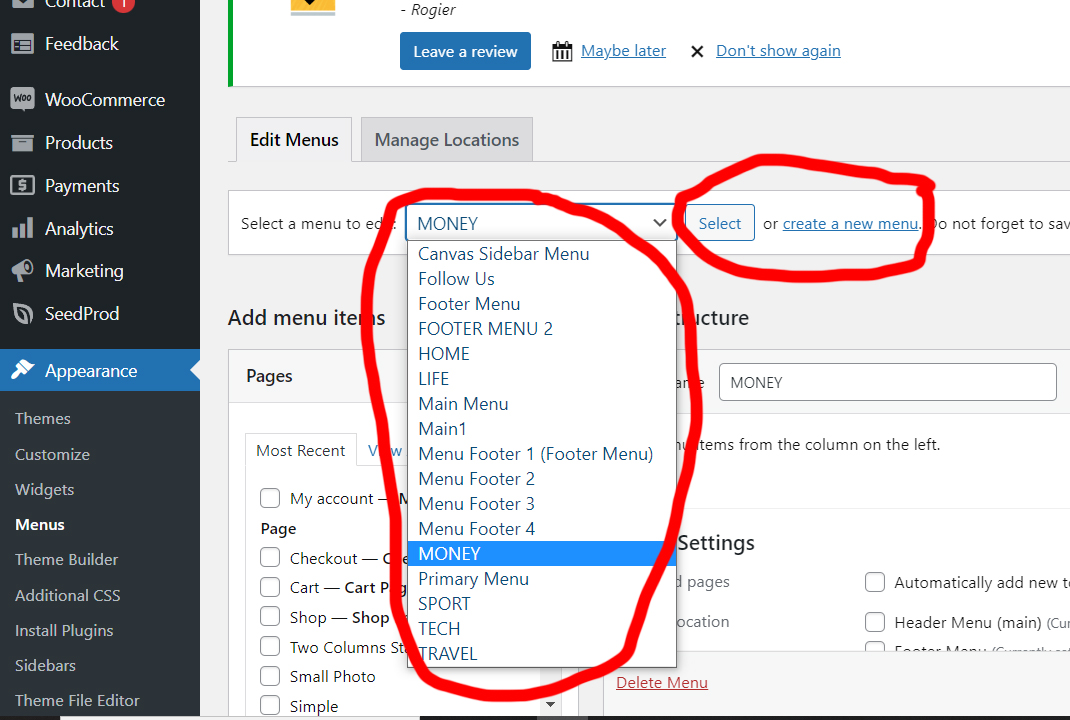
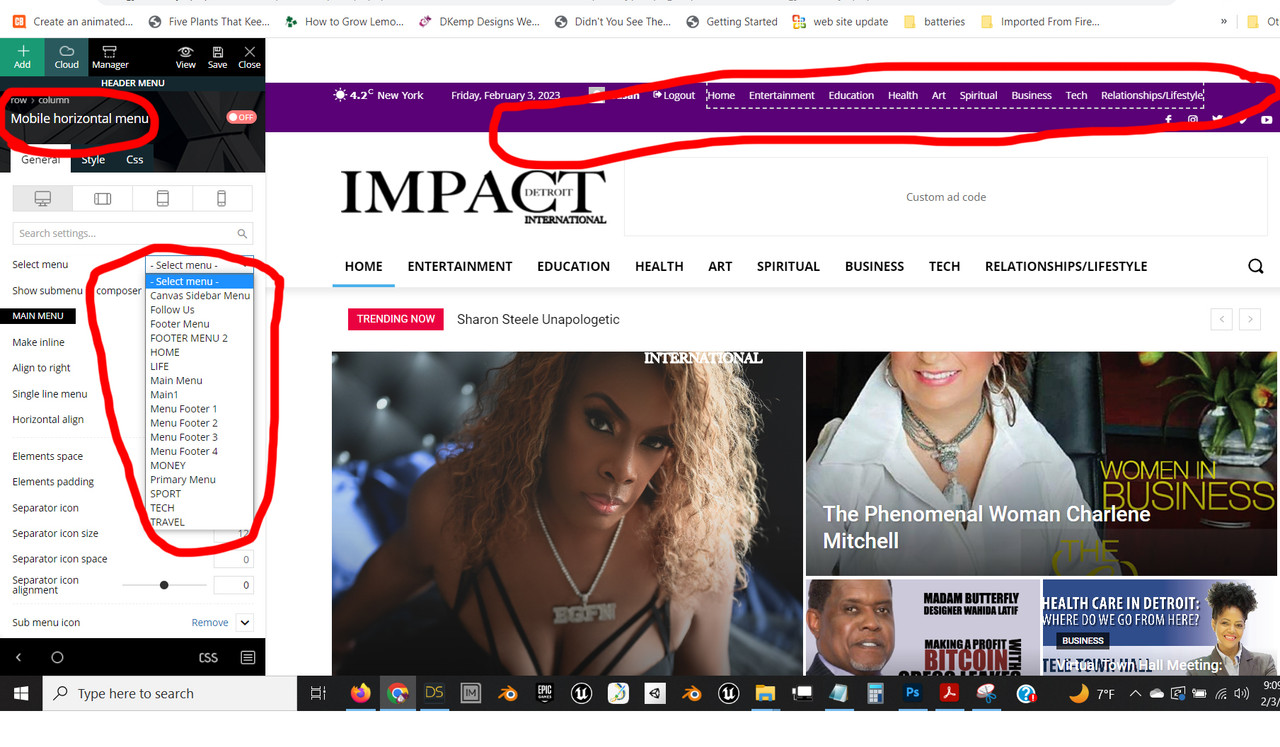
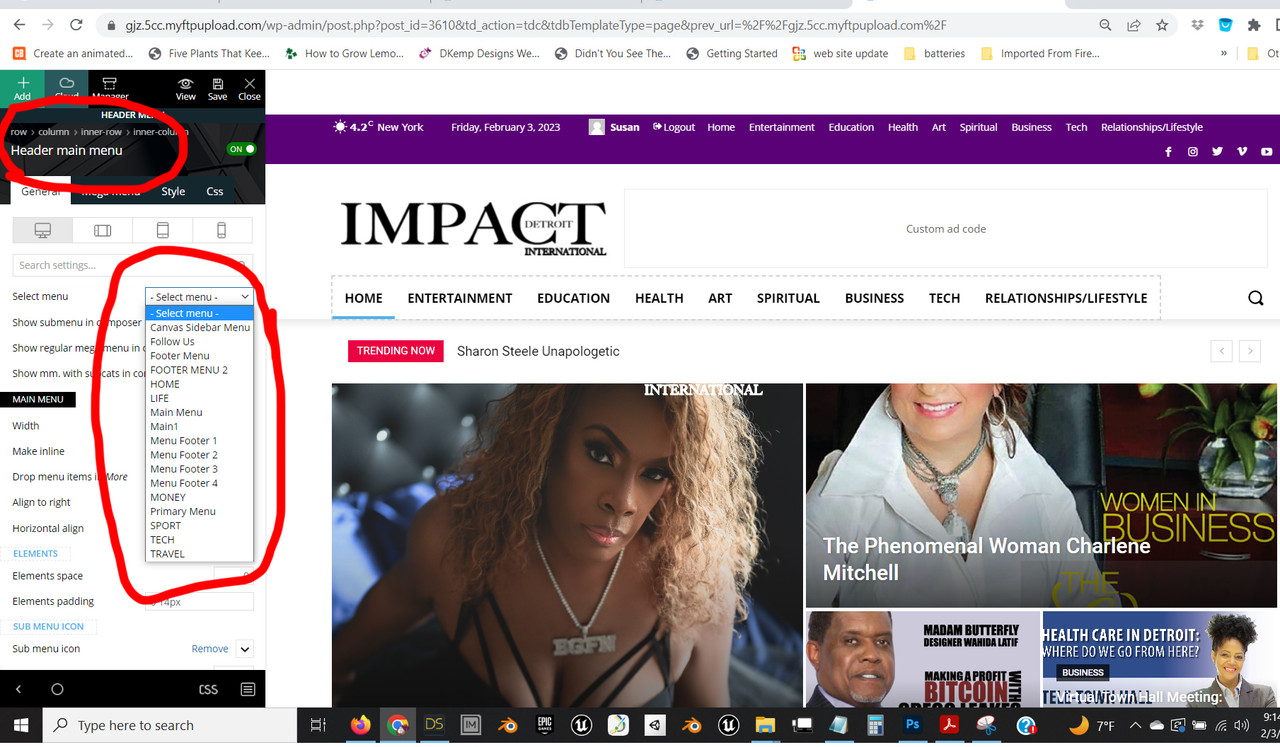
I am attaching more images to show that the list of menus you show and the menus available to me are not the same. Please note, the td-demo menus are not in the list of available menus that I have. This is the issue that is causing me to not be able to access the menu items and edit them. Please address why these menus did not import in the demo import.
Thanks
https://i.postimg.cc/GtkSDMqP/menus.jpg
https://i.postimg.cc/nLCR2V3h/menus2.jpg
https://i.postimg.cc/PxD6G3sG/menus3.jpg
 mikthegreek
I have installed Week Pro demo. When I edit category page template with tag/div composer I can see the column with sidebar on right.
When I am visiting category on website sidebar is missing?
What’s wrong?
I post the 2 photos here.
Here is the administration with column/sidebar on right
https://fileup.to/5gz8/Στιγμιότυπο_οθόνης_2023-02-04,_1.32.00_πμ.png
And here is when I visit website I cannot see the sidebar.
https://fileup.to/5gz9/Στιγμιότυπο_οθόνης_2023-02-04,_1.32.21_πμ.png
 Mir
Mir My Mistake I was Not clear enough. What I meant was the feature that was in the demo.
I have the feature that I want please take a look.
https://drive.google.com/file/d/1DJVlr7KzI4jvM90oTmNqRgBvUhzw7QNi/view?usp=share_link
When you click on those you will see that it change into different category. Hope you undertand it now.
Here the demo link you can check it yourself: https://demo.tagdiv.com/newspaper_compass_pro/header-compass/