
- NewspaperWP Rocket and Newspaper Theme: Optimization Guide
- TutorialsFrom WPBakery to tagDiv Composer
- TutorialsOffset Feature
- TutorialsWhat is Ajax preloading?
- TutorialstagDiv Social Counter Tutorial
 heyjohnboy
Hi. I need help getting a flex block to show only one category. If I select “all categories” (the default option) it displays a post as expected. But if I select a specific category, it says “no posts” and will not display any posts, even though we do have posts with the specific category assigned. Can you explain what we are doing wrong and how to get the block to display posts from a specific category?
I am including a link to screenshots showing the filter settings and the resulting display that is rendered when “all categories” is selected in the category filter and also attached screenshots showing the filter settings and resulting display when we select “travel” in the category filter. We have also included a screenshot of the posts page to show that there are posts with the “travel” category assigned.
The site is currently in early development and can be viewed here: https://wbh.jji.mybluehost.me/website_195199ee/
Thanks in advance for your help working this out.
 Calin
Calin Hi,
What you can do is to use the module builder, create the module layout as you want, and after that, replace the flex block 1 with the flex block builder element. Choose the create module, and the images will be set using the img tag rather than as background images, as they are now on flex block 1.
Thank you!
 mustapha
Bonjour l’équipe tagDiv,
J’utilise le thème Newspaper avec tagDiv Composer et j’ai un problème d’optimisation LCP (Core Web Vitals) sur mes blocs.
Actuellement, mon Flex Block 1 génère les images sous forme de background-image à l’intérieur d’une balise <span>. Cela m’empêche d’utiliser l’attribut fetchpriority=”high” pour optimiser le chargement des images principales.
Ma question est la suivante :
Est-il possible de configurer le Flex Block 1 directement dans l’éditeur pour qu’il génère une balise réelle (comme c’est le cas à l’intérieur de mes articles) ? Ou dois-je obligatoirement ajouter un code PHP personnalisé pour forcer ce comportement ?
Voici le code actuel généré par mon bloc :
HTML
<span class=”entry-thumb td-thumb-css” style=”background-image: url(‘image.jpg’);”
lien de sit web : JOBMA.MA
merci :
Calin Hi,
The theme uses admin-ajax to handle the request to the database. Now each block from a page will make it’s on requets, so what you can do is to reduce the number of blocks on your pages.
What you should do is to use a good cache plugin, and I see that you already use CDN/Cloudflare.
Another option that can help is the flex blocks the cache option https://forum.tagdiv.com/use-flex-blocks-cache-option/. This option will cache those block requests and deliver them as long as the cache is set (is recommended that the cache expiration time to be longer if you create only a few articles per day).
Another solution is to reduce the number of ajax usage on the website, as those are the ones that will make requests to load more posts.
So ajax features like ajax pagination – https://i.imgur.com/EfKi0za.png – https://i.imgur.com/sMeot5s.png – https://i.imgur.com/vrJq3BC.png
The ajax menus – https://i.imgur.com/n0K9hCN.png
Also, the header live search makes requests when it is used – https://i.imgur.com/1ZvDwZx.png This can be deactivated when using a cloud header template. We added an option specially for it, as it can cause increased load on large websites.
The mega-menu pagination – https://i.imgur.com/T8kYzu4.png This can be deactivated when using cloud header templates, an option for this was also added for the same reasons mostly.
You can disable the ajax view count from here -> https://i.imgur.com/BIwbscU.png
Thank you!
Calin Hi,
Unfortunately, there is no filter as you mentioned. However, this can be achieved by creating three categories with the following names: Video, Audio, and Normal, and then filtering the flex blocks based on those categories.
Thank you!
 janw33
Hi TagDiv Team,
I’m using the Flex Block Builder in Newspaper with a layout where the image is on the left (5/12) and the content is on the right (7/12).
What I would like to achieve is the following behavior:
If a post has a featured image → layout stays 5/12 (image) + 7/12 (content)
If a post does not have a featured image → the content should automatically expand to 12/12 width, filling the entire block
At the moment, when there is no featured image, the layout still keeps the 5/12 + 7/12 structure and leaves empty space where the image would normally be.
Is there a built-in option in the Flex Block Builder to handle this automatically?
Or is there a recommended theme-based solution (without duplicating templates)?
Thank you in advance for your help.
Calin Hello,
I understand what you want to opt for, but unfortunately the elements used do not have the ajax option, these reload the page. What can be used is the “Ajax categories dropdown” option on flex blocks, these use ajax to bring information related to the selected category – https://i.imgur.com/21B9vLs.png – https://forum.tagdiv.com/flex-block-settings-guide/
Thank you!
 petar777
Hey there,
When creating posts we have this feature “format = video / audio / normal”. Is it possible to filter the flex block via this field? Otherwise except the attachment of a video thumbnail what is the use of that?
Best regards!
 Test2CBD
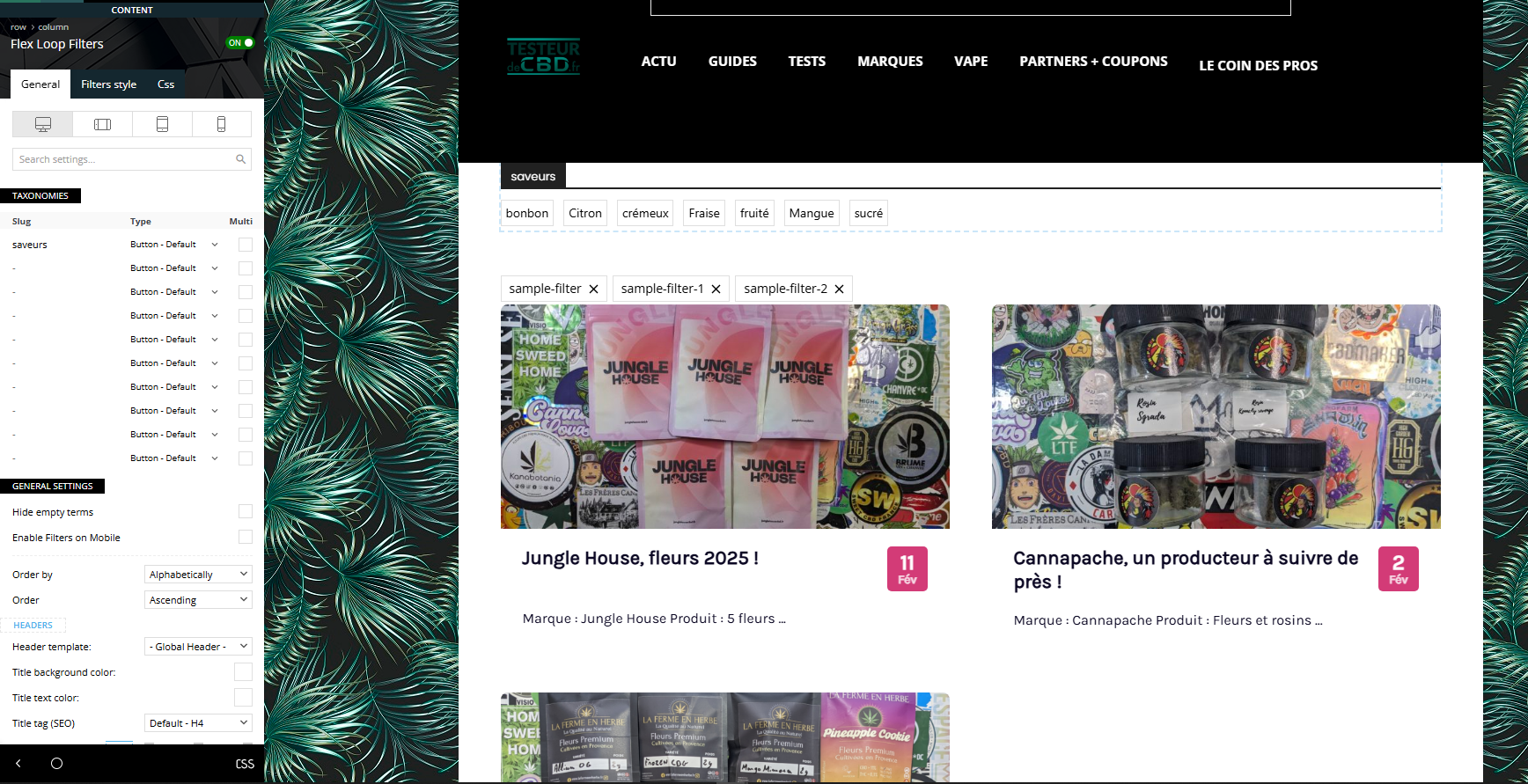
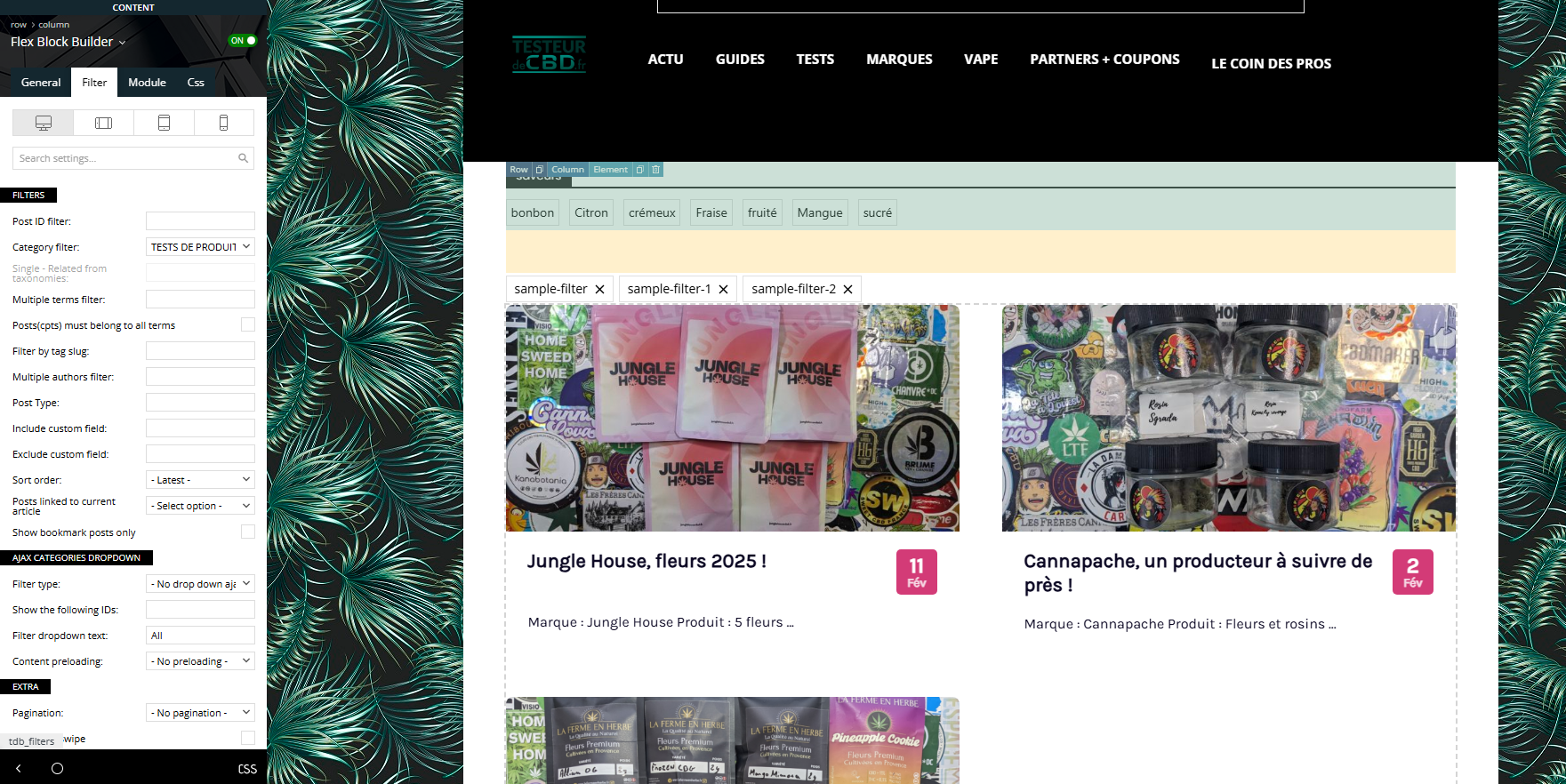
I tried all day to setup this option that look super intersting but I just don’t manage. we are reviewing CBD products and My goal is to create a menu that comes on the top of my post, with for example “flavor” (strawberry, lemon, …) so when the user click on one item, he can see (without reloading page) all the article marked as “strawberry”.
I created a custom taxonomy with Custom Post Type UI plugin.
I followed all the documentation, tried everything, but I dont manage to link the menu to the post.
https://testeurdecbd.fr/toutes-nos-critiques/
I would like to manage to get the menu like it is, but the menu filter article in “ajax” mode. No reloading.
And if possible, I would love to do this with multiple taxonomy on different place of the site.
Calin Hi,
Please try logging in because when you are logged in, usually the cache is not used. When you are in incognito and not logged in, it’s possible to get some cache.
Another test that can be done is using only the theme plugins and see if the problem persists. Also, do you use CDN/Cloudflare?
Right now, the cache appears to be applied on the site at https://i.imgur.com/SMQoXjg.png, and if you have a LiteSpeed server, certain server options may be interfering.
Also, do you use the cache option from the flex block element? https://forum.tagdiv.com/use-flex-blocks-cache-option/
 NiklasFischier
Hi i’m running ewpaper theme on litespeed server. And i have 6 flex blocks on the home page with ajax pagination activated. Clicking the “next” arrows results in the same in this case articles being shown, and not loading new ones. And the bottom three flex blocks, if i click the arrows it takes me directly to the top of the homepage. Devtools shows no errors in console or network. (afaik)
There are 6 categories like Österskär, Norrtälje, haninge etc.
You can try it on https://skargarden.se
Thanks
Niklas
 degelcreatives
 Idont Have These Option like categry in mega menu But i desinged inthe divtag section on the page but the Problem I saw is mobile Doesnt Have enoght with all Block medule flex1 have a limit while desktop an the others have capacity where i rezize mobile raw
Calin Hi,
I’m sorry, but I don’t understand what you’re trying to say!
If you have pages and you want to display some content on those pages, then it should be set using tagDiv Composer. To display articles on pages, you can set flex block elements and use the filter to filter the articles you’d like to be displayed on each block.
If this is not what you’d like to do, please provide a better explanation of what you want to achieve.
Calin Hi,
If those from your image are articles then you can use the flex block 1 element, hide all elements except the title and set a separator for the elements https://i.imgur.com/kPHWsIs.png – https://i.imgur.com/RhOBIoL.png
If is a list, then I think the best solution will be using a html/css code and set it in element raw HTML
Thank you!
Calin Hi,
According to your screenshot, you have excluded two categories, so any article that contains one of those categories or subcategories will no longer be displayed on block 11.
https://forum.tagdiv.com/flex-block-settings-guide/ – https://prnt.sc/oiRZX1zxBDGV
 newsbazar24
Hello Team,
I am using your theme on my news website and facing a persistent issue with the homepage slider / Flex Block setup.
Problem description:
I am using Flex Block / Big Grid on the homepage.
I want the slider to be visible on desktop only, and hidden on mobile.
However, I am unable to find any clear or consistent option to:
Disable slider on mobile
Control Flex Block visibility per device
Even after turning Flex Block 1 OFF, there is no visible change, which makes it confusing to understand which container (Row / Column / Block) is actually controlling the output.
What I have already tried:
Turning Flex Block ON/OFF
Checking Row, Column, Layout, Style, Filter, and CSS tabs
Searching for “Hide on mobile”, “Responsive”, or “Device visibility” options
Clearing cache and hard refreshing
But the behavior remains the same.
My questions:
Which element actually controls the slider output — Row, Column, or Flex Block?
What is the recommended way to:
Show slider on desktop
Hide it completely on mobile
Is there a built-in responsive option, or should this be done via custom CSS?
If CSS is required, can you please share the correct class or selector used by the Flex Block / Big Grid slider?
I would really appreciate a step-by-step explanation, as this is a homepage critical section and affects both UX and PageSpeed performance.
Thank you in advance for your support.
Best regards,
Sankar Chakraborty
NewsBazar24
Website: https://newsbazar24.com
Calin Hi,
What you can do is replace that block with a different one that uses a larger thumb. For example, if flex blocks are used yu can choose the thumb you want to use – https://forum.tagdiv.com/flex-block-settings-guide/ https://i.imgur.com/dGfxXFS.png
Calin Hi,
If that is a category/taxonomy template, then the approach is not correct, you should not set id’s for taxonomies, you should use the category filter and choose for a category -current category, or if is a taxonimy choose taxonomy -current taxonomy – https://i.imgur.com/YVLfGtf.png – https://i.imgur.com/uLP9N6Q.png https://forum.tagdiv.com/flex-block-settings-guide/ – https://i.imgur.com/ZHFuG3A.png
 gpeter
 Hi there,
I followed all the settings exactly as you suggested, but on the homepage I can still only reach around 59–60 points because of FCP and LCP. I’m not necessarily aiming for 100, but it would be great to get into the 70–80 range.
Site: https://ajovokezdete.hu/
I configured WP Rocket based on your guide:
https://forum.tagdiv.com/wp-rocket-and-newspaper-theme-optimization-guide/
I’m also using Bunny CDN, mostly WebP images, and I’ve disabled unnecessary plugin assets with Asset CleanUp Pro.
On the first (top) section of the homepage I’m using Modules Builder:
https://forum.tagdiv.com/modules-builder-newspaper-theme/
My questions:
In Flex Block Builder, is it recommended to enable “Cache block results”?
Under Filter → “Content preloading”, should this be set to “preload all” or “no preloading”?
And in general, what else would you recommend to improve the performance metrics and overall speed? I’ve tried quite a few things already without much success.
Thank you in advance for your help!
Calin Hi,
I’m not sure that I understand what do you want to achieve, but if you publish/update the website only once per day and you want to have a cache on your flex blocks, then you can use this option – https://forum.tagdiv.com/use-flex-blocks-cache-option/
I hope this will help you!
Calin Hi,
You can create a category template that will be used on most of the categories, this will be set as global https://prnt.sc/7RxaX0PI4tqQ then you create one extra template (or as many as you want) that will be assigned individually, for example – https://prnt.sc/YI7ui-Q-beyG
On flex blocks, just make sure that you select teh current category filter https://forum.tagdiv.com/flex-block-settings-guide/ if you are using a posts loop element, this will automatically filter the results based on the template.
Thank you!
Calin Hi,
Could you please provide some screenshots of the settings you have made on Fle Xblock? It is possible that the filter is not set correctly – https://forum.tagdiv.com/flex-block-settings-guide/
Calin Hi,
Ok, so now on desktop is set and is displayed correctly https://prnt.sc/5k-Gh59f5aB5 but you need it on mobile to be adjusted, for this css in the theme panel > custom code> advance css > phone css:
    body .td-trending-now-wrapper {

        flex-direction: row;

        margin-left: 18px;

    }
Calin I see, unfortunately, we do not have an album element, but maybe you can use something like a Gallery? If so, then it can be achieved by using the gallery option from the posts settings – https://prnt.sc/jq6pfLAm9FAi, then on the single post template edit with tagDiv Composer and add the gallery element – https://prnt.sc/QBFucMiOvJ0i – https://prnt.sc/Poh4o7S-EFkP – https://prnt.sc/-eEtWwX6aJUY
Now, the next step is to create a module that will display the gallery in flex block builder, similar as on single post template in the module, add the gallery element and set it as you like to be displayed https://prnt.sc/E1gZ2eVeOX-y
Calin Hi,
For this, you can choose the video format – https://forum.tagdiv.com/featured-image-or-video/, the results will be similar to those from the video news demo https://demo.tagdiv.com/newspaper_video_news_pro/, the video will be popping up on flex blocks when you’ll click on the featured image.



