
- TutorialsDefault Block Settings Guide
 Anamaria
 Hello,
You can remove the shadow effect from the content zone, like this => edit the homepage with tagDiv Composer => https://www.screencast.com/t/XihQl0zHm, select the CSS Code(Raw CSS), open the CSS editor and remove these lines of code => https://www.screencast.com/t/bGWrgQXp , also, if you want to remove the effect for header and footer delete the code => https://www.screencast.com/t/iVhFB14S
Hope this helps you!
Thank you!
Anamaria Hello,
If you have a standard header style then you can disable the top bar from Theme Panel -> Header -> Top Bar => https://www.screencast.com/t/UzNU38uSE
but if you have a header from Cloud Library, then you need to delete the row on the top => https://www.screencast.com/t/1O7WeatEaJ
Hope this helps you!
Thank you!
Anamaria Hello,
Please select the viewport on phone, select the header and you can change the logo text => https://www.screencast.com/t/1I62T5QwHIjW
Hope this helps you!
Thank you!
 jph1313
jakehotchkiss.com
My header is working fine on the desktop page, but on mobile, the title of the website says “Classic”. I can’t figure out how to update it to “Jake Hotchkiss”.
 jasonpel
Hi,
How can I remove the shadow from the sides of the content zone? Please see screen below. I tried using the CSS below pasted into the Theme Panel but it briefly flashes the shadow on page load then it disappears. I was able to set the shadow to “0” in both the header and footer zones and that worked fine, but it won’t work for the content zone.
Thanks!
Screen: https://imgur.com/NJcinBw
CSS: .td-main-content-wrap{box-shadow: none;}
 nearview
We have had our theme panel reset automatically two different times now in the past week on one site and one time 2 weeks ago on a different site. It completely reverts all settings back to default, removes the association of cloud template headers and footers, etc. When I try to restore from one of the backups on the side of the import/export page it does not populate the import block when I click on the date, it only shows a link to view differences, which I can see the previous version had data and the new version does not.
Now this has happened on 10.3.9 as we have not updated to 10.4.1 yet as it is not compatible with WooCommerce.
When I open up the td_011_settings and I paste the results into https://www.unserialize.com/ it only gets a 1/4 of the way and then it breaks.
Why does this keep happening and what can we do to mitigate it? There is no way to “disable plugins and theme” to see if it works as it only does it sporadically
 nycinsider
 Ok so can you please recommend someone who can work on my time zone and make efficient use of my time and money? I need someone familiar with your templates – like if I say I want an overlay header or a banner image on the posts, but with wide margins – I want someone who knows that. But then we can work together to change, let’s say, fonts without 60 emails back and forth.
nycinsider here’s what I’d like to do:
Keep default post template #7 – I want to keep the header image, the fonts, etc. Almost everything about this template.
but I want to widen the margins. So they are more like https://demo.tagdiv.com/newspaper_influencer/2019/02/15/td-post-she-built-her-profile-into-a-growing-empire/
I just want to increase the space for my content. As simply as possible.
Please type out step by step instructions for the easiest way to widen the margins of the content and sidebar without having to change 30 other things back to what they are now with template 7. Thank you!
 tangierads
Background gradient it’s empty , It does not contain any settings
 Bettina
 Hello!
For cloud templates the file is in td-cloud-library/shortcodes/header/tdb_header_logo.php
But, please note that any change you make in the files after update will be overwritten and you have to make the changes again. Better save the code somewhere and then apply it again after update.
Hope that helps you somehow!
Thank you!
nycinsider no you are looking at the wrong header. where can I send you screenshots of what I want and what’s there now?
nycinsider Thank you. So here’s what I’d like to do:
Keep default post template #7 – I want to keep the header image, the fonts, etc.
but I want to widen the margins. So they are more like https://demo.tagdiv.com/newspaper_influencer/2019/02/15/td-post-she-built-her-profile-into-a-growing-empire/
I just want to increase the space for my content. As simply as possible.
Please type out step by step instructions for the easiest way to widen the margins of the content and sidebar without having to change 30 other things back to what they are now. Thank you!
 Vlad S
 Hello !
That is the sticky header. If you say that this is disabled it means that you are facing a caching issue. Please make sure to clear all your cache and try again. Please follow our guide and make sure that WP Super Cache has been installed properly: https://forum.tagdiv.com/cache-plugin-install-and-configure/
Let us know the result.
Thank you !
nycinsider Hi here is the preview header:
I don’t post live links to my site anywhere. the url is https://www.nycinsiderguide.com/
wp-admin/post.php?post_id=124761&td_action=tdc&tdbTemplateType=page
I want the search icon to the left of the social buttons. Also the font is showing different in the tagdiv editor than it does on the preview.
nycinsiderHi – do you have any recommendations for anyone that can work live in helping me to customize my site? I’d like to screenshare and work together to get the job done with little back and forth. I’ve tried 12 headers, and at least 4 post templates. I run into issues with every one of them and then end up with a dozen drafts and nothing accomplished. My time and money would be used more wisely if I could have some live 1 on 1 support with someone to help teach me. Is there a list of developers you can refer people to? A list of Newspaper experts I can hire who can work with me?
Thank you.
 divaspathak
I don’t use the sticky header menu, I have disabled that option. The moment I scroll down, the header menu disappears letting the users focus on the content (pic 1) which is good, but the second you scroll up, the header menu appears and I don’t want this. (See pic)
Even if you scroll up a bit, I don’t want the header menu to appear.
 Sebastian
Hi,
I’m using Polylang for multilingual settings, but I can’t seem to find a setting to change the link on the logo in the main header, based on the language page (like to make it /en for English, / for default language).
Please advise, what would be the best solution to solve this with the Newspaper theme.
Cheers,
Sebastian
 anderss1
 Okay, I did that. I also had to check “Stretch” or “Tiled” for it to show up.
https://www.frikurir.se/kategori/kultur/
However, the background is only out on the edges.
Is it possible to have a background picture for the entire page (between header and footer).
 katsar0v
 An update on this issue would be really helpful, thank you! I have tried adding the code here:
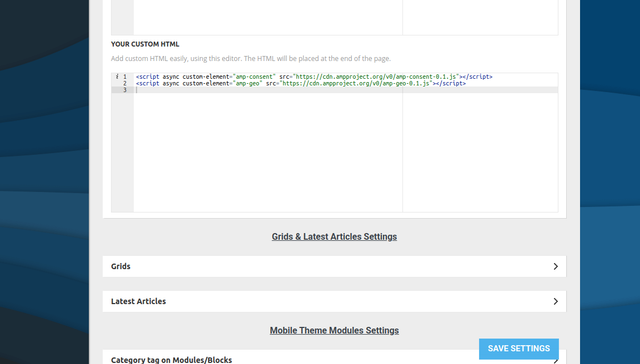
But it does not seem to show. I also tried adding it here (wp-content/plugins/td-composer/mobile/header-amp.php):
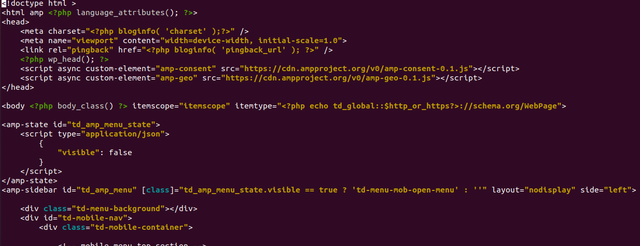
But it also does not work unfortunately. Any help would be appreciated!
Anamaria Hello,
You can set the general header in Theme Panel -> Header => https://www.screencast.com/t/Us620POf, but in your case, you need to change the header where isn’t the Global Template on Global Template from Manager (Website Manager) -> Header => https://www.screencast.com/t/d0CXbUghhN
Thank you!
 akiim.deshay@onlymoveforward.com
After running CSS Analyzer all headers using Block 18 Headers are distorted.
Before Running CSS Analyzer

1. Disabled WP Super Cache
2. Ran CSS Analyzer
3. saved found CSS
4. enabled Super Cache and Deleted Cache
After Running CSS Analyzer

5. Disabled WP Super Cache again
6. Ran CSS Analyzer
7. Excluded line for Header in “Body Inline Style 56”

8. saved found CSS
9. enabled Super Cache and Deleted Cache
After

10. Disabled WP Super Cache again
11. Ran CSS Analyzer
12. Disabled “Body Inline Style 56”

13. saved found CSS
14. enabled Super Cache and Deleted Cache
After

 raebild
I have a problem, hope you can solve for me. When opening my category page live, header, footer and content looks strange
See example: https://prnt.sc/11pijeb
Here is live link: https://www.altomautocamperen.dk/category/pladstips/
Header and footer should be same as: https://www.altomautocamperen.dk/
When opening the category template from Cloud templates – it looks perfect.
I assume its something i do wrong in the panel setup.
Is it possible you can have a look at it?
 thefeedski
I can’t for the life of me figure out how to change the background image for the mobile menu (it’s currently the preset photo of the girls). Where can I go to remove this?
Bettina Hello!
In Composer you can save elements or rows as a reusable element. For example, select the row in the sticky header, right-click and save as element, and when you will want to add the element again, you can find it in the ADD list.
Hope that helps you!
Thank you!
 mikevanmoonlight
 How can I set the same style header for all post and pages include homepage?
