
- Apitd_api_header_style::delete
- Apitd_api_header_style::update_key
- Apitd_api_header_style::update
- Apitd_api_header_style::add
- ApiAPI – Header style – Introduction
- Apitd_api_top_bar_template::update_key
- Apitd_api_top_bar_template::update
- Apitd_api_top_bar_template::add
- ApiAPI – Top Bar Template – Introduction
- Apitd_api_single_template::update_key
- Apitd_api_single_template::update
- Apitd_api_single_template::add
- ApiAPI – Single Template – Introduction
- Apitd_api_footer_template::update_key
- Apitd_api_footer_template::update
- Apitd_api_footer_template::add
- ApiAPI – Footer Template – Introduction
- Apitd_api_smart_list::update_key
- Apitd_api_smart_list::update
- Apitd_api_smart_list::add
 szmarinov
 Thank you for the answer. I did check this before, and I am using global header everywhere -> https://prnt.sc/114xh31 even that ive tested to create new one. I just want to use global one for now. But still there is difference and still not sure what the problem is.
 Vlad S
 Hello !
Please make sure to take a look and see what header is the one set as global. You can see that as you can see here: https://www.screencast.com/t/2FCbrAvt
Let us know the result !
Thank you !
 mardo2k2
I just got approved for Adsense and I’m placing ads. But they only work for me in the header ad, sidebar ad and custom ad 1 (for home). The ones that interest me are those of the articles, and those do not work for me. I’ve already tried article top ad, article inline ad, and article bottom ad, with none of them showing up. I have read complaints from users who have had problems after the last update. As I did not have them configured with the previous version of the theme, I do not know if it is due to the update.
 be2name
 Hello Vlad,
I use a cloud template for my header.
 RonyAdams
My URL: https://softbuzz.org/
Hi,
As mentioned in the subject I have issues with your theme in my homepage that codes are not uploading correctly and the stay as they are strings.
Please enter my website and you automatically will see it.
Adding screenshot of the issue: https://ibb.co/NYVZbZh
and another thing is that I’m not possible to enter my TagDiv composer. I don’t know why but when I try to edit a page with the TagDiv composer it trying to upload but the loader never stops. and it getting stuck in this position and not giving any option to work on the page.
Adding screenshot of the issue: https://ibb.co/bX96ZBf
Please let me know I can fix this.
Best Regards,
Rony Adam
 benj0612
 Hi,
Alex solved my problem of stretched logo (only on Mozilla).
I use Style 1 (standard header).
Vlad S Hello !
Please let me know are you using a Cloud Library header or a standard header from here: https://www.screencast.com/t/uLyiiir0Hb
Thank you !
 byothe
Hello
I have trying for a whil to remove a black line at the top of my blog in the header :
https://www.casimages.com/i/210405124817493990.jpg.html
I didn’t see any option in TD composer to remove it..
 Anamaria
 Hello,
To hide the scroll to the top, you need to use a custom code CSS =>
.td-scroll-up{

display: none !important;

}
The code needs to be set in Theme panel -> Custom code -> Custom CSS => https://www.screencast.com/t/fxetQe24ZHf
To remove if you have the tagDiv Standard Pack plugin active then you need to comment this line => https://www.screencast.com/t/NRBxqmUp4I from this path
wp-content/plugins/td-standard-pack/Newspaper/header.php
but if you have the tagDiv Standard Pack plugin disabled then to comment the line go in
wp-content/plugins/td-composer/legacy/Newspaper/header.php
=> https://www.screencast.com/t/OWhnxwfS
Thank you!
Anamaria Hello,
If you want to add that code for favicon there are two methods, the first is to insert the code in Theme Panel -> Analytics / JS Code =>https://www.screencast.com/t/qC0YLfvVj and the second is to set the code in the files in these paths wp-content/plugins/td-composer/legacy/Newspaper/header.php
wp-content/plugins/td-standard-pack/Newspaper/header.php in the head section => https://www.screencast.com/t/61YA3Gimm3
Hope this helps you!
Thank you!
 patrickschua
 Hi,
Can you just please guide me through how to fix the header and the footer? I have tried creating a new page with the same settings as the other pages and this is what the heading looks like – https://imgur.com/rSEiiVm
As for the reviews page I made, no content still shows up in my mobile device.
 JJ0000
Hi I’m trying to customize this section:
<ul class="top-header-menu td_ul_login sf-js-enabled"><li class="menu-item"><a href="#login-form">SIGN IN / SIGN UP</a><span class="td-sp-ico-login td_sp_login_ico_style"></span></li></ul>
to change the link url’s and other stuff, but haven’t found the location yet.
Also if I make the changes in a child theme (I’m a noob to that), would that be via the function.php file, and these changes will stay the same even after Newspaper future updates right?
Thanks!
 NesBmore
 So it looks like you have to go back into your website theme settings and assign the header, footer and page templates again. It resets to zero so it makes the site appear to be gone. Try that and it should correct @doocmandoo
 docmandoo
The header and footer are broken, the post format is changed, mobile version reverted to the default.
Can you all provide an update on when you might fix?
Thank you
Beth
docmandooThe header and footer are broken, the post format is changed, mobile version reverted to the default.
Can you all provide an update on when you might fix?
Thank you
James
 butur
buturHi. When I update 10.4 My “dental studio template” website. header & top bar is not working correctly. But my friend using “default template” it is working correctly.
And I try downgrade 10.3.9
It is working perfectly.
Screen shots for Dental Studio Template:
After 10.4 update finished
https://prnt.sc/113vfaj
https://prnt.sc/113vgcv
Downgrade 10.3.9
https://prnt.sc/113vha8
My friend “Default Template” Website
https://prnt.sc/113visk
 ChandlerBing1985
Hi,
I create with div composer this header version (color white with menu black) but I don’t understand why doesn’t appear live on my site http://www.minutidirecupero.it. Which option I have not activated?
The pic: https://ibb.co/q0sXCnw
 stephanwhelan
Hi team – got an issue with Mobile Theme. We have it installed and working perfectly for Homepage, Categories and Posts. However we are having issues on Pages.
We have some pages like this one: https://www.deeperblue.com/beginners-guide-scuba-diving/ that on desktop work perfectly. When we have mobile theme installed it just shows a page with a header, title and footer with no content. We tried creating a mobile version of the page in TD Composer and crafted one specifically as a mobile template – but that doesn’t show properly: https://www.deeperblue.com/the-beginners-guide-to-scuba-diving-mobile/
How do we get the right content to display on mobile with Mobile Theme installed?
Thanks,
Stephan
 hyperbros
hyperbros.com site
Hi, I would like some help in particular for the mobile version of my newspaper site (I did the Gossip pro installation).
On the home page I can correctly set both the background color of the menu and the display of the menu in the bottom.
But when I try to view any other page or post, the settings revert to the default settings on Gossip Pro.
Instead I have two problems in the “classic” version of the site. In the “Flex Block 2” at the top right of the header, I can’t correctly filter the article to show.
While below the pagination of the articles does not work.
Would you be kind enough to help me?
Thanks
NesBmorehttp://www.baltimorepositive.com
after the update, we seem to have lost all our settings and its reverted back to old default headers and footer and themes? Please help us fix and recover this. Our logo is not even showing up anymore after the latest install.
szmarinovHello, can you help me solving this issue after updating to 10.4
https://lifeisfortravel.com/destinations/north-america/usa/ – Category using individual template -> http://prntscr.com/1131zgb
working as expected all settings from the theme panel are applied here:
the settings:
http://prntscr.com/113202r
http://prntscr.com/11320ci
http://prntscr.com/11320ub
http://prntscr.com/11321cc
Another category with individual template duplicated 1:1 from https://lifeisfortravel.com/destinations/north-america/usa/, here you can see the navigation with completely different background color and different fonts, and font sizes
https://lifeisfortravel.com/destinations/caribbean/aruba/
while the template is being updated, the menu seems OK, as it should look like
but in the front end part shows another thing -> http://prntscr.com/11323g9
another difference in the heading styles can be found, also -> http://prntscr.com/1132crn
all of the categories that are created and editing before updating to v10.4 are working ok, but the newest after 10.4 showing wrong settings. I even reset template settings to see if this will happen again, and yes, the same things. After importing template backup. Some of the categories were deleted for good. I did manage to bring them manually, but the problem with the different header menu/bar remains.
Also, there some differences in the page menu, and category menu.
page:
https://lifeisfortravel.com/travel-planning/
category:
https://lifeisfortravel.com/destinations/north-america/usa/
font-weight is different, not sure why
here are the settings:
http://prntscr.com/11329zi
http://prntscr.com/1132aea
http://prntscr.com/11329nc
Can you help me solving this problem? Thank you!
 khanmi
I have recently purchased a news theme and installed a pre built design. Unfortunately my header is not showing and whenever ever I update from the composer no change is being done.
http://www.lifeinpakistan.net
 Sim_Stripes
 I deliberately set the debug mode to true because I was looking for the cause of the issue. There still seems to be a bug in …/td-composer/legacy/Newspaper/includes/shortcodes/td_block_raw_css.php.
Although the header looks a lot better now, there are still some broken styles due to the error in this file.
Will there soon be an update of the composer plugin that solves this issue?
 rima144
 Hi
Thanks but none of that helps.
I use AmberLight PRO Templates.
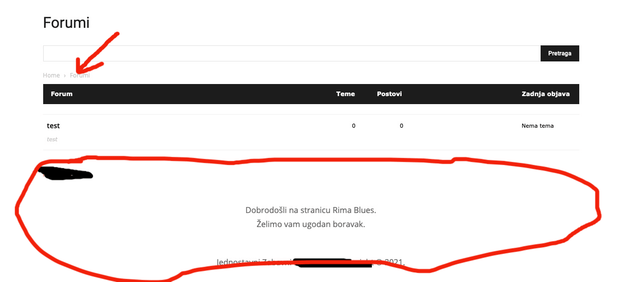
The problem is with the BBPress forum pages. There is an error with Header and Footer and only on the forum home page. While on forum topics everything is fine.
A little confusing !?
This is what it looks like on the home page of the forum: /forums
Header and Footer with error.

This is what the forum topic looks like and everything is fine here: /forums/forum /test
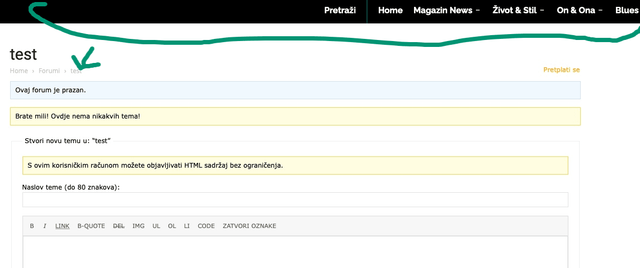
So the problem only appears on the forum home page.
It’s not urgent for me 🙂
Thanks for the good service.
 Thami
Thamiwebsite : http://www.mondedestoutous.com
Good evening,
While I had already uploaded Newspapper version 10.4 via envato, here are a few days that I was invited to update the same version via the wordpress dashboard, which I did to remove among other things an unnecessary notification. Just after, my site displays a fatal error because of td_composer. I tried to go back down to the previous version, back up from the day before, but it doesn’t work. By deactivating td_composer, the site is accessible but looks like nothing.
Here is the error message and I hope someone will save my life before the weekend.
Fatal error: Uncaught Error: Too few arguments to function {closure}(), 4 passed in /home/hath5827/mondedestoutous.com/wp-includes/class-wp-hook.php on line 287 and exactly 5 expected
in /home/hath5827/mondedestoutous.com/wp-content/plugins/td-composer/css-analyze/css-analyze.php on line 507
Call stack:
{closure}()
wp-includes/class-wp-hook.php:287
WP_Hook::apply_filters()
wp-includes/plugin.php:212
apply_filters()
wp-includes/meta.php:676
metadata_exists()
wp-content/plugins/td-composer/legacy/common/wp_booster/td_wp_booster_functions.php:572
td_load_css_fonts()
wp-includes/class-wp-hook.php:287
WP_Hook::apply_filters()
wp-includes/class-wp-hook.php:311
WP_Hook::do_action()
wp-includes/plugin.php:484
do_action()
wp-includes/script-loader.php:2004
wp_enqueue_scripts()
wp-includes/class-wp-hook.php:287
WP_Hook::apply_filters()
wp-includes/class-wp-hook.php:311
WP_Hook::do_action()
wp-includes/plugin.php:484
do_action()
wp-includes/general-template.php:3005
wp_head()
wp-content/plugins/td-standard-pack/Newspaper/header.php:11
require_once()
wp-content/plugins/td-composer/td-composer.php:246
{closure}()
wp-includes/class-wp-hook.php:287
WP_Hook::apply_filters()
wp-includes/class-wp-hook.php:311
WP_Hook::do_action()
wp-includes/plugin.php:484
do_action()
wp-content/themes/Newspaper/header.php:2
require_once()
wp-includes/template.php:730
load_template()
wp-includes/template.php:676
locate_template()
wp-includes/general-template.php:48
get_header()
wp-content/plugins/td-composer/legacy/Newspaper/page-pagebuilder-latest.php:4
include()
wp-includes/template-loader.php:106
require_once()
wp-blog-header.php:19
require()
index.php:17

