- Apitd_api_header_style::delete
- Apitd_api_header_style::update_key
- Apitd_api_header_style::update
- Apitd_api_header_style::add
- ApiAPI – Header style – Introduction
- Apitd_api_top_bar_template::update_key
- Apitd_api_top_bar_template::update
- Apitd_api_top_bar_template::add
- ApiAPI – Top Bar Template – Introduction
- Apitd_api_single_template::update_key
- Apitd_api_single_template::update
- Apitd_api_single_template::add
- ApiAPI – Single Template – Introduction
- Apitd_api_footer_template::update_key
- Apitd_api_footer_template::update
- Apitd_api_footer_template::add
- ApiAPI – Footer Template – Introduction
- Apitd_api_smart_list::update_key
- Apitd_api_smart_list::update
- Apitd_api_smart_list::add
 kibiribi
 Calin, thanks again for the detailed explanation.
I’ve reviewed all Templates – https://www.screencast.com/t/3JWV3Vrfj
May I ask you: I just want to leave my header’s design as it is.. but I want to add search bar only on the 2nd line of header –
see mockup – https://www.screencast.com/t/xU2Hyz39VrAq
But right now I don’t have a Header template for my site – https://www.screencast.com/t/XJW4wcBw9u0E
How to modify search bar in this case for all pages and posts without Header template? 🙁
Please explain, it’s not clear for me.
 anki14542
  sproutnepal
 Dear Calin
1st and 3rd points are done. Thanks for that.
Regarding 2nd issue, please see screenshots of post, home page source code.
Home page source code : https://imgur.com/a/5hCQsC7
Post’s source code https://imgur.com/a/cFlI9qT
I have already deleted signin element from header and also disabled the same from theme panel. https://imgur.com/3JZbxVq but still those text are in source code. These text were triggered by copyscape.org for duplicacy of content. See pink colored text https://imgur.com/xpTCPsz
I am using header template – https://imgur.com/jOW7JXA please suggest if said issue have any connection with this
My website www sproutnepal com
-
This reply was modified 6 years by
sproutnepal.
 khnalsaroj083
custom header did not save what need to do?
only show saving
https://drive.google.com/file/d/1Mc2sLQIS_3Y2YHEruoLv5j11r-OP1pbD/view
 bjames1000
Hi, the default advertising sizes on mobile in the responsive version of hte them (not mobile theme) are big and square and not appropriate. I want them changed to 320×100.
Using the menu in the Theme Panel > Ads > Header Ad I successfully changed the mobile size to 320×100… on the home page only! The category pages are still using the square size and I cannot find where to change that.
Example: (View on phone) https://bangkokherald.com/category/health/coronavirus/
 FietsersbondHZ
I have added a forum to my site and a widget which displays the latest forum posts, all works fine but I can’t find a way to change the “Header template”. Throughout my site I have used “block header 4” as “header template” in “header settings” when I add a custom title and I also changed the “Title background color” and the font used.
The widget I add however shows a default global header in black and I can’t find a way to change this, is this possible?
Here you can see the “issue” in the sidebar https://fietsenvanhtotz.be/forum/
 mehmag
HI,
Im trying to change the static image it shows on the “header ad” space but when I try to change the file I want shown the space just goes blank. Im using the same code it came with the template, only changing the filename.
Under theme panel/ads/header ad
<div class=”td-all-devices”>  </div>
What could be the issue?
 SeaBlueHK
 Hello, I do not understand how I can get the cloud header settings panel. When I click on it, it just acts like normal site link that goes back to homepage.
Site: https://shop.seablue.hk/
I want the top logo to have different url.
Thanks!
 matthewbath
Hi all,
Odd challenge here, and I hope I can get some pointers.
My site Wise Living Magazine (https://wiselivingmagazine.co.uk) was approved for AdSense, has a status of ‘Ready’ and I have created and placed ad units using Newspaper’s Theme panel > Ads. I have pasted the ad code into the ad spots (Header etc).
However, ads are only showing up in WordPress Previews of posts – but not the actual post itself when live! So far, no ads have been appearing on the live site, but they do appear when previewing a post (new or an existing post).
Could it be because I am deferring JS and CSS? Is there a bug with the Ad placements in Newspaper? Could it be caching? Am I being too impatient (but why would ads show in preview)?
Things to know:
Account activated 24 hours ago; ad units created 12 hours ago
Site status is ‘Ready’
I have purged the caches on CloudFlare (CDN) and LiteSpeed (WordPress cache)
No ad blockers
Tried incognito mode, ensured Javascript active
Checked script in <header> tags, checked ads.txt file
Plenty of traffic (>1k sessions so far)
Installed and using Site Kit
A couple of questions, please:
Key question: why are ads showing in Preview but not on the live site?
Could deferring JS, using LazyLoad etc be the culprit (though the same settings apply to Post Previews). Anyone else experience this with Newspaper?
Any ideas? Would love to actually serve the ads!
Many thanks, and keep safe!
Matt
 Calin
Calin Hi,
1. SO the theme functiones are in tagDiv Composer and in standard pack
2. Unfortunately we do not have a full guide for this, where to say what file and when it will be set/overwrite sorry.
3. Only the files with folders mentioned in our documentation will work in child theme -> https://forum.tagdiv.com/the-child-theme-support-tutorial/ the two plugins has the same structure -> https://i.imgur.com/vwtAasR.png -> https://i.imgur.com/cX2qmci.png therefore each file you choose to use in child them it will work.
Now I will try to explain how the header file is working. Our theme has 3 header files, on in theme, one in tagDiv Composer and one in tagDiv Standard Pack, now if the standard pack is enable and you do not use a cloud template then you’ll use the file from standard pack, if this plugin is disable or you use a cloud header from tagDiv Cloud Library then it will be use the file from composer, if both of these are disable will be display the one from theme.
But if you set a header file in child theme as in our guide you can use each header file you want (from composer or standard pack) these will work.
Now in tagDiv Standard Pack are set the default templates and tagDiv Composer is just a builder that can edit pages and cloud templates.
Thank you!
Calin Hi,
When you hover the menu you’ll see the post thumbs, category, title, maybe author or date, all the can be edited with tagDiv Composer.
If you want to have a mega menu without thumbs you need to use a cloud header from tagDiv Cloud Library and edit it with tagDiv Composer click on menu and check the mega menu tab -> https://i.imgur.com/Su5KRyu.png
Thank you!
Calin Hi meeshymee,
I think that Vlad do not understand correctly.
You can create a menu as you want, a simple menu, a menu with sub-menus or a mega menu with sub-categories or without subcategories also you can set a page as menu -> https://forum.tagdiv.com/page-menu/\
If you want to have a mega menu without thumbs you need to use a cloud header from tagDiv Cloud Library and edit it with tagDiv Composer click on menu and check the mega menu tab -> https://i.imgur.com/Su5KRyu.png
Thank you!
 Simion C.
 Hi,
I have checked the header menu, I have to say that it works fine for me. Hovering the menu item displays the sub-menu and I can then choose the desired link – https://prnt.sc/syjpn1
It doesn’t seem to close when I move the cursor from the main menu item down to the sub-menu. Am I checking correctly?
Thank you!
Simion C. Hi,
A drop-down menu is like this – https://prnt.sc/syjhud This type of menu can be created in the WordPress menus section.
The theme provides mega-menus – https://forum.tagdiv.com/mega-menu/ Which when using cloud headers have quite a few settings, so their design can be customized. You can preview the cloud headers here for example – https://cloud.tagdiv.com/#/load/Headers
What exactly would you like to do with the menu? Please provide a link to the website where the menu can be seen, mention how you would like it to look exactly, that will be faster.
Thank you!
Simion C. Hi,
Please provide a link to the website so we can take a look. From what I understand the logo and the ads do not appear in the homepage header, but they appear in the rest of the website. Are you using the same header?
Thank you!
 dcivera
 Thanks a lot Calin. As I explained, the problem went away when I recreated a new header from scratch, so I don’t have the php error anymore.
 David
DavidHi,
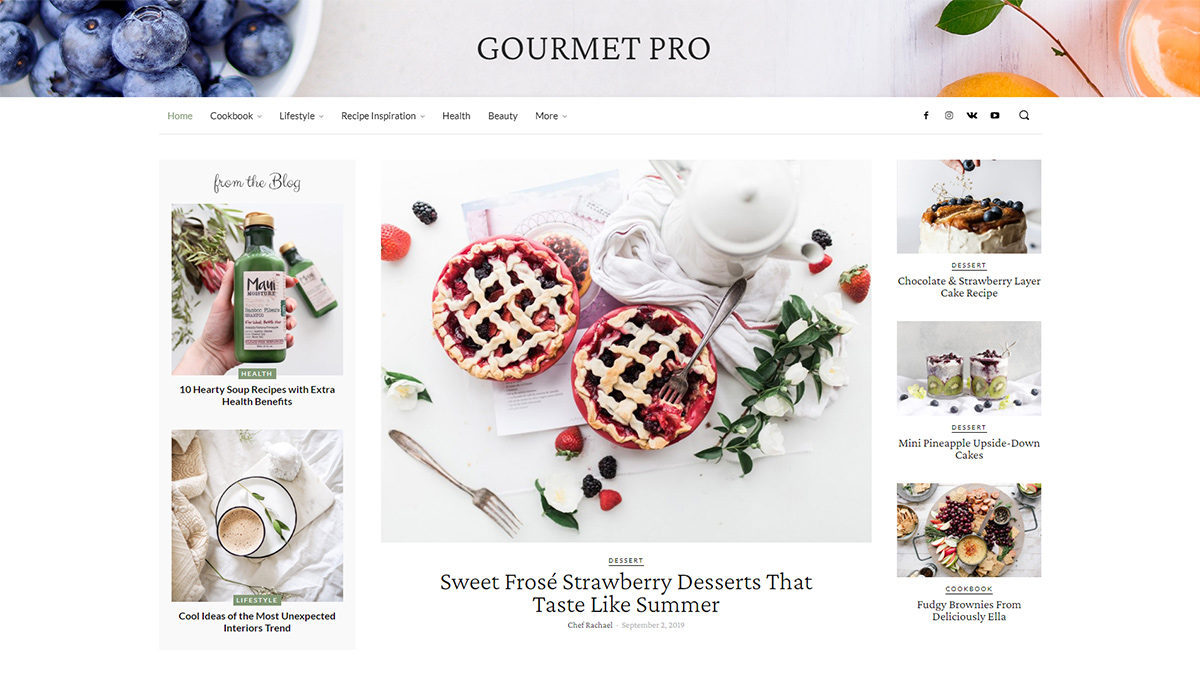
How can I change the header background image of Gourment PRO (https://tagdiv.com/wp-content/uploads/2020/03/Homepage-of-Gourmet-PRO.jpg)
I imported the demo layout but somehow I find no setting in Tagdiv Composer to change the image.
Thanks in advance for any help!
Calin Hi,
If you choose header style 7, 8 or 10 then you can set the size you want for the logo https://i.imgur.com/7SZvpfc.png -> https://i.imgur.com/qm5LYeR.png -> https://i.imgur.com/BWZ8IkK.jpg also if you are using other header style, please make sure that the logo is set in full size.
Header styles -> https://forum.tagdiv.com/header-styles/
Logo & Favicon in Newspaper Theme -> https://forum.tagdiv.com/logo-favicon/
Also you can use cloud headers from tagDiv Cloud Library, these can be edited using tagDiv Composer and adjust after your needs.
If this is not what you mean, please provide some more details and a link where I can inspect the header image.
Thank you!
 Nagarig
 Problem not solved. I tried making a new header. I also created topics on WordPress Forums with a Newspaper X theme search box problem. Can you join there so we can solve this together? You can find a thread on different cache plugins.
Try asking your colleagues: Live search box only working if user is logged in. Or it doesn’t work.
 marclaude
Dear tagDiv Staff,
Many advertising networks require to place ADS script immediately after BODY opening, and common plugins (like Insert Header and Footer plugin) fail to do it with Newspaper theme.
So in the past I used this method with success:
FUNCTIONS.PHP
function custom_content_after_body_open_tag() {
?>
XXX CUSTOM CODE XXX
<?php
}
add_action(‘after_body_open_tag’, ‘custom_content_after_body_open_tag’);
HEADER
<?php do_action(‘after_body_open_tag’); ?>
But now, after I updated Newspaper theme to the latest version, it doesn’t work anymore.
And I have also disabled STANDARD PACK to speed up website, considering that I’m working now only with Cloud Templates stuff, so I cannot use the HEADER of the STANDARD PACK to place the code.
Any suggestions to place Scripts immediately after BODY opening without using STANDARD PACK?
Best Regards,
Marco
Calin Hi sproutnepal,
1. Our documentation is online, it can be found in these these links:
-> https://forum.tagdiv.com/newspaper-theme-documentation/
-> https://tagdiv.com/category/documentation/
2. If you are using a cloud header or a PRO Demo, you can edit with tagDiv Composer the homepage and remove the login element using the right click https://i.imgur.com/acOqrXR.png -> https://i.imgur.com/678Y1Wk.png and make sure that the option from theme panel is disable -> https://i.imgur.com/fRIb2xO.png this will remove the code for login, but if you are using a standard/default header style, this will be only hide.
3. The ajax view count is needed only if you are using some cache plugins, in order that the counter to work, this need to be enable -> https://i.imgur.com/nzf6qZy.png also if you are using a single post template from tagDiv Cloud Library, you can add the element using tagDiv Composer -> https://i.imgur.com/Vpv3uIe.png -> https://i.imgur.com/AQ5lloh.png
Thank you!
Calin Hi redheaddigital,
You are using a cloud header from tagDiv Cloud library, this is allow you to edit the mega menu using tagDiv Composer, edit the homepage https://i.imgur.com/3FreELo.png -> https://i.imgur.com/KGhAcGv.png -> select style tab and set the colors you want https://i.imgur.com/vFZjPcR.jpg
Hope this will help you!
Thank you!
Calin Hi,
1. Using Newsmag you can change the menu style only if you change the header style -> https://i.imgur.com/u7xknEN.png the menu colors can be set from here -> https://i.imgur.com/IAcDN72.png and the size of menu and fonts can be adjusted from here -> https://i.imgur.com/uxEPtsJ.png
2. The header template on sidebar block can be set from appearance -> https://i.imgur.com/fXuqo4u.png
3. Yes, the theme has an option for lazyload in theme panel -> https://i.imgur.com/U6m1jlD.png -> https://forum.tagdiv.com/newsmag-loading-image-effects/
Thank you!
 ryanward1993
My header and logo on my website liive.org – is little slow to load, and moving around before it shows.
Is it possible to hire some one here to support my website, i checked my google ratings for speed -and its performing poorly. Or some advice in right direction would be appreciated?
I am using things such as cloudflare, and wp-rocket pro – WPMU DEV- smush etc, but still some loading issues. I tried disabling all plugins – but still loading issues.
Much love & best of health to all.
 oraysion
I just updated and I need to knock these errors out:
NOTICE: wp-content/plugins/td-composer/legacy/common/wp_booster/td_remote_video.php:226 – unserialize(): Error at offset 0 of 140865 bytes
require(‘wp-blog-header.php’), require_once(‘wp-includes/template-loader.php’), include(‘/plugins/td-standard-pack/Newspaper/page.php’), the_content, apply_filters(‘the_content’), WP_Hook->apply_filters, do_shortcode, preg_replace_callback, do_shortcode_tag, td_global_blocks::proxy_function, tdc_zone->render, tdc_composer_block->do_shortcode, do_shortcode, preg_replace_callback, do_shortcode_tag, td_global_blocks::proxy_function, vc_row->render, tdc_composer_block->do_shortcode, do_shortcode, preg_replace_callback, do_shortcode_tag, td_global_blocks::proxy_function, vc_column->render, tdc_composer_block->do_shortcode, do_shortcode, preg_replace_callback, do_shortcode_tag, td_global_blocks::proxy_function, td_flex_block_1->render, td_flex_block_1->inner, td_module_flex_1->render, td_module->get_video_duration, td_video_support::get_video_duration, td_remote_video::api_get_videos_info, td_remote_video::vimeo_api_get_videos_info, unserialize