
- TutorialsDefault Block Settings Guide
 Anamaria
 Hi,
You need to check the row from your header. You need to stretch the row and save after you will see the row.
Thank you!
 Ericky
I want to add the black area in the image to my header myself. I put the image from your templates as an example, but my header is different. I want to add this black area manually without using a template. How can I do this?
 snoopy
Appreciate your kind support in:
1. How can i change the background of the header menu in her in the mobile view https://ibb.co/wRbjX8r
2. How can i Assign a menu to the mobile view? as in the English the header menu does not appear in the mobile view as in the image above, while it appears in the Arabic version correctly.
Thank you
 leogarcia1988ha
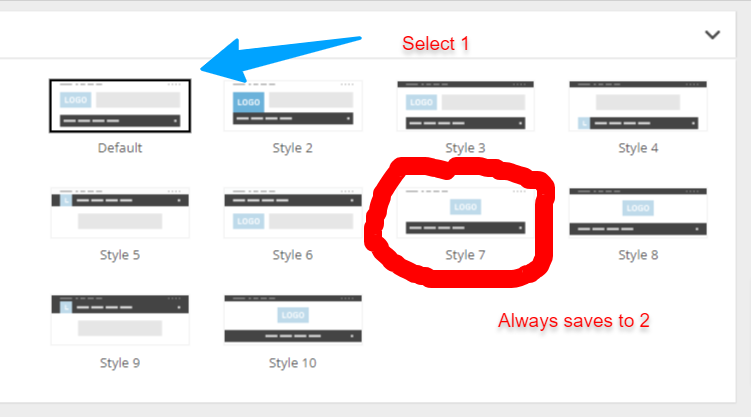
Hello. Everytime I try to change the header settings, it reverts to the original one (see image)
Also when I try to add new CSS code it does not save it.
 iamsergiomarin
Hello! I have problems with the mobile version of my website. I have created a mobile template for each page and the homepage. Also for the single template and other WordPress templates.
Each one has a yes in the Mobile Template column.
The fact is that when I enter the mobile it doesn’t look like it should, but rather the latest news appears in a row and the design is not the same.
The same thing happens with the menu on the mobile, since when I click on a page from the mobile it does not appear and only the title of said page appears.
All of this, except the mobile menu, is done in the ‘Cloud Templates’ option.
How can I solve that?
I don’t know if something needs to be installed or not. I have the AMP plugin installed and the AMP option activated in the Mobile Theme of the Theme Panel.
Additionally, the menu for the mobile version is with the mobile pages created.
I also forgot to mention that when I’m on the mobile below I get the option ‘exit the mobile version’ and there it appears correctly, but I don’t know how to make the header logo look smaller.
I leave you the website so you can see it https://valladoliddeportivo.es/
 bogdan.martiniuc
 Yes, i would like to not have that margin-top 30px on the checkout page, on mobile.
It looks really wierd. Also, the cart icon moves from it’s place. Why it does this only on the checkout page?.
Look how the header should look normally – https://snipboard.io/1bryxD.jpg
Look how the header looks on the checkout page – https://snipboard.io/2nWYLS.jpg
It should look like this on every page – https://snipboard.io/0LIJDm.jpg
Thank you
bogdan.martiniuc Hi,
I’ve set on the header section (mobile) – margin 0 for that row and it still does not work.
https://snipboard.io/1bryxD.jpg
Thank you
 Merkucio
I don’t understand how can I add the links for social icons in header and footer with tagdiv composer.
I know how to find links input area.
When I add full url https://www.facebook.com/gabuniadavid template doesn’t saves it and after save all/refresh shows # again.
When I add /gabuniadavid or just gabuniadavid template saves it but after click sends me the the wrong url https://mydomain.com/gabuniadavid
So, how should I add
Anamaria Hi,
You can to disable the Sign in/join from Theme Panel -> Header -> https://i.imgur.com/YwttygP.png
Thank you!
Anamaria Hello,
Yes, you need to use a plugin to set an image for your users https://forum.tagdiv.com/how-to-set-the-avatar/
Why do you use Woo Login? Do you have a shop? You can use Header Login. Also, did you set an icon for guests: https://i.imgur.com/e7yOpqc.png?
Thank you!
Anamaria Hello,
Please check this video https://www.youtube.com/watch?v=HXQQygkCCJo
You need to edit it with Composer and select the sticky header.
Thank you!
Anamaria Hello,
Please provide the link to your website so we can identify the header and footer template. You can find more details here -> https://forum.tagdiv.com/header-manager/-> https://forum.tagdiv.com/footer-templates/
Thank you!
 simchris
 a) Twitter has come and go issues with capturing images and nothing to do with your site, theme or content … X is a shit show, and they don’t really care about your images – so, be aware this can happen and not much you can do about it
b) only thing you can do to help try to get Twitter to capture image is make sure your meta data headers for post have the open graph (OG) tags and image for twitter clearly noted (you can set this in software like YOAST, etc.).
Had our top client today, and news item would not capture image. Hella annoying.
== the card validator used to work 99% of the time, so you can ‘try’ this, but again ‘X’ is a dumpster and may not work and they don’t care:
https://cards-dev.x.com/validator
( I don’t work here. )
 volkanunal
 this code effected social counter blok. just because of this, footer and header part crashed too. I deactived social counter and solved the problem.
Are there any other way to show top bar on mobile? without adding code? I dont want to add this code again! I spent many hours to fix the problem.
And one more question: when I click a news on homepage, the new article opens in a new window. How I can set this, too?
Thank you.
 kerunet
 Please advise me to change the footer and header using the cloud templates. I want to know if it is possible to keep the current information.
Anamaria Hello,
You need to activate the tagdiv Standard pack plugin and clear the cache, but I recommend replacing blocks 1 to 25 with flex blocks and the standard templates (header, footer,single, etc.) with cloud templates.
Thank you!
kerunetWe are currently developing the change from newspaper 8 to 12 and we found several errors that we have not been able to solve for example: wp_booster error:
td_api_base::mark_used_on_page : a component with the ID: single_template_3 is not set.
/var/www/vhosts/digitalbizmagazine.com/httpdocs/wp-content/plugins/td-composer/legacy/common/wp_booster/td_api.php
The first is that it does not find some particular tags:
We cannot find how to change the background of the footer and finally when trying to edit the header menu as we had it on the original page
 Media Creative Lab LLC.
Hi,
I want to use lowercase letters for the text part of the header logo,
but it is automatically converted to uppercase letters.

If you enter the footer in lowercase letters,
it will remain in lowercase, so there is no problem.

What’s the problem?
Thank you.
 AjitSirohi
 I had a Page properly setup and not touched for last one year. I changed the Header Image. As I saved the image, rest of the Content of the Page (which was through the Editor) disappeared.
I am trying to set it up again but not able to.
the image explains the issue. Please advise.
” alt=”Page Setup” />
AjitSirohisrc=”ftp://charchac@vedicmedia.in/public_html/03-Temp/Page-Setup-Issue.jpg” alt=”Page Setup” />
I had a Page properly setup and not touched for last one year. I changed the Header Image. As I saved the image, rest of the Content of the Page (which was through the Editor) disappeared.
I am trying to set it up again but not able to.
the image explains the issue. Please advise.
 Calin
Calin Ok, Please try this custom css:
 #mega-menu-wrap-header-menu {

        background: #486962;

    }
This can be set in the theme panel > custom code> custom css
I hope this will help you!
 kevinstolz
So I have been working on setting up the website the way I want it but it is possible that the theme won’t support my idea or concept.
On Firefox it sort of appears as I want it so far on the home page but interior pages are all broken.
I need to create 4 pages right now About Us, Current Issues, Past Issues, Adult Industry News!
About Us: would be a text and image fixed page that doesn’t change as I add content.
Current Issues: would display 3 images per row and 4 Rows images that I upload and they are linked to our publishers website.
Past Issues: would do the same as Current Issues but would be from previous years and instead of 4 rows of three would have 4 rows of 3 for 2023, 2022, 2021 divided into sub sections.
Adult Industry News: would display in rows of 3 images with title in text pulling from posts in the category of “News”.
Eventually we would add more pages like “Videos” that display posts from the video category in the same manner as “industry News” Image, Title, Text and the same Also, a page that does the same but features posts from other categories.
Right now it seems the theme is broken on Safari, Chrome and mobile devices. One client sent me a message that the website is a mess.
Also on Mobile my logo and header were replaced by the demo logo and tagline text.
Anybody know if what I want is possible or is this a waste of my time.
 tyenews
I set up a website (twline365.com) on the wordpress website and installed the Newspaper theme on this website, but I designed the Header templates in cloud templates, which have four device display effects that can be adjusted. After I designed them, I tried them on the mobile phone. Looking at the results, there is no response to the style I designed.
I tried deleting the cache or opening it with a different browser, but the result was the same. It did not display according to the design of the mobile phone in the Header templates, but the computer responded normally.
There is a MOBILE setting in the background Theme panel of Newspaper. I have adjusted the settings, but the result of the content modification here is not the style I designed, so it can only be temporary.
Why can’t the styles designed by cloud templates be displayed in MOBILE?
Calin Hi,
I see that is a sticky sidebar ad, I think that you’ll need to use a different kind of ads in that place. It should work using normal adsense ad (standalone ad).
“if i use https://forum.tagdiv.com/newsmag-header-ads/
should i deactivate the Google Adsense configuration ?” – you can use both.
Thank you!
Anamaria Hi,
You have a header template from Cloud Library, then you need to edit with tagDiv Composer https://www.screencast.com/t/Y5j6ArY8Ug, select the row on the top, and with right-click you can delete it => https://www.screencast.com/t/fdBMaqQevyo
Hope this helps you!
Thank you!



