
- NewsmagHeader styles
- NewsmagHeader ads
- NewsmagtagDiv Composer Tutorial
- NewsmagCategory templates
- NewsmagSmart list ads
- NewsmagWeather Widget
- NewsmagInstagram widget
- NewsmagPage Menu
- NewsmagMain menu
- NewsmagTop bar templates
- NewsmagLogin – how to enable the user registration
- NewsmagLogo & Favicon
- NewsmagFooter templates
- NewsmagCategory grid styles
- NewsmagCategory top post styles
- NewsmagHow category settings work
- NewsmagTheme colors introduction
 STL7997
I deleted all the example posts and now cannot figure out how to populate the 3 featured articles in the header. The ones that overlay in the Travel template. Any ideas?
 simchris
 Likely because the font is loading ‘after’ everything else to speed up page load.
Only way to really fix that is complex
a) either load the font in header up front
b) convert the font elements to base 64 and include inline in the code
c) Another option, would be to unhook the theme font, and instead load the ‘font awesome’ font off their CDN, which would make it more likely to have been cached by a visitor – and hence load faster even though 5x the size of the ‘slimmed’ version included with theme
Just food for thought.
 tagdivchick
Hi, I’d like to create a “page” that has a different header style than the one that is manually set in the “Newspaper – Theme Panel” setting.
What is the easiest way to do this?
Thank you in advance.
 fquiquet
 and the font seems to be very strong. How can I delete all customisation of the block header 1 ?
 debarup
Hi, I have just updated the NewsMag theme to 4.1 after that some images are looking too big, not in the same dimension which was set previously. Also few pages are not opening which was hyperlinked on images.
Please help me to fix this.
I am uploading before and after images
Home Page before – https://prnt.sc/h4ylke
Home page after – https://prnt.sc/h4ylvb
https://www.topfivebuzz.com/trek-in-india-price-comparison/
Trek page before – https://prnt.sc/h4ymdz
Trek page after – https://prnt.sc/h4ynq2
Also the images in trek page was linked with pages, but right now it is not opening. In the page link this all header banner images are now too big not in right dimension which was before – https://www.topfivebuzz.com/panchachuli-trek-cost-comparison-plan-guide/
Pages created by visual composer are all broken
Please please help me to fix this
 krjain123
Continuously getting this error for each page…
pls help to resolve.
PHP Warning: include_once(analyticstracking.php): failed to open stream: No such file or directory in /home/enrichwi/public_html/rishikajain.com/wp-content/themes/Newspaper/header.php on line 14
And that file does not exist.
Can you help what is the error.
 cantonjester
Hello, my client wants to use the Language Bar Flags plugin. It places a set of country flags directly above the top bar.
I looked at the plugin’s CSS, and discovered that it’s 24 pixels tall.
When I enable the Sticky Header, it gets blocked by the set of country flags when the Sticky Header feature activates, and that’s likely because of the 24 pixels that need to be adjusted in CSS.
Help!
 Edward
 > Why do we have to sign up now?
To obtain the API, you need to register on the site. Obviously, changed the policy of free provision of services.
> And there’s no place to put the api key in the header settings
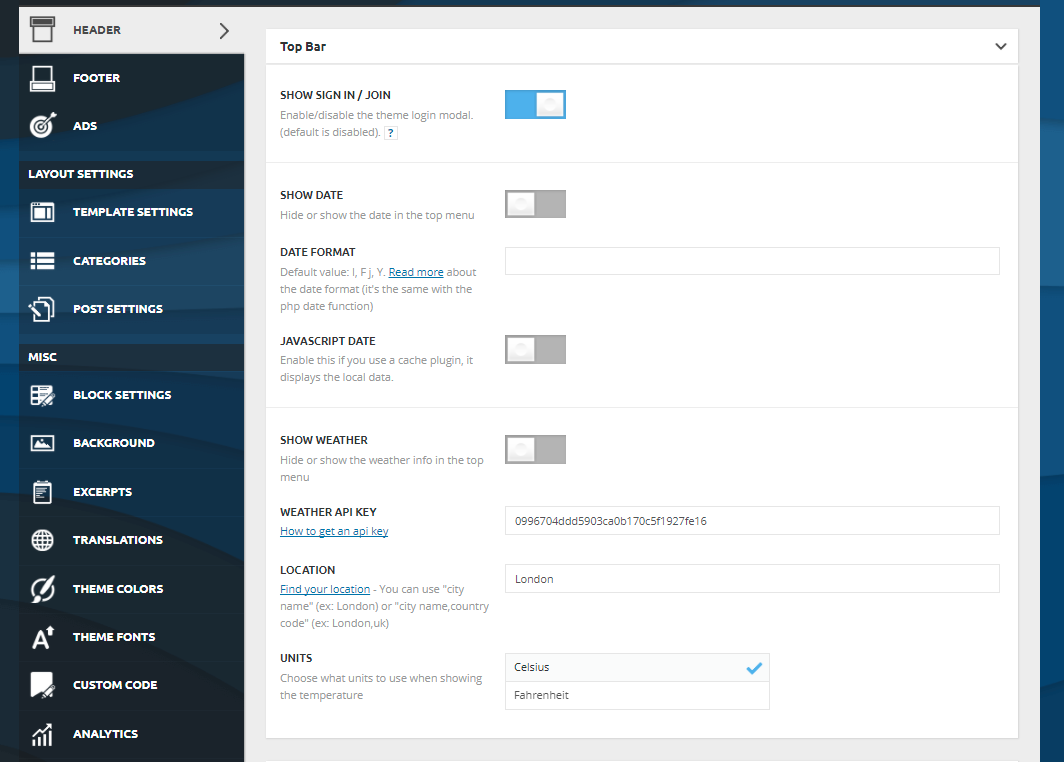
 akaii
akaii Why do we have to sign up now?
And there’s no place to put the api key in the header settings
 Simion C.
 Hi,
1. The church demo uses header style 7 – https://forum.tagdiv.com/header-styles/
In that guide you can see how all the header styles display the header ad.
2. Demos contain custom design, meaning each has a specific stylesheet. If you make modifications to the homepage for example, this design may not apply anymore since it was created for particular elements and conditions.
The website will always be boxed if there is a background color or image set
– https://forum.tagdiv.com/background-introduction/
3. Each header style can display a header banner. Please check the guide to see how all the headers look. Alternatively you could test them all by changing them in the theme panel. See how they all look and choose the one you think it’s best.
There are also options in the theme panel to stretch the header elements
– https://www.screencast.com/t/XhkBDj7qI6ao
Thanks
 ihora
ihora Search page query (eg http://www.ypaithros.gr/?s=agrotes)
AND ypn_posts.post_type IN (‘post’, ‘page’, ‘attachment’, ‘tribe_venue’, ‘tribe_events’, ‘tribe-ea-record’)
AND (ypn_posts.post_status = ‘publish’ OR ypn_posts.post_status = ‘tribe-ea-success’ OR ypn_posts.post_status = ‘tribe-ea-failed’ OR ypn_posts.post_status = ‘tribe-ea-schedule’ OR ypn_posts.post_status = ‘tribe-ea-pending’ OR ypn_posts.post_status = ‘tribe-ea-draft’ OR ypn_posts.post_status = ‘private’)
2) td-drop-down-search – Newspaper theme (header search with suggestion)
AND (ypn_posts.post_password = ”)
AND ypn_posts.post_type IN (‘post’, ‘page’, ‘attachment’, ‘vc4_templates’, ‘tribe_venue’, ‘tribe_events’, ‘tribe-ea-record’)
AND ((ypn_posts.post_status = ‘publish’))
Why search queries is different?
Simion C. Hi,
The header ad seems to be displayed at the moment
– https://www.screencast.com/t/cdLCgM2UZiX4
This ad is displayed – https://www.screencast.com/t/bDyRJWdsJZ
I refreshed the page a few times, the ad disappeared but it seems to try to display a different ad
– https://www.screencast.com/t/bNRgk7TqK
Maybe double check the ad codes to be valid, and the plugin documentation
– https://ajdg.solutions/manuals/adrotate-manuals/
Thanks
 pstgibson
 Some question please:
1. Does it mean the banner space of the header style 4 will be remove with the church demo, because I can’t see the banner space?
2. With Newspaper version 8, is possible to turn any demo box design into a full with design?
3. What is the best header style that can display a banner for full width demo?
Thank you.
ihora Hi
I think the 2 searches have a different query.
1) Search page (eg http://www.ypaithros.gr/?s=agrotes)
2) td-drop-down-search – Newspaper theme (header search with suggestion)
The second search (with suggestion) works well
The default WordPress search (www.xxx.gr/?s=test) returns wrong results
Why Newspaper-theme search query is different from wordpress default search page?
Simion C. Hi,
Each demo has custom design, that is one of the design choices for the demo. It would depend where you want to make this customization, in some cases it could not work properly. The style is not available as a block header, it is made with CSS.
This section of code is responsible
– https://www.screencast.com/t/xJgciKdGg6r
– https://www.screencast.com/t/u96hgAwLabml
Try it with the default block template selected
.block-title {

text-align: center;

border: none;

margin-bottom: 25px;

}

.block-title span {

background: transparent;

color: #222;

border-width: 1px;

border-style: solid;

border-color: #ff9bd2;

padding: 10px 0 8px 0;

width: 100%;

}
This is the base code, it will apply to all block titles. Make modifications to it how you like.
Thanks
 digitalf
Hi,
Is there a way to specify the subheader/subtitle size?
it is really small compared with the format of most post titles and would like to make it H2 size
Thanks
 David
DavidHi,
I would like to make my block headers look like seen here at the baby blog demo (square outline). But I can’t find this style under the block header templates. Could you please tell me how you created this?
Thanks in Advance!
Simion C. Hi,
So you want to prevent the dragging of the logo image, from what I understand. There are some solutions in this topic
– https://stackoverflow.com/questions/7439042/css-js-to-prevent-dragging-of-ghost-image
Try the CSS method maybe – https://www.screencast.com/t/pbXpV0aFz
.td-header-sp-logo img {

-webkit-user-drag: none;

-khtml-user-drag: none;

-moz-user-drag: none;

-o-user-drag: none;

user-drag: none;

}
Thanks
 menneskedyr
I’m aware that this problem may be due to AdRotate and not Newspaper, but I’m posting it here in case anyone ran into a similar problem.
I have several custom ads along with one responsive AdSense unit all together in an AdRotate group.
The group is placed through Newspaper theme panel into ‘Header’ location, with default options for AdSense.
On desktop, all ads work as expected.
On mobile, the AdSense unit will not show up no matter what. Its code is in the source, but all of its parent elements have a height of 0.
When I add the AdSense unit there manually (not through AdRotate group – just pasting the code in the panel box or in AdRotate code box) it works.
So I believe there is a problem with the way mobile ads are sized. I have contacted the AdRotate author as well. Any ideas?
 arollettson
 Hi Simion,
Thanks for your prompt and helpful reply. I can assign a category for my ‘external-pointing’ articles, use custom CSS to switch off the author box for posts with his category, then hopefully I’ll be able to use custom CSS to hide the category header itself in the post (a needless distraction).
Problem solved!
Alan
Simion C. Hi,
That code needs to be entered in the theme header.php file, between the head tags
– https://www.screencast.com/t/3ORNutEVslq
Thanks
Simion C. Hi,
The ad codes inserted in the theme panel header section, will always be displayed. They will appear on the whole website. The theme does not have at the moment options to display them on specific pages only. You could try the Adrotate plugin which seems to work properly with the theme, based on user feedback. This might have more settings to control the displaying of ads.
Thanks
Simion C. Hi,
I understand now what you mean. You want to create some space above and below the logo image, in order to display a background color. Something like this maybe
– https://www.screencast.com/t/yhsqEsnJLG
.td-header-style-9 .td-banner-wrap-full.td-logo-wrap-full{

padding-top: 50px;

padding-bottom: 50px;

}
Set a background color for the header as shown in the theme panel, and use the code.
Thanks
 deltabh
Hello i applied for adsense and i got the code i need to insert before they review the page. Where do I need to insert it?
Do i need to insert it in header.php or in ads section in theme panel?
 suprim
How can I disable header ads on certain pages? For example I want to disable ads on 404 page and contact us page.
Thank you
