
- TutorialsDefault Block Settings Guide
 tvpittner
Hi
I use Style 11 Header on heypretty.com and up until a few weeks ago the logo was centered as it should. Now for some time it is aligned left. I tried a few things but for the life of me cannot see how this became ‘broken’. It could be that a plugin interferes but i was not able to find the culprit.
what I tried:
- uploaded a new logo
- made sure there are no ’empty’ header ad banners
- played around with different ways of compressing css and js
any help is very appreciated
best
marc
 Bogdan B.
 Hello,
Style 7 has issues with logos as big as yours. It needs a smaller logo in order to position properly.
You can replace the fade on header style 7 with a line using this code:
.td-header-style-7 .td-header-gradient:before{

border-top: 2px solid black;

}
You can make the logo position properly with a custom css code tough but now you do not use header style 7 on your site so I cannot inspect it.
Thank you!
 Simion C.
 Hi,
You could try a code like this to center the category header on category pages, and reduce the space at the same time – https://www.screencast.com/t/259QBOjs1Tq
Or like this to have the same amount of space top as there is bottom – https://www.screencast.com/t/nJ4FZ5ZO
These is the code used in the first example
.category .td-category-header {

margin-bottom: 22px;

padding-bottom: 0;

}
And in the second example
.category .td-category-header {

padding-top: 36px;

}
Thanks
Simion C. Hi,
I do not understand exactly what you would like to do. Please provide more details about this, where exactly you want to add this phone number and what is it supposed to do. There is no default option to add anything else then a logo in the header.
Thanks
 anoopcnair
I have been working with Godaddy hosting (the linux virtual server provider) because of the issues of very slow loading time of the site.
I tested the loading time with different tools but it’s seems loading time is very high. Rather in the flow I could see that it’s wait for 5S/7s before loading the website. This is really slow
(see the attached pic 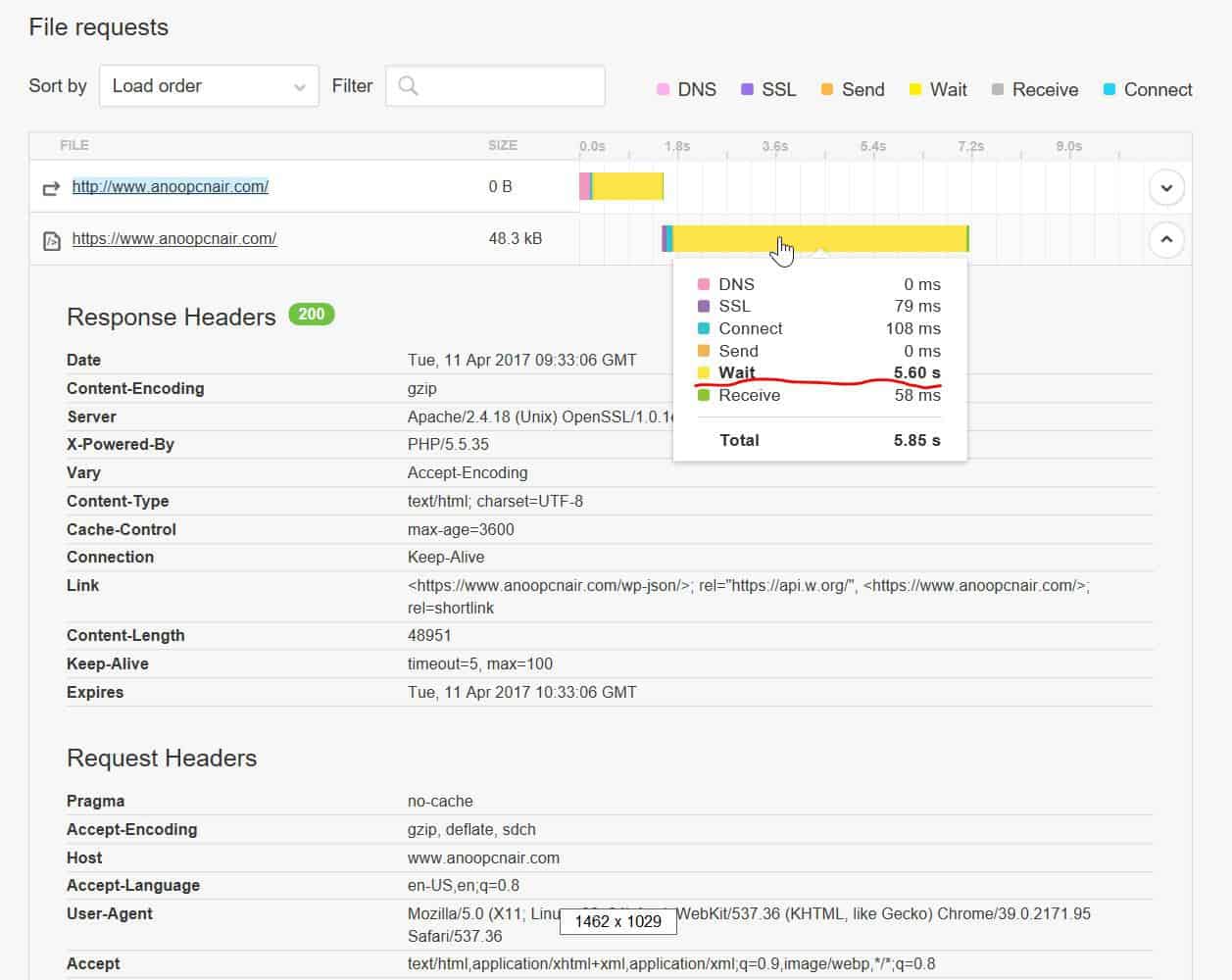 )
)
https://gtmetrix.com/reports/www.anoopcnair.com/3pyMLT7K (result is copied below)
https://tools.pingdom.com/#!/dtR5oa/www.anoopcnair.com
Godaddy says this is coding issue and the web developer says this is server issue but I’m stuck now . Any pointers would be really helpful !!
200 OK
anoopcnair.com
47.8 KB
7.52s
HeadersResponse
Response Headers
Date
Tue, 11 Apr 2017 09:34:23 GMT
Server
Apache/2.4.18 (Unix) OpenSSL/1.0.1e-fips mod_bwlimited/1.4
X-Powered-By
PHP/5.5.35
Link
<https://www.anoopcnair.com/wp-json/>; rel=”https://api.w.org/”, <https://www.anoopcnair.com/>; rel=
shortlink
Vary
Accept-Encoding
Content-Encoding
gzip
Cache-Control
max-age=3600
Expires
Tue, 11 Apr 2017 10:34:23 GMT
Content-Length
48957
Keep-Alive
timeout=5, max=100
Connection
Keep-Alive
Content-Type
text/html; charset=UTF-8
Request Headers
Host
http://www.anoopcnair.com
User-Agent
Mozilla/5.0 (X11; Linux x86_64; rv:49.0) Gecko/20100101 Firefox/49.0
Accept
text/html,application/xhtml+xml,application/xml;q=0.9,*/*;q=0.8
Accept-Language
en-US,en;q=0.5
Accept-Encoding
gzip, deflate, br
Connection
keep-alive
Upgrade-Insecure-Requests
 taylorp
So I uploaded a background image to make my site a boxed layout. However, the white space doesn’t cut off at the top to ‘box the site’. I’d like to have the background show in-between the top of the site and the address bar. Is this possible? Thank You!
*FYI – I don’t have a ‘Top Header Menu’ and I do not want to use one. So the white space just goes up to the address bar.
 littleracer1
Hello,
I would like to put my own personal advertisement next to the logo on the header. To clarify, where the google adsense advertisement would go in header, I would like to put my own box instead. Is this an option? Or I can only put google adsense banners in this spot? Is there are work around?
 WillRobins
Is there anyway to add link to phone number on image in mobile header?
 simchris
 e.g.,
[ Version 7.8.1 ]
– improvement: we updated Visual Composer to the latest version.
– improvement: tagDiv Social Counter was updated to the latest version, this fixes the issue with Facebook
[ Version 7.8 ]
– new: Huge improvement with the spacing of elements and the grid. We compleatly rewrote the grid system to allow easier full width rows and headers. Expect more full width options soon 🙂
– new: clear cache debug button for video playlists
– new: speed booster plugin version. Please update it if you use it.
– new: pinterest block and widget. Show your pinterest boards in style with this new block. Please note that this block is in testing phase.
– new: the main menu of the theme was redesigned from scratch
– new: Added a lot of options for colors on menu
– header and footer full width support
– improvement: better plugin descriptions and help text
– improvement: all big grids now show a nice error message when they don’t fit in the layout of the site. (when used on one column or two)
– fix: added various missing translations to the translation panel
– fix: some block templates where not able to change color on firefox due to a scoped style
– fix: we removed the offset from ajax requests, this provides a better user experience with the theme and the filters
– fix: the global modal window now ignores pictures with external links. Before this update, the modal windows was trying to open the external link
– fix: the jetpack sorting method on blocks now works as expected again
– fix: block header 17 on social counter now works as expected
– fix: instagram images aligment issues
– fix: post template 1 featured image sizing bug
– fix: all embeds that overflow content on small screens are now fixed
– fix: repaint in Chrome browser on blocks that use Load More
– fix: mobile theme now works with revolution slider as expected
 FranciscoM
With the Newspaper theme it is very easy to change the header ad so that a custom one appears and not Google Adsense, but … How can we link this to the URL that we want?
On my website: http://www.lamancharock.com I have a custom header ad, but I do not know how to enter the URL so I can go wherever I want
Bogdan B. Hello,
You can add those networks to the top header social icons or the footer social icons: https://www.screencast.com/t/sPawNdDl9cJ but if you require post sharing options or those particular social networks you can either add them custom like this example of linkedin or vk:
https://forum.tagdiv.com/topic/add-linkedin-sharing-button/
https://forum.tagdiv.com/topic/how-to-add-a-vk-sharing-button-on-your-posts/
Unfortunately there is no simpler way except installing a share plugin.
Thank you!
Bogdan B. Hello,
The large white space is dues to the fact that this header style has a header ad spot that is not used by you. https://www.screencast.com/t/PFYY13Gi
The ad container will still be there even if you do not use a header ad. Please use a header style that shows the full logo for example headers style 9, 10 or 11
As for the line, it is an image and the color cannot be changed. Sorry.
Thank you!
 meceware
Hi,
Can you guys please add Pinterest to social counter plugin? Also Pinterest widget has no option for only title tag. Is it possible to add widget for only pinterest header (no images)?
Thank you,
 Catalin
 Hello Tony,
If you want to change the color for these elements, you should use a bit of CSS code to do that.
.td-review-score{

color:red;

}

.td-review-header .block-title{

background-color:red!important;

}

.td-review-summary .block-title{

background-color:red!important;

}
The result is here -> https://www.screencast.com/t/uXbKoGcUTXWW
Thanks for the message!
Bogdan B. Hello,
Please add this code in the theme panl-> custom css box:
.td-header-style-12 .td-header-menu-wrap-full .td-header-gradient:after{

display:none;

}
Thanks.
 Sowon
SowonHi,
I have 2 questions regarding header style 10.
1. How can I remove the default text logo tagline which says ‘DISCOVER THE ART OF PUBLISHING’
2. How can I center the text logo after removing the text logo tagline?
my site url is http://blog.newswire.co.kr/
 pstgibson
Dear support,
I am experiencing a serious issue on my home page.
Any configureation change I made to the features on my own does take effect.
Case1:
I change the top header color to white. The change did not take effect, But when I navigated out of the home page (www.warrimarket.com) before I saw the change. If you go back to home page again, the default color will reappear.
Case2: I permanently deleted two pages (also deleted them from the trash) called “car market with slug: inventory” and “Real Estate with slug: property-ads”. I further deleted it from menu under appearance.
Guess what? The same result. The two deleted menu pages are still showing on my main menu in the home page. But when you navigate out of the home page (www.warrimarket.com), I noticed that the page menu was no longer on the main menu. If you go back to home page again, the deleted menus will reappear.
Kindly, urgently assistance.
Thanks.
 ekwutosi
My website: https://inspiraonline.uk/
If you visit the homepage and scroll down, you will see a section called “Development Posts”.
I am using Block 5 module for that section, but the issue is even if I set the post count to 3, the section is displaying the post thumbnails vertically when it should be showing them horizontally as your demo does.
Example: https://demo.tagdiv.com/newspaper/block-header-3/ (MOST POPULAR section at the bottom, just above footer)
I can send a few screenshots if you wish.
 venknar
Hi
Any changes to the footer or header is not getting reflected. I am not sure what is incorrect. All the system status are green. Only the super cache plugin is not installed since the hosting provider disallow super cache since they have a cache mechanism.
Any help would be great since I am unable to make any progress since I purchased this theme.
Please treat this as urgent.
Thanks again
venknar Hello, Thanks for your response. I have set the system status parameters properly. Everything is green. Still changing the header style is not working. It is not getting reflected. Please help as it is blocker for us.
Thanks for help.
 cahpolli
Hi there!
I’m having an issue with category background after updating the theme
The background is being cropped around the header and footer areas – as you can see:
https://www.screencast.com/t/NYjTrABfou
https://www.screencast.com/t/6n8dKQCw4sV
What is causing this?
TKS
 dalemccune
I have 3 questions.
1. The Mobile menu is too small. I’ve figured out how to increase the size for Desktop. The code I’ve used searching here doesn’t work.
@media (max-width: 767px){
.td-header-style-7 .td-main-menu-logo img {
max-height: 150px!important;
}
.td-main-menu-logo img {
max-width: 150px;
}}
When I edit the numbers it goes from Too Big back to the tiny default newsmag setting. Nothing in-between
2. I’d like to have the toggle button for the Mobile menu be 3-slashes, like most Menu Buttons, not the 9-square grid.
3. Can I have my Mobile Logo Placed above the Menu Toggle and Search button?
I’m using Style 7
http://www.pghsportsforum.com/pghnat
Thanks!!
 steebostech
Hi developers,
When my website loads, the header shows a green and white before it displays properly. How do I fix this? My website link is http://www.steebostech.com
 orlandodipino
Hi, can I put a gif or JPG banner in header instead Google AdSense? Thanks!
 Sebastian Escobar
Hi, I want to hide the shadow in blue bar in header. I can’t find the style for this! Thank you!
http://chilecientifico.cl/chilecientifico/
